


Mastering Time-Based Events in Business Workflows
1. Introduction to BPMN Timers
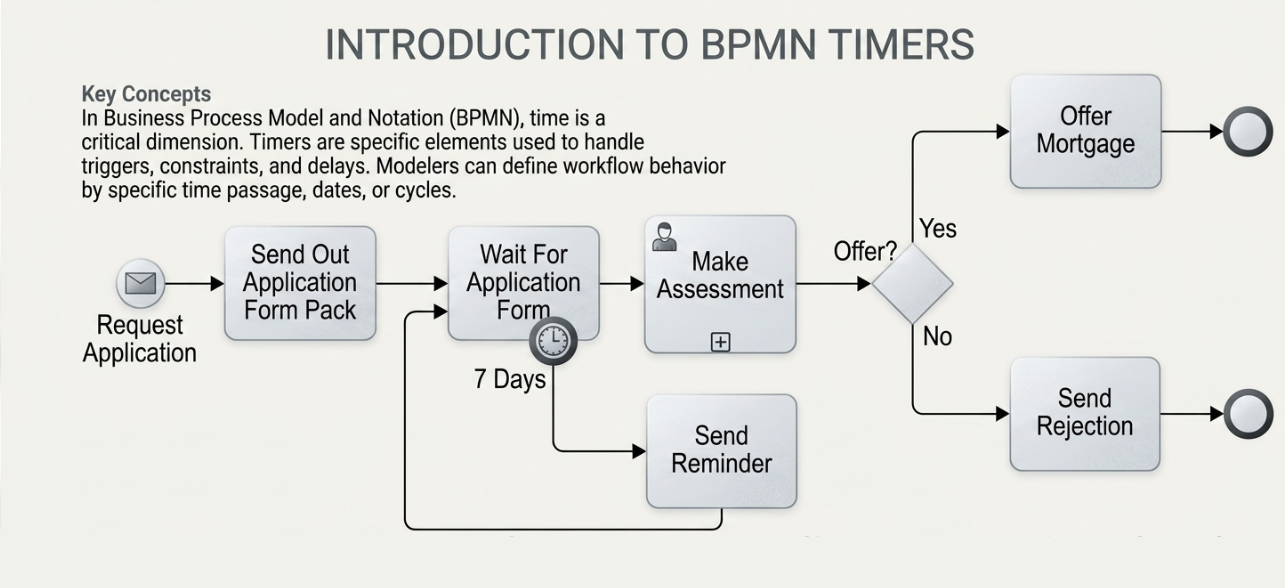
In Business Process Model and Notation (BPMN), time is a critical dimension of process management. Timers are a specific type of Event element used to handle time-related triggers, constraints, and delays. They allow process modelers to define exactly how a workflow should behave when specific amounts of time pass, specific dates arrive, or recurring cycles occur.
Visual Representation:
-
Timers are depicted as a circle containing a clock icon.
-
Depending on their placement in the diagram, they act as Catching Events (pausing the flow until a time condition is met) or Interrupting/Non-Interrupting Boundary Events (triggering alternative paths based on time).
2. When and How to Use Timers
Timers are essential for creating robust, automated workflows that do not rely solely on human intervention. They are typically deployed in four key scenarios:
| Scenario | Description | Example |
|---|---|---|
| Timeouts & Deadlines | Triggering an alternative path if a task takes too long. | “If approval isn’t received in 48 hours, escalate to manager.” |
| Reminders & Escalations | Sending notifications if a user fails to act within a window. | “Send a reminder email if the form isn’t submitted in 3 days.” |
| Delays | Pausing a process for a specific duration before proceeding. | “Wait 24 hours after purchase before sending a satisfaction survey.” |
| Periodic Tasks | Triggering routine tasks on a recurring schedule. | “Generate a sales report every Monday at 9:00 AM.” |
3. Case Study: The Mortgage Offer Scenario
To understand the practical application of timers, we will analyze the evolution of a mortgage application process from a basic flow to a time-managed workflow.
Phase 1: The Baseline Process
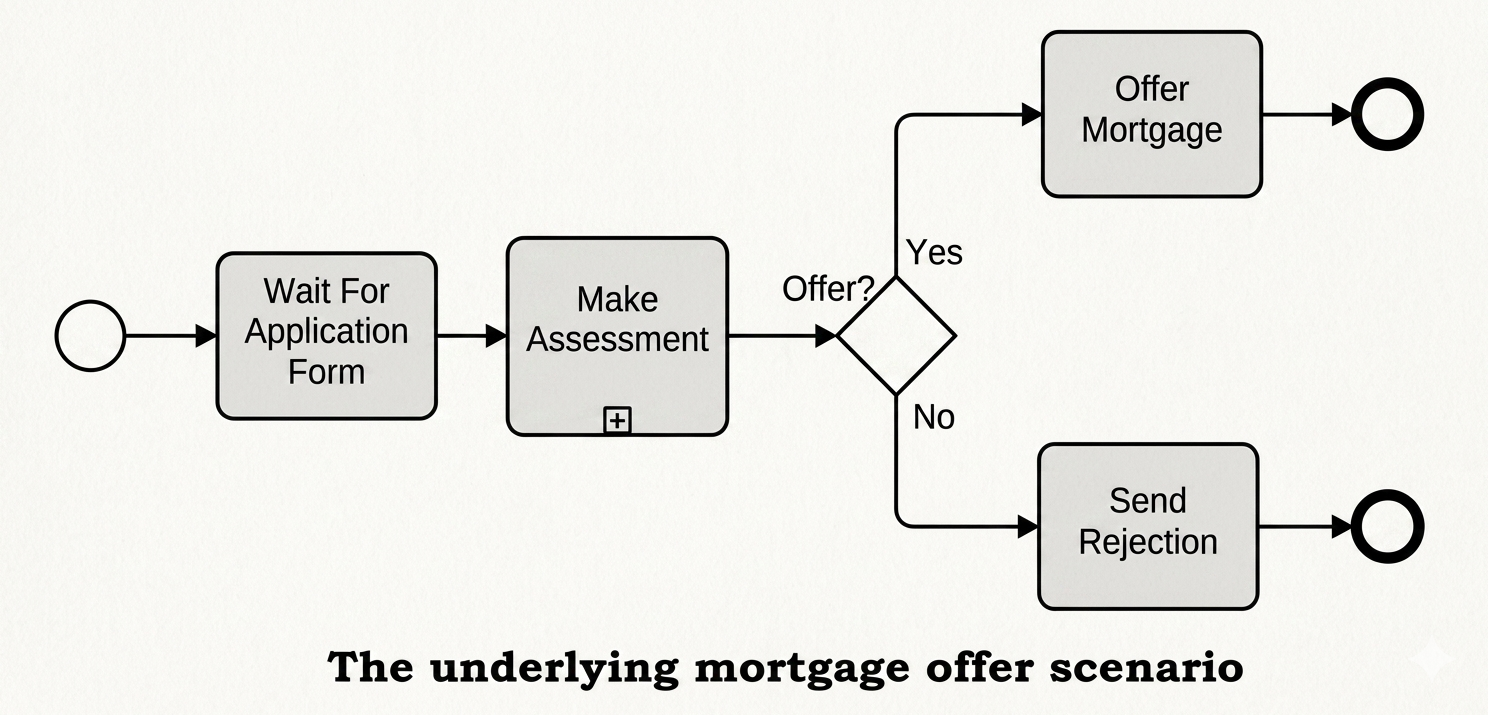
The Underlying Mortgage Offer Scenario
In the initial model, the process follows a simple, linear path:
-
Start Event: The process begins.
-
Wait For Application Form: The system waits for the client to submit their paperwork.
-
Make Assessment: The bank reviews the application.
-
Exclusive Gateway (Offer?): A decision point based on the assessment.
-
Yes: Proceed to “Offer Mortgage” $\rightarrow$ End Event.
-
No: Proceed to “Send Rejection” $\rightarrow$ End Event.
-
The Critical Flaw:
This model contains a significant vulnerability. The “Wait For Application Form” task is passive. If a client abandons the application or never submits the form, the process instance hangs indefinitely. There is no mechanism to timeout, remind the user, or close the stale request. This leads to “zombie processes” that clog the system.
Phase 2: The Robust Process
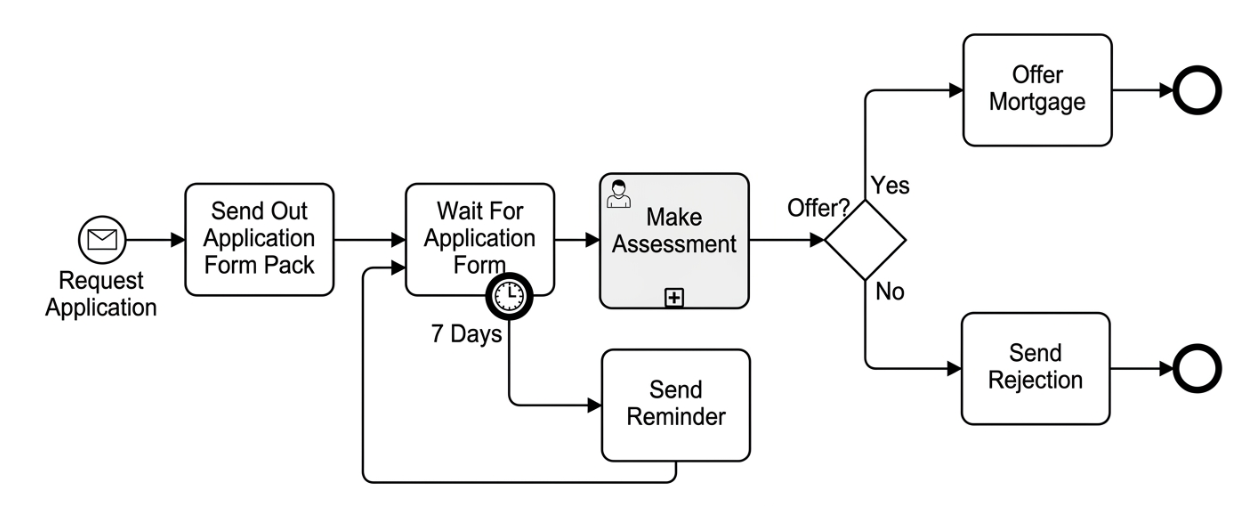
Introducing Message Start and Timer Intermediate Events
To resolve the flaws in the baseline model, the workflow is enhanced with two specific BPMN elements: a Message Start Event and a Boundary Timer Event.
Key Enhancements:
-
Message Start Event (The Envelope Icon):
-
Instead of a generic start, the process is now triggered dynamically by an external message: “Request Application”.
-
This immediately triggers the task “Send Out Application Form Pack”, automating the initial outreach to the client.
-
-
Boundary Timer Event (The Clock Icon):
-
A timer is attached to the bottom boundary of the “Wait For Application Form” task.
-
It is configured with a duration of “7 Days”.
-
This acts as a watchdog for the waiting task.
-
How the Enhanced Flow Works:
-
The Happy Path: If the client submits the application form before the 7-day timer expires, the process flows normally from “Wait For Application Form” directly to “Make Assessment.” The timer is effectively cancelled.
-
The Exception Path (Timeout): If 7 days pass without the form being received:
-
The Boundary Timer triggers.
-
The flow exits the “Wait For Application Form” task via the timer path.
-
The process executes the “Send Reminder” task.
-
The Loop: Crucially, the arrow from “Send Reminder” loops back to the input of “Wait For Application Form.” This resets the wait state, giving the client another 7 days to respond while keeping the process active and managed.
-
4. Key Takeaways for Process Modelers
-
Avoid Infinite Waits: Never leave a “Wait” task without a boundary timer or an event-based gateway. Every wait state needs a timeout strategy.
-
Boundary Events are Powerful: Attaching a timer to the boundary of a task (as seen in Figure 5-2) allows you to create exception handling logic (like reminders) without disrupting the main “Happy Path” of the process.
-
Looping for Persistence: By routing the timer output back to the start of the wait task (after sending a reminder), you create a resilient loop that persists until the user acts or a maximum retry limit is reached (which could be added in a future iteration).
-
Event-Driven Starts: Using Message Start Events (Figure 5-2) makes your process responsive to real-world triggers rather than manual initiation, improving automation and speed.
Conclusion
- Timers Prevent Process Stagnation: The addition of the 7-Day Boundary Timer eliminates the risk of “zombie processes.” It ensures that silence from a client does not result in a permanently stuck workflow, but rather triggers a proactive response.
- Automation Enhances Customer Experience: The combination of the Message Start Event and the Timer-driven Reminder loop creates an automated feedback system. The business remains responsive (sending reminders) without requiring manual intervention from loan officers to chase missing documents.
- Exception Handling is Critical: The diagrams demonstrate that a complete process model must account for both the “Happy Path” (form received on time) and the “Exception Path” (timeout). The boundary timer elegantly handles this exception by routing the flow to a remediation task (“Send Reminder”) and looping back, rather than simply terminating the process.