


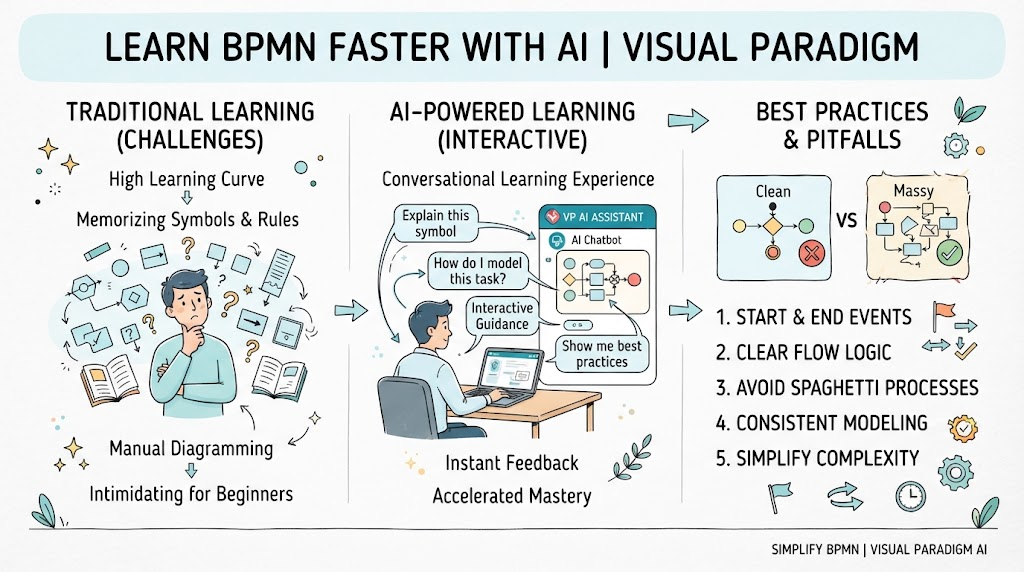
Business Process Model and Notation (BPMN) is the gold standard for process mapping, but for beginners, the sheer volume of symbols and rules can be intimidating. Traditionally, learning BPMN meant memorizing specifications and manually dragging shapes onto a canvas. Today, that learning curve has been flattened by AI.
Visual Paradigm’s AI Chatbot transforms BPMN from a static diagramming task into an interactive, conversational learning experience. This guide covers the essential BPMN concepts every beginner needs, outlines best practices to ensure your models are professional-grade, and demonstrates how to leverage Visual Paradigm’s AI Assistant to accelerate your mastery while avoiding common pitfalls.
1. BPMN Key Concepts: The Building Blocks
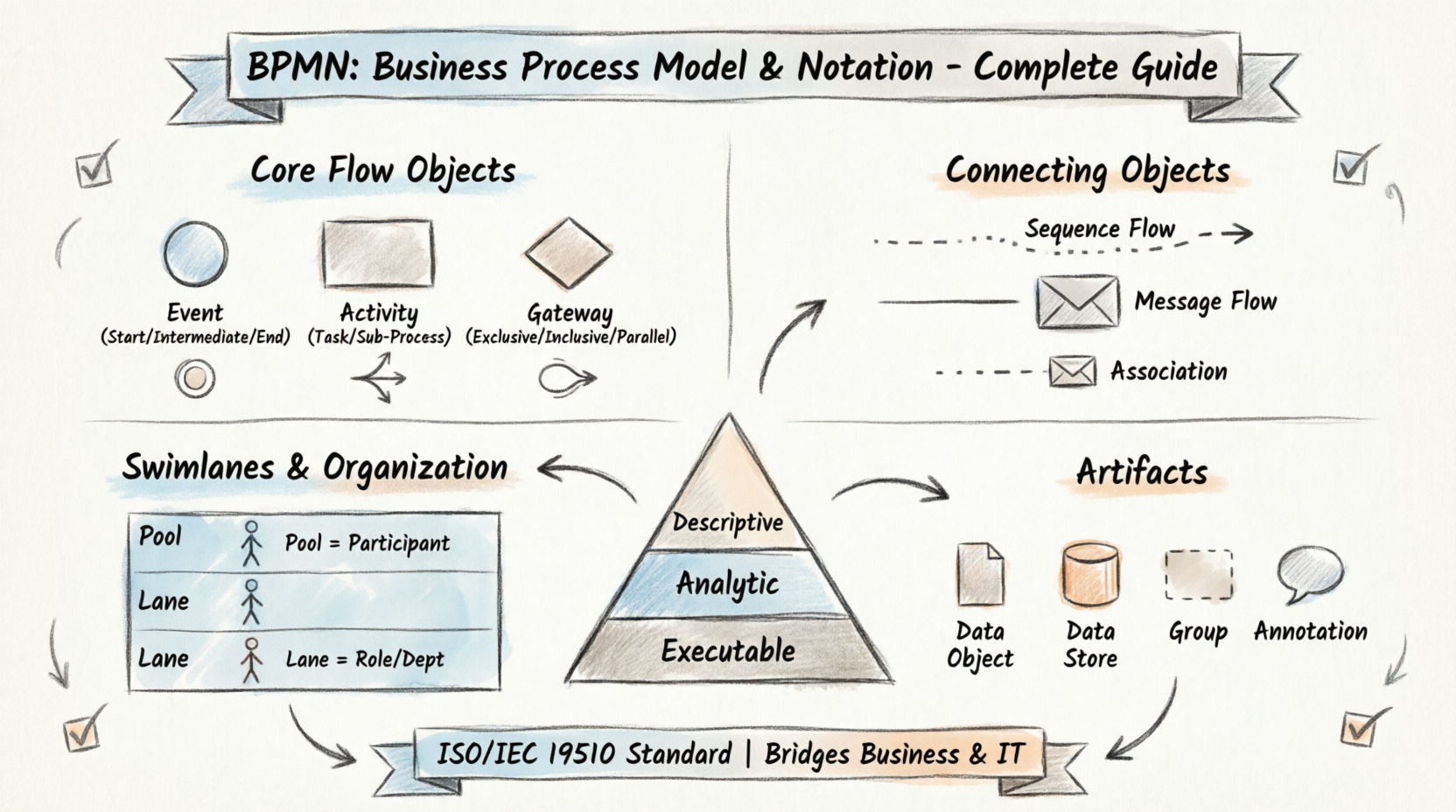
Before asking AI to generate complex workflows, you must understand the four primary categories of BPMN elements. These are the vocabulary of business process modeling.
Events (Circles)
Events represent something that happens during a process. They are categorized by timing:
-
Start Event: A thin single circle. Triggers the process (e.g., “Customer submits order”).
-
Intermediate Event: A double circle. Occurs between start and end (e.g., “Timer expires,” “Message received”).
-
End Event: A thick bold circle. Signifies the conclusion of a process path.
Activities (Rounded Rectangles)
Activities represent work being performed.
-
Task: A single rounded rectangle. The fundamental unit of work (e.g., “Verify Invoice”).
-
Sub-process: A rounded rectangle with a plus sign (+). Indicates a collapsed set of activities that can be expanded for detail.
-
Call Activity: A rounded rectangle with a thick border. Reuses a globally defined process or task.
Gateways (Diamonds)
Gateways control the flow logic. Confusing these is the #1 cause of invalid models.
-
Exclusive Gateway (XOR): Only one outgoing path is taken based on conditions.
-
Parallel Gateway (AND): Splits into multiple simultaneous paths or merges them without conditions.
-
Inclusive Gateway (OR): One or more paths may be taken depending on conditions.
Flows (Arrows)
-
Sequence Flow: Solid arrow. Shows the chronological order of activities within a pool/lane.
-
Message Flow: Dashed arrow with an open circle head. Represents communication between separate participants/pools. Never use solid sequence flows across pool boundaries.
💡 AI Learning Tip: Instead of searching documentation, ask Visual Paradigm’s AI Chatbot: “Explain the difference between Exclusive and Inclusive gateways with a real-world procurement example.” The AI provides contextual explanations rather than abstract definitions.
2. BPMN Best Practices for Clean Models
Knowing the symbols isn’t enough; you must arrange them logically. Follow these principles to create diagrams that stakeholders actually understand.
Keep It Simple and Hierarchical
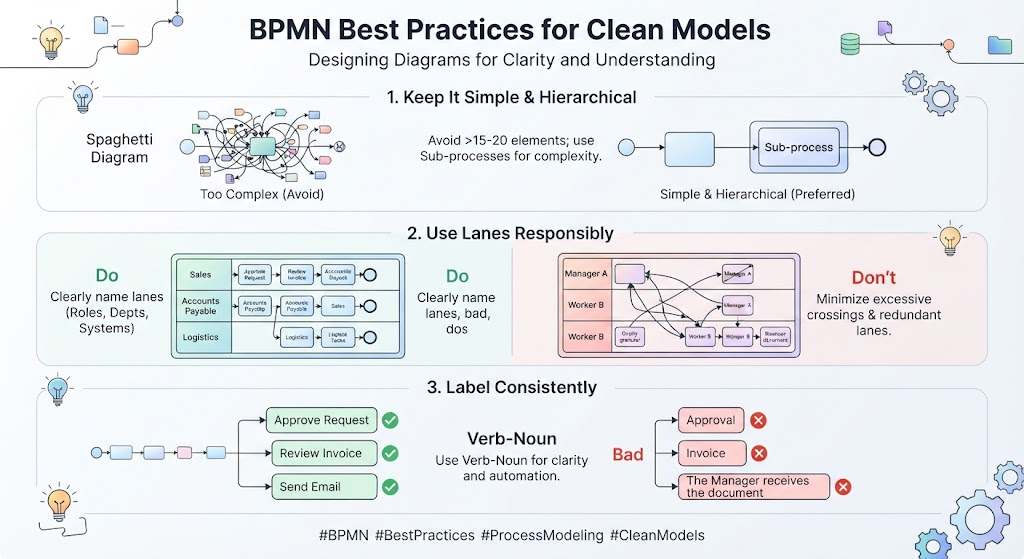
Avoid “spaghetti diagrams.” If a process exceeds 15-20 elements on one level, break it down using Sub-processes. Aim for a top-level overview first, then drill down.
Use Lanes Responsibly
Swimlanes represent roles, departments, or systems.
-
Do: Name lanes clearly (e.g., “Accounts Payable,” “ERP System”).
-
Don’t: Create a lane for every single person. Group by function unless individual accountability is critical.
-
Don’t: Let sequence flows cross back and forth excessively between lanes. This indicates poor handoff design.
Label Consistently
Use a Verb-Noun format for tasks (e.g., “Approve Request,” not “Approval” or “Manager approves the request when they have time”). Consistent labeling makes AI-generated documentation and code generation significantly more accurate.
Validate Semantics, Not Just Syntax
A model can be syntactically correct (valid BPMN) but semantically wrong (illogical business flow). Always verify that gateway splits have corresponding joins and that no dead-end paths exist.
3. Leveraging Visual Paradigm’s AI Chatbot & AI Assist
Visual Paradigm integrates AI directly into the modeling environment. Here is how beginners can use it as both a tutor and a co-pilot.
Text-to-Process Generation
Describe your process in plain English, and let the AI generate the initial BPMN diagram.
-
Prompt Example: “Act as a BPMN 2.0 expert. Create a detailed BPMN diagram for a new employee onboarding process. The process must include three distinct pools: HR, IT, and the Hiring Manager. The workflow should start with the Hiring Manager submitting a requisition and end with the employee’s first day.
-
Critical steps to include:
-
HR: Initiate and adjudicate the background check (include a decision gateway for ‘Pass’ vs ‘Fail’).
-
IT: Provision all hardware (laptop, monitor), software licenses, and access credentials based on the employee’s role.
-
Hiring Manager: Review and approve the IT setup, and schedule the new hire’s orientation.
Output Requirements:
-
Use standard BPMN elements (Start/End events, User tasks, Service tasks, Exclusive gateways).
-
Clearly label all lanes (pools) and sequence flows.
-
Format the output as a Mermaid JS code block (or PlantUML) so I can render it visually.”
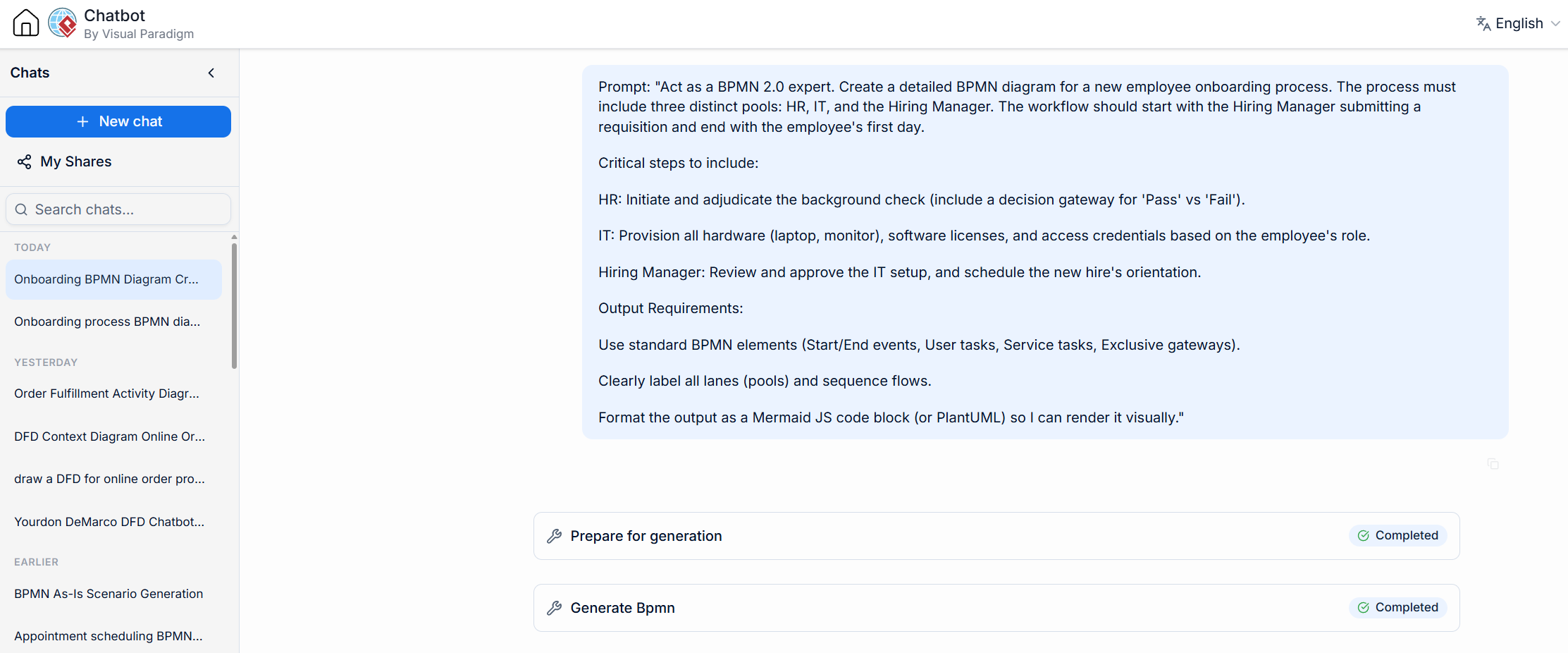
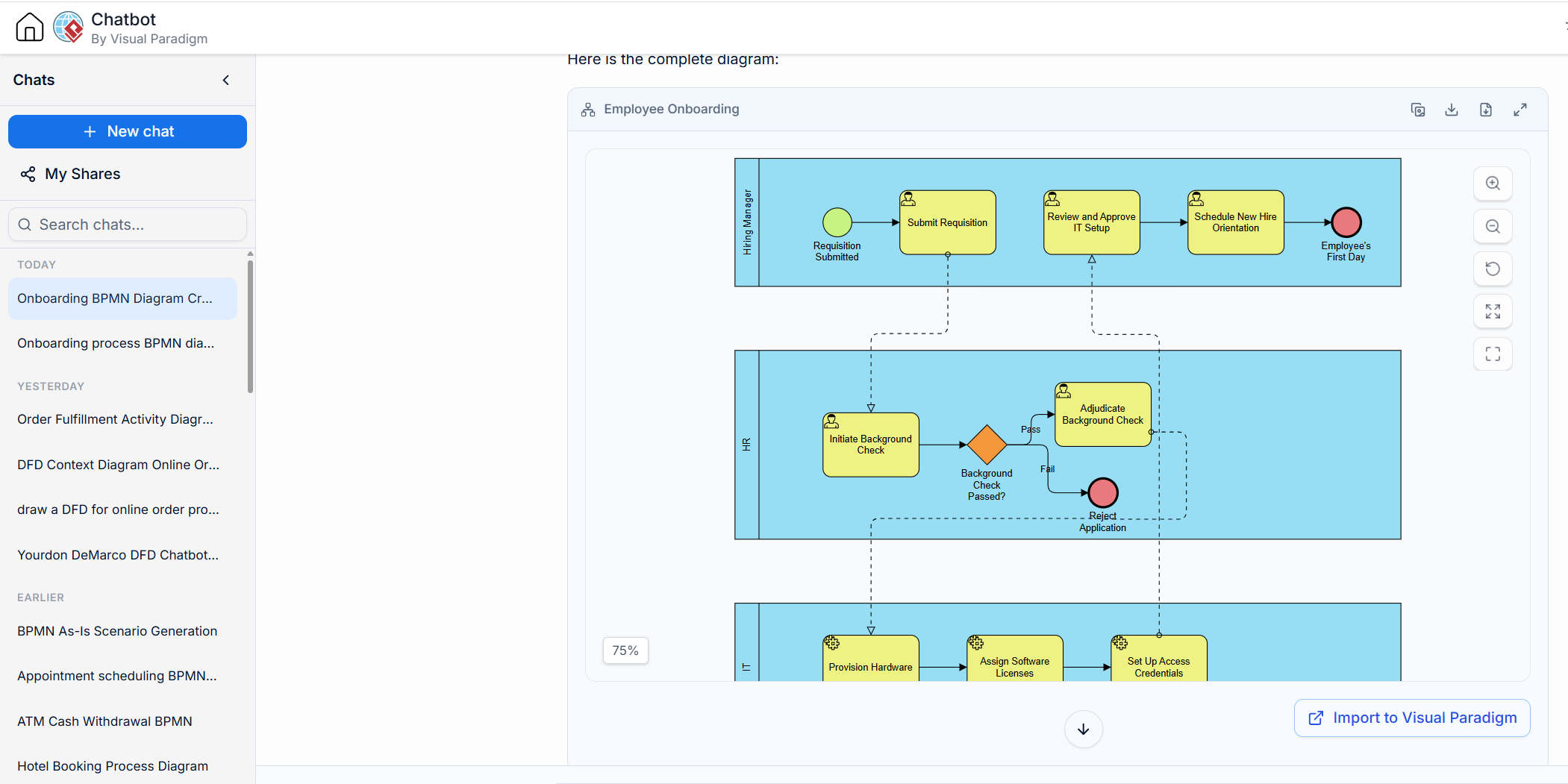
Benefit: Eliminates blank-canvas paralysis and provides a baseline structure to refine.
-
Interactive Learning & Troubleshooting
Treat the chatbot as a senior BPMN analyst sitting next to you.
-
Prompt Example: “I have a parallel gateway splitting into three tasks, but only two are merging at the next gateway. Is this valid?”
-
Benefit: Get instant validation and correction suggestions without leaving the tool.
Documentation and Stakeholder Communication
AI can translate visual models into text artifacts.
-
Prompt Example: “Generate a step-by-step standard operating procedure (SOP) based on this BPMN diagram for the warehouse team.”
-
Benefit: Bridges the gap between technical modelers and non-technical process owners.
Refinement Prompts
Iterate on AI-generated models conversationally.
-
Prompt Example: “Add an error boundary event to the ‘Payment Processing’ task that routes to a ‘Manual Review’ sub-process if payment fails.”
4. Common Modeling Mistakes (And How AI Helps Avoid Them)
Even with AI assistance, beginners frequently make these errors. Awareness is your first line of defense.
| Mistake | Why It’s Problematic | How VP AI Chatbot Helps |
|---|---|---|
| Modeling Organization Charts | BPMN shows process flow, not reporting hierarchy. | Ask: “Is my diagram showing workflow or org structure?” AI can identify static vs. dynamic patterns. |
| Misusing Message vs. Sequence Flow | Crossing pools with solid arrows breaks BPMN semantics. | AI validation flags cross-pool sequence flows instantly. |
| Unmatched Gateways | Splitting with XOR but merging with AND causes logical deadlocks. | Ask AI to “Check gateway pairing consistency” before publishing. |
| Overloading Tasks | Putting decision logic inside a task instead of using a gateway. | Describe the task to AI; it will suggest extracting decisions into proper gateways. |
| Vague Naming | “Handle Data” means nothing to developers or auditors. | Ask AI: “Suggest specific verb-noun labels for these generic tasks.” |
⚠️ Critical Reminder: AI is an assistant, not an authority. Always review AI-generated models against actual business reality. The AI knows BPMN syntax perfectly, but you know your organization’s unique constraints.
5. Interactive Learning Prompts to Try Now
Copy these prompts directly into Visual Paradigm’s AI Chatbot to build muscle memory and explore capabilities:
For Concept Mastery
-
“Quiz me on BPMN event types. Give me a scenario and ask which event I should use.”
-
“Show me three different ways to model a customer return process and explain the pros/cons of each approach.”
For Practical Application
-
“Convert this bulleted list of steps into a BPMN-compliant process description.”
-
“Review my attached diagram for BPMN 2.0 compliance issues and suggest fixes.”
For Advanced Exploration
-
“How would I model a compensation boundary event versus an escalation boundary event in this loan approval process?”
-
“Generate user stories from this BPMN diagram for our Agile development team.”
Conclusion
BPMN mastery no longer requires months of solitary study. By combining foundational knowledge of events, activities, gateways, and flows with the interactive power of Visual Paradigm’s AI Chatbot, beginners can produce professional-quality process models faster and with greater confidence.
Remember: AI accelerates your journey, but your understanding of key concepts and commitment to best practices ensures the destination is correct. Start experimenting with the prompts above, validate relentlessly, and treat every AI interaction as a learning opportunity. Your future self—and your stakeholders—will thank you for building processes that are not just visually appealing, but genuinely executable.
Related posts:
 From Text to Process Flow: A Hands-On Review of Visual Paradigm’s AI-Powered BPMN Generator
 How to Turn User Stories into Visual Process Diagrams with AI
 The Definitive Guide to AI-Powered BPMN: Transforming Process Modeling with Visual Paradigm
Decoding the Flow: A Beginner’s Guide to Reading BPMN Diagrams with Visual Paradigm
The Definitive Guide to AI-Powered BPMN: Transforming Process Modeling with Visual Paradigm
Decoding the Flow: A Beginner’s Guide to Reading BPMN Diagrams with Visual Paradigm