


Introduction
Have you ever looked at a Business Process Model and Notation (BPMN) diagram and felt like you were staring at an alien language? You are not alone. With its mix of circles, diamonds, and complex arrows, BPMN can seem intimidating to anyone without formal training in business analysis.
However, the good news is that you don’t need a certification to understand the core story a process map is telling. Just as you don’t need to know the rules of grammar to read a sentence, you only need to recognize the “nouns, verbs, and punctuation” of a diagram to grasp 80% of its meaning.
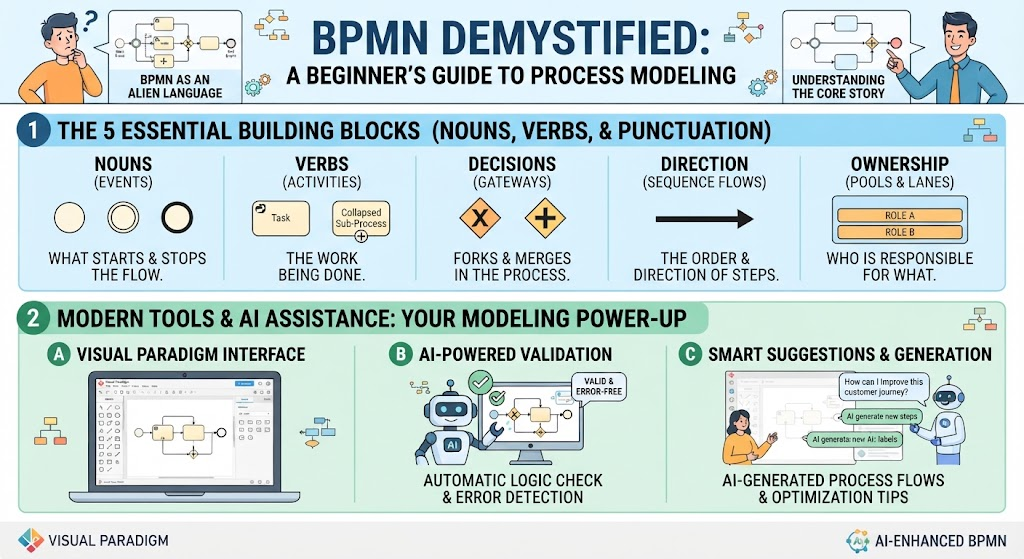
This guide strips away the academic jargon and focuses on the five essential concepts needed to read any BPMN chart. We will also explore how modern tools like Visual Paradigm, enhanced by AI assistance, can help you not only read but also create and validate these diagrams with ease.
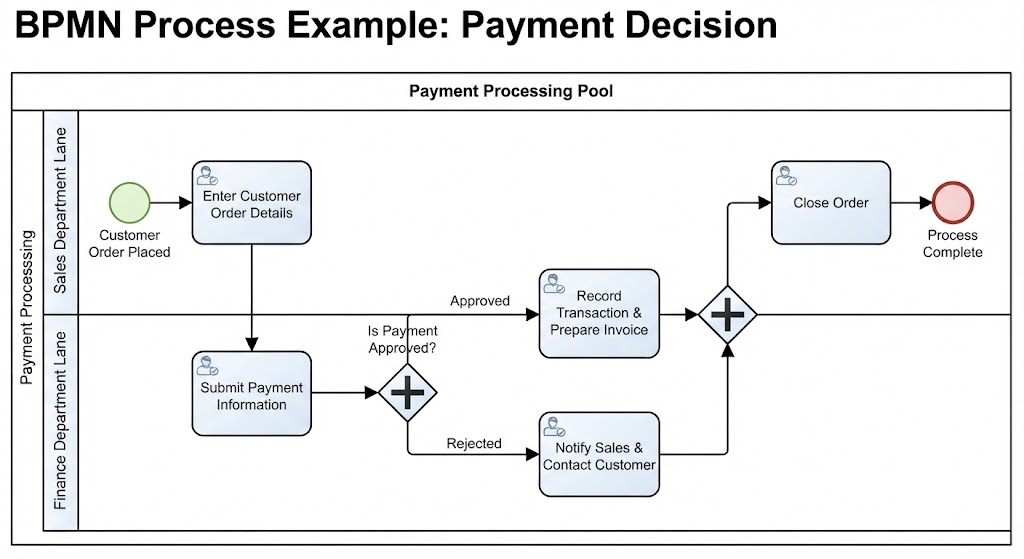
1. Start with the “Swimlanes” (Who is Doing the Work)
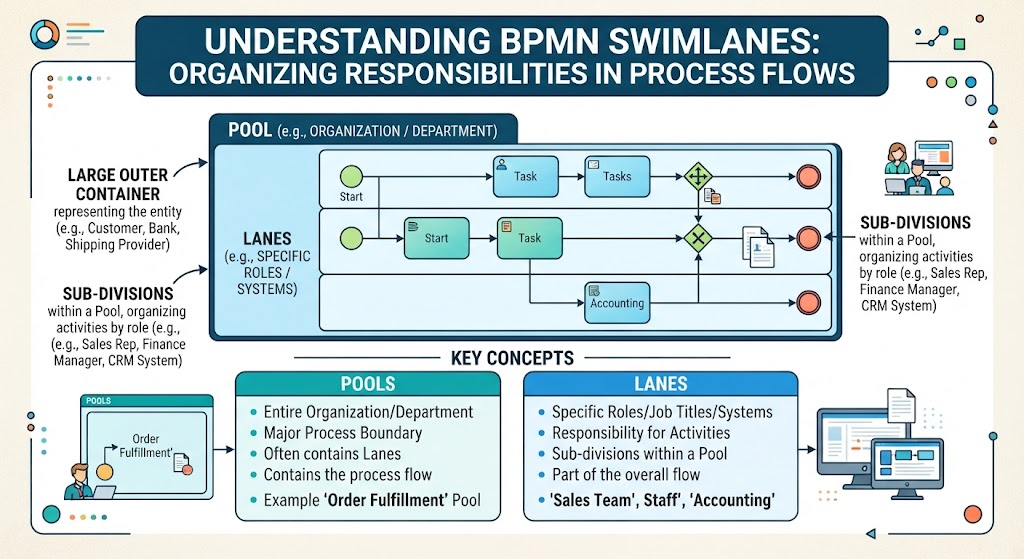
Before looking at what is happening, look at who is doing it. BPMN uses a container structure called “Swimlanes” to organize responsibilities.
Key Concepts
-
Pools: These are the large, outer boxes that typically represent entire organizations, departments, or external entities (e.g., “Customer,” “Bank,” “Shipping Provider”).
-
Lanes: These are the sub-divisions within a Pool. They represent specific roles, job titles, or systems (e.g., “Sales Rep,” “Finance Manager,” “CRM System”).
How to Read It
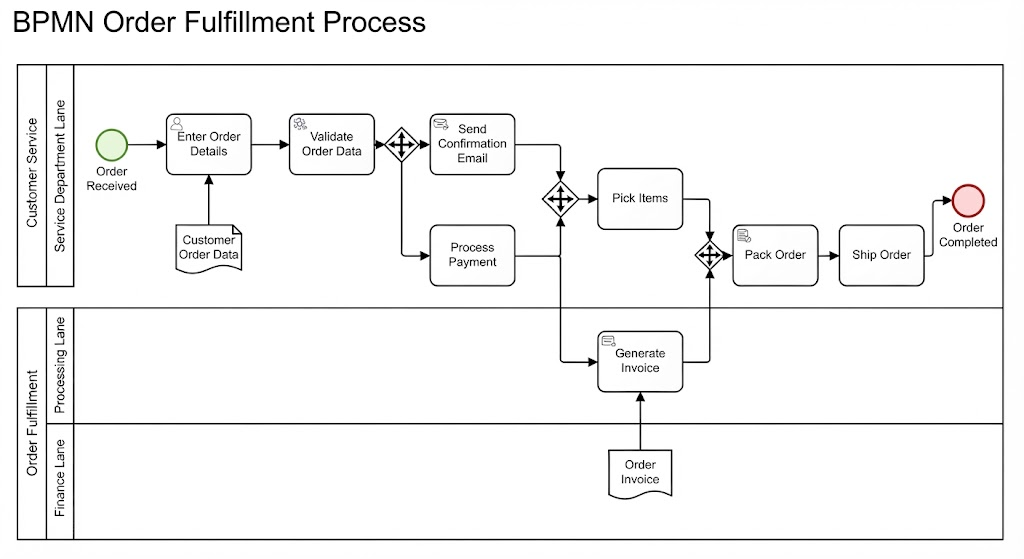
Read the diagram top-to-bottom or left-to-right to see handoffs. If a flow line crosses from one lane to another, it indicates a handoff of responsibility.
Example: In a “Purchase Order” pool, you might see a lane for “Customer” and a lane for “Warehouse.” When the arrow moves from the Customer lane to the Warehouse lane, it means the customer has finished their part (placing the order) and the warehouse must now act.
2. The “Ball” is the Action (Understanding Events)
Events trigger processes or mark their conclusion. In BPMN, events are always represented by circles.
Key Concepts
-
Start Event (Green/Thin Border): The starting gun. This circle indicates what triggers the process (e.g., “Order Received,” “Timer Reached,” “Message Arrived”).
-
End Event (Red/Thick Border): The finish line. This circle indicates the process has completed successfully or terminated due to an error.
Rule of Thumb
If it’s a circle, something is about to start or has just ended. Ignore the internal details for now; just identify where the process begins and ends.
3. The “Boxes” are the Work (Activities & Tasks)
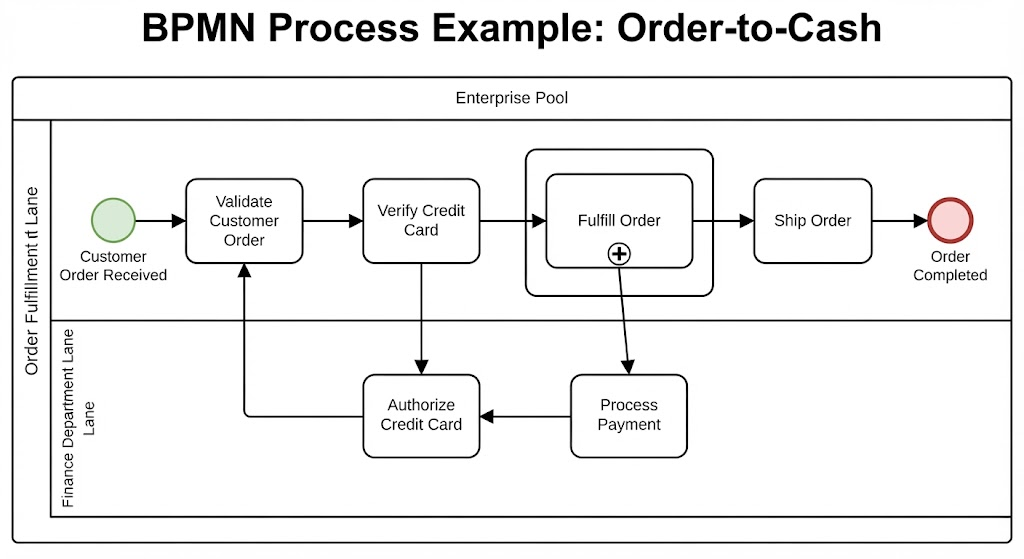
Between the start and end events, work gets done. This work is represented by rounded rectangles.
Key Concepts
-
Task (Simple Rounded Rectangle): A single unit of work that cannot be broken down further in this context (e.g., “Verify Credit Card,” “Pack Item”).
-
Sub-Process (Box with a Plus Sign +): This indicates a complex activity that contains its own internal steps. Think of it as a “zoom-in” feature.
Cheat Sheet
When reading a high-level diagram, ignore the internal details of a Sub-Process. Just read the label to understand the general step (e.g., “Fulfill Order”) and move on. If you need details, you can drill down into that specific box in tools like Visual Paradigm.
4. The “Diamonds” are the Decisions (Gateways)
Processes rarely follow a straight line. Diamonds represent points where the flow diverges based on conditions.
Key Concepts
-
Exclusive Gateway (Blank Diamond): The “Fork in the Road.” Only one path can be taken based on a condition (e.g., “Is Payment Approved?”).
-
Path Labels: Look for text labels on the arrows emerging from the diamond (e.g., “Yes,” “No,” “Approved,” “Rejected”).
The Golden Rule
Only one path goes forward from an Exclusive Gateway. If you see multiple paths merging back together later, it usually means the different outcomes eventually reconvene at a common next step.
5. The “Arrows” are the Flow (Sequence Lines)
Arrows connect all the elements and show the order of operations.
Key Concepts
-
Solid Arrow (Sequence Flow): The normal path. It shows the order in which activities are performed (Step 1 → Step 2).
-
Dashed/Dotted Arrow (Message Flow): The “Side Note.” This represents communication between two different Pools (e.g., sending an email from the “Customer” pool to the “Support” pool). It does not dictate the internal order of tasks within a pool.
Pro Ti
Follow the solid arrows from left-to-right (or top-to-bottom). Never skip ahead. If you get lost, trace the arrow back to the last known element.
Tooling Spotlight: Visual Paradigm & AI-Assisted Modeling
While understanding the symbols is crucial, creating and maintaining these diagrams can be complex. This is where Visual Paradigm shines, especially with its new AI-powered features.

Why Visual Paradigm?
-
Drag-and-Drop Simplicity: Easily create Pools, Lanes, and Tasks without memorizing keyboard shortcuts.
-
Built-in Validation: The tool automatically checks for common errors, such as disconnected flows or missing end events, ensuring your diagram is technically sound.
-
AI-Powered Generation: Perhaps the most powerful feature for beginners and experts alike is the Visual Paradigm AI. You can describe a process in plain English (e.g., “Create a BPMN for a user logging in, resetting password if forgotten, and landing on the dashboard”), and the AI will generate a fully editable BPMN 2.0 diagram for you.
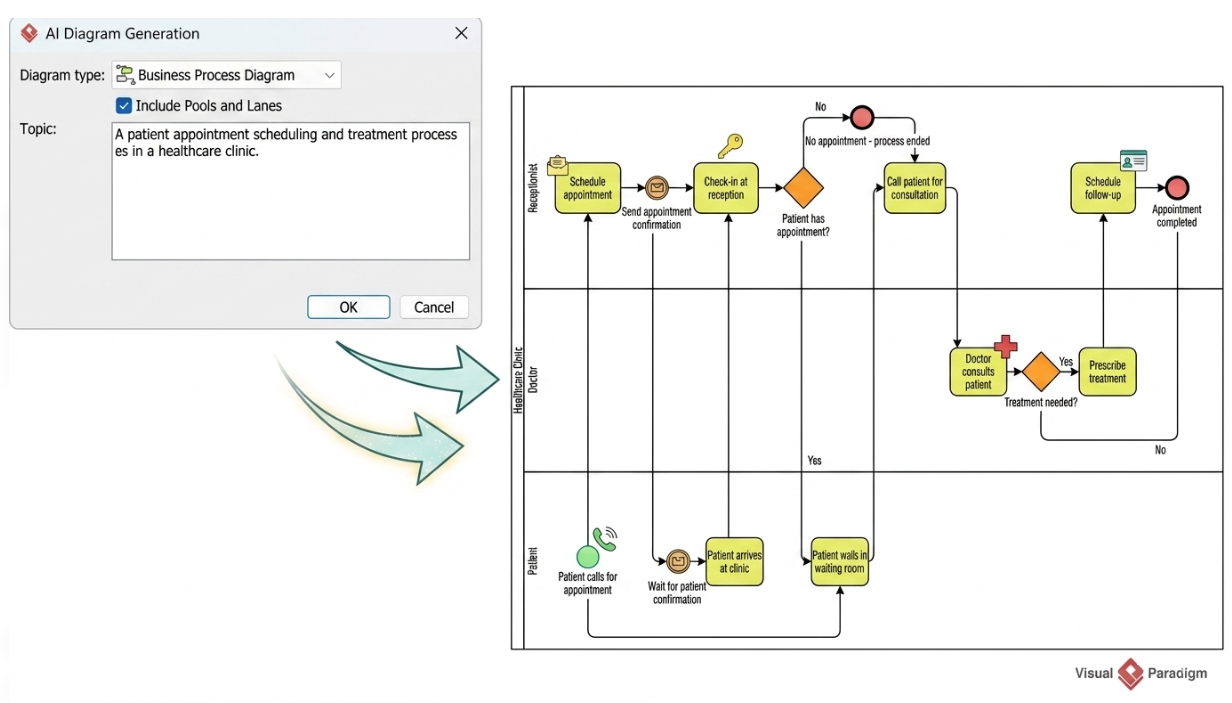
How to Use AI for BPMN in Visual Paradigm
-
Open Visual Paradigm Online or Desktop.
-
Select the “AI Generator” feature.
-
Type your process description in natural language.
-
Review the generated diagram. The AI handles the placement of Gateways, Events, and Tasks, allowing you to focus on refining the logic rather than drawing shapes.
Conclusion: Your 60-Second Scanning Process
Next time you are handed a BPMN diagram, don’t panic. Use this quick scanning process:
-
Who is involved? Check the Pools and Lanes.
-
Where do we start? Find the single green Start Event.
-
What is the main path? Follow the solid arrows through the Task boxes.
-
Where do we diverge? Spot the Diamonds and read the “Yes/No” labels.
-
Where do we end? Find the red End Event.
By mastering these five concepts, you can decode almost any business process. And when you’re ready to create your own, let tools like Visual Paradigm and its AI assistant handle the heavy lifting, turning your ideas into professional diagrams in seconds.
Recommended Resources: Visual Paradigm BPMN Tools
- How to Create BPMN Business Process Diagrams in Visual Paradigm: A step-by-step tutorial on building BPMN 2.0 diagrams, covering Pools, Lanes, and the Resource Catalog for efficient modeling.
- Visual Paradigm BPMN Best Practices: Discusses using Visual Paradigm’s built-in validation, model repository, and documentation panels to catch errors early and maintain consistency.
- Using Validation and Collaboration Features for CX Modeling: Explores how to use validation and commenting features for collaborative review, ensuring models are technically sound and stakeholder-aligned.
- Mastering Business Modeling: Visual Paradigm Support for CMMN and BPMN: An overview of Visual Paradigm’s comprehensive support for BPMN 2.0 and CMMN 1.1, including drag-and-drop and documentation generation.
- Mastering Business Process Modeling: A Complete Guide to BPMN and AI-Powered Diagram Generation: A guide bridging fundamental BPMN concepts with AI-powered diagram generation in Visual Paradigm Online.
- BPMN Project Repository Structure: Best Practices: Provides a practical framework for organizing BPMN diagrams in Visual Paradigm, including folder structure and naming conventions.
- Using Visual Paradigm AI for BPMN: A Comprehensive Guide: Details how Visual Paradigm’s AI generator can transform plain text descriptions into fully editable BPMN 2.0 diagrams, dramatically accelerating the modeling process.
- Visual Paradigm BPMN Consistency: Maintain Models & Traceability: Focuses on using Visual Paradigm’s repository and reference management to maintain consistency and traceability across multiple diagrams.
- Visual Paradigm: The Ultimate All-in-One Software for Software Development: Highlights key BPMN features like Process Drill-Down, process simulation, and resource allocation for cost evaluation.
- Comprehensive Guide to BPMN with Visual Paradigm: A comprehensive guide covering BPMN basics and how to get started with Visual Paradigm’s BPMN tools, including installation and diagram creation steps.
Related posts:
 From Text to Process Flow: A Hands-On Review of Visual Paradigm’s AI-Powered BPMN Generator
 How to Turn User Stories into Visual Process Diagrams with AI
 The Definitive Guide to AI-Powered BPMN: Transforming Process Modeling with Visual Paradigm
BPMN for Beginners: Key Concepts & Best Practices with Visual Paradigm’s AI Chatbot
The Definitive Guide to AI-Powered BPMN: Transforming Process Modeling with Visual Paradigm
BPMN for Beginners: Key Concepts & Best Practices with Visual Paradigm’s AI Chatbot