


1. Introduction
-
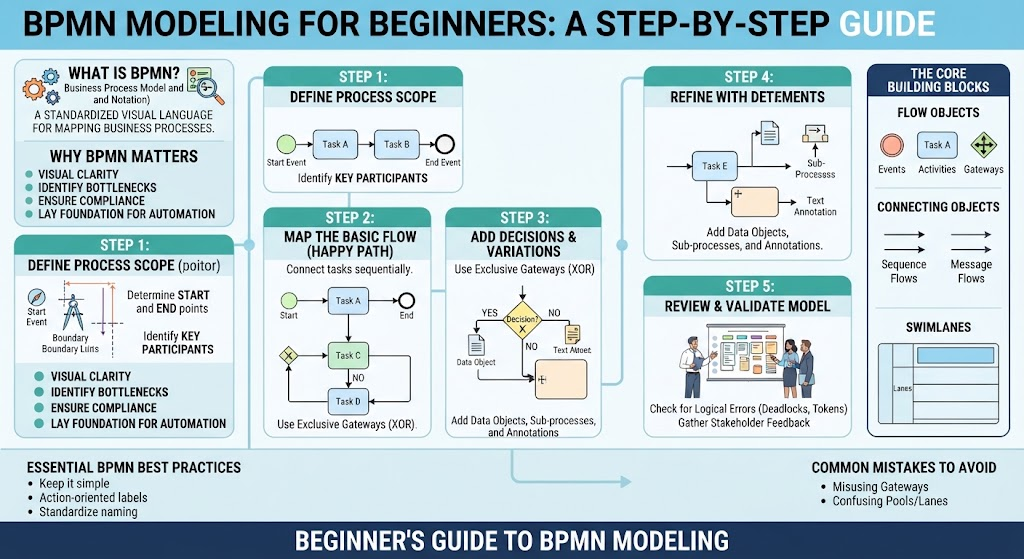
What is BPMN? Business Process Model and Notation (BPMN) is a standardized graphical representation for mapping out business processes. Think of it as a universal flowchart language that bridges the gap between how business people talk and how technical teams build systems.
-
Why It Matters: BPMN brings visual clarity to chaos. It helps organizations identify bottlenecks, eliminate redundant steps, ensure compliance, and lay the groundwork for digital transformation and automation.
-
Who This Guide Is For: Business analysts, project managers, entrepreneurs, and anyone looking to document or optimize workflows without needing a computer science degree.
2. The Core Building Blocks: The “Big Three”
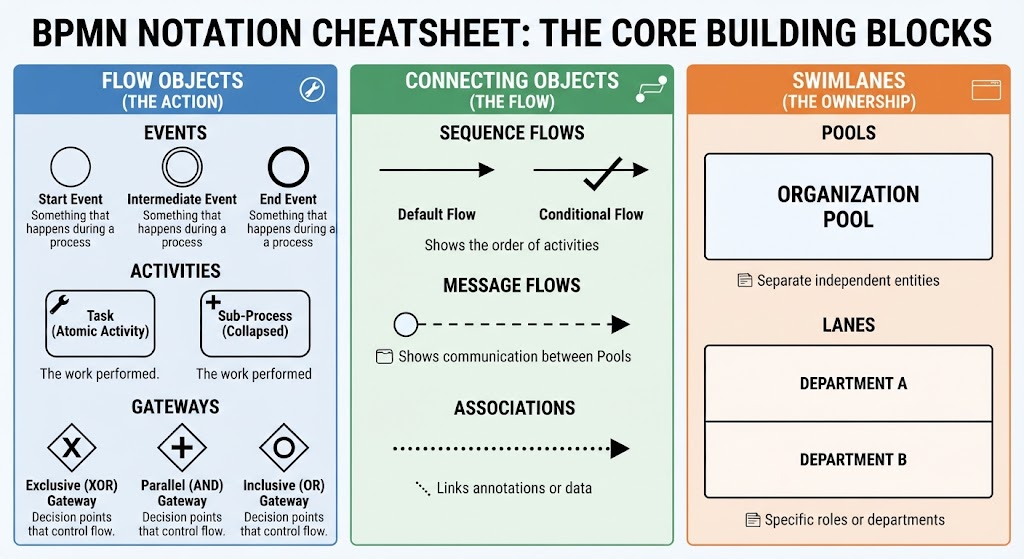
BPMN diagrams are built using a specific set of graphical elements divided into three main categories:
-
Flow Objects (The Action):
-
Events: Something that happens during a process (represented by circles—start, intermediate, and end).
-
Activities: The work performed (represented by rounded rectangles, also known as tasks).
-
Gateways: Decision points that control the path of the flow (represented by diamonds).
-
-
Connecting Objects (The Flow):
-
Sequence Flows: Solid lines showing the order of activities.
-
Message Flows: Dashed lines showing communication between different organizational pools.
-
Associations: Dotted lines linking text annotations or data to flow objects.
-
-
Swimlanes (The Ownership):
-
Pools: Represent separate independent entities or organizations.
-
Lanes: Sub-partitions within a pool representing specific departments, roles, or systems (e.g., “Sales,” “Finance”).
-
3. Step 1: Define Your Process Scope
Before drawing a single shape, you need boundaries.
-
Start and End Points: Clearly define what triggers the process (e.g., “Customer submits order form”) and what defines ultimate completion (e.g., “Order shipped and invoice paid”).
-
Key Participants: Identify who is involved. Keep it simple at first—limit your initial map to 2 or 3 primary roles or departments to avoid cognitive overload.
4. Step 2: Map the Basic Flow (The Happy Path)
Start by drawing the ideal scenario—the path where everything goes right.
-
First Elements: Drop your Start Event (thin-bordered circle) on the far left. Connect it via a Sequence Flow to your first Task (e.g., “Review Application”).
-
Connecting Tasks: Continue adding tasks sequentially left-to-right until you reach the End Event (thick-bordered circle). Keep your lines clean and avoid crossing paths unnecessarily.
5. Step 3: Add Decisions and Variations
Real-world processes aren’t linear. This is where gateways come in.
-
Exclusive Gateways (XOR): Use a diamond with an “X” (or blank) to represent a “Yes/No” or multiple-choice fork. Only one outgoing path can be taken based on the condition.
-
Handling Paths: Label your outgoing sequence flows clearly (e.g., “Approved” vs. “Rejected”) so anyone reading the model instantly understands the criteria.
6. Step 4: Refine with Detailed Elements
As your diagram grows, you can add nuance without cluttering the canvas.
-
Sub-Processes: If a single task (like “Perform Credit Check”) involves five smaller steps, collapse it into a sub-process (indicated by a small plus sign) that can be drilled into separately.
-
Data Objects & Annotations: Add document icons to represent inputs and outputs (e.g., “Invoice PDF”), and use text annotations for extra context or policy reminders.
7. Step 5: Review and Validate Your Model
A beautiful map is useless if it doesn’t make logical sense.
-
Check for Logic Errors: Ensure every token that enters a gateway eventually reaches an end event. Avoid infinite loops or “dead ends” where a process stalls indefinitely.
-
Stakeholder Feedback: Walk through the diagram with the people who actually execute the steps daily. They will spot missing exceptions or unrealistic assumptions instantly.
8. Essential BPMN Best Practices
-
Keep It Simple: Stick to the core elements (tasks, events, gateways) before experimenting with advanced symbols.
-
Action-Oriented Labels: Name tasks using a Verb + Noun structure (e.g., “Approve Loan,” “Send Email”) rather than vague descriptions like “Loan processing.”
-
Standardize Conventions: Maintain consistent layout flows (typically left-to-right) and uniform lane sizing.
9. Common Mistakes to Avoid
-
Misusing Gateways: Don’t mix up Exclusive (XOR) gateways with Parallel (AND) gateways, which require all paths to execute simultaneously.
-
Leaving Open Paths: Failing to account for rejection or error scenarios leaves open loops that confuse automated engines and human readers alike.
-
Confusing Pools and Lanes: Remember that message flows cross pools (different systems/companies), while sequence flows stay within a single pool across different lanes.
10. Conclusion & Next Steps
-
Quick Recap: BPMN organizes business logic visually through flow objects, connectors, and swimlanes, transforming vague workflows into structured, actionable maps.
-
Recommended Tools: Start experimenting with user-friendly modeling platforms: Visual Paradigm BPMN (Desktop / Online)
-
Where to Go From Here: Once you master standard BPMN, explore DMN (Decision Model and Notation) for complex business rules, or look into RPA (Robotic Process Automation) to turn your newly optimized models into automated digital workflows.
References
-
Introduction to BPMN Part I: Comprehensive introduction to BPMN standards, building blocks, and organizational benefits.
-
Business Process Modeling (BPM) Tutorial: Step-by-step beginner tutorial on creating professional business process diagrams.
-
Learning BPMN Events: Detailed technical breakdown of start, intermediate, and end event types, triggers, and markers.
-
Mastering BPMN 2.0: A Beginner’s Guide to Business Process Modeling: In-depth guide explaining core building blocks and best practices for clear workflow mapping.
Related posts:
 BPMN Quick Start: Build Your First Business Process Diagram in 15 Minutes
 BPMN Tasks vs. Events: What’s the Difference and Why It Matters
 The Future of BPMN: What’s Coming in the Next Generation of Process Modeling
 From Text to Process Flow: A Hands-On Review of Visual Paradigm’s AI-Powered BPMN Generator