


Introduction
Business Process Model and Notation (BPMN) provides a standardized graphical representation for specifying business processes. For organizations looking to automate recurring tasks—such as weekly status reports or periodic audits—understanding how to model time-based triggers and decision loops is essential.
This guide explores the anatomy of a recurring workflow, specifically a “Weekly Working Group Status Check,” using the industry-standard BPMN 2.0 notation. We will break down the core components of the diagram, explain the logic behind the flow, and demonstrate how Visual Paradigm serves as a powerful tool for designing, simulating, and executing these processes.
The Workflow in Focus: Weekly Status Reporting
The following diagram illustrates a process where a system checks the status of a working group every Friday at 6 PM Pacific Time. If the group is still active, an issue list is generated and sent; if not, the process terminates.
Introduction
Business Process Model and Notation (BPMN) provides a standardized graphical representation for specifying business processes. For organizations looking to automate recurring tasks—such as weekly status reports or periodic audits—understanding how to model time-based triggers and decision loops is essential.
This guide explores the anatomy of a recurring workflow, specifically a “Weekly Working Group Status Check,” using the industry-standard BPMN 2.0 notation. We will break down the core components of the diagram, explain the logic behind the flow, and demonstrate how Visual Paradigm serves as a powerful tool for designing, simulating, and executing these processes.
The Workflow in Focus: Weekly Status Reporting
The following diagram illustrates a process where a system checks the status of a working group every Friday at 6 PM Pacific Time. If the group is still active, an issue list is generated and sent; if not, the process terminates.
Diagram Interpretation
To understand this workflow, we follow the Sequence Flow (solid arrows) from left to right:
-
Start Event (Message): The process is initiated by a “Working group active” message, indicating that a specific team or project has been launched.
-
Intermediate Timer Event: This is the heartbeat of the workflow. It is configured to trigger every Friday at 6 PM Pacific Time. In BPMN, the clock icon signifies a time-based catch event.
-
Task (Check status of working group): A manual or automated task where the system verifies the current state of the project.
-
Exclusive Gateway (XOR): Represented by the diamond with an “X”, this is a decision point. The process evaluates the condition: “Working group still active?”.
-
Path A (Yes): If the group is active, the flow proceeds to the “Send current issue list” task.
-
Path B (No): If the group is inactive, the flow moves to the End Event (thick circle), terminating the process for that cycle.
-
-
Task (Send current issue list): This task utilizes a Data Object (the document icon labeled “Issue list”) to compile and distribute the report.
-
The Loop: After the email is sent, the sequence flow loops back to the Timer Event. This creates a recurring cycle that repeats every week until the “No” path is taken.
Key BPMN Concepts Explained
When modeling processes in Visual Paradigm, it is vital to distinguish between different types of flows and objects:
-
Events: These are circles that represent something that “happens” during the process. They are categorized as Start (thin circle), Intermediate (double circle), or End (thick circle).
-
Gateways: These control the divergence and convergence of paths. The Exclusive Gateway (XOR) ensures that only one path is taken based on the evaluation of conditions.
-
Sequence Flow vs. Message Flow:
-
Sequence Flow (Solid line with arrow): Shows the order of activities within a single process.
-
Message Flow (Dashed line with open arrow): Used to show communication between two separate participants (pools), such as the dotted line connecting the “Issue list” data object to the send task in some interpretations, or communication between departments.
-
-
Data Objects: These provide information about what data is required or produced by an activity. In our example, the “Issue list” is a data input for the sending task.
Tooling Deep Dive: Visual Paradigm for BPMN
Visual Paradigm is a leading modeling tool that supports the full BPMN 2.0 specification, allowing users to move from simple diagrams to executable code.
Why Use Visual Paradigm?
-
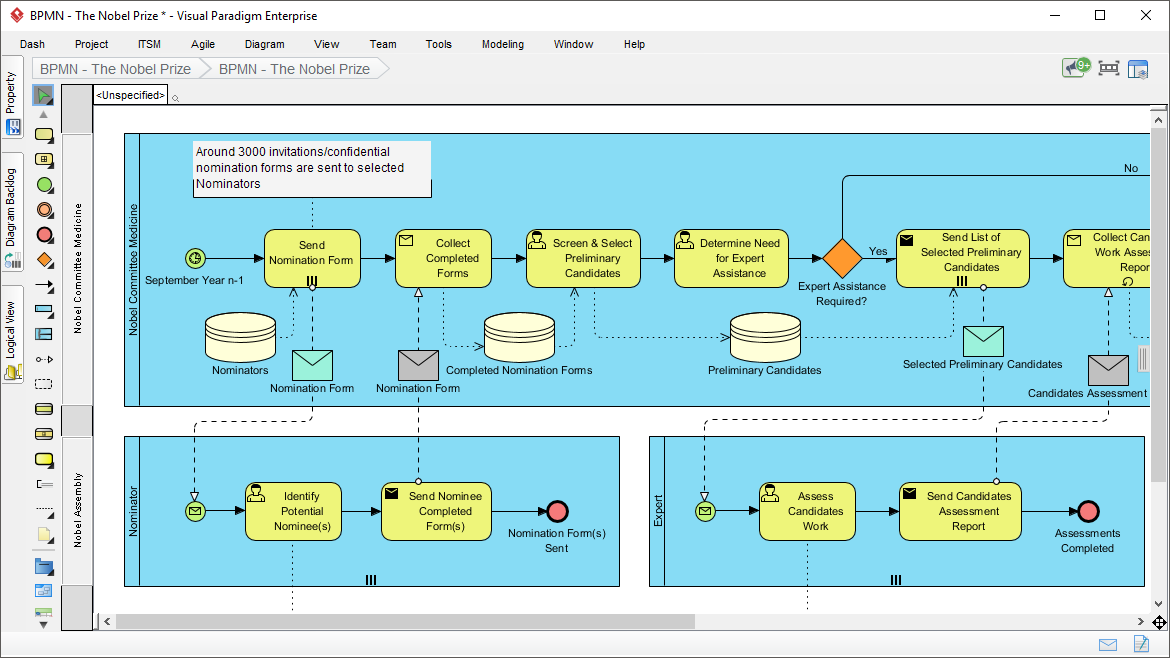
Intuitive Drag-and-Drop Interface: The tool features a resource catalog that allows you to quickly connect shapes. For example, dragging from a Task automatically suggests relevant gateways or events.
-
Smart Guide: When creating the loop seen in our diagram, Visual Paradigm’s smart connectors ensure that the return arrow from “Send current issue list” back to the “Timer Event” is routed neatly without overlapping other elements.
-
Simulation and Validation: Before deploying the workflow, you can use the simulation tool to test the “Friday 6 PM” trigger and the XOR gateway logic to ensure there are no dead ends or infinite loops.
-
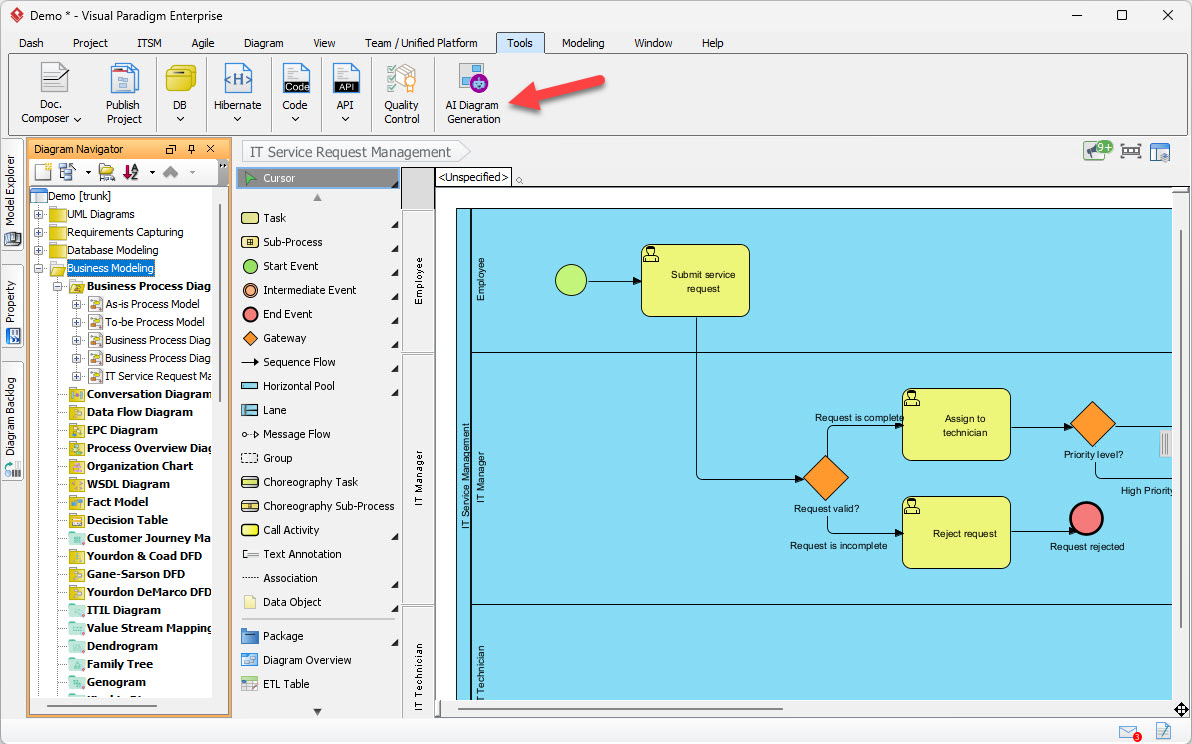
AI-Powered Modeling: Visual Paradigm integrates AI chatbots that can generate BPMN diagrams from text descriptions, helping to quickly scaffold processes like the one described above.
Example: Configuring the Timer in Visual Paradigm
To replicate the “Friday at 6 PM” trigger in Visual Paradigm:
-
Select the Intermediate Timer Event.
-
Open the Specification window.
-
Set the Timer Definition Type to
Cycle. -
Enter the ISO 8601 repeating interval format:
R/2026-01-02T18:00:00-08:00/P7D(which represents repeating every 7 days starting from a specific Friday at 6 PM PST).
Best Practices for BPMN Modeling
To ensure your diagrams remain readable and effective, follow these industry standards:
-
Keep it Simple: Aim for diagrams that fit on a single page. Use sub-processes to hide complexity.
-
Consistent Layout: Flow should generally move from left to right. Avoid crossing sequence flows whenever possible.
-
Labeling: Always label gateways with a question (e.g., “Working group still active?”) and outgoing flows with the answer (e.g., “Yes”, “No”).
Conclusion
The “Weekly Working Group Status Check” is a prime example of how BPMN can be used to model recurring, logic-driven business processes. By combining Timer Events for scheduling, Exclusive Gateways for decision-making, and Loops for repetition, organizations can create robust automated workflows.
Using a dedicated tool like Visual Paradigm elevates this process from a static drawing to a dynamic blueprint. Its support for BPMN 2.0 standards, simulation capabilities, and intuitive interface ensures that business analysts and developers share a common understanding of the process, ultimately leading to more efficient and error-free operations. Whether you are tracking project issues or managing complex supply chains, mastering these BPMN fundamentals is the first step toward operational excellence.
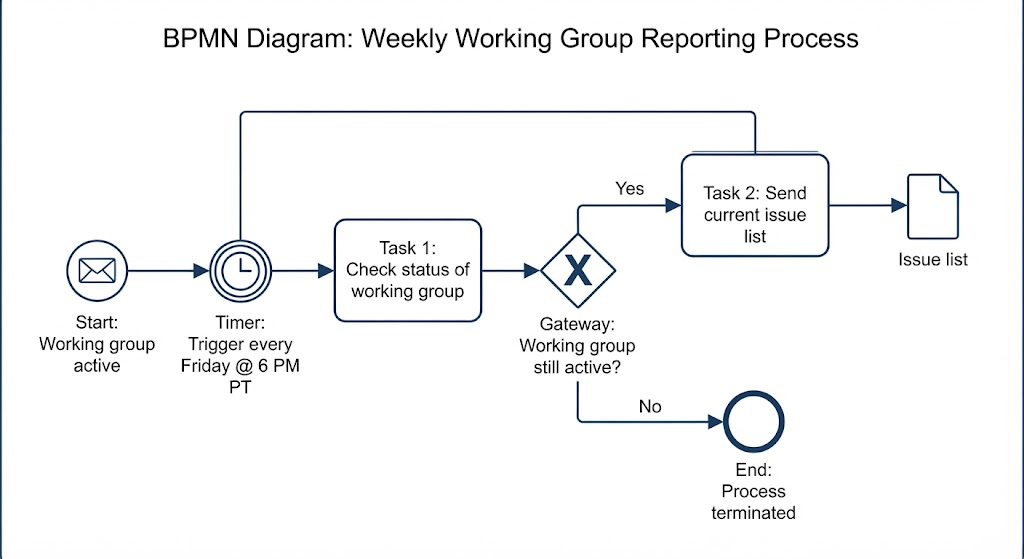
Diagram Interpretation
To understand this workflow, we follow the Sequence Flow (solid arrows) from left to right:
-
Start Event (Message): The process is initiated by a “Working group active” message, indicating that a specific team or project has been launched.
-
Intermediate Timer Event: This is the heartbeat of the workflow. It is configured to trigger every Friday at 6 PM Pacific Time. In BPMN, the clock icon signifies a time-based catch event.
-
Task (Check status of working group): A manual or automated task where the system verifies the current state of the project.
-
Exclusive Gateway (XOR): Represented by the diamond with an “X”, this is a decision point. The process evaluates the condition: “Working group still active?”
-
Path A (Yes): If the group is active, the flow proceeds to the “Send current issue list” task.
-
Path B (No): If the group is inactive, the flow moves to the End Event (thick circle), terminating the process for that cycle.
-
-
Task (Send current issue list): This task utilizes a Data Object (the document icon labeled “Issue list”) to compile and distribute the report.
-
The Loop: After the email is sent, the sequence flow loops back to the Timer Event. This creates a recurring cycle that repeats every week until the “No” path is taken.
Key BPMN Concepts Explained
When modeling processes in Visual Paradigm, it is vital to distinguish between different types of flows and objects:
-
Events: These are circles that represent something that “happens” during the process. They are categorized as Start (thin circle), Intermediate (double circle), or End (thick circle).
-
Gateways: These control the divergence and convergence of paths. The Exclusive Gateway (XOR) ensures that only one path is taken based on the evaluation of conditions.
-
Sequence Flow vs. Message Flow:
-
Sequence Flow (Solid line with arrow): Shows the order of activities within a single process.
-
Message Flow (Dashed line with open arrow): Used to show communication between two separate participants (pools), such as the dotted line connecting the “Issue list” data object to the send task in some interpretations, or communication between departments.
-
-
Data Objects: These provide information about what data is required or produced by an activity. In our example, the “Issue list” is a data input for the sending task.
Tooling Deep Dive: Visual Paradigm for BPMN
Visual Paradigm is a leading modeling tool that supports the full BPMN 2.0 specification, allowing users to move from simple diagrams to executable code.
Why Use Visual Paradigm?
-
Intuitive Drag-and-Drop Interface: The tool features a resource catalog that allows you to quickly connect shapes. For example, dragging from a Task automatically suggests relevant gateways or events.
-
Smart Guide: When creating the loop seen in our diagram, Visual Paradigm’s smart connectors ensure that the return arrow from “Send current issue list” back to the “Timer Event” is routed neatly without overlapping other elements.
-
Simulation and Validation: Before deploying the workflow, you can use the simulation tool to test the “Friday 6 PM” trigger and the XOR gateway logic to ensure there are no dead ends or infinite loops.
-
AI-Powered Modeling: Visual Paradigm integrates AI chatbots that can generate BPMN diagrams from text descriptions, helping to quickly scaffold processes like the one described above .
Example: Configuring the Timer in Visual Paradigm
To replicate the “Friday at 6 PM” trigger in Visual Paradigm:
-
Select the Intermediate Timer Event.
-
Open the Specification window.
-
Set the Timer Definition Type to
Cycle. -
Enter the ISO 8601 repeating interval format:
R/2026-01-02T18:00:00-08:00/P7D(which represents repeating every 7 days starting from a specific Friday at 6 PM PST).
Best Practices for BPMN Modeling
To ensure your diagrams remain readable and effective, follow these industry standards:
-
Keep it Simple: Aim for diagrams that fit on a single page. Use sub-processes to hide complexity.
-
Consistent Layout: Flow should generally move from left to right. Avoid crossing sequence flows whenever possible.
-
Labeling: Always label gateways with a question (e.g., “Working group still active?”) and outgoing flows with the answer (e.g., “Yes”, “No”).
Conclusion
The “Weekly Working Group Status Check” is a prime example of how BPMN can be used to model recurring, logic-driven business processes. By combining Timer Events for scheduling, Exclusive Gateways for decision-making, and Loops for repetition, organizations can create robust automated workflows.
Using a dedicated tool like Visual Paradigm elevates this process from a static drawing to a dynamic blueprint. Its support for BPMN 2.0 standards, simulation capabilities, and intuitive interface ensures that business analysts and developers share a common understanding of the process, ultimately leading to more efficient and error-free operations. Whether you are tracking project issues or managing complex supply chains, mastering these BPMN fundamentals is the first step toward operational excellence.