


1. Introduction to Activity Diagrams
An Activity Diagram is a behavioral diagram in the Unified Modeling Language (UML) that depicts the flow of control or object flow within a system. Unlike class diagrams which show static structure, activity diagrams visualize the dynamic aspects of a system.
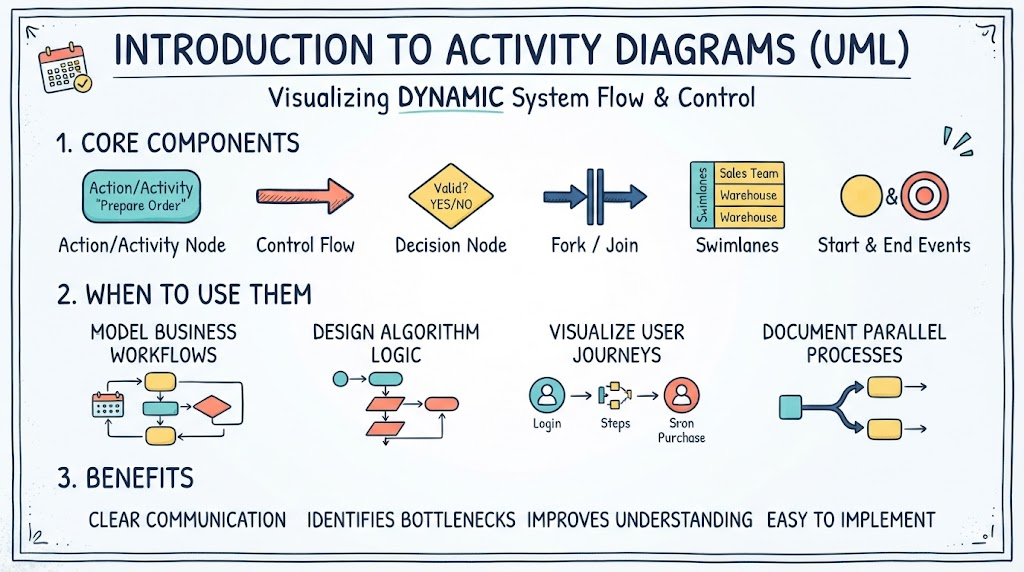
Core Components
-
Action/Activity Nodes: Rounded rectangles representing a specific task or step.
-
Control Flow: Arrows showing the sequence of execution.
-
Decision Nodes: Diamonds representing conditional branching (if/else).
-
Fork/Join Bars: Thick horizontal or vertical bars representing parallel processing or synchronization.
-
Swimlanes: Vertical or horizontal partitions that organize activities by actor, department, or system component.
-
Start/End Events: Solid circles (start) and bullseye circles (end).
When to Use Them
-
Modeling business workflows and standard operating procedures.
-
Designing algorithm logic before coding.
-
Visualizing use case scenarios and user journeys.
-
Documenting parallel processes and multi-threaded systems.
2. Usage Cases, PlantUML Example, and the “Diagram-as-Code” Revolution
Common Usage Cases
-
E-Commerce Checkout: Visualizing cart validation, payment gateway interaction, and inventory updates across different swimlanes (User, Frontend, Backend, Payment Provider).
-
CI/CD Pipeline: Mapping build, test, deploy stages with parallel testing forks and deployment decision gates.
-
User Onboarding: Tracking registration, email verification, profile setup, and tutorial flows.
-
API Request Lifecycle: Showing authentication, rate limiting, processing, caching, and response generation.
VPasCode / PlantUML Example
Below is a PlantUML script representing an Order Fulfillment Process. This syntax is compatible with Visual Paradigm’s VPasCode engine.
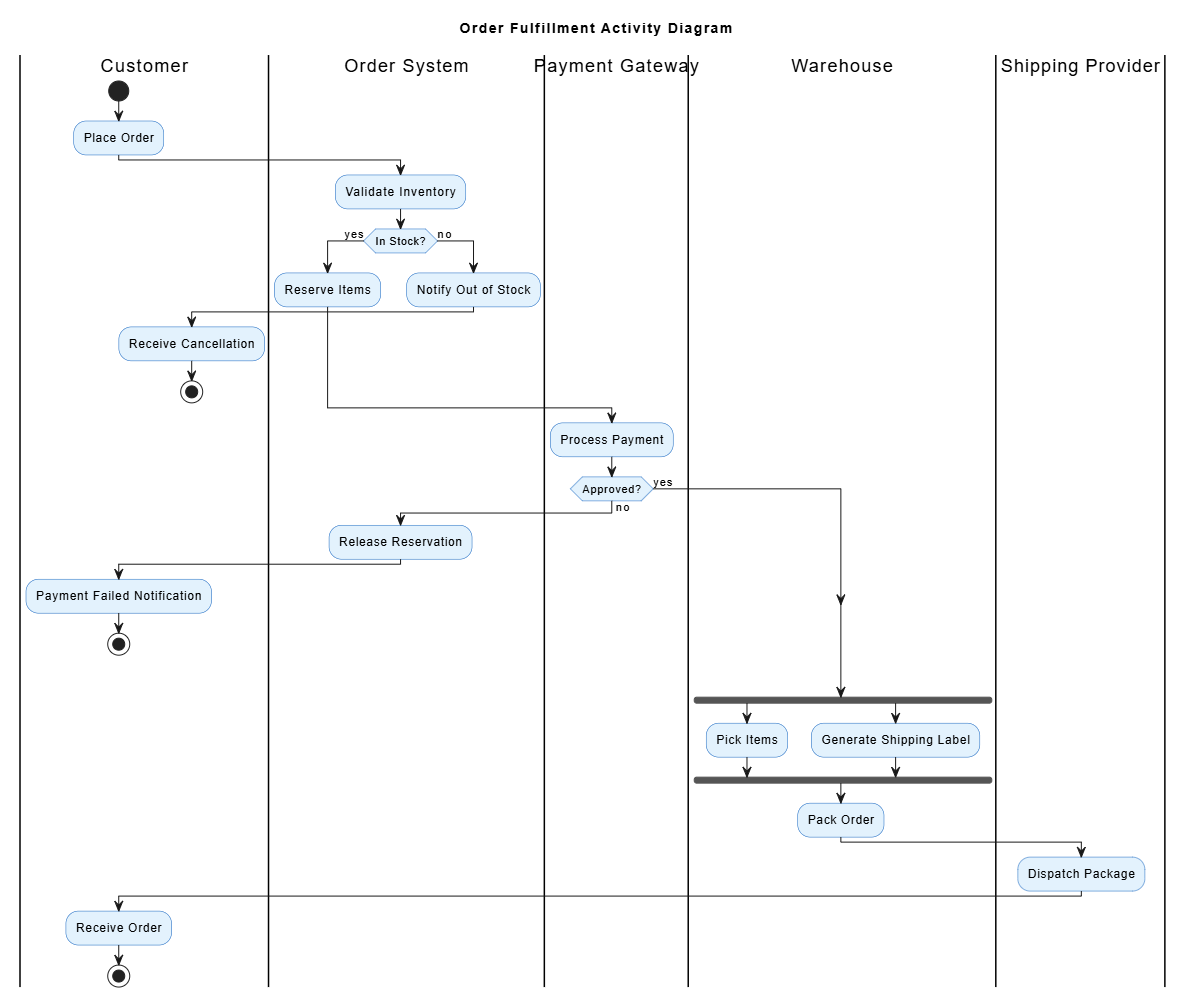
@startuml OrderFulfillment
title Order Fulfillment Activity Diagram
skinparam ActivityBackgroundColor #E3F2FD
skinparam ActivityBorderColor #1565C0

|Customer|
start
:Place Order;

|Order System|
:Validate Inventory;
if (In Stock?) then (yes)
  :Reserve Items;
else (no)
  :Notify Out of Stock;
  |Customer|
  :Receive Cancellation;
  stop
endif

|Payment Gateway|
:Process Payment;
if (Approved?) then (yes)
else (no)
  |Order System|
  :Release Reservation;
  |Customer|
  :Payment Failed Notification;
  stop
endif

|Warehouse|
fork
  :Pick Items;
fork again
  :Generate Shipping Label;
end fork
:Pack Order;

|Shipping Provider|
:Dispatch Package;

|Customer|
:Receive Order;
stop
@enduml
Why Diagram-as-Code is Popular Now
-
Version Control Friendly: Text files can be tracked in Git, enabling diff reviews, branching, and history tracking—impossible with binary image files.
-
Consistency & Standards: Eliminates “style drift.” Layout and formatting are handled by the rendering engine, ensuring uniform documentation.
-
Automation Integration: Can be embedded in CI/CD pipelines to auto-generate documentation on every commit.
-
Reusability: Code snippets, macros, and includes allow for modular diagram design.
-
Accessibility: Text-based diagrams are searchable, screen-reader friendly, and easily indexed.
Why Diagram-as-Code is AI-Friendly
-
LLM Native Format: Large Language Models are trained on vast amounts of code. PlantUML/Mermaid syntax is far more token-efficient and structurally predictable than describing a visual layout in natural language.
-
Deterministic Output: AI can generate syntactically correct code that renders predictably, whereas generating pixel-perfect images directly is still unreliable.
-
Easy Iteration: You can ask AI to “add a retry loop to the payment step,” and it modifies specific lines of code rather than regenerating an entire image.
-
Bidirectional Translation: AI can convert legacy documentation → code, code → diagram, or diagram code → refactored code seamlessly.
3. Using Visual Paradigm AI Chatbot → VPasCode
Visual Paradigm integrates an AI assistant that acts as a bridge between natural language intent and precise VPasCode/PlantUML output.
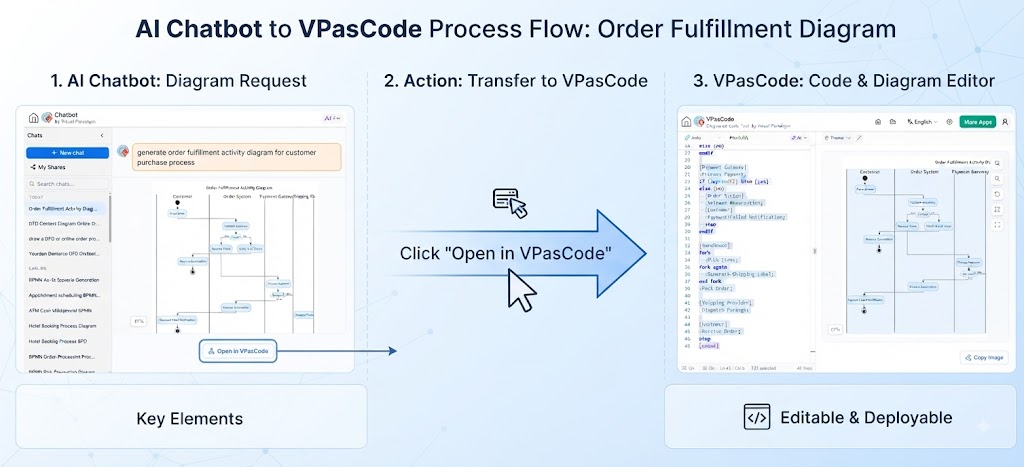
How to Use It
-
Open VP AI Chatbot: Access via the Visual Paradigm toolbar or web platform.
-
Describe Your Intent: Use natural language, e.g., “Create an activity diagram for a hotel booking system with swimlanes for Guest, Reception, and Room Service. Include a decision node for room availability and parallel tasks for confirmation email and calendar sync.”
-
Generate VPasCode: The AI returns validated VPasCode/PlantUML syntax.
-
Render Instantly: Paste into the VP editor or use the built-in preview to see the diagram immediately.
-
Iterate Conversationally: Say “Add error handling for payment failure” or “Change the fork to happen after validation” — the AI modifies the existing code contextually.
-
Export: Save as SVG, PNG, PDF, or keep as code in your repository.
Benefits & Convenience
| Benefit | Description |
|---|---|
| Zero Syntax Learning Curve | Get production-ready diagrams without memorizing PlantUML keywords |
| Context-Aware Editing | AI understands your existing diagram and makes surgical changes |
| Best Practices Built-In | AI applies UML conventions, proper swimlane usage, and naming standards automatically |
| Rapid Prototyping | Go from idea to visual in seconds during meetings or planning sessions |
| Documentation Generation | Ask AI to generate descriptive text from the diagram code for wikis/docs |
| Cross-Diagram Consistency | AI can align activity diagrams with related sequence or class diagrams |
4. Why Modeling is Now Agile & Feasible with AI + As-Code
Historically, UML modeling was seen as heavyweight, waterfall-era overhead. AI and as-code have fundamentally changed this equation.
Streamlining the Problems of Traditional Modeling
❌ Old Problem: Modeling Takes Too Long
✅ AI Solution: What took hours of drag-and-drop now takes minutes of conversation. AI handles layout, styling, and boilerplate, letting architects focus on logic, not pixels.
❌ Old Problem: Diagrams Go Stale Immediately
✅ As-Code Solution: Diagrams live in the same repo as source code. PRs that change behavior must update the diagram code. Reviewers catch mismatches during code review. Documentation stays synchronized organically.
❌ Old Problem: High Skill Barrier
✅ AI Solution: Domain experts who understand the process but not UML can describe workflows in plain English. AI translates expertise into formal notation, democratizing modeling.
❌ Old Problem: Feedback Loops Are Slow
✅ Combined Solution: During sprint planning, a team can verbally describe a flow → AI generates the diagram instantly → team validates/corrects in real-time → refined code is committed before the meeting ends. Modeling becomes a collaborative thinking tool, not a post-hoc documentation chore.
❌ Old Problem: Tool Lock-In & Portability
✅ As-Code Solution: PlantUML/VPasCode is vendor-neutral text. Teams can switch tools, render in multiple platforms, and never lose their intellectual property to proprietary binary formats.
The Agile Modeling Flywheel
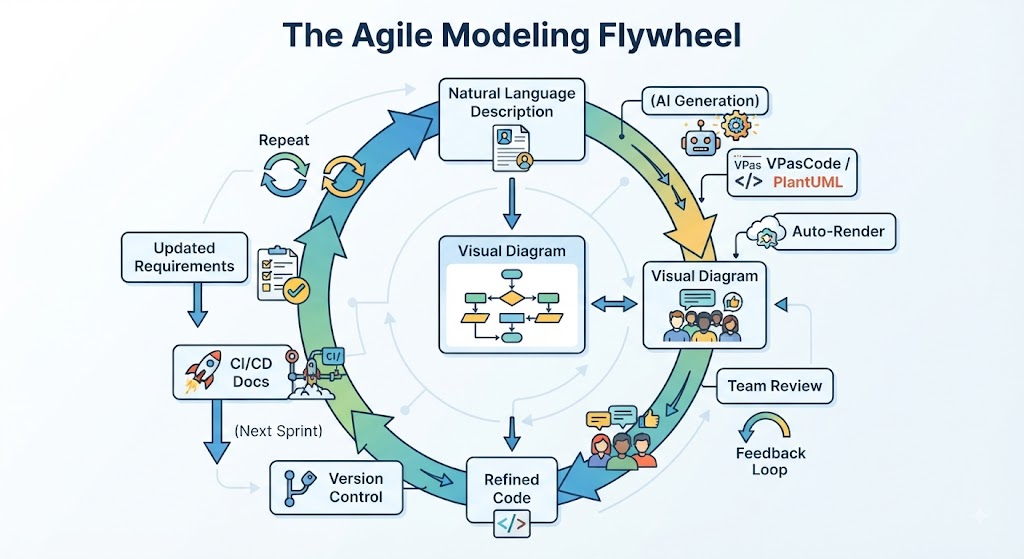
Natural Language Description
        ↓ (AI Generation)
VPasCode / PlantUML
        ↓ (Auto-Render)
Visual Diagram ←→ Team Review
        ↓ (Feedback Loop)
Refined Code → Version Control → CI/CD Docs
        ↓ (Next Sprint)
Updated Requirements → Repeat
Key Takeaway
Modeling is no longer a phase—it’s a continuous, lightweight practice. AI removes the friction of creation, as-code removes the friction of maintenance, and together they make architectural visualization an integral part of agile development rather than an afterthought. Visual Paradigm’s AI-to-VPasCode pipeline operationalizes this shift, making professional-grade modeling accessible, sustainable, and genuinely useful in modern software delivery.
Related posts:
 Why UML Remains Relevant in the AI Era: Visual Paradigm, Diagram-as-Code, and Modern Agile
Orchestrating Team Harmony: How Visual Paradigm OpenDocs Revolutionizes Real-Time Collaborative Documentation
Case Study: Modernizing Our Architecture Documentation with VPasCode – An Product Review
Why UML Remains Relevant in the AI Era: Visual Paradigm, Diagram-as-Code, and Modern Agile
Orchestrating Team Harmony: How Visual Paradigm OpenDocs Revolutionizes Real-Time Collaborative Documentation
Case Study: Modernizing Our Architecture Documentation with VPasCode – An Product Review
 UML Diagram Generators vs. Full Modeling Platforms: Why One Isn’t Enough
