Introduction: The Evolution of a Critical Skill
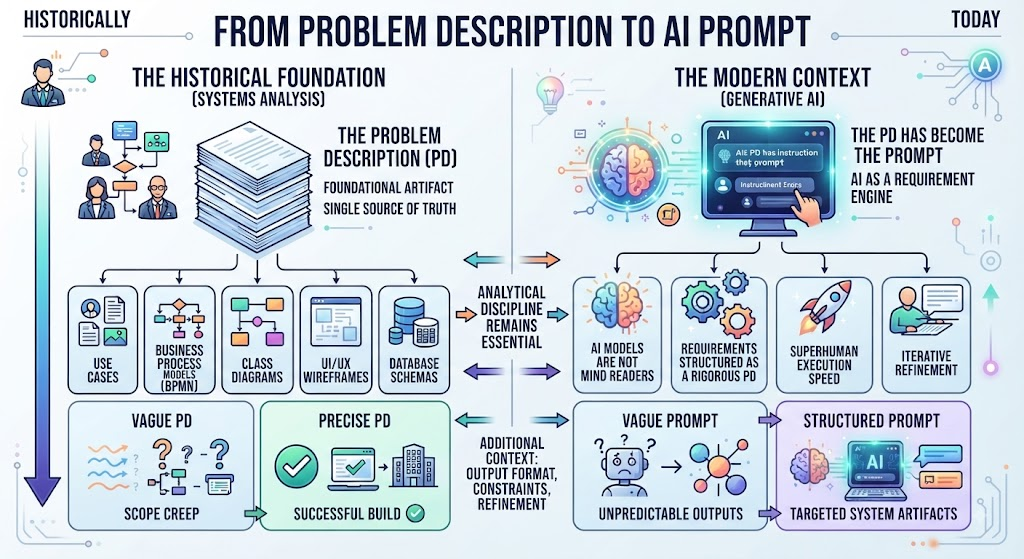
Historically, the Problem Description (PD) was the foundational artifact in Systems Analysis. It served as the single source of truth for deriving use cases, business process models (BPMN), class diagrams, and database schemas. A vague PD meant scope creep; a precise PD meant a successful build.
Today, with Generative AI, the Problem Description has not become obsolete; it has become the prompt.
AI models are essentially “requirement engines.” They cannot read your mind, but they can execute instructions with superhuman speed if those instructions are structured like a rigorous problem description. Writing a PD for AI requires the same analytical discipline as writing one for a development team, but with added layers of context regarding output format, constraints, and iterative refinement.
This guide bridges traditional systems analysis and modern AI prompting, providing a comprehensive framework for writing Problem Descriptions that yield high-quality diagrams, code, and strategic insights.
1. Key Concepts of Effective Problem Descriptions
Whether targeting human analysts or LLMs, four pillars support a robust PD:
1. Contextual Anchoring
-
Traditional: Business background, stakeholders, regulatory environment.
-
AI Usage: Persona definition, domain expertise level, target audience for the output.
-
Why it matters: Without context, AI defaults to generic averages. “Design a login system” yields a student project; “Design a HIPAA-compliant patient portal login for elderly users with low digital literacy” yields a specialized architectural pattern.
2. Structural Decomposition
-
Traditional: Breaking problems into functional/non-functional requirements, actors, and entities.
-
AI Usage: Chain-of-Thought (CoT) structuring, step-by-step reasoning requests, modular prompting.
-
Why it matters: AI struggles with monolithic complexity. Decomposing the PD helps the model maintain coherence over long outputs.
3. Constraint Specification
-
Traditional: Budget, timeline, tech stack, compliance standards.
-
AI Usage: Output format (Mermaid, PlantUML, JSON), style guidelines, forbidden patterns, token limits.
-
Why it matters: Constraints force creativity and precision. Unconstrained AI generates verbose, often unusable artifacts.
4. Acceptance Criteria
-
Traditional: Definition of Done, test cases, KPIs.
-
AI Usage: Validation checks, self-correction prompts, expected structure verification.
-
Why it matters: You must define what “good” looks like before generation begins to enable effective iteration.
2. Framework: The C.R.E.F.O. Model for AI Problem Descriptions
Adapted from traditional requirements gathering, use this template for AI tasks:
| Component | Traditional Equivalent | AI Prompt Element | Example |
|---|---|---|---|
| Context | Business Case / Stakeholder Analysis | Role + Domain + Audience | “Act as a Senior Enterprise Architect designing for a fintech startup…” |
| Requirements | Functional/Non-Functional Reqs | Task + Specific Goals | “Generate a sequence diagram showing OAuth2 flow with MFA fallback…” |
| Entities | Domain Model / Glossary | Key Terms + Definitions | “Key entities: User, AuthProvider, SessionToken, AuditLog…” |
| Format | Deliverable Standards | Output Syntax + Style | “Output in Mermaid.js syntax. Use orthogonal edge routing…” |
| Output Checks | QA / Testing | Validation + Refinement | “Ensure all lifelines have activation boxes. Verify no circular dependencies…” |
3. Usage Cases & Examples
Case A: Generating UML Class Diagrams
Challenge: AI often creates overly complex or syntactically incorrect diagrams when given vague domain descriptions.
❌ Weak Problem Description
“Create a class diagram for an e-commerce system.”
✅ Comprehensive Problem Description
CONTEXT: You are a Domain-Driven Design expert. We are building a B2B wholesale
e-commerce platform where pricing is contract-based, not catalog-based.

REQUIREMENTS: Model the core ordering bounded context. Focus on the relationship
between Contracts, PriceLists, Products, and Orders. Do NOT model UI or payment processing.

ENTITIES & RULES:
- Contract: Has effective dates, belongs to one CustomerAccount
- PriceList: Linked to Contract, contains tiered pricing rules
- OrderLine: Must validate price against active Contract at time of creation
- CustomerAccount: Can have multiple Contracts (current/historical)

FORMAT: Mermaid classDiagram syntax. Include visibility modifiers (+/-/#).
Show multiplicity on ALL associations. Use notes for complex business rules.

CONSTRAINTS: Maximum 12 classes. Apply SOLID principles. No inheritance
deeper than 2 levels. Prefer composition over inheritance.

VALIDATION: After generating, list 3 potential design weaknesses in this model.
Case B: Business Process Modeling (BPMN)
Challenge: AI confuses BPMN notation and misses exception paths.
✅ Comprehensive Problem Description
CONTEXT: Healthcare insurance claims processing. Audience: Compliance auditors
and junior developers. Tone: Formal and precise.

TASK: Create a BPMN 2.0 compliant process diagram for "Prior Authorization Request."

PROCESS SCOPE:
START: Physician submits auth request via EHR integration
END: Decision communicated back to EHR + notification sent to member

KEY DECISION POINTS:
1. Is procedure covered under member's plan? (If no → auto-deny + appeal path)
2. Is clinical documentation complete? (If no → pend to nurse reviewer)
3. Does it require medical director review? (Threshold: >$50K or experimental)

EXCEPTION HANDLING: Model timeout events for each review stage (48hr SLA).
Model escalation path if SLA breached.

FORMAT: Mermaid flowchart with BPMN-like styling. Use subgraphs for
"Clinical Review" and "Administrative Validation" lanes.

OUTPUT REQUIREMENT: Provide the diagram code AND a markdown table mapping
each decision node to the specific policy document section that governs it.
Case C: Deriving User Stories & Acceptance Criteria
Challenge: AI generates generic stories lacking testability.
✅ Comprehensive Problem Description
CONTEXT: Agile team migrating legacy COBOL payroll system to cloud-native.
Team uses Gherkin/Cucumber BDD.

INPUT: [Paste excerpt of legacy system specification or interview transcript]

TASK: Extract user stories for the "Tax Withholding Calculation" module.

REQUIREMENTS PER STORY:
- Follow INVEST criteria
- Title format: As a [role], I want [capability], so that [business value]
- Acceptance Criteria: Minimum 5 Gherkin scenarios per story
- Include edge cases: Multi-state employees, retroactive pay adjustments,
  garnishment caps, tax treaty exemptions

CONSTRAINTS: Each story must be completable in ≤3 days. Flag any story
that seems too large with "[NEEDS SPLITTING]" tag.

FORMAT: Structured markdown with YAML frontmatter containing:
  - story_id
  - priority (MoSCoW)
  - estimated_points
  - dependencies
Case D: System Architecture Decision Records (ADR)
Challenge: Getting AI to reason about tradeoffs rather than just listing options.
✅ Comprehensive Problem Description
CONTEXT: We're choosing an event streaming platform for IoT telemetry
(10M devices, 50K msgs/sec peak). Team has strong Kafka experience but
management wants lower operational overhead.

TASK: Write an ADR comparing Apache Kafka vs. AWS Kinesis vs. Pulsar.

STRUCTURE (Follow Michael Nygard's ADR template):
1. Title & Status
2. Context (include our specific constraints below)
3. Decision Drivers (weighted)
4. Options Considered (pros/cons matrix)
5. Decision + Rationale
6. Consequences (positive AND negative)

DECISION DRIVERS (Weighted):
- Operational complexity (35%) - team is small (3 engineers)
- Cost at scale (25%)
- Message ordering guarantees (20%)
- Vendor lock-in risk (15%)
- Community/ecosystem (5%)

CONSTRAINT: Be brutally honest about downsides. Do not recommend based
on popularity alone. If none are suitable, say so and suggest alternatives.

TONE: Technical, evidence-based, no marketing language.
4. Tips & Tricks
🎯 Precision Techniques
-
Define Your Ontology First: Before asking for any diagram, ask the AI to create a glossary/domain model. Align on terminology before generating artifacts. “First, define the key entities and their relationships in bullet points. Wait for my approval before generating the diagram.”
-
Negative Constraints Are Powerful: Telling AI what NOT to do is often more effective than what TO do. “Do not include CRUD operations in this sequence diagram. Do not use inheritance. Do not assume synchronous communication.”
-
Provide Anti-Examples: Show what bad output looks like. “Here is an example of an overly complex diagram we rejected last week [paste]. Avoid this pattern because…”
-
Use Structured Input Formats: Feed requirements as YAML, JSON, or numbered lists rather than prose. AI parses structured data more reliably.
-
Iterative Refinement Protocol: Never accept first-pass output for complex diagrams. Build refinement into your PD: “After generating, critique your own output against these 5 quality criteria. Then regenerate addressing all identified issues.”
⚠️ Common Pitfalls to Avoid
| Pitfall | Why It Fails | Fix |
|---|---|---|
| Over-specifying implementation details | Constrains AI’s ability to find optimal solutions | Specify WHAT and WHY, let AI propose HOW |
| Assuming shared knowledge | AI doesn’t know your org’s conventions | Always include relevant standards/templates |
| Single mega-prompt for complex systems | Context window degradation, loss of coherence | Decompose into chained prompts with explicit handoffs |
| Ignoring non-functional requirements | Generates architecturally naive outputs | Explicitly weight NFRs in decision drivers |
| Treating AI output as final | Hallucinations in notation/syntax are common | Always validate syntax + semantic correctness |
5. Guidelines Checklist
Before submitting any Problem Description to AI, verify:
-
Role/Persona defined with appropriate expertise level
-
Business context provided (not just technical specs)
-
Scope boundaries explicitly stated (in/out of scope)
-
Key entities/terms defined or referenced
-
Output format specified with syntax/version details
-
Constraints listed (technical, business, stylistic)
-
Quality criteria defined for self-evaluation
-
Edge cases/exceptions addressed
-
Decomposition strategy planned for complex outputs
-
Iteration protocol established
6. The Meta-Skill: Problem Description as Thinking Tool
The most important insight: Writing a Problem Description for AI is primarily an exercise in clarifying your own thinking.
If you struggle to write a clear PD, you don’t have a prompting problem—you have a requirements problem. The AI merely exposes the ambiguity that would have caused issues downstream anyway.
Use this workflow:
-
Draft your PD
-
Ask AI: “What questions would you need answered to complete this task perfectly?”
-
Answer those questions, refining your PD
-
Only then request the actual deliverable
This turns AI into a requirements elicitation partner, not just a generation engine. The quality of your Problem Description remains, as it always has been, the single greatest predictor of success—whether your collaborator is human or artificial.
7. Tooling Spotlight: Visual Paradigm as the AI-to-Artifact Bridge
While AI excels at generating diagram code (Mermaid, PlantUML, JSON), it cannot natively produce enterprise-grade, editable modeling files. This is where Visual Paradigm (VP) serves as the critical middleware between AI-generated Problem Descriptions and professional systems documentation. VP’s native AI integration and robust import capabilities make it the ideal validation and refinement layer for the workflows described above.
Why Visual Paradigm for AI-Generated Diagrams?
| Capability | Relevance to AI PD Workflow |
|---|---|
| AI-Assisted Modeling | Built-in LLM integration that generates UML/BPMN directly from natural language PDs within the tool |
| Multi-Format Import | VPasCode accepts Mermaid, PlantUML, JSON, and XMI—enabling seamless ingestion of AI output |
| Model Repository | Converts flat diagrams into a centralized, queryable model database with cross-diagram consistency |
| Round-Trip Engineering | Syncs AI-generated class diagrams with actual codebases for validation |
| Standards Compliance | Enforces UML 2.5, BPMN 2.0, ArchiMate syntax that AI frequently violates |
| Collaboration & Versioning | Enables team review of AI-generated artifacts with change tracking |
Integrated Workflow: PD → AI → Visual Paradigm
Step 1: Generate Structured Output via AI PD
Use the C.R.E.F.O. framework to prompt your AI, but explicitly target VP-compatible formats:
FORMAT REQUIREMENT: Generate the class diagram in PlantUML syntax
compatible with Visual Paradigm import. Include all stereotype annotations
(<<entity>>, <<service>>, <<repository>>). Use VP-supported relationship
notations only. Do NOT use custom extensions or non-standard decorators.
💡 Pro Tip: Visual Paradigm’s PlantUML importer handles stereotypes, notes, and package structures better than its Mermaid importer. For complex UML, prefer PlantUML as your AI output target.
Step 2: Import & Validate in Visual Paradigm
-
Copy AI-generated code into VP via File → Import → PlantUML/Mermaid
-
Run Model Validation (Tools → Model Validation) to catch AI hallucinations:
-
Missing multiplicity on associations
-
Invalid stereotype usage
-
Orphaned elements
-
Naming convention violations
-
-
Use Find & Replace to normalize AI-inconsistent terminology against your project glossary
Step 3: Leverage VP’s Native AI for Refinement
Instead of returning to an external LLM for iterations, use VP’s built-in AI assistant:
-
“Refine this diagram”: Select elements and ask VP’s AI to restructure based on updated PD constraints
-
“Generate documentation”: Auto-create requirement traceability matrices from imported diagrams
-
“Suggest improvements”: Get pattern-based recommendations grounded in VP’s modeling best practices (not generic LLM training data)
Step 4: Establish Model Consistency Across Diagrams
This is where VP delivers value no external AI can match. When you import an AI-generated class diagram:
-
Entities become first-class model elements, not just shapes
-
Updating a class name in the class diagram auto-propagates to sequence diagrams, state machines, and ERDs
-
AI-generated use cases can be linked to requirements in VP’s requirement management module
-
Cross-references are validated: if AI invents a class that doesn’t exist in your repository, VP flags it immediately
Practical Example: Correcting AI Output in VP
AI Generated (via PD):
class OrderService {
  +processOrder(order: Order): void
}
class Order {
  +orderDate: Date
}
OrderService --> Order : uses
Issues Detected in VP Validation:
-
❌
Ordermissing<<entity>>stereotype per project standards -
❌ Association lacks role name and multiplicity
-
❌ No dependency on
OrderRepository(violates layered architecture constraint from PD)
Refined in VP (using AI assist + manual correction):
<<service>> class OrderService {
  +processOrder(order: Order): void
}
<<entity>> class Order {
  +orderDate: Date
}
<<repository>> class OrderRepository {
  +findById(id: UUID): Optional<Order>
}
OrderService --> OrderRepository : depends on
OrderService ..> Order : uses [1..* creates]
The refined version now passes VP validation, conforms to architectural constraints specified in the original PD, and is fully integrated into the project model repository.
When to Use Visual Paradigm vs. Pure AI Output
| Scenario | Recommended Approach |
|---|---|
| Quick exploration / brainstorming | AI → Mermaid in markdown editor |
| Stakeholder presentation drafts | AI → Mermaid/PlantUML rendered inline |
| Formal requirements documentation | AI → PlantUML → Visual Paradigm |
| Architecture Decision Records with diagrams | AI → VP (native ADR template + embedded diagrams) |
| Code generation / reverse engineering | AI PD → VP → Round-trip sync with IDE |
| Team collaboration with version control | AI → VP → VP Server / Git integration |
| Regulatory/compliance deliverables | AI → VP (validation + audit trail mandatory) |
Key Takeaway
Visual Paradigm transforms AI-generated diagrams from disposable artifacts into living model assets. The Problem Description remains the intellectual foundation, AI provides the generative acceleration, and Visual Paradigm ensures the output meets professional modeling standards, maintains cross-artifact consistency, and integrates into your organization’s broader systems engineering lifecycle. Never treat AI diagram output as final—always route it through a proper modeling tool for validation, refinement, and governance.
This guide synthesizes best practices from traditional systems analysis (IEEE 830, BABOK, UML specifications) and modern AI prompt engineering research. Adapt the frameworks to your organizational context and continuously refine based on output quality feedback loops.