


Introduction
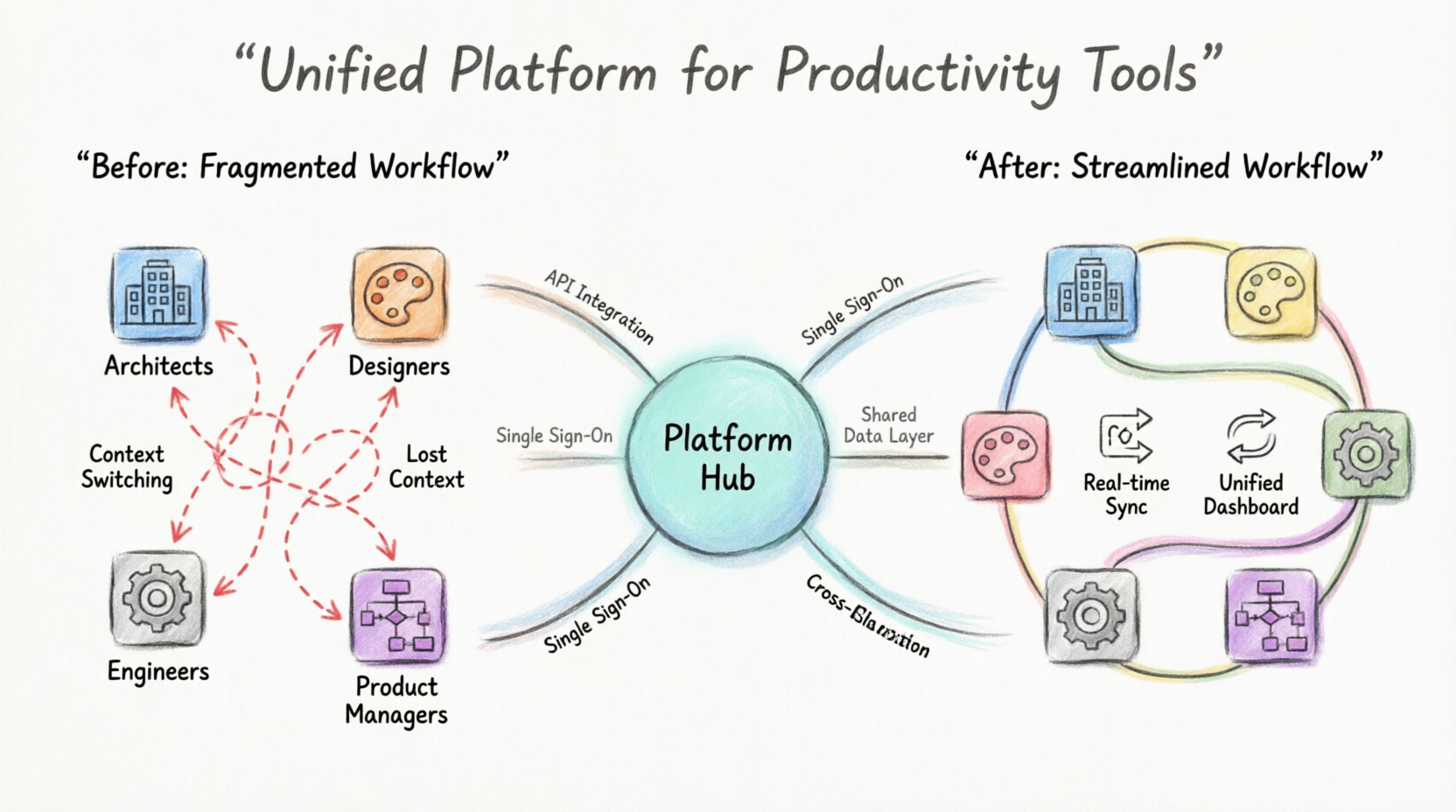
The modern professional landscape is defined by a paradox: while the number of powerful productivity tools has never been greater, the friction of using them together has become an equally significant burden. Architects, product managers, designers, and engineers routinely bounce between a dozen different applications, each with its own file formats, login requirements, and learning curves. The result is a daily workflow plagued by context-switching, duplicated effort, and the constant fear that critical information is trapped in a tool you cannot currently access.
In June 2026, Visual Paradigm responded to this universal challenge with the launch of the Visual Paradigm Unified Platform, a transformative ecosystem that fundamentally reimagines how visual productivity tools should work together. Rather than adding yet another standalone application to an already crowded toolkit, the Unified Platform takes a different approach: it dissolves the boundaries between existing tools, creating a single, coherent environment where desktop-grade modeling power and cloud-based accessibility coexist seamlessly.
This guide provides a comprehensive exploration of the Unified Platform—what it is, why it was built, how it connects to Visual Paradigm’s broader ecosystem of tools, and how real-world professionals can leverage it to transform their daily work.
What is the Unified Platform?
The Visual Paradigm Unified Platform is not a new standalone product; rather, it is an integration layer and orchestration hub that brings every Visual Paradigm tool, every piece of data, and every workflow into a single, unified experience.
The word “Unified” represents the core philosophy behind this release. We have broken down the barriers between applications and platforms to give you a single, cohesive environment. Whether you are creating a complex architecture diagram on your desktop or building an agile roadmap in a web browser, everything now flows into one centralized workspace.
The platform addresses three critical pain points that existed in the ecosystem prior to its launch:
-
Siloed Data: Diagrams, documents, and projects created in different applications lived in isolation.
-
Fragmented Discovery: Users frequently struggled to locate the right tool for a given task among the sprawling catalog of available applications.
-
The Desktop-Cloud Divide: Desktop users lacked easy access to cloud-based collaboration, while online users had limited integration with heavy-duty desktop workflows.
The Role of the Unified Platform in the Visual Paradigm Ecosystem
The Unified Platform does not replace Visual Paradigm’s existing products—it unifies them. It serves as the central nervous system for the entire Visual Paradigm ecosystem, connecting distinct components into a harmonious whole.
1. Bridging Desktop and Cloud
The Unified Platform extends Visual Paradigm Desktop by embedding a full cloud workspace directly inside the desktop application through an integrated browser. This means:
-
Locally-created enterprise models remain on your machine with full offline capability.
-
You gain instant access to cloud-based apps, collaboration features, and AI tools without ever leaving the desktop interface.
-
Diagrams built in Desktop are automatically synchronized and visible within the Unified Platform’s centralized drive.
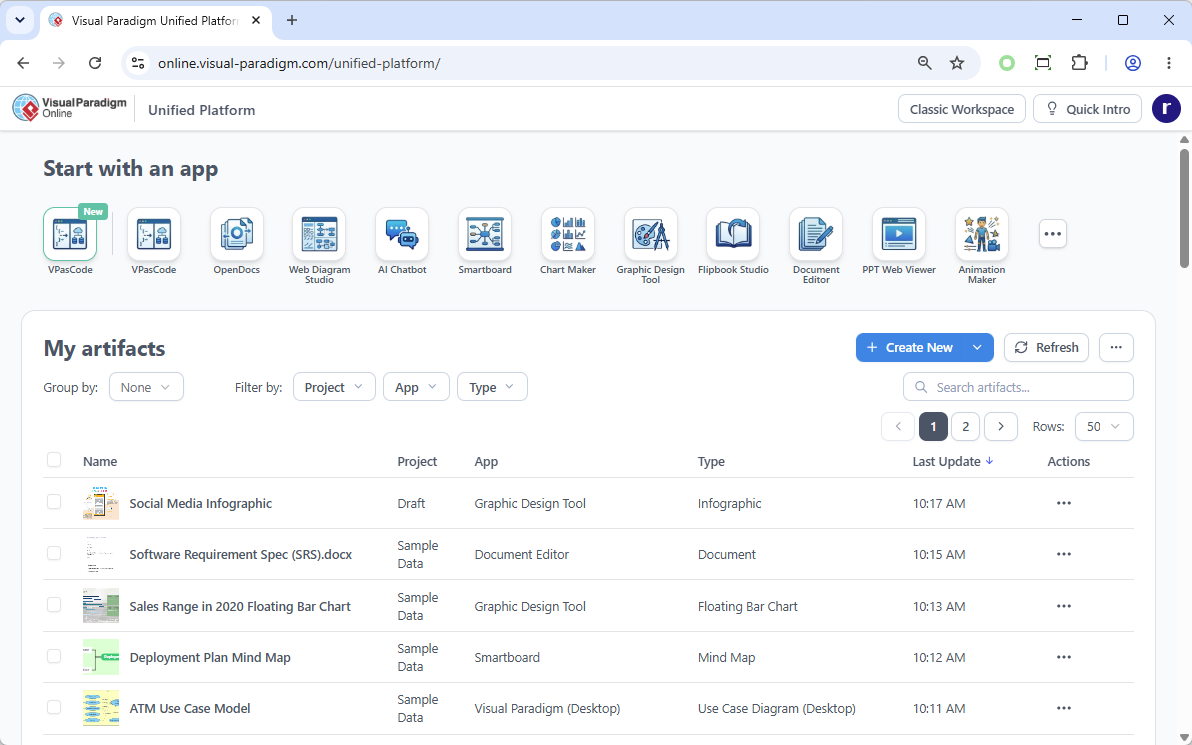
For Visual Paradigm Online users, the Unified Platform becomes the new home. Upon logging in, users are directed straight to the Unified Platform dashboard, which serves as the single entry point to all 100+ cloud applications.
2. Centralized App Store and Launcher
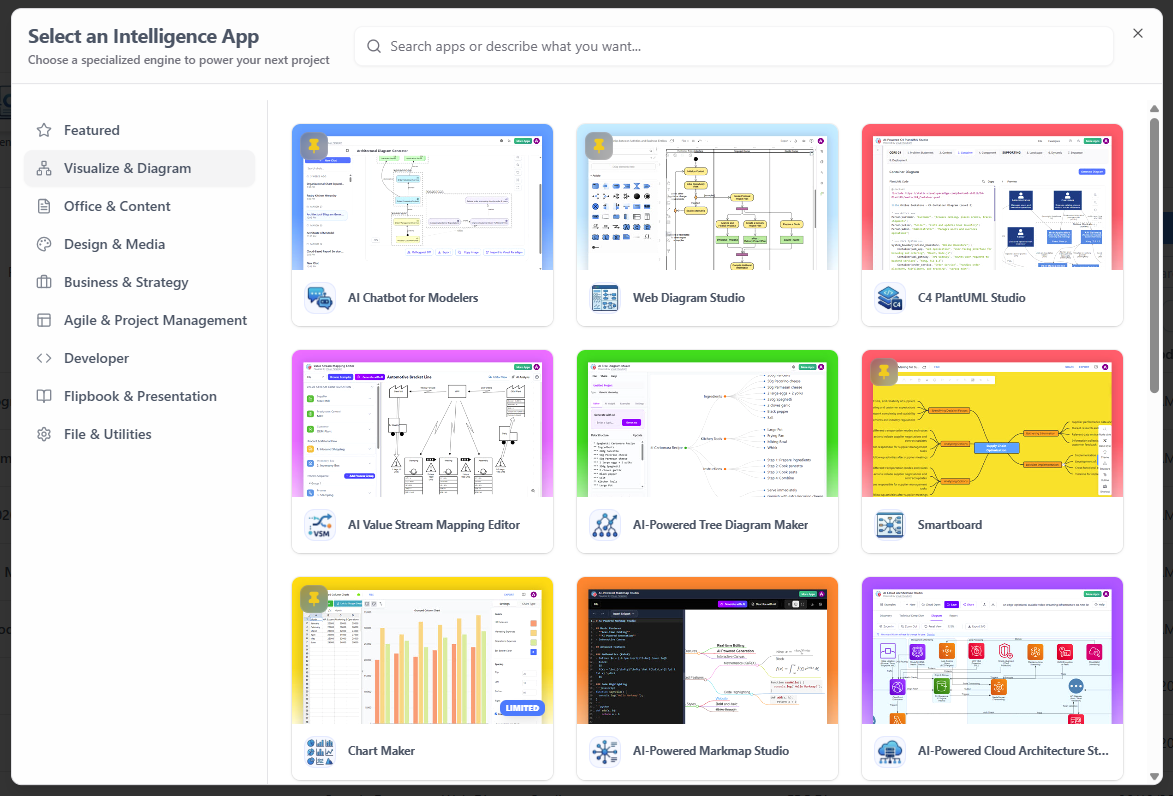
The Unified Platform acts as a centralized app store and launcher. Rather than navigating separate URLs or remembering which application handles which task, users access a categorized dashboard where every specialized tool—including Agile planning, infographics, Gantt charts, wireframing, business process modeling, and strategic management applications—is one click away.
3. Integrating AI Capabilities
AI capabilities such as VPasCode (Text-to-Diagram), AI Presentation Studio, and AI App Studio are woven directly into the Unified Platform. Rather than being isolated features, these tools are contextually available throughout the ecosystem, accelerating creation wherever visual work happens.

Key Concepts and Examples
Key Concept 1: The Unified Drive (Centralized Cloud Storage)
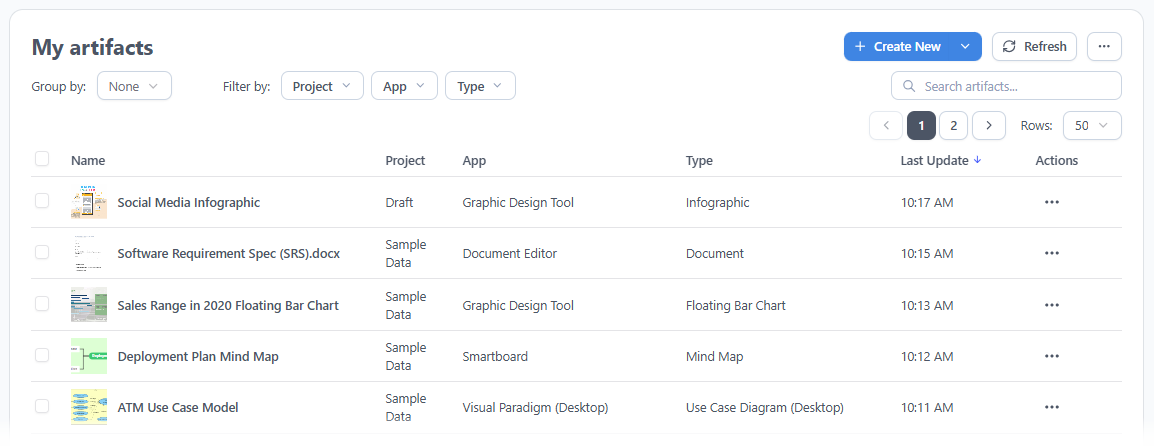
At the heart of the platform is the Unified Drive, a drive-like environment that automatically indexes and organizes every artifact created across the entire Visual Paradigm ecosystem. Every diagram, document, project, and presentation lives in a single, searchable location. There is no need to remember which application created which file or to navigate through scattered folders.
Example:
A project manager creates a Gantt Chart in the “Project Management” app and a Wireframe in the “UX Design” app. In the Unified Drive, both artifacts appear in a single list under the project name, with metadata indicating which app created them and when they were last updated. The user can filter by “Type” or “App” instantly.
Key Concept 2: Frictionless Modeling-to-Documentation Flow
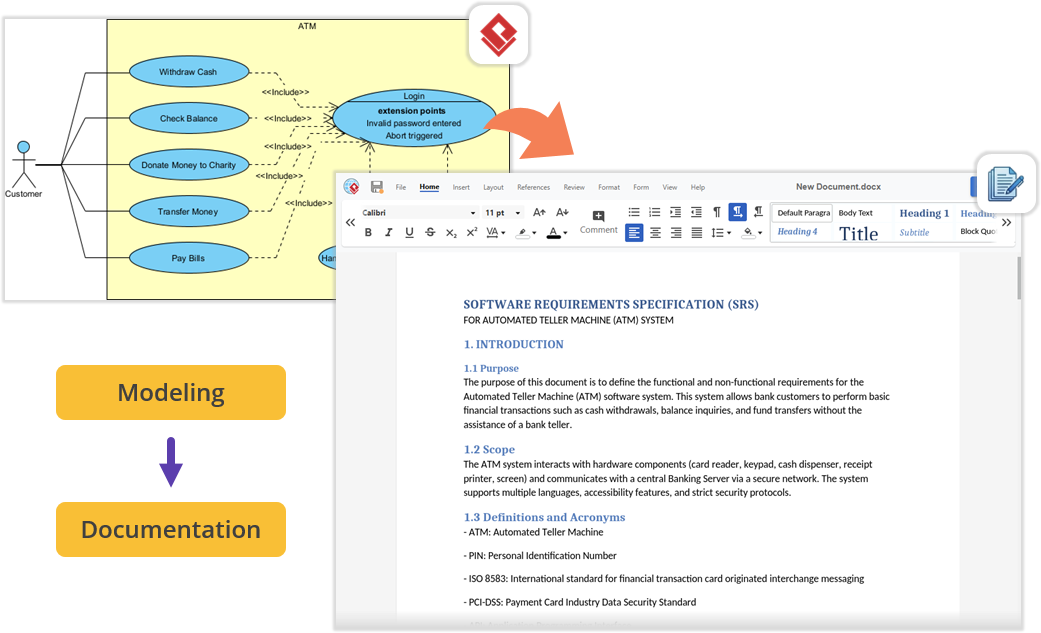
Traditionally, moving from a technical model to a formal document required manual export and import, often leading to broken links or formatting issues. The Unified Platform bridges this gap by allowing users to drag-and-drop desktop-generated diagrams directly into cloud-based documents (like OpenDocs) without any export-import friction.
Example:
An architect builds a UML Use Case Diagram in Visual Paradigm Desktop. They then open the embedded Unified Platform workspace, launch the Document Editor, and drag the diagram directly into a “Software Requirement Specification (SRS)” document. The diagram updates automatically if the source model changes, and no file exporting is required.
Key Concept 3: Contextual AI-Assisted Creation
The Unified Platform integrates AI tools directly into the workflow, allowing users to transition raw text and ideas into production-ready diagrams, presentations, and applications instantly.
Example:
A product manager types a natural language description: “Create a workflow for user login and password reset.” Using the VPasCode or AI Chatbot feature within the Unified Platform, the system instantly generates a complete BPMN activity diagram based on the description, which the user can then refine.
Key Concept 4: Embedded Desktop Integration
The platform eliminates context-switching by embedding the cloud experience directly inside the desktop application. This allows desktop users to access the full power of cloud apps and their synchronized data without leaving their local environment.
Example:
A developer working on a complex SysML model in Desktop clicks the Unified Platform menu icon in the toolbar. An embedded browser window opens within the Desktop interface, showing their cloud artifacts and a list of AI tools, allowing them to generate a presentation or check project status without minimizing their modeling window.

Key Concept 5: The Pipeline and OpenDocs Synergy
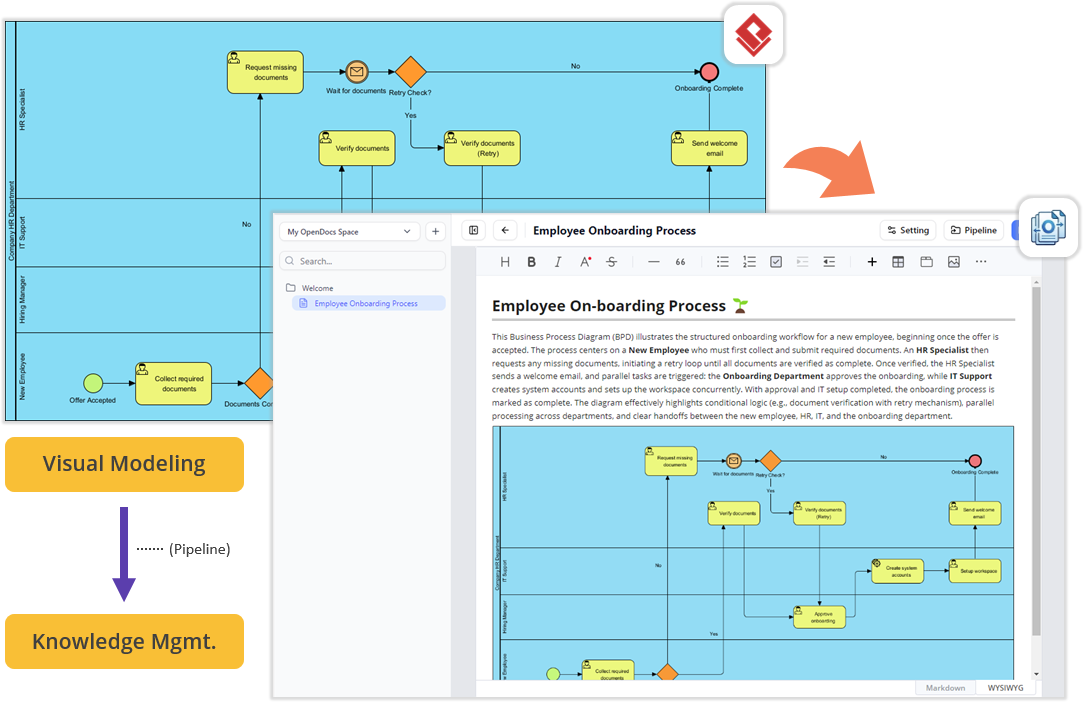
The Unified Platform connects the cloud’s documentation features (Pipeline and OpenDocs) with Desktop modeling. This creates a seamless flow where diagrams created locally can be instantly used in cloud-based knowledge bases.
Example:
A team builds a Business Process Diagram in OpenDocs. They realize they need a more complex simulation, so they push the diagram to the Pipeline, refine it in Desktop, and then drag the updated version back into the OpenDocs document. The process is seamless, with no version conflicts or manual file transfers.
Key Concept 6: Project-Centric Collaboration and Permissions
The platform introduces a unified “Project” concept that provides granular permission control over work created across all applications. This ensures that teams can collaborate effectively while maintaining strict access controls.
Example:
A company creates a “Project Alpha” in the Unified Platform. They grant “Editor” access to the engineering team for architecture diagrams and “Viewer” access to marketing for project timelines. All artifacts, regardless of whether they were created in Desktop or Online, are governed by this single project-level permission set.
How to Access the Unified Platform
Getting started with the new ecosystem is incredibly straightforward, whether you prefer working in a browser or inside the desktop software.
For Visual Paradigm Online Users
-
Log into your VP Online account at the official login portal.
-
Upon successful login, you will automatically be redirected to the new Unified Platform dashboard.
-
You can also bookmark and visit the platform directly at any time by navigating to the unified platform URL in your browser.
For Visual Paradigm Desktop Users
-
Ensure you are logged in: To see the Unified Platform menu, connect your desktop application to your cloud repository. From the main menu, select Team / Unified Platform > Select Repository and enter your VP Online credentials.
-
Open the Platform: Once logged in, navigate to Team / Unified Platform > Unified Platform in the main menu. An embedded browser will open directly inside your workspace, revealing the centralized cloud drive and your entire app ecosystem.
Real-World Scenarios
Scenario 1: Connecting Heavy System Modeling with Product Requirements
Imagine you are architecting a new software module using UML or SysML inside Visual Paradigm Desktop. Once the technical models are complete, you need to write a comprehensive Product Requirement Specification (PRD). In the traditional workflow, you would minimize Visual Paradigm, open a separate word processor, and manually export and import image files.
With the Unified Platform, you simply open the embedded workspace and launch the Document Editor app. Your requirements documentation is written right next to your active modeling environment, with everything organized under a single project space.
Scenario 2: Effortless Documentation via Pipeline and OpenDocs
For teams producing technical documentation, the flow between the desktop workspace and cloud documentation features is now frictionless. You can build diagrams locally in VP Desktop and send them to the cloud-based Pipeline. Then, switch to the OpenDocs app within the Unified Platform panel, where your Pipeline pane awaits. You can write manuals or project guides and drag-and-drop desktop-generated diagrams directly into the document canvas—no file exporting, no broken image links, and zero context-switching.
Scenario 3: Supercharge Projects with Agile and Management Tools
Software development requires far more than just architectural diagrams; it requires project management, scheduling, and team alignment. The Unified Platform instantly unlocks access to a massive library of specialized PM and Agile applications for desktop users. Within the same interface where you manage your codebase models, you can now jump into apps dedicated to Stakeholder Management, generate Development Plans, build interactive Gantt Charts, map out a RACI Matrix, or even design a prototype site using the Website Builder. It perfectly bridges the gap between engineering design and project execution.
Conclusion
The Visual Paradigm Unified Platform represents a fundamental shift in how professionals approach visual work. It is not merely a new interface or a collection of features; it is a philosophical statement about how productivity tools should work in the modern era. By dissolving the boundaries between desktop and cloud, between specialized applications, and between human creativity and artificial intelligence, Visual Paradigm has created an ecosystem that respects the way people actually work.
For individuals, the platform offers the freedom to focus on ideas rather than tool management. For teams, it provides a shared, frictionless space where collaboration happens naturally—without incompatible file formats, broken links, or disconnected workflows. For organizations, it delivers enterprise-grade modeling and architecture capabilities wrapped in an interface accessible to non-technical stakeholders.
Visual Paradigm Unified Platform Reference List
- Announcing the All-New Visual Paradigm Unified Platform: Official launch announcement detailing the platform’s core features and philosophy.
- Introducing Visual Paradigm 18.1: A New Era of Unified Ecosystems: Overview of version 18.1’s unified ecosystem and AI capabilities.
- Visual Paradigm Unified Platform: Project Management UI Enhancements: Details on project management interface improvements within the Unified Platform.
- Visual Paradigm Unified Platform: Quick Introduction: A beginner-friendly guide to getting started with the platform.
- Visual Paradigm Desktop Product Updates: Latest updates and enhancements for the desktop application.
- Sync AI Diagram to OpenDocs Pipeline Guide: Guide on syncing desktop diagrams to cloud documentation.
- Visual Paradigm Online: Unified Platform: The cloud-based entry point for the Unified Platform experience.
- Visual Paradigm Official Website: The main hub for Visual Paradigm products, resources, and information.
- Visual Paradigm Updates Hub: The central repository for all Visual Paradigm release notes and product updates.
