The modern professional landscape is defined by a paradox: while the number of powerful productivity tools has never been greater, the friction of using them together has become a significant burden. Architects, product managers, designers, and engineers routinely bounce between a dozen different applications, each with its own file formats, login requirements, and learning curves. The result is a daily workflow plagued by context-switching, duplicated effort, and the constant fear that critical information is trapped in a tool you cannot currently access.
In response to this challenge, Visual Paradigm launched the Unified Platform, a transformative ecosystem that fundamentally reimagines how visual productivity tools work together. Rather than adding another standalone application, the Unified Platform dissolves the boundaries between existing tools, creating a single, coherent environment where desktop-grade modeling power and cloud-based accessibility coexist seamlessly.
The Purpose Behind the Unified Platform
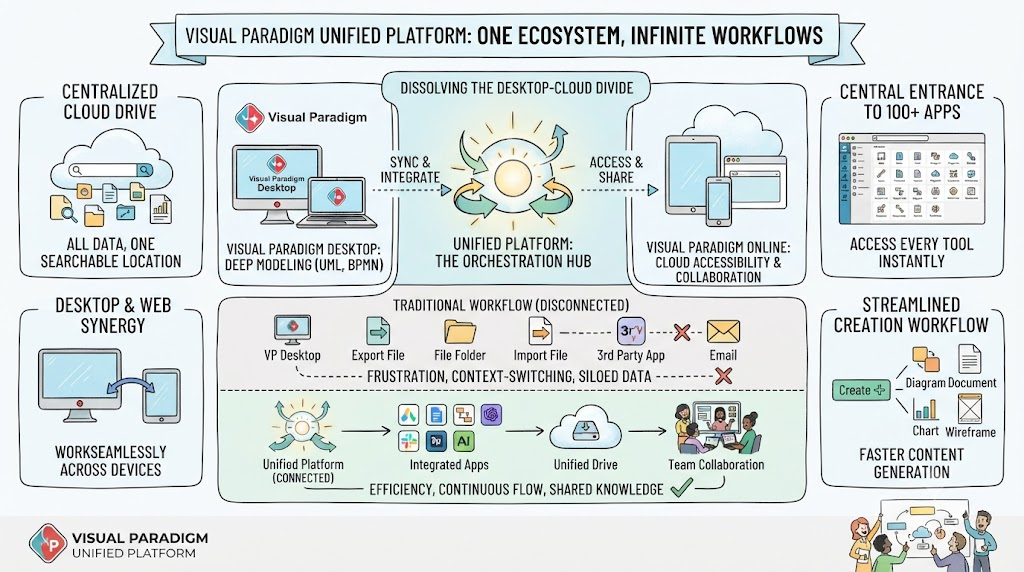
To understand the Unified Platform, it is essential to first understand the problem it was designed to solve. Over the years, the Visual Paradigm ecosystem grew to include over 100 specialized applications alongside its flagship modeling tools. While this expansion brought tremendous capability, it introduced three critical pain points:
-
Siloed Data: Diagrams, documents, and projects created in different applications lived in isolation. Moving data between tools required tedious manual exports and imports.
-
Fragmented Discovery: Users frequently struggled to locate the right tool for a given task among the sprawling catalog of available applications.
-
The Desktop-Cloud Divide: Desktop users enjoyed deep modeling capabilities but lacked easy access to cloud-based collaboration. Conversely, online users had accessibility but limited integration with heavy-duty desktop workflows.
The Unified Platform was built explicitly to eliminate these problems. It is not a new standalone product; rather, it is an integration layer and orchestration hub that brings every Visual Paradigm tool, every piece of data, and every workflow into a single, unified experience.
The Role of the Unified Platform in the Visual Paradigm Ecosystem
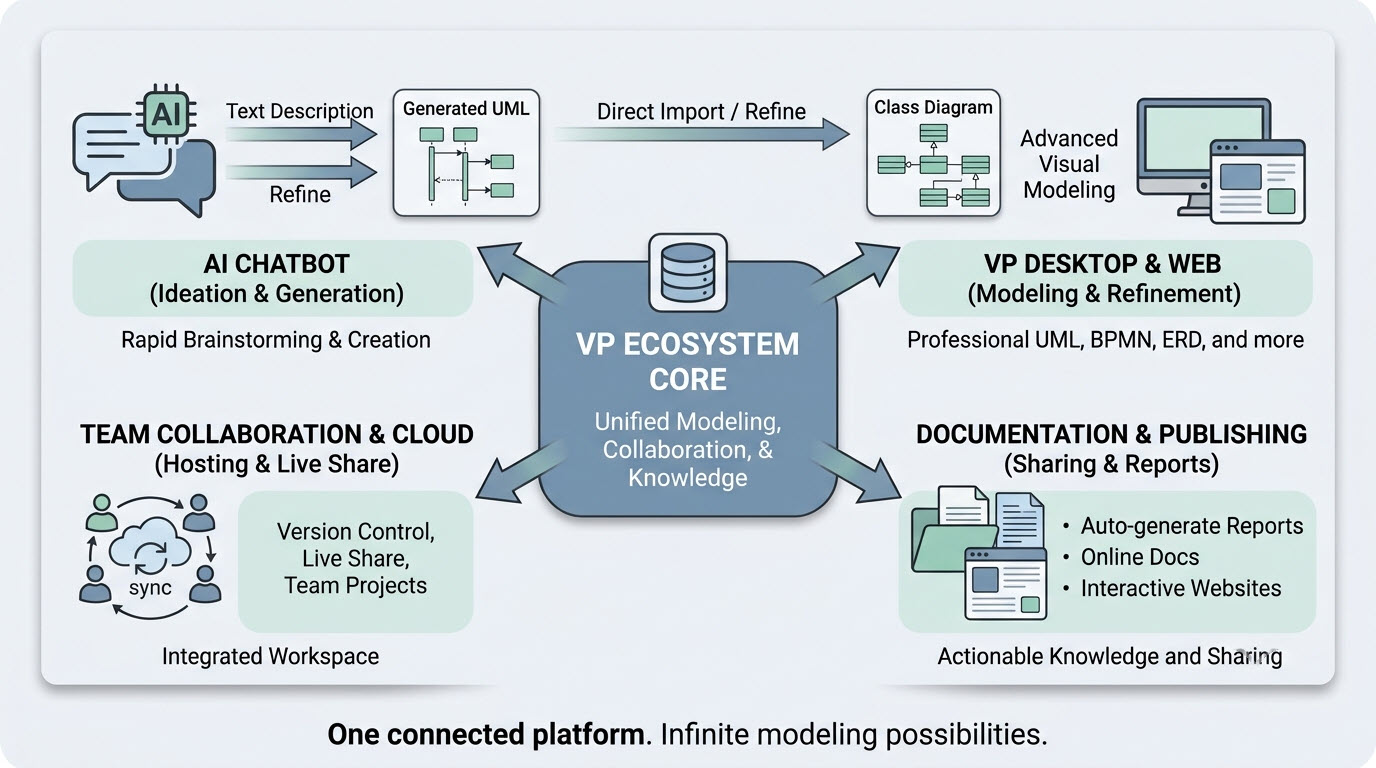
The Unified Platform does not replace existing products; it unifies them. It serves as the central nervous system for the entire Visual Paradigm ecosystem, connecting Desktop, Online, and specialized apps into a seamless workflow.
Relationship with Visual Paradigm Desktop
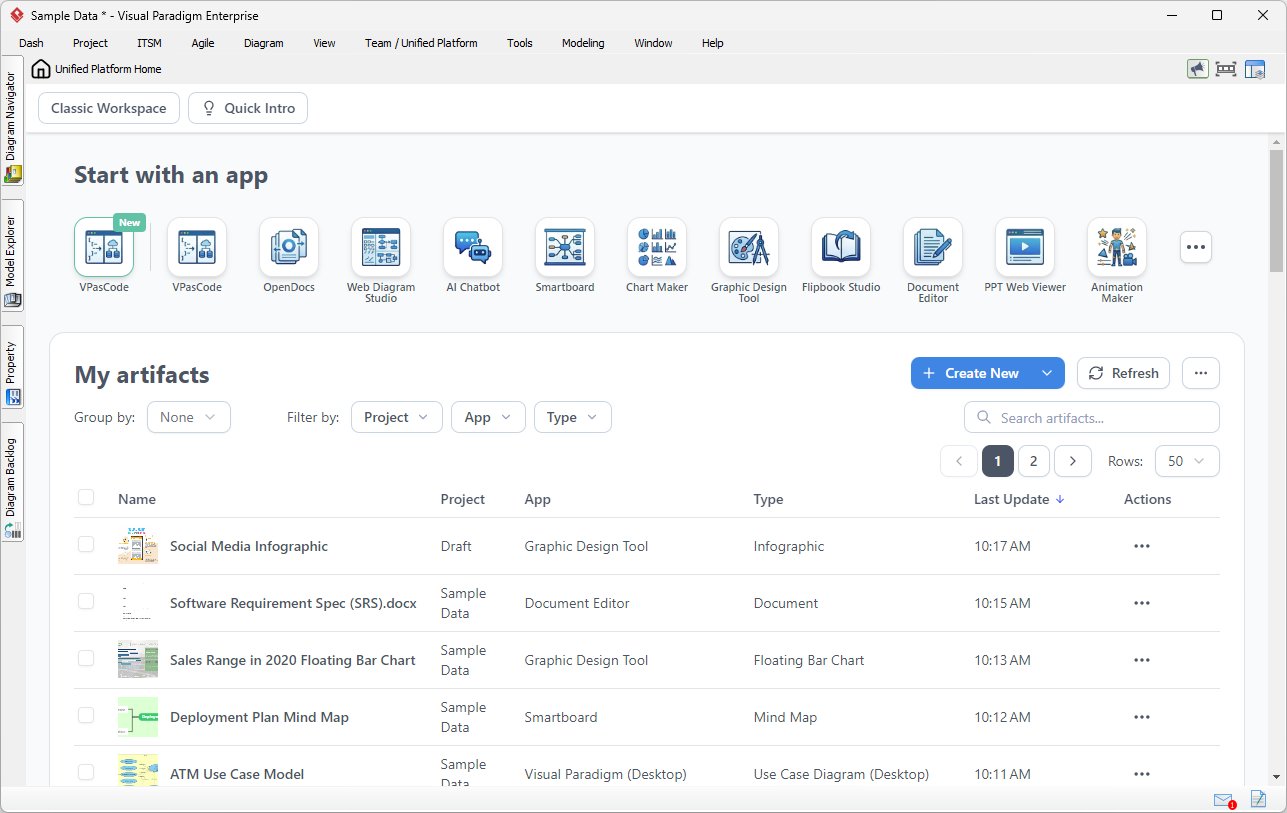
Visual Paradigm Desktop is the flagship product for enterprise-grade system modeling, offering deep support for UML, SysML, BPMN, and ArchiMate. The Unified Platform extends Desktop by embedding a full cloud workspace directly inside the desktop application through an integrated browser. This means:
-
Locally-created enterprise models remain on your machine with full offline capability.
-
You gain instant access to cloud-based apps, collaboration features, and AI tools without ever leaving the desktop interface.
-
Diagrams built in Desktop are automatically synchronized and visible within the Unified Platform’s centralized drive.

Relationship with Visual Paradigm Online (VP Online)
VP Online has been Visual Paradigm’s browser-based offering, providing accessibility from any device. The Unified Platform becomes the new home for VP Online users; upon logging in, users are directed straight to the Unified Platform dashboard, which serves as the single entry point to all 100+ cloud applications.
A Centralized App Store and Launcher
The Unified Platform acts as a centralized app store and launcher. Instead of navigating separate URLs, users access a categorized dashboard where every specialized tool—including Agile planning, infographics, Gantt charts, wireframing, and strategic management applications—is one click away.

Core Pillars and Key Concepts
The Unified Platform is built on four foundational pillars that address the specific dimensions of modern visual productivity.
Key Concept 1: The Unified Drive (Centralized Cloud Drive)
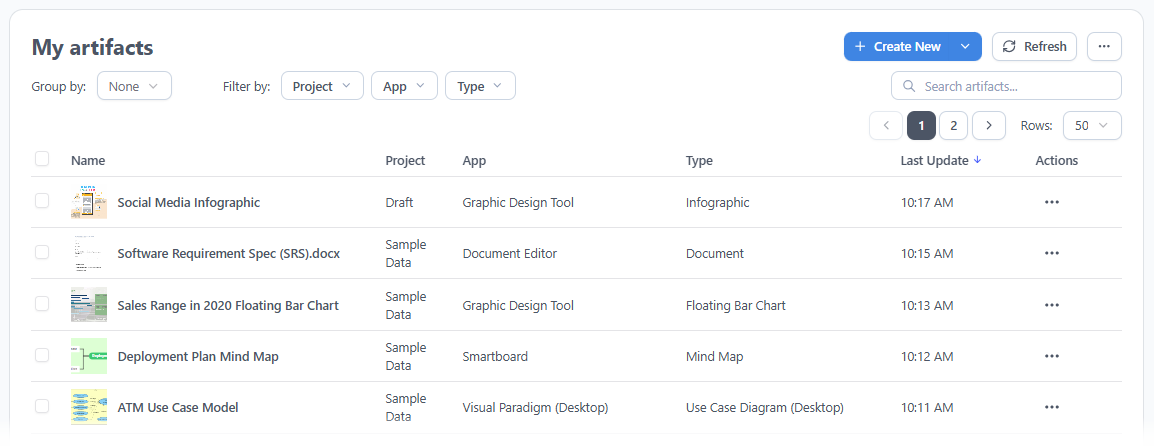
At the heart of the platform is the Unified Drive, a drive-like environment that automatically indexes and organizes every artifact created across the entire ecosystem. Every diagram, document, project, and presentation lives in a single, searchable location.
-
Eliminates Siloed Data: Files created in one application easily communicate with others.
-
Single Source of Truth: There is no need to remember which application created which file.
Key Concept 2: Desktop-Cloud Synergy
The platform bridges the gap between robust desktop modeling and accessible cloud collaboration.
-
Embedded Browser: Desktop users access the cloud workspace directly inside the desktop client.
-
Cross-Device Access: Users can log in via any external web browser to access, view, and manage both desktop-synced and cloud-native assets seamlessly.
-
Synchronization: Diagrams built locally are automatically visible in the cloud environment and vice versa.
Key Concept 3: Consolidated Multi-App Workflows
Modern projects rarely fit neatly into a single discipline. The Unified Platform brings all workflows into a unified space, allowing teams to move fluidly between different types of work (e.g., architecture, agile, documentation) without losing context or switching applications.
Key Concept 4: AI-Driven Acceleration
AI capabilities such as VPasCode (Text-to-Diagram), AI Presentation Studio, and AI App Studio are woven directly into the platform. Rather than being isolated features, these tools are contextually available throughout the ecosystem, accelerating creation wherever visual work happens.
-
From Idea to Diagram: Rapidly transition raw text and ideas into production-ready diagrams.
-
Contextual AI: AI tools are available wherever visual work happens, reducing the time from concept to deliverable.
Key Concept 5: Integration with Pipeline and OpenDocs
Pipeline and OpenDocs represent two of the cloud’s most powerful documentation features. The Unified Platform bridges these tools with Desktop modeling, allowing users to drag-and-drop locally-created diagrams directly into cloud-based documents without any export-import friction.
-
Frictionless Documentation: Build diagrams locally in VP Desktop and send them to the cloud-based Pipeline.
-
Drag-and-Drop: Switch to the OpenDocs app and insert diagrams directly into the document canvas.
Key Concept 6: Unified Project Management
The platform is laying the groundwork for advanced project concepts that will provide unified, granular permission control over work created across all different applications. This ensures that teams can manage complex projects with consistent access controls and visibility across all integrated tools.
Real-World Examples and Scenarios
Example 1: Connecting System Modeling with Product Requirements
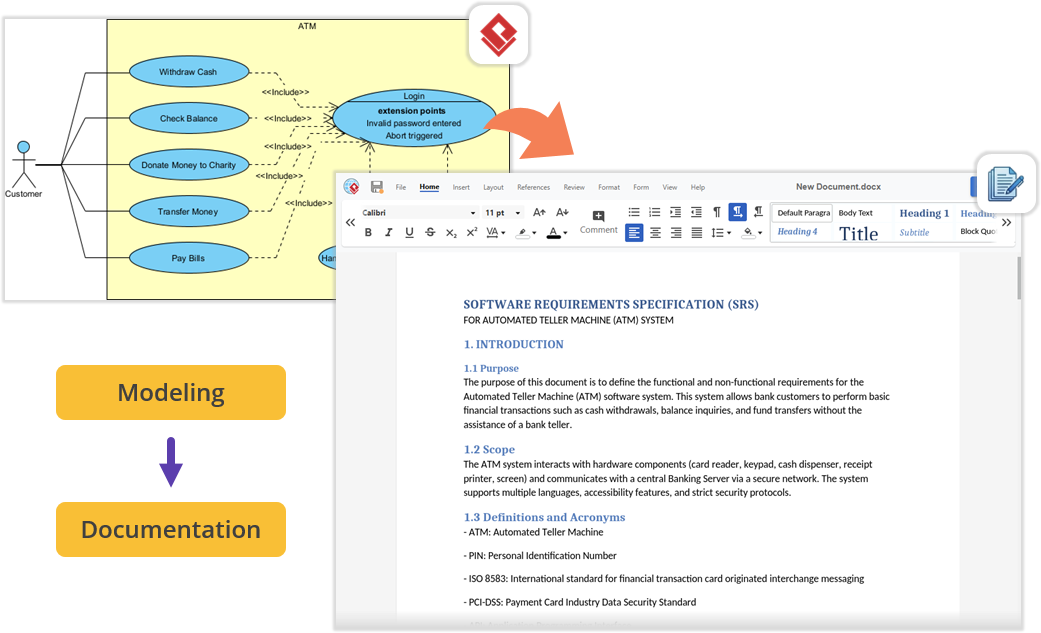
Imagine you are architecting a new software module using UML inside Visual Paradigm Desktop. Once the technical models are complete, you need to author a comprehensive Product Requirement Specification (PRD).
-
Traditional Workflow: Minimize Visual Paradigm, open a separate word processor, and manually export and import image files.
-
Unified Platform Workflow: Open the embedded workspace and launch the Document Editor app. Your requirements documentation is written right next to your active modeling environment, with everything organized under a single project space.
Example 2: Effortless Documentation via Pipeline
For teams producing technical documentation, the flow between the desktop workspace and cloud documentation features is now frictionless.
-
Step 1: Build diagrams locally in VP Desktop and send them to the cloud-based Pipeline.
-
Step 2: Switch to the OpenDocs app within the Unified Platform panel.
-
Step 3: Write manuals or project guides and drag-and-drop desktop-generated diagrams directly into the document canvas.
-
Result: No file exporting, no broken image links, and zero context-switching.
Example 3: Accessing 100+ Apps from One Dashboard
Instead of remembering 20 different URLs for 20 different tools, a user can:
-
Log in to the Unified Platform.
-
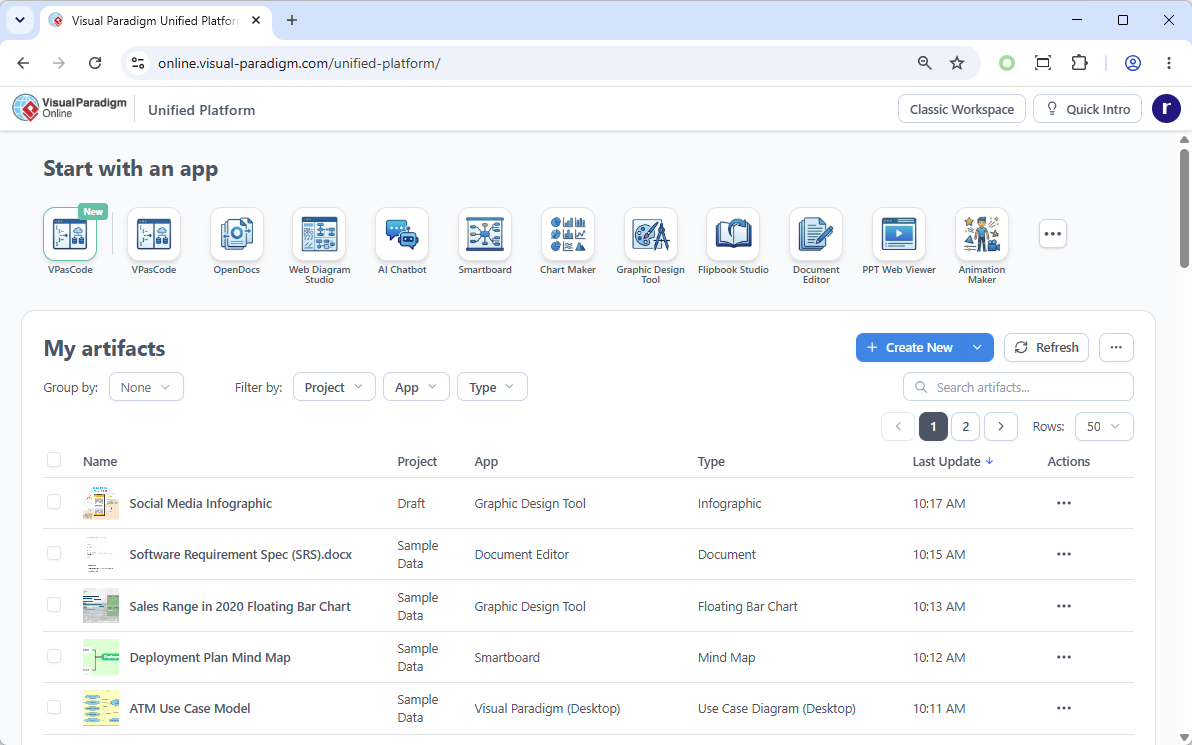
See the “Start with an app” section with icons for VPasCode, Smartboard, Chart Maker, OpenDocs, and more.
-
Click the desired tool to launch it instantly within the embedded browser or full environment.
Looking Ahead
The Unified Platform is designed as a foundation for what comes next. Centralizing data into a single hub opens the door for upcoming features that will allow different applications to leverage cross-source data seamlessly. As AI capabilities continue to mature, the platform is positioned to become an increasingly intelligent collaborator, anticipating user needs and automating routine visual tasks.
Conclusion
The Visual Paradigm Unified Platform represents a fundamental shift in how professionals approach visual work. It is not merely a new interface or a collection of features; it is a philosophical statement about how productivity tools should work in the modern era. By dissolving the boundaries between desktop and cloud, between specialized applications, and between human creativity and artificial intelligence, Visual Paradigm has created an ecosystem that respects the way people actually work.
For individuals, the platform offers the freedom to focus on ideas rather than tool management. For teams, it provides a shared, frictionless space where collaboration happens naturally—without incompatible file formats, broken links, or disconnected workflows. For organizations, it delivers enterprise-grade modeling and architecture capabilities wrapped in an interface accessible to non-technical stakeholders.
Platform Reference List
-
Introducing Visual Paradigm 18.1: A New Era of Unified Ecosystems and AI-Driven Innovation
-
Visual Paradigm Unified Platform: Project Management UI Enhancements
Related posts:
 Your Guide to Choosing a Powerful AI-Powered SysML Modeling Tool
 Case Study: Modernizing Our Architecture Documentation with VPasCode – An Product Review
 From Text to Process Flow: A Hands-On Review of Visual Paradigm’s AI-Powered BPMN Generator
From Chaos to Clarity: A Practitioner’s Review and Guide to Mastering BPMN
From Text to Process Flow: A Hands-On Review of Visual Paradigm’s AI-Powered BPMN Generator
From Chaos to Clarity: A Practitioner’s Review and Guide to Mastering BPMN