Introduction
As a seasoned business analyst and process improvement specialist, I have evaluated countless modeling tools over the years. The transition from manual, drag-and-drop diagramming to intelligent, AI-assisted modeling is no longer just a futuristic concept—it is a present-day reality. In my recent evaluation of Visual Paradigm, I was particularly struck by how its generative AI capabilities directly address the most tedious aspects of Business Process Model and Notation (BPMN) workflows.
Creating “As-Is” and “To-Be” models is a core methodology for process improvement, allowing organizations to visualize their current state and design their future state. However, the manual effort required to map these states often leads to outdated diagrams and analyst burnout. This guide shares my hands-on experience with Visual Paradigm’s AI ecosystem, detailing how it transforms raw procedural narratives into compliant, actionable BPMN 2.0 diagrams, and why it has become a staple in my process optimization toolkit.
Key Concepts of As-Is vs. To-Be Modeling
In my practice, the transition from As-Is to To-Be represents a journey from problem identification to solution implementation.
-
As-Is Modeling: This documents the process exactly as it runs today. It is crucial to capture current inefficiencies, bottlenecks, manual workarounds, and pain points without sugarcoating or idealizing the workflow.
-
To-Be Modeling: This designs the optimized future-state process. It incorporates improvements like automation, eliminated redundancies, parallel processing, and clearer role definitions to achieve strategic goals.
-
The Gap Analysis: This is the critical analytical step between the two models. It identifies exactly what needs to change—whether in technology, roles, or steps—to move from the As-Is state to the To-Be state.
Core BPMN Elements Used in Modeling
To build these models effectively, I rely on four primary categories of BPMN elements, all of which Visual Paradigm’s AI accurately instantiates:
-
Flow Objects:
-
Events: Circular symbols representing triggers (Start, Intermediate, End).
-
Activities: Rounded rectangles representing work performed (Tasks or Sub-processes).
-
Gateways: Diamond shapes controlling the divergence and convergence of sequence flows (Exclusive, Parallel, Inclusive).
-
-
Data: Data Objects and Data Stores showing what information is created, read, or updated.
-
Connection Objects: Sequence Flows (solid lines for workflow order) and Message Flows (dashed lines for communication across organizations).
-
Swimlanes: Pools (representing independent organizations or systems) and Lanes (representing specific roles or departments within a pool) to clearly show accountability.
Step-by-Step Practical Example: Customer Onboarding
To test the tool’s capabilities, I applied it to a traditional bank’s customer onboarding process. This example perfectly highlights how a process transforms from a messy current state to an optimized future state.
1. The “As-Is” Process (Current State)
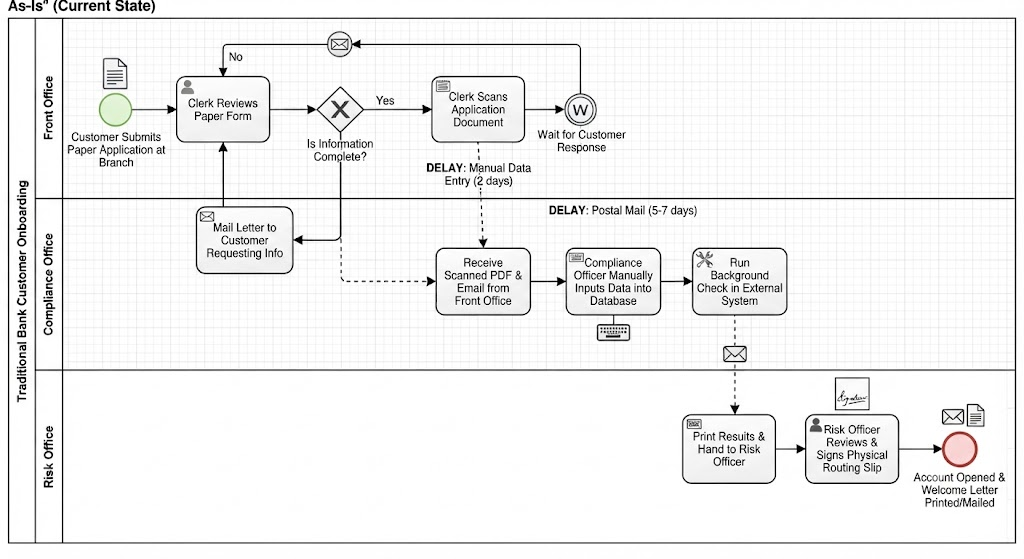
In the current state, the onboarding process is highly manual, paper-reliant, and suffers from long delays.
-
The Workflow:
-
Start Event: Customer submits a paper application at a branch.
-
Lane (Front Office): A clerk reviews the paper form. If information is missing (Exclusive Gateway), they mail a letter to the customer and wait. If complete, they scan the document.
-
Lane (Compliance Office): The clerk emails the scanned PDF to Compliance. A compliance officer manually inputs data into an external database to run a background check.
-
Lane (Risk Office): Compliance prints the results and hands them to a Risk Officer. The Risk Officer reviews and signs off on a physical routing slip.
-
End Event: Account is opened, and a welcome letter is printed and mailed.
-
-
BPMN Representation Triggers: In my generated model, I observed heavily sequential tasks, user tasks (manual data entry), text annotations highlighting delays, and message flows representing slow communication channels like postal mail.
2. The Gap Analysis
Reviewing the As-Is model revealed clear areas for optimization:
-
Bottleneck: Manual transcription of data from paper to PDF, and PDF to the compliance system.
-
Delay: Waiting for postal mail when information is missing.
-
Redundancy: Hand-offs between Compliance and Risk could happen simultaneously rather than sequentially.
3. The “To-Be” Process (Optimized Future State)
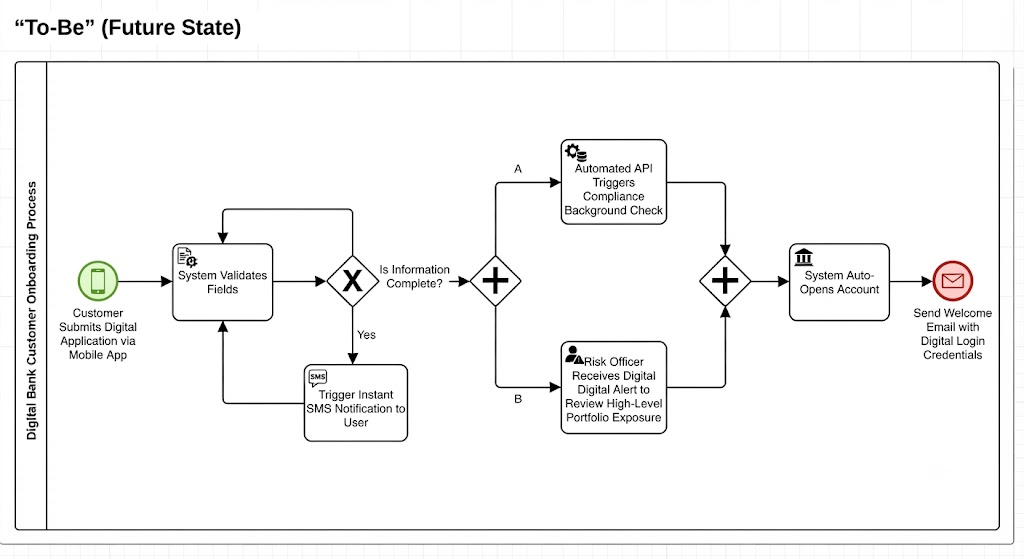
The future state leverages automation, digital channels, and parallel processing to drastically cut cycle times.
-
The Workflow:
-
Start Event: Customer submits a digital application via a mobile app.
-
Validation: The system automatically validates fields. Missing data triggers an instant SMS notification to the user, blocking submission until complete.
-
Parallel Gateway (Split): Once submitted, the system splits the workflow into two simultaneous paths:
-
Path A (Service Task): An automated API instantly triggers the compliance background check.
-
Path B (User Task): The Risk Officer receives a digital alert to review high-level portfolio exposure.
-
-
Parallel Gateway (Join): Both automated compliance and digital risk reviews must finish before merging.
-
End Event: System auto-opens the account and sends a welcome email with digital login credentials.
-
-
BPMN Representation Triggers: The AI successfully shifted the diagram from User/Manual Tasks to Service Tasks (automated scripts/APIs), introduced Parallel Gateways to save time, and minimized hand-off lanes.
Best Practices for As-Is / To-Be Mapping
Based on my experience using this tool, I highly recommend adhering to these best practices:
-
Don’t Model the “Should-Be” as “As-Is”: Employees often describe how a process is supposed to work according to official policy. Interview them to map how it actually works, flaws included.
-
Keep Layouts Consistent: When presenting As-Is and To-Be models to stakeholders, keep the visual structure, pool sizes, and lane orders identical. This makes it easy for the eye to spot where steps were eliminated or re-routed.
-
Focus on Business Value, Not Perfection: Avoid over-complicating models with microscopic sub-steps. If a step doesn’t impact the overall logic or cost of the workflow, abstract it into a broader task.
-
Standardize Task Naming: Always use the [Verb + Noun] convention for activities (e.g., “Verify Identity,” “Generate Invoice”). This maintains readability across both models.
Visual Paradigm’s AI Features: A Review
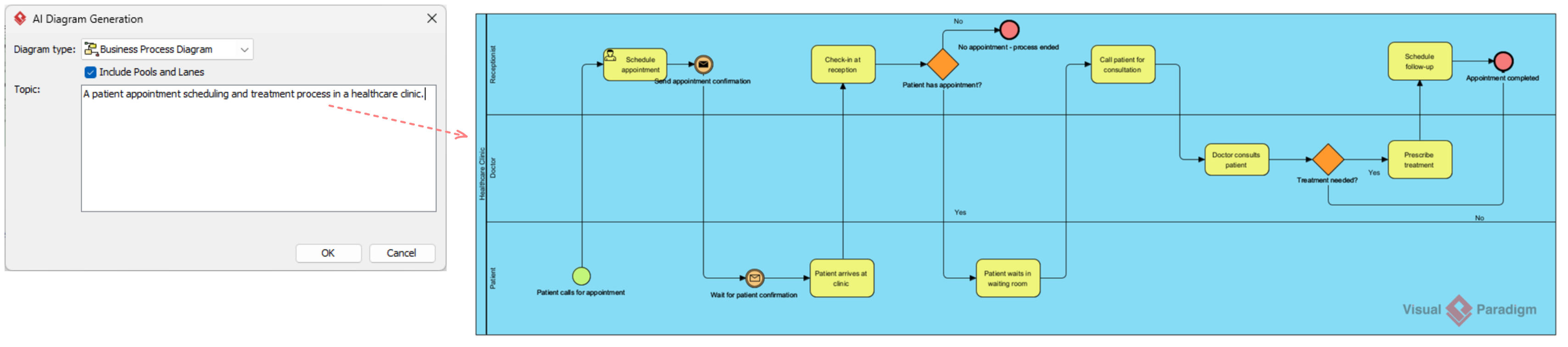
Visual Paradigm has significantly evolved by integrating generative artificial intelligence (AI) directly into its modeling ecosystem. This integration drastically accelerates standard BPMN 2.0 workflows. Instead of manually dragging, dropping, and alignment editing individual lanes and gateways, business analysts can now use natural language processing (NLP) to generate fully structured, compliant models from simple text.
Key AI Features for BPMN
Visual Paradigm utilizes a multi-layered AI approach to move business modeling from manual drawing to intelligent creation:
-
Text-to-BPMN Generation Engine: Converts a raw procedural narrative into an interactive, editable Business Process Diagram (BPD).
-
Semantic Object Instantiation: Rather than generating static shapes or simple image mockups, the underlying AI engine creates explicit database objects in the modeling layer, ensuring full adherence to BPMN 2.0 standards.
-
Automated Pool and Lane Mapping: The AI automatically extracts organizational entities, departments, or IT systems from your text and constructs separate, dedicated swimlanes for them.
-
Smart Layout Routing: The AI analyzes sequential tasks and decision criteria to map optimal arrow pathways, minimizing line crossings and keeping spacing balanced.
Step-by-Step Tooling Workflow
In my testing, accessing these native AI features within Visual Paradigm Desktop (Professional Edition or higher) was remarkably straightforward:
-
Launch the Tool: Open your workspace and navigate to Tools > AI Diagram Generation from the main menu.
-
Configure Diagram Settings: Select Business Process Diagram as the target type and ensure the Include Pools and Lanes option is checked.
-
Write or Paste Your Narrative: Input a clean, chronological workflow story in plain English.
-
Generate and Edit: Click OK to let the engine populate the model. Once built, you can use Visual Paradigm’s native manual suite to refine gateways, add data objects, or run step-by-step process animations.
Prompting Strategy for “As-Is” vs. “To-Be”
Because the AI translates natural language explicitly, you must tailor your prompt text to capture inefficiencies for an As-Is state or optimizations for a To-Be state.
1. The “As-Is” Prompt (Focus on Manual Steps & Bottlenecks)
Prompt: “The Customer submits a physical loan application form at the bank counter. The Bank Clerk reviews the form. If information is missing, the Clerk prints a notification letter and mails it to the Customer via post. If complete, the Clerk manually types the customer data into the core banking portal and then emails a PDF scan to the Risk Officer. The Risk Officer reviews the PDF and signs a paper approval slip.”
-
What Visual Paradigm’s AI Builds: A heavily linear diagram with multiple manual/user tasks and distinct lanes for Customer, Bank Clerk, and Risk Officer.
2. The “To-Be” Prompt (Focus on Automation & Parallel Paths)
Prompt: “The Customer submits a digital application on the mobile banking app. The App validates fields automatically; if fields are missing, an SMS alert blocks submission. Once submitted, the system splits paths simultaneously: an automated API checks the background credit score while the Risk Officer receives a digital dashboard alert. Both tracks must finish before merging. The system then automatically issues an account creation confirmation email.”
-
What Visual Paradigm’s AI Builds: An optimized diagram featuring a split-and-merge Parallel Gateway, specialized Service Tasks for the automation/API calls, and minimized paper-handling lanes.
Moving to the Intelligent BPM & Analysis Suite
For deep enterprise planning, Visual Paradigm also includes an Intelligent BPM and Analysis Suite. Accessible via Tools > App, it establishes a structured five-step wizard:
[1. Overview] ➔ [2. Interactions] ➔ [3. Visualize (AI)] ➔ [4. KPIs] ➔ [5. Reports]
This suite allows you to define your core problem statement, map human-to-system interactions using text, auto-generate the visual model, attach target Key Performance Indicators (KPIs), and export a clean optimization report for project stakeholders.
Conclusion
After putting Visual Paradigm’s AI BPMN capabilities through rigorous testing, my verdict is highly positive. The tool successfully bridges the gap between abstract business narratives and precise, standardized technical execution. By automating the tedious aspects of swimlane mapping, gateway placement, and semantic object creation, it frees up business analysts to focus on what truly matters: strategic gap analysis and process optimization.
Whether you are documenting a messy, paper-based “As-Is” state or designing a sleek, automated “To-Be” future, Visual Paradigm’s AI-driven approach transforms process modeling from a chore into a strategic advantage. For teams looking to scale their BPMN 2.0 practices without scaling their headcount, this is a tool worth integrating into your workflow immediately.
Reference
- From Narrative to Diagram: How Visual Paradigm’s AI BPMN Generator Transforms Process Modeling Workflows: Explores how AI converts raw text narratives into interactive, compliant BPMN diagrams.
- AI BPMN Business Process Diagram Generator Update: Release notes detailing the latest enhancements and capabilities of the AI BPMN generator.
- Visual Paradigm Official Website: The central hub for Visual Paradigm’s comprehensive suite of modeling, design, and collaboration tools.
- Mastering Business Process Modeling (BPMN 2.0) with Visual Paradigm’s AI-Powered Tools: A third-party guide on leveraging VP’s AI capabilities for BPMN 2.0 mastery.
- How AI-Powered NLP is Revolutionizing Text-to-BPMN Generation: Details the natural language processing technology behind automated enterprise process modeling.
- Introduction to UML and the AI Transformation: A foundational guide to visual modeling within the Visual Paradigm AI ecosystem.
- Visual Paradigm BPMN Review: Bridging the Gap Between Business Logic and Technical Execution: An in-depth review of VP’s ability to align business processes with technical implementation.
- From Narrative to Diagram: AI BPMN Generator Workflow Transformation: A secondary reference highlighting the transformative impact of AI on process modeling workflows.
- Click Start AI Technical Support Guide: Official know-how documentation for initiating and troubleshooting AI features in Visual Paradigm.
- Revolutionizing Text-to-BPMN Generation for Enterprise Modeling: A secondary reference detailing NLP applications in enterprise process modeling.
- Transforming Process Modeling Workflows with AI BPMN Generation: A tertiary reference highlighting the workflow transformation from narrative to diagram.
- From Chaos to Clarity: A Product Manager’s Review of Visual Paradigm for BPMN 2.0: A product manager’s perspective on using VP for streamlined and clear BPMN 2.0 modeling.
- AI Business Process Improvement Tool Update: Release information for the new AI-driven business process improvement wizard.
- Intelligent BPM and Analysis Suite Features: Overview of the structured five-step wizard for enterprise process planning and KPI tracking.
- Intelligent BPM and Analysis Suite: Enterprise Planning: A secondary reference to the comprehensive features of the Intelligent BPM and Analysis Suite.