


Introduction
However, before opening any modeling software, it is essential to ground yourself in the fundamental concepts of what a process actually is. As explored in this guide, “process” is an abstract term with dozens of interpretations. BPMN cuts through this noise by defining a process specifically as the work an organization performs to accomplish a specific objective. This guide will walk you through distinguishing formal procedures from informal practices, mastering the core flow objects that define process structure, and understanding how supporting elements add context without altering logic. Whether you are documenting a banking transaction or mapping a consulting engagement, this foundation will ensure your models are accurate, consistent, and actionable.
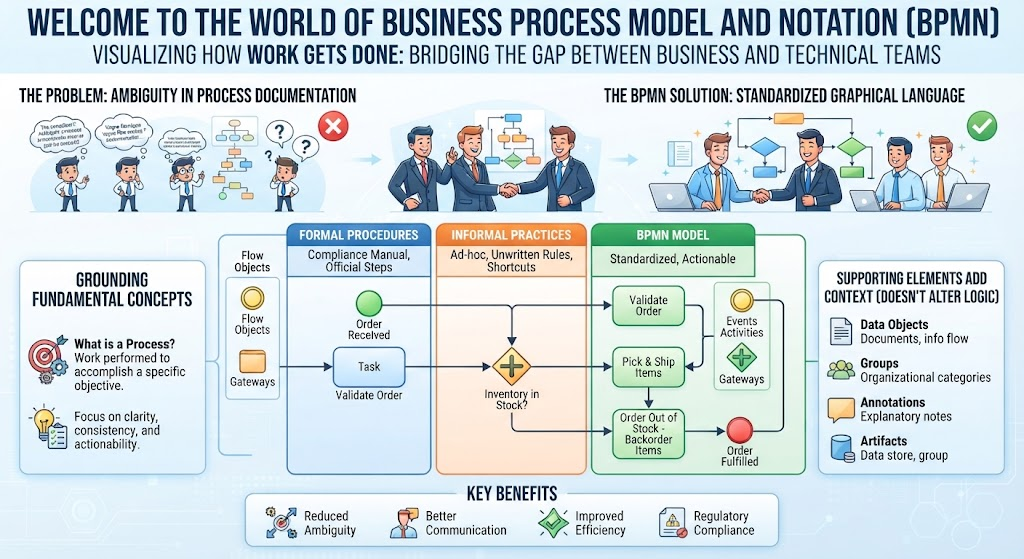
1. What is a Business Process?
Before drawing diagrams, you must understand what you are modeling. The term “Business Process” is abstract, and definitions vary widely across organizations. Common interpretations include:
-
A sequence of activities transforming inputs into outputs.
-
A systematic set of activities taking a business event to a successful outcome.
-
Activities creating value for a customer.
-
Roles collaborating to achieve a goal.
-
“Just the way things get done around here.”
The Working Definition for BPMN
Because definitions vary, BPMN adopts a specific working definition to ensure consistency in modeling:
A Process represents what an organization does—its work—in order to accomplish a specific purpose or objective.
Regardless of the specific definition used, almost all processes share three characteristics:
-
They require input (electronic or physical).
-
They use/consume resources.
-
They produce output to satisfy a defined purpose.
2. The Two Categories of Processes
Not all processes behave the same way. When beginning with BPMN, it is crucial to identify whether you are modeling a Procedure or a Practice, as this dictates how rigid your diagram should be.
| Feature | Procedures | Practices |
|---|---|---|
| Nature | Formal, repeatable, well-structured | Informal, flexible, unpredictable, variable |
| Automation | Often automated or easily automatable | Hard to define, repeat, or automate |
| Examples | Healthcare claims processing, Banking transactions, Expense claims, Creating new accounts | Writing user manuals, Developing sales strategy, Preparing conference agendas, Consulting engagements |
3. Core BPMN Elements: Flow Objects
BPMN uses specialized graphical elements to depict a process. For beginners, the most critical concept is that Flow Objects define the underlying structure and behavior of the process.
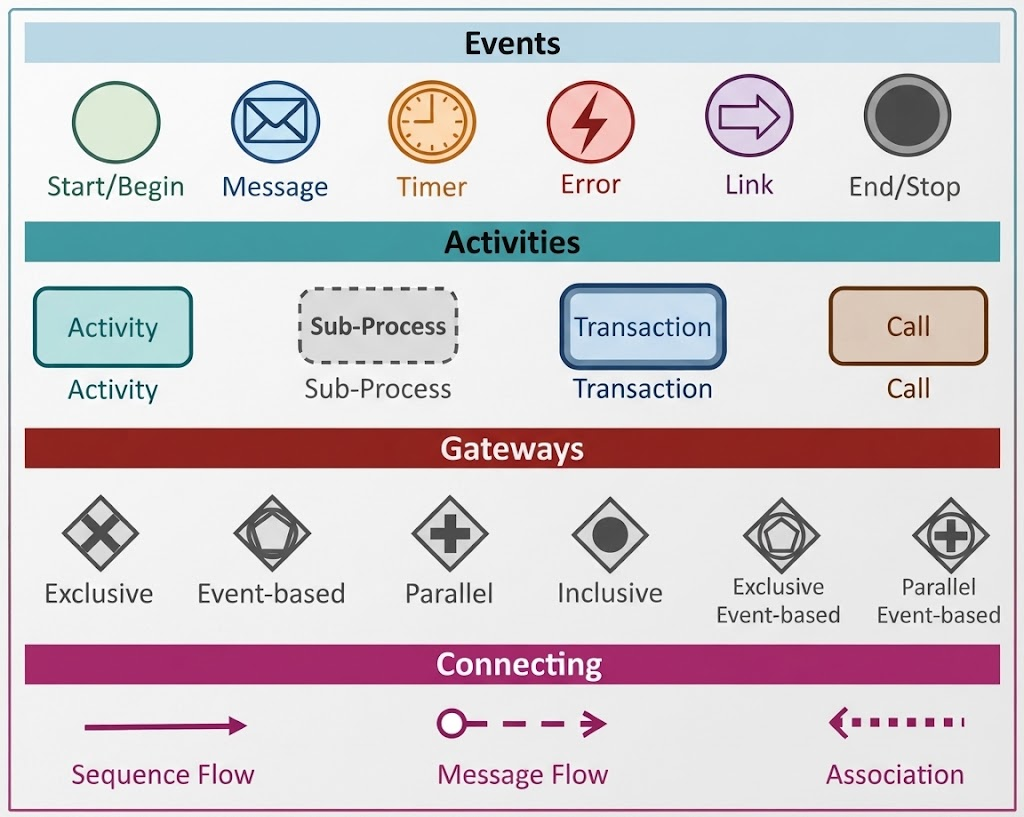
There are three primary types of Flow Objects:
-
Activities: Represent the work being performed (e.g., tasks, sub-processes).
-
Events: Represent something that happens during the process (e.g., start triggers, end results, intermediate messages).
-
Gateways: Represent decision points or divergence/convergence in the flow (e.g., exclusive choices, parallel paths).
These objects are connected by Sequence Flow, which dictates the order in which activities, events, and gateways occur.
⚠️ Key Point for Beginners: If you change a Flow Object or a Sequence Flow, you are changing the fundamental logic and structure of the process.
4. Supporting Elements: Adding Context
While Flow Objects provide the skeleton, supporting elements add flesh and clarity. These elements describe performance or behavior but do not significantly modify the underlying structure.
-
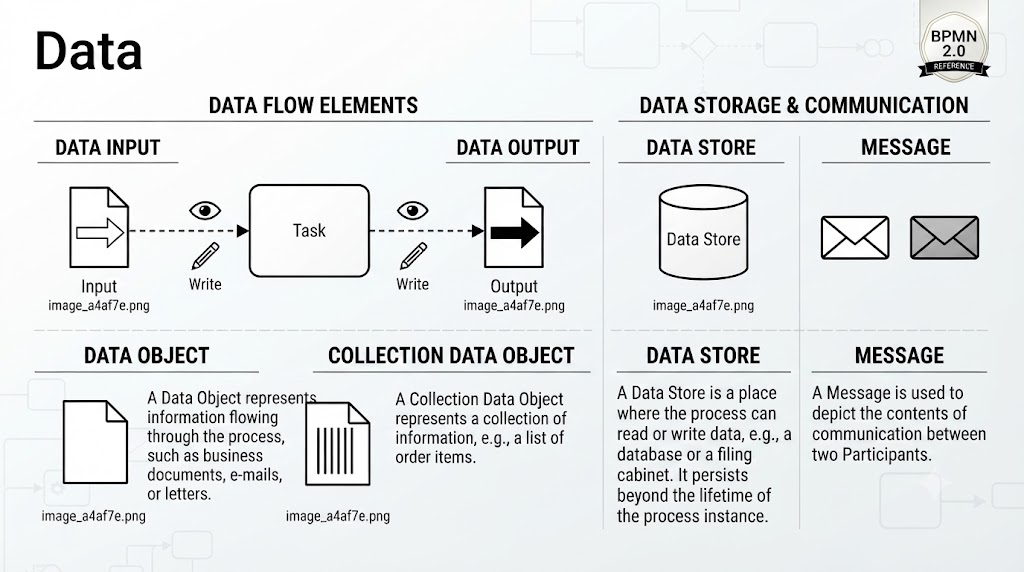
Data Objects: Show how data is created, read, or updated within the process.
-
Lanes: Partition the diagram to show who performs the work (e.g., by role, department, or system).

-
Artifacts: Provide additional documentation and organization.
-
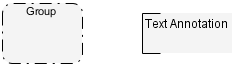
Groups: Visually cluster related elements without affecting flow.
-
Text Annotations: Add explanatory notes to clarify complex steps.
-
⚠️ Key Point for Beginners: You can add, remove, or move Data Objects, Lanes, and Artifacts to improve readability or documentation without breaking the core process logic defined by the Flow Objects.
5. Beyond Single Processes: BPMN Categories
As you advance past basic process mapping, be aware that BPMN supports three distinct categories of process interaction:
-
Orchestration: The internal workflow of a single entity (the standard process diagram most beginners start with).

-
Choreography: The expected interactions and message exchanges between multiple independent participants.

-
Collaboration: A combination showing how two or more orchestrated processes interact with each other via message flows.

Tooling Spotlight: Modeling with Visual Paradigm
Why Visual Paradigm for BPMN?
Key Features for Beginners
|
Feature
|
Benefit for BPMN Learners
|
|---|---|
|
Intelligent Palette
|
Only displays relevant BPMN elements based on context, preventing invalid connections (e.g., stopping you from connecting two Events directly without an Activity).
|
|
Real-Time Syntax Validation
|
Highlights errors instantly with red markers, teaching correct BPMN structure as you model rather than after the fact.
|
|
Model-to-Documentation
|
Auto-generates process documentation, step descriptions, and role matrices directly from your diagram, reinforcing the link between Flow Objects and Artifacts.
|
|
Lane & Pool Management
|
Simplifies the creation of Collaborations and Orchestrations with drag-and-drop partitioning that automatically adjusts Sequence Flows.
|
|
Template Library
|
Provides pre-built Procedure and Practice templates (e.g., expense claims, onboarding) to accelerate learning through example-based modeling.
|
Practical Workflow in Visual Paradigm
- Start with a Blank BPMN Diagram: Select New > BPMN Diagram to access the compliant canvas.
- Define Structure First: Use the Flow Object toolbar to map Activities, Events, and Gateways. Connect them with Sequence Flow. Let the validation engine confirm your logic.
- Add Context Layer: Drag Lanes onto the pool to assign roles. Add Data Objects and Text Annotations to clarify inputs/outputs without restructuring the flow.
- Validate & Export: Run the built-in BPMN Validator to check for structural issues. Export to PNG, PDF, or XML for sharing with stakeholders.
💡 Beginner Tip: Visual Paradigm offers a free Community Edition that includes full BPMN 2.0 support. This allows beginners to practice distinguishing Procedures from Practices and mastering Flow Objects without licensing barriers. Avoid using non-BPMN-compliant drawing tools during the learning phase, as they reinforce bad habits and produce diagrams that cannot be executed or analyzed.
BPMN in Action: Practical Examples
Example 1: Expense Claims Processing (Formal Procedure)
BPMN Modeling Approach
- Process Type: Formal Procedure (repeatable, structured, automatable).
- Core Flow Objects:
- Start Event: “Expense Claim Submitted”
- Activities: “Validate Receipts,” “Manager Review,” “Process Payment,” “Notify Employee of Rejection”
- Gateway: Exclusive Gateway after validation (Valid/Invalid paths) and after manager review (Approved/Rejected paths)
- End Events: “Payment Completed” and “Claim Returned for Correction”
- Supporting Elements:
- Lanes: Employee, System, Manager, Finance
- Data Objects: “Expense Report,” “Receipt Attachments,” “Approval Decision”
- Text Annotation: “Auto-reject if receipts > 90 days old”
💡 Key Takeaway for Beginners
Example 2: Developing a Sales Strategy (Informal Practice)
Scenario: A sales team collaboratively develops a quarterly strategy. Activities include market research, brainstorming sessions, draft creation, peer feedback, and finalization. The path is non-linear; teams may loop back to brainstorming based on feedback, skip steps if prior work exists, or involve external consultants ad-hoc.
BPMN Modeling Approach
- Process Type: Informal Practice (flexible, variable, hard to automate).
- Core Flow Objects:
- Start Event: “Quarterly Planning Cycle Initiated”
- Activities: “Conduct Market Research,” “Facilitate Brainstorming Workshop,” “Draft Strategy Document,” “Gather Peer Feedback,” “Finalize Strategy”
- Gateways: Inclusive Gateway after feedback (may loop to brainstorming, proceed to finalization, or request external input)
- End Event: “Strategy Approved by Leadership”
- Supporting Elements:
- Groups: Cluster “Research & Ideation” activities separately from “Review & Finalization”
- Text Annotations: “Feedback loops expected; duration varies 2–6 weeks,” “External consultant involvement optional”
- No Rigid Lanes: Roles are fluid; avoid over-partitioning
💡 Key Takeaway for Beginners
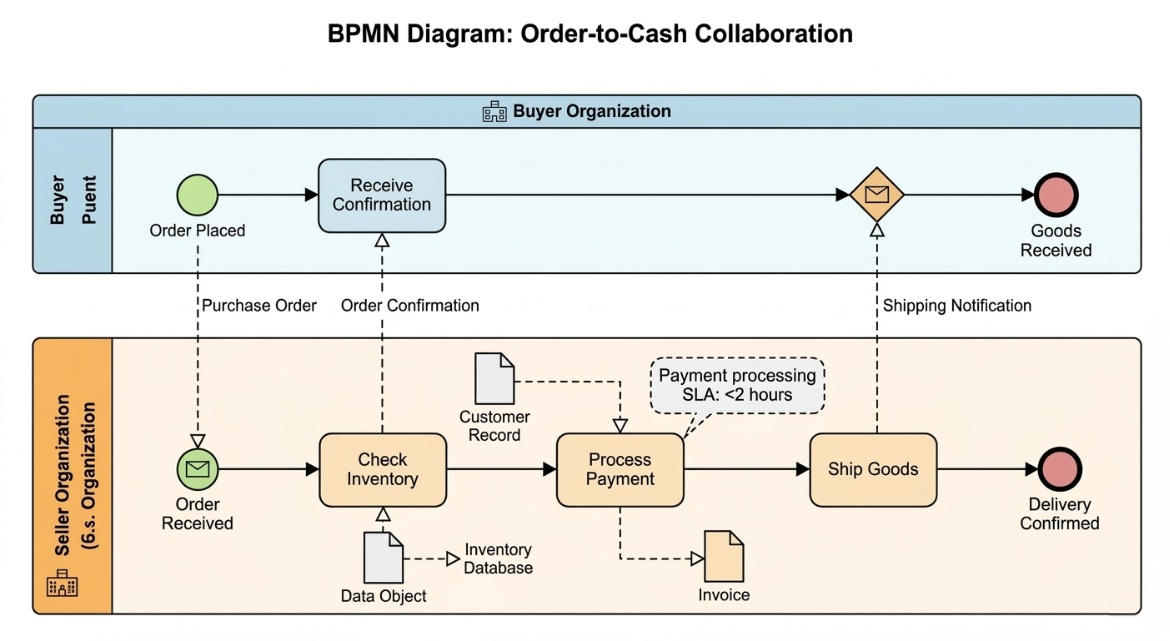
Example 3: Order-to-Cash Collaboration (Multi-Participant)
BPMN Modeling Approach
- Process Type: Collaboration (two orchestrated processes interacting).
- Structure: Two Pools (Buyer Organization, Seller Organization), each with internal Lanes.
- Core Flow Objects per Pool:
- Buyer Pool: Start Event (“Order Placed”) → Activity (“Receive Confirmation”) → End Event (“Goods Received”)
- Seller Pool: Start Event (“Order Received”) → Activities (“Check Inventory,” “Process Payment,” “Ship Goods”) → End Event (“Delivery Confirmed”)
- Message Flows: Dashed arrows connecting pools: “Purchase Order,” “Order Confirmation,” “Shipping Notification”
- Supporting Elements:
- Data Objects: “Customer Record,” “Inventory Database,” “Invoice” (within Seller pool only)
- Text Annotation: “Payment processing SLA: <2 hours”
💡 Key Takeaway for Beginners
Common Beginner Mistakes to Avoid
|
Mistake
|
Why It’s Wrong
|
Correct Approach
|
|---|---|---|
|
Using Sequence Flow between pools
|
Violates BPMN semantics; implies shared control
|
Use Message Flow (dashed arrow) for inter-pool communication
|
|
Modeling practices with exclusive gateways only
|
Forces false binary choices on variable workflows
|
Use Inclusive Gateways or Ad-Hoc Subprocesses for flexibility
|
|
Adding Data Objects as flow connectors
|
Data Objects don’t drive sequence; they describe information
|
Connect Data Objects to Activities with Association Lines (dotted), not Sequence Flow
|
|
Overloading diagrams with annotations
|
Clutters core structure
|
Use annotations sparingly; move detailed notes to separate documentation
|
|
Ignoring lane consistency
|
Mixing roles within a single lane creates ambiguity
|
Ensure each lane represents one consistent role/system/unit
|
🔍 Validation Check: After creating any diagram, ask: “Does this model reflect how work actually gets done, or how we wish it got done?” For Procedures, precision matters. For Practices, flexibility matters. For Collaborations, boundary clarity matters. Align your modeling rigor with the process type identified in Section 2 of this guide.
Summary Checklist for Beginners
When starting your first BPMN diagram based on this chapter:
-
Define the specific purpose/objective of the process first.
-
Determine if the process is a formal Procedure or an informal Practice.
-
Map the core structure using only Activities, Events, Gateways, and Sequence Flow.
-
Validate the logic before adding supporting details.
-
Enhance clarity using Data Objects, Lanes, and Artifacts only after the core flow is stable.
-
Remember that supporting elements explain the process; they do not define its structural behavior.