


Introduction
In modern software development and system architecture, the gap between documentation and implementation often widens as projects evolve. Traditional drag-and-drop diagramming tools, while intuitive, frequently result in static artifacts that become outdated the moment code changes. Visual Paradigm VPasCode bridges this divide by offering a unified “Diagram-as-Code” platform. Designed for developers, architects, and technical teams, VPasCode transforms text-based Domain Specific Languages (DSLs) and structured data into dynamic, professional visual diagrams.
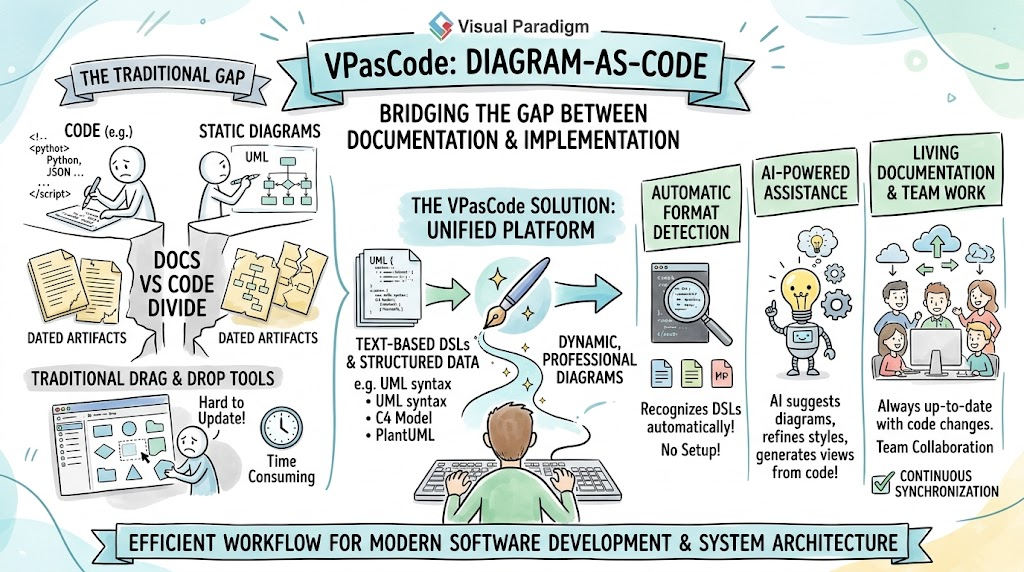
This guide explores how VPasCode streamlines the visualization workflow through automatic format detection, AI-powered assistance, and extensive language support, making it an essential tool for maintaining living documentation.
Key Concepts of VPasCode
Before diving into specific workflows, it is important to understand the core concepts that define the VPasCode experience:
-
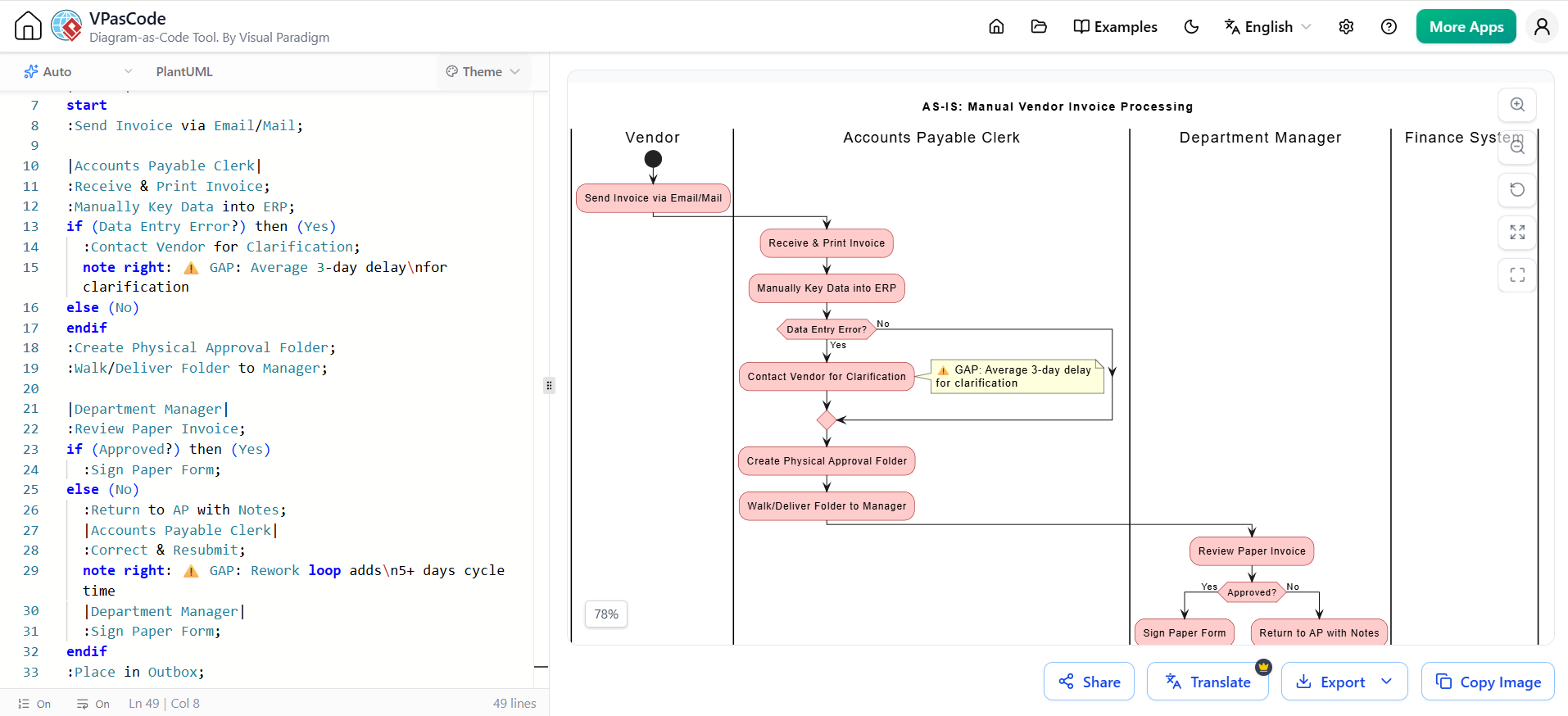
https://www.vpascode.com/tw/why-vpascode-is-the-best-software-for-editing-plantuml-and-how-others-compare/Diagram-as-Code (DaC): The practice of defining diagrams using plain text or code rather than GUI manipulation. This enables version control, code review, and automated generation.
-
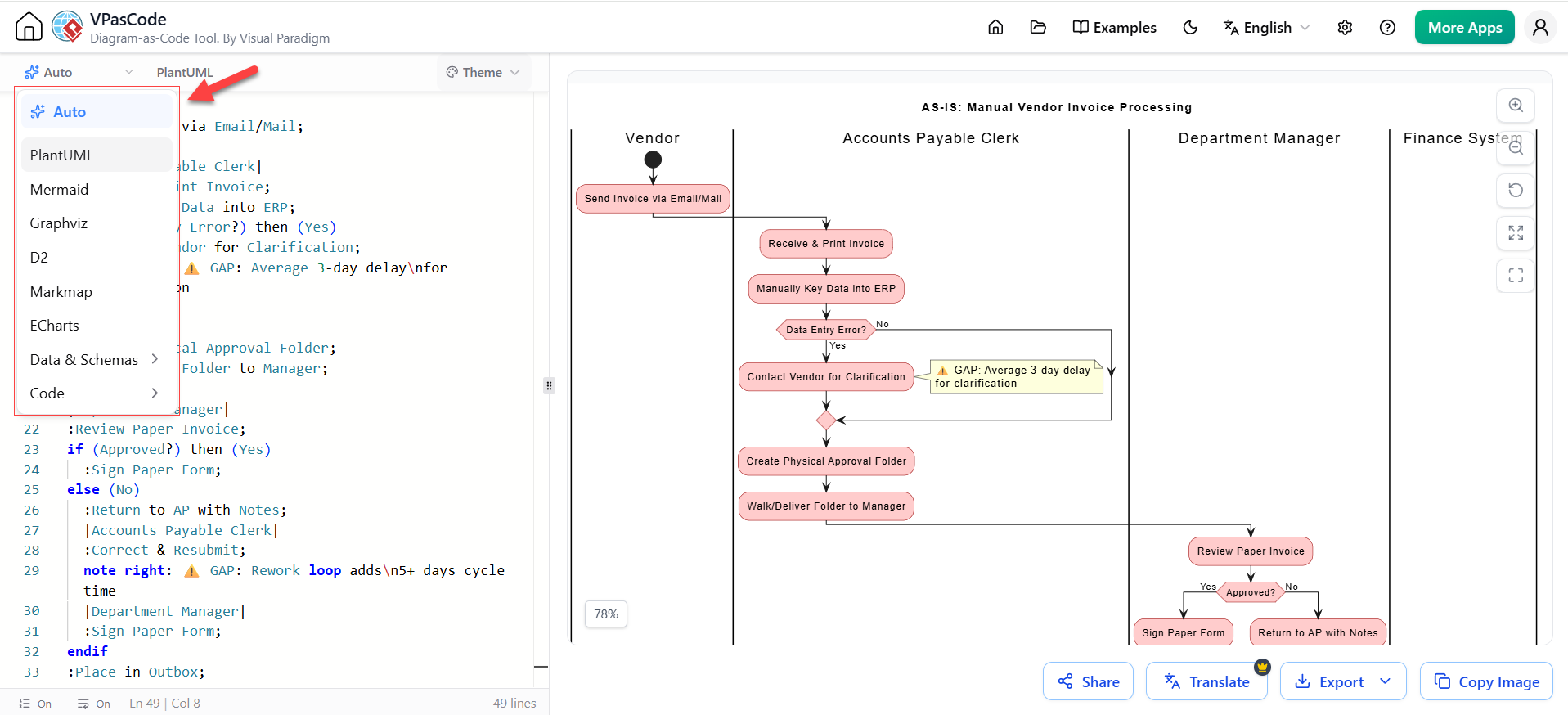
Polyglot Rendering: Unlike single-format tools, VPasCode acts as a universal renderer supporting PlantUML, Mermaid, D2, Graphviz, ECharts, and even raw programming languages like Java or Python.
-
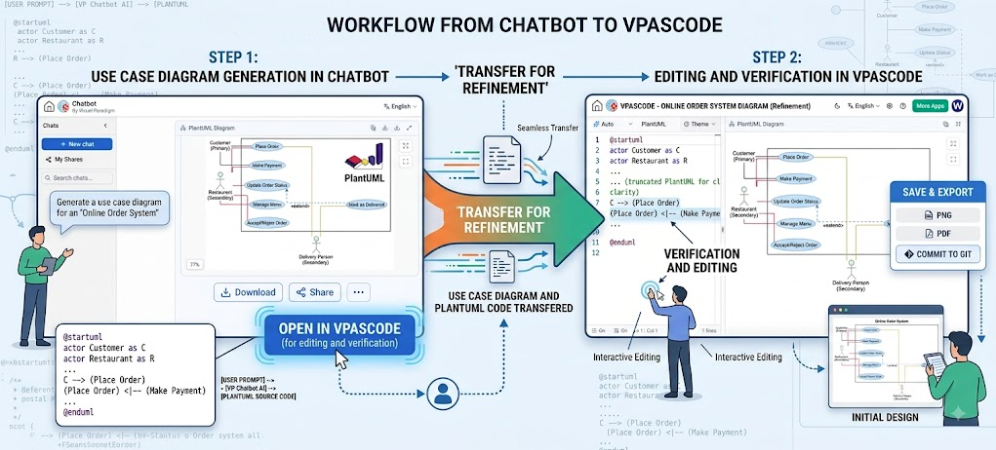
AI-Augmented Authoring: Integration of Large Language Models directly into the editor to fix syntax errors, explain corrections via diffs, and translate diagram labels across natural languages.
-
Zero-Configuration Detection: The engine automatically identifies the DSL or data format pasted into the editor, removing the friction of manual language selection.
-
Living Documentation Integration: Seamless connectivity with Visual Paradigm OpenDocs ensures that diagrams generated in VPasCode can be embedded directly into comprehensive technical specifications.
Core Capabilities and Editor Experience
VPasCode is built around a developer-centric editor experience that prioritizes speed and accessibility.
Automatic Format Detection and Real-Time Preview
The hallmark of VPasCode is its intelligent parser. Users can paste raw scripts—whether it is a Mermaid flowchart, a PlantUML sequence diagram, or a JSON structure—and the platform instantly detects the format and renders the visual output. There is no need to select a language from a dropdown menu. As you type, the real-time preview updates instantly, providing immediate visual feedback on structural changes.
Sharing and Export Flexibility
Collaboration is frictionless. Diagrams can be shared via unique URLs, generated QR codes for mobile access, or direct social media integration. For offline use or formal documentation, VPasCode supports exporting to:
-
SVG: Scalable vector graphics ideal for web and print.
-
PNG: High-resolution raster images.
-
PDF: Document-ready formats.
Free Core Access
Crucially, the core editing, rendering, and export functionalities are completely free, lowering the barrier to entry for individual developers and open-source projects.
AI-Powered and Advanced Features
VPasCode distinguishes itself from standard text-to-diagram converters through deep AI integration, available in the Premium tier.
AI Code Error Fixing and Transparent Diffs
Syntax errors in DSLs can be frustrating. VPasCode’s “Fix by AI” button automatically repairs broken scripts. More importantly, it provides a side-by-side code diff and explanation, turning error correction into a learning opportunity. Users can see exactly what changed and why, accelerating their mastery of complex DSLs.
Native AI Translation
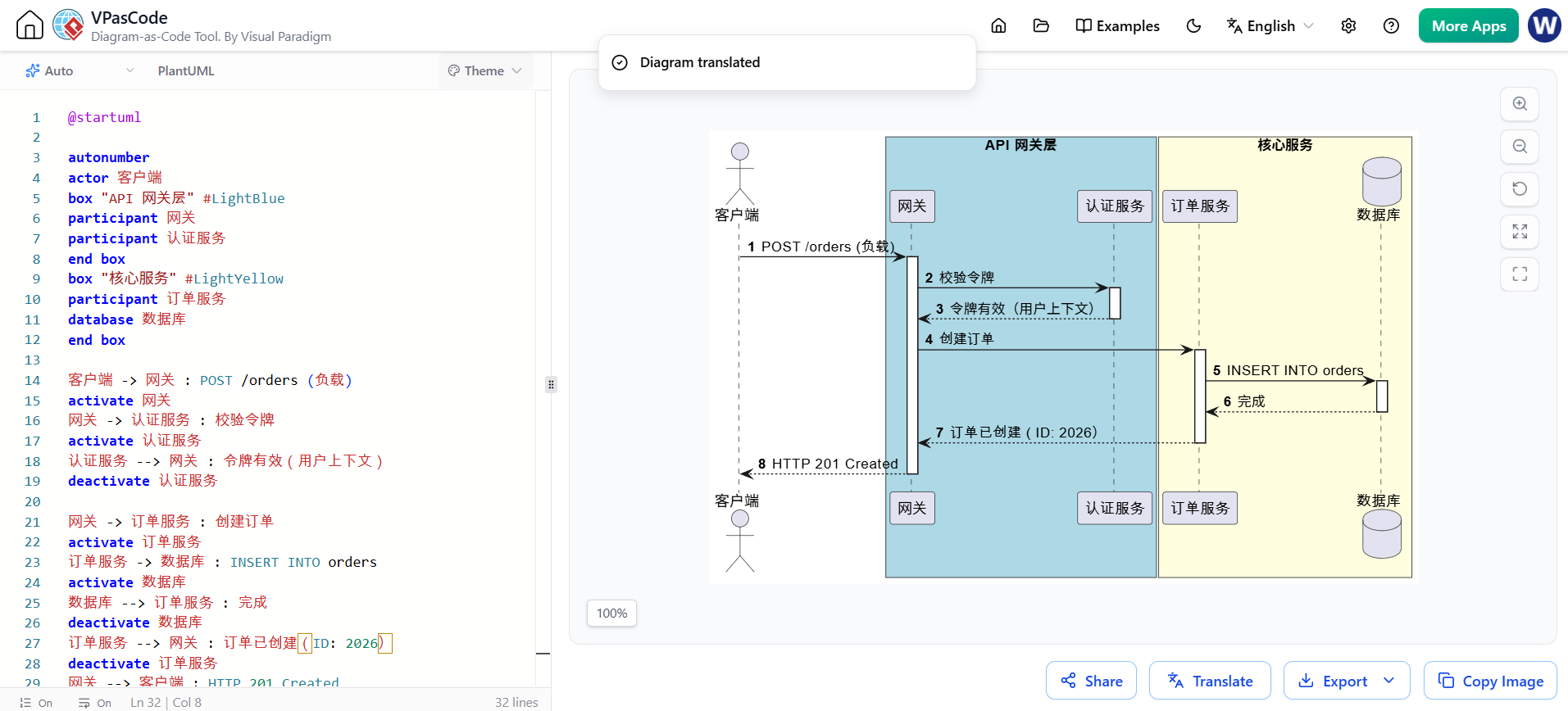
Global teams benefit from native AI translation within the editor. Diagram labels and text can be translated across languages (e.g., converting “Withdraw Cash” to “提取现金”) without leaving the platform, ensuring documentation is accessible to international stakeholders.
OpenDocs Integration
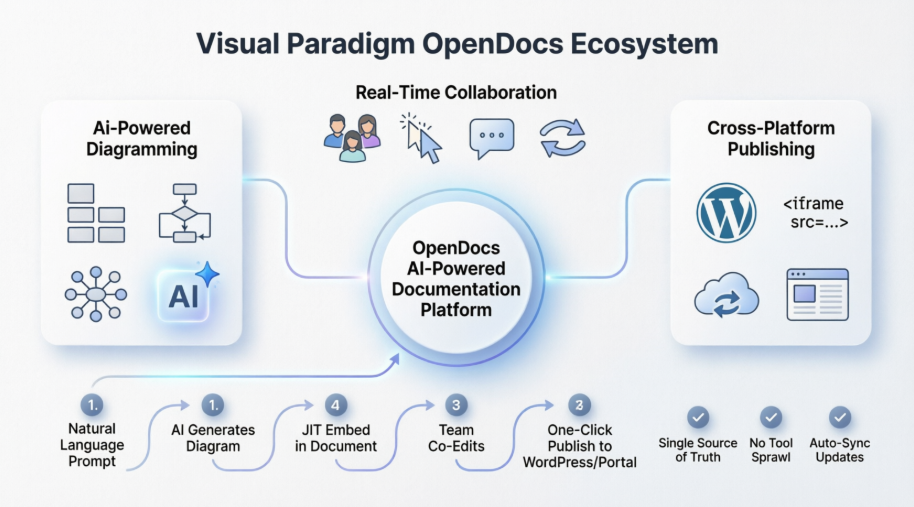
Premium users can push diagrams directly to Visual Paradigm OpenDocs. This creates a unified documentation ecosystem where code-generated diagrams live alongside narrative text, requirements, and project management artifacts.
Supported Formats and DSLs
VPasCode boasts one of the widest format support matrices in the industry.
Diagram & Visualization DSLs
-
PlantUML: Comprehensive support including ArchiMate, C4 Model, Sequence, Use Case, Class, Activity, Component, Deployment, State, Timing, ERD, Chen ERD, Network, WBS, Gantt, and Mind Maps.
-
Mermaid: Flowcharts, Class diagrams, Sequence diagrams, ERD, State diagrams, Mind Maps, C4, Gantt, Quadrant charts, Requirements, Timelines, User Journeys, Git Graphs, Kanban boards, Ishikawa (Fishbone), Venn diagrams, and Wardley Maps.
-
D2, Graphviz & Markmap: Modern graph visualization and dynamic mind mapping.
-
ECharts: Data-driven interactive chart definitions.
Structured Data & Programming Languages
Uniquely, VPasCode can visualize source code and data structures directly:
-
Data/Config: JSON, YAML, XML, CSV, TOML
-
Database: DBML, SQL
-
Languages: Java, TypeScript, Go, Rust, C#, Python, C, C++, PHP, Ruby, Scala, Zig, Kotlin, Swift, Elixir
Licensing and Pricing
VPasCode operates on a transparent freemium model:
| Feature Set | Free Plan | Premium Plan |
|---|---|---|
| Online Code Editor | ✅ | ✅ |
| Auto Format Detection | ✅ | ✅ |
| Real-Time Rendering | ✅ | ✅ |
| Image Export (SVG/PNG) | ✅ | ✅ |
| Diagram Sharing | ✅ | ✅ |
| AI Error Fixing | ❌ | ✅ |
| AI Translation | ❌ | ✅ |
| OpenDocs Integration | ❌ | ✅ |
Premium Access Routes:
-
VP Online: Combo Edition or higher.
-
VP Desktop: Professional Edition or higher (with active maintenance). Note: Desktop Pro users with active maintenance receive complimentary VP Online Combo access.
Conclusion
Visual Paradigm VPasCode represents a significant evolution in technical visualization. By combining a free, zero-config editor with premium AI capabilities and an exhaustive list of supported formats, it serves both casual users needing quick diagrams and enterprise teams requiring integrated, living documentation. Whether you are debugging a PlantUML script, translating architecture diagrams for a global team, or visualizing a JSON config file, VPasCode provides a unified, efficient environment that keeps your visuals in sync with your code.
Related posts:
 Orchestrating Team Harmony: How Visual Paradigm OpenDocs Revolutionizes Real-Time Collaborative Documentation
Case Study: Modernizing Our Architecture Documentation with VPasCode – An Product Review
The Modern Modeler’s Guide: Activity Diagrams with VPasCode & AI
Why UML Remains Relevant in the AI Era: Visual Paradigm, Diagram-as-Code, and Modern Agile
Orchestrating Team Harmony: How Visual Paradigm OpenDocs Revolutionizes Real-Time Collaborative Documentation
Case Study: Modernizing Our Architecture Documentation with VPasCode – An Product Review
The Modern Modeler’s Guide: Activity Diagrams with VPasCode & AI
Why UML Remains Relevant in the AI Era: Visual Paradigm, Diagram-as-Code, and Modern Agile