


Introduction
In the fast-paced world of software architecture and system design, the traditional bottleneck has often been the manual labor of diagramming. Product managers, architects, and developers spend significant time dragging shapes, aligning connectors, and ensuring syntax correctness rather than focusing on the logic and structure of the system itself.
Visual Paradigm has revolutionized this workflow by integrating Artificial Intelligence directly into its modeling ecosystem. By shifting the focus from manual drawing to automated generation and conversational refinement, Visual Paradigm allows teams to move from ideation to specification in minutes rather than hours. This guide explores how these AI features streamline the UML design process, providing key concepts, practical examples, and PlantUML code snippets to demonstrate the power of AI-assisted modeling.
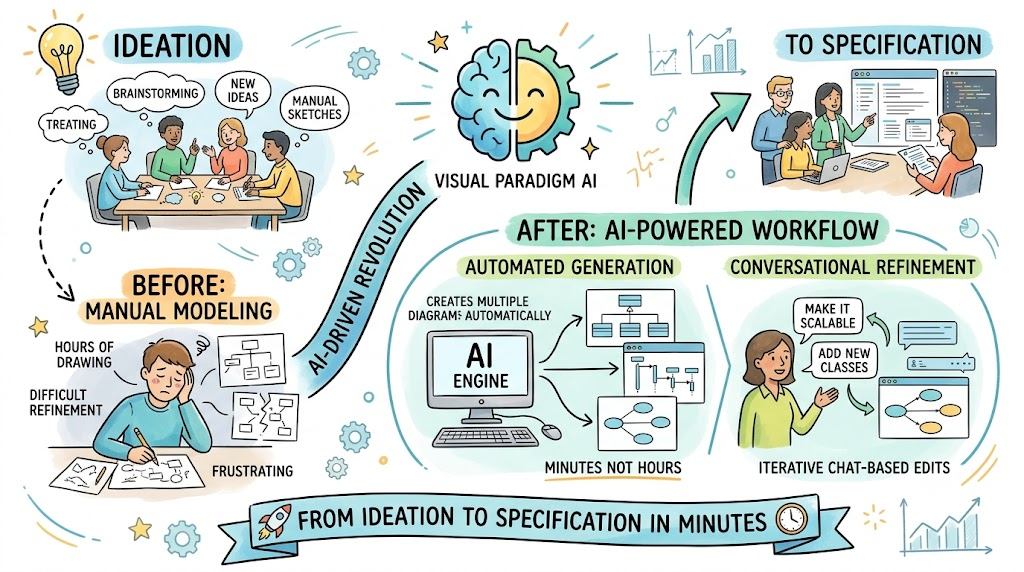
Key Concept 1: Rapid Ideation via Conversational Generation
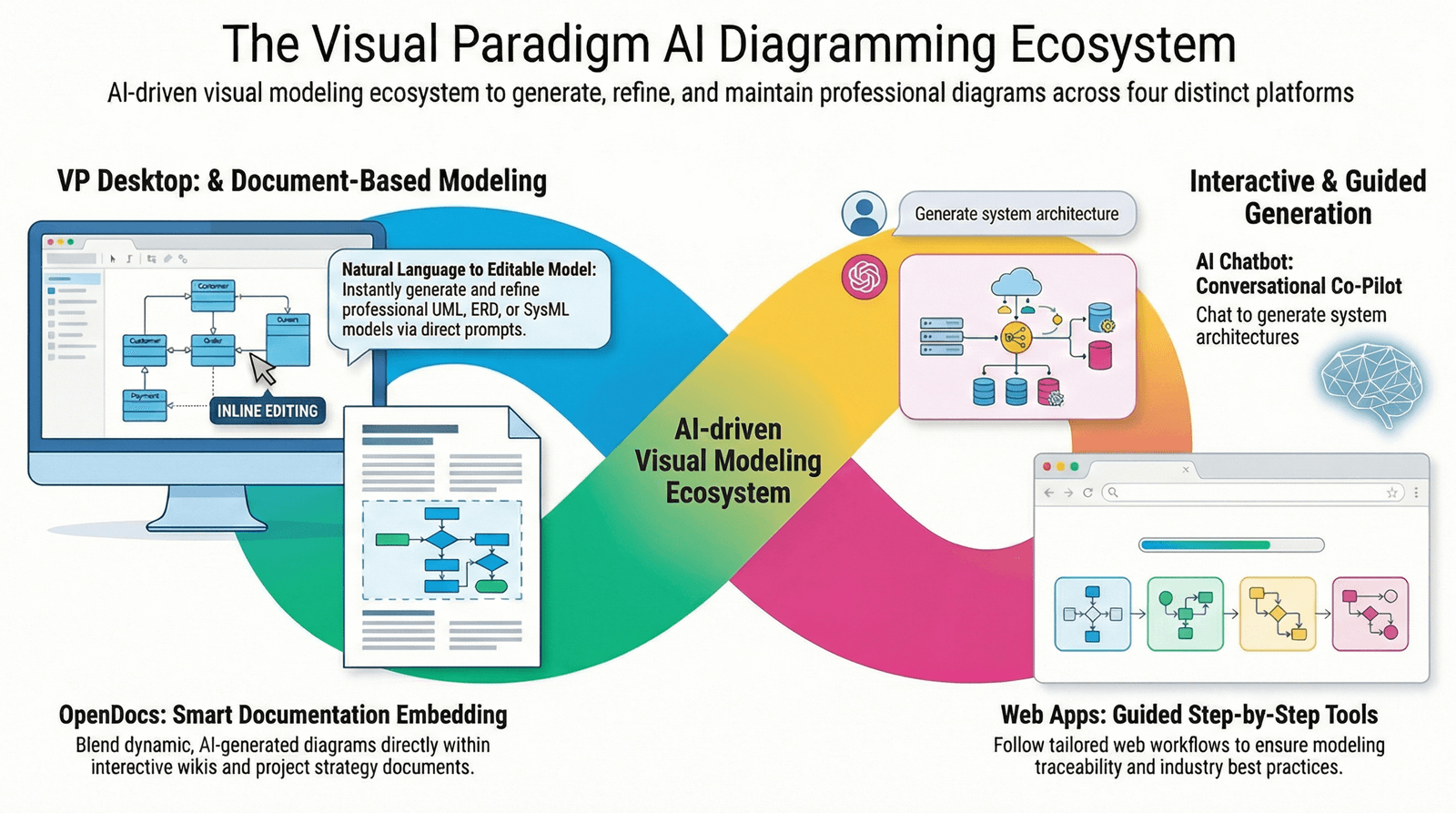
The core of Visual Paradigm’s AI capability is the AI Diagramming Chatbot. This feature acts as a collaborative partner, allowing users to describe system logic in plain English and receive instant visual drafts.
How It Works
-
Natural Language Input: You describe the scenario (e.g., “Create a class diagram for an e-commerce checkout process”).
-
Instant Drafting: The AI analyzes the intent and generates a syntactically correct UML diagram.
-
Iterative Refinement: You can converse with the bot to tweak details, add constraints, or generate related diagrams without starting from scratch.
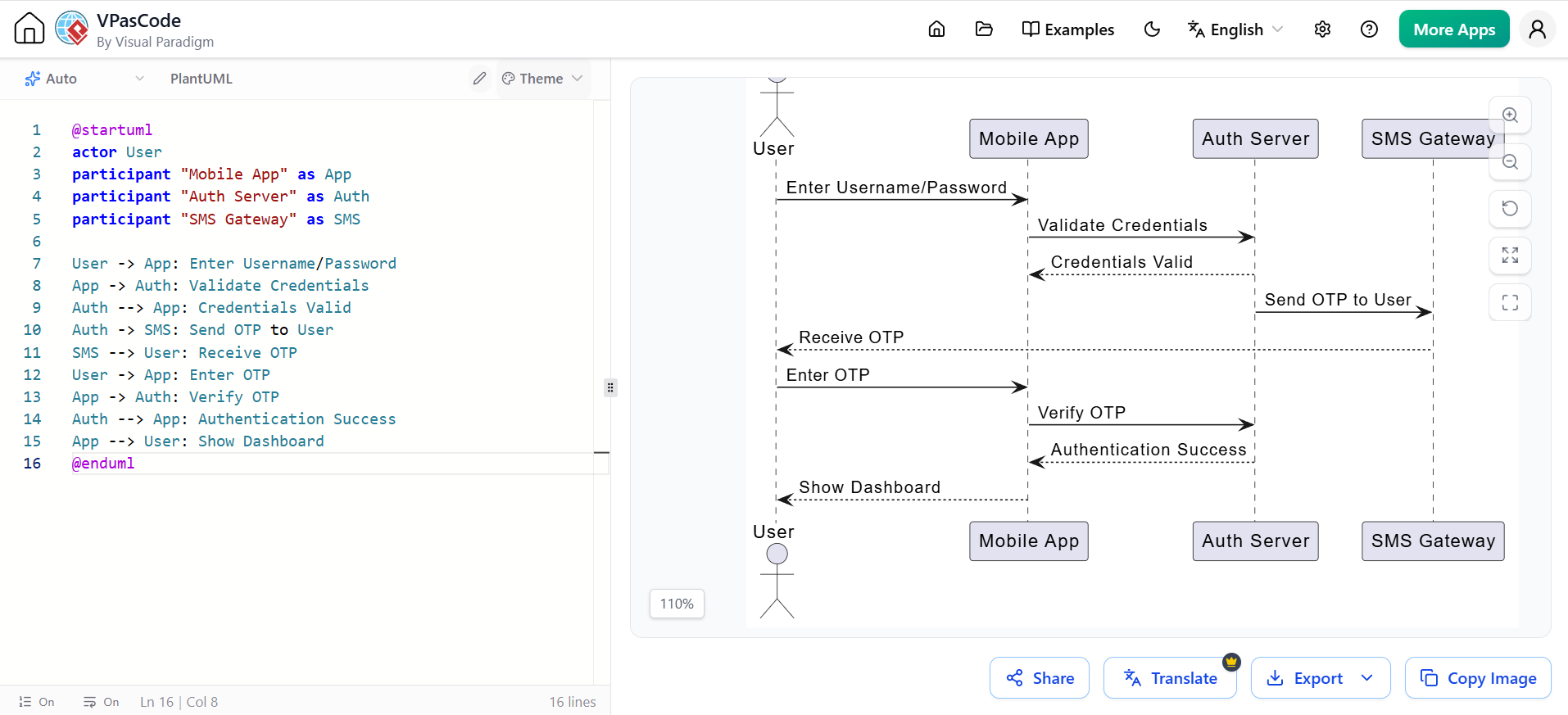
Example Scenario: Online Banking Login
User Prompt: “Generate a sequence diagram for a user logging into a banking app, including multi-factor authentication.”
AI Output Logic:
-
Actor: User
-
System: Mobile App, Auth Server, SMS Gateway
-
Flow: Enter credentials -> Validate -> Send OTP -> Verify OTP -> Grant Access
PlantUML Representation
Below is how the AI might generate the underlying structure for this sequence diagram:
@startuml
actor User
participant "Mobile App" as App
participant "Auth Server" as Auth
participant "SMS Gateway" as SMS

User -> App: Enter Username/Password
App -> Auth: Validate Credentials
Auth --> App: Credentials Valid
Auth -> SMS: Send OTP to User
SMS --> User: Receive OTP
User -> App: Enter OTP
App -> Auth: Verify OTP
Auth --> App: Authentication Success
App --> User: Show Dashboard
@enduml
Benefit
This eliminates the “blank canvas paralysis.” Instead of worrying about where to place the Auth Server lifeline, you focus on the logic of the authentication flow.
Key Concept 2: Automated Specialized Modeling Tools
While the chatbot handles general generation, Visual Paradigm includes targeted AI tools for specific UML diagram types. These tools automate time-consuming documentation and structural modeling tasks.
1. AI Use Case Description Generator
Writing detailed use case specifications (preconditions, postconditions, main success scenarios) is tedious. This tool automatically documents event flows based on high-level use case titles.
-
Example: For a use case titled “Process Return,” the AI generates:
-
Precondition: Order must be within 30 days.
-
Main Flow: User selects item -> System validates eligibility -> Warehouse notified -> Refund initiated.
-
2. AI-Assisted UML Class Diagram Generator
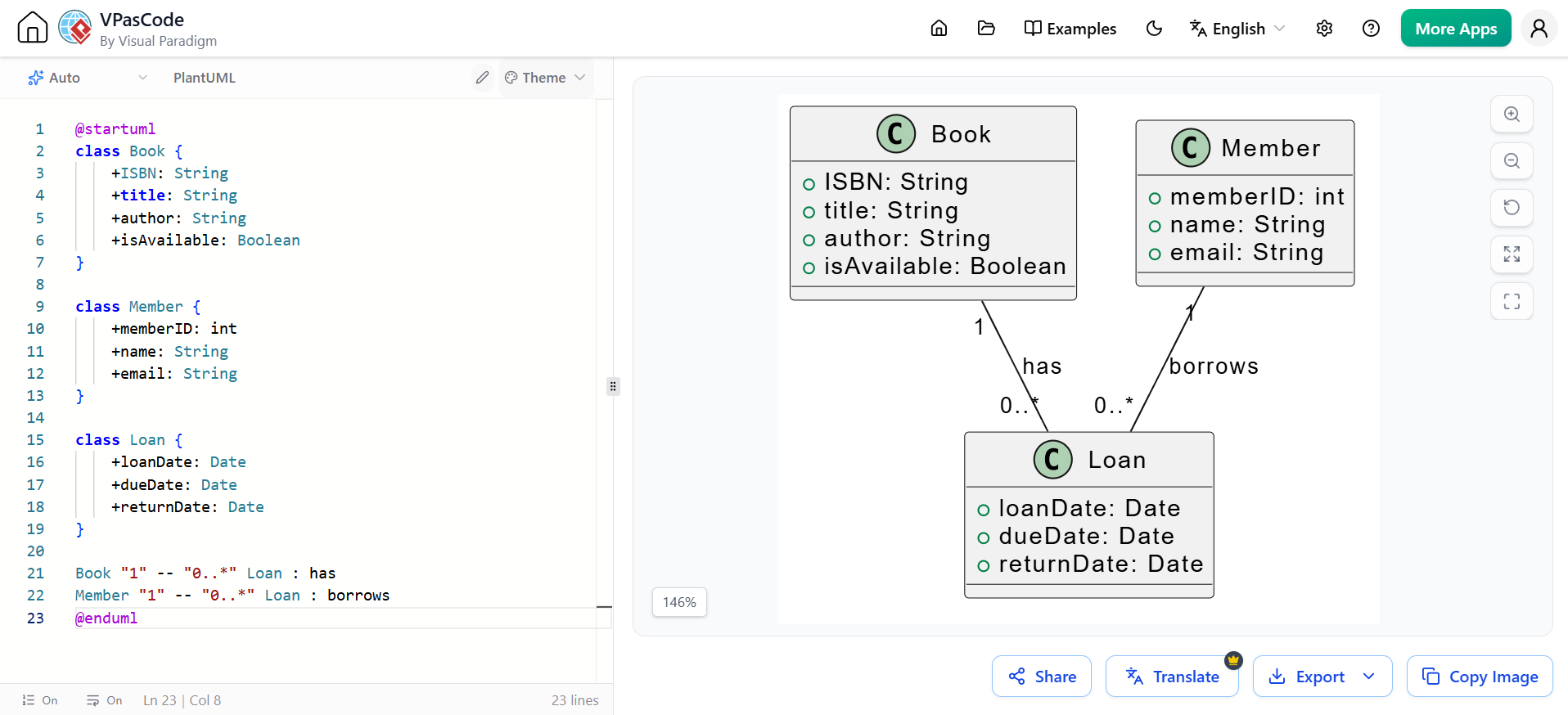
This tool speeds up static structure modeling by inferring classes, attributes, and relationships from textual descriptions.
User Prompt: “Create a class diagram for a library system with Books, Members, and Loans.”
PlantUML Representation
@startuml
class Book {
    +ISBN: String
    +title: String
    +author: String
    +isAvailable: Boolean
}

class Member {
    +memberID: int
    +name: String
    +email: String
}

class Loan {
    +loanDate: Date
    +dueDate: Date
    +returnDate: Date
}

Book "1" -- "0..*" Loan : has
Member "1" -- "0..*" Loan : borrows
@enduml
3. Use Case to Activity Diagram Transformation
Functional requirements often exist as use cases. This AI feature automatically transforms them into behavioral workflows (Activity Diagrams), bridging the gap between what the system does and how it does it.
Key Concept 3: Guided Workflows and Knowledge Hubs
AI in Visual Paradigm is not just about generation; it’s about guidance and management.
AI WebApps: Step-by-Step Guidance
For complex diagrams, AI WebApps provide intuitive, guided workflows. Instead of guessing the next step, the interface prompts you through the modeling process, ensuring completeness and consistency. This is particularly useful for junior modelers or when adhering to strict corporate standards.
OpenDocs: Centralized Knowledge Hub
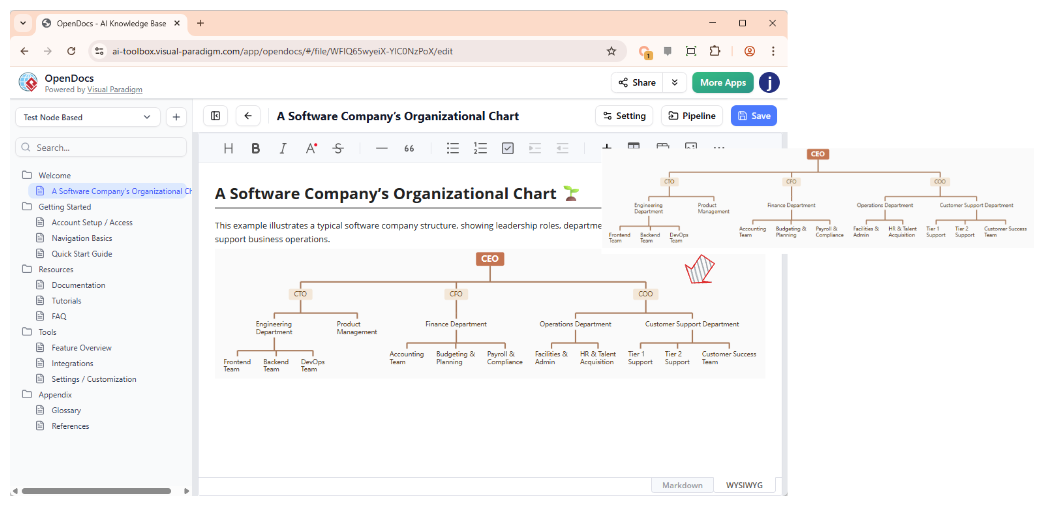
One of the biggest challenges in modeling is keeping documentation synchronized with diagrams. OpenDocs serves as a central hub where:
-
AI-generated diagrams are stored.
-
Technical documentation is linked directly to model elements.
-
Changes in the diagram automatically reflect in the documentation, and vice versa.
Key Concept 4: Seamless Ecosystem Integration
The true speed gain comes from how AI-generated artifacts integrate into the broader Visual Paradigm platform.
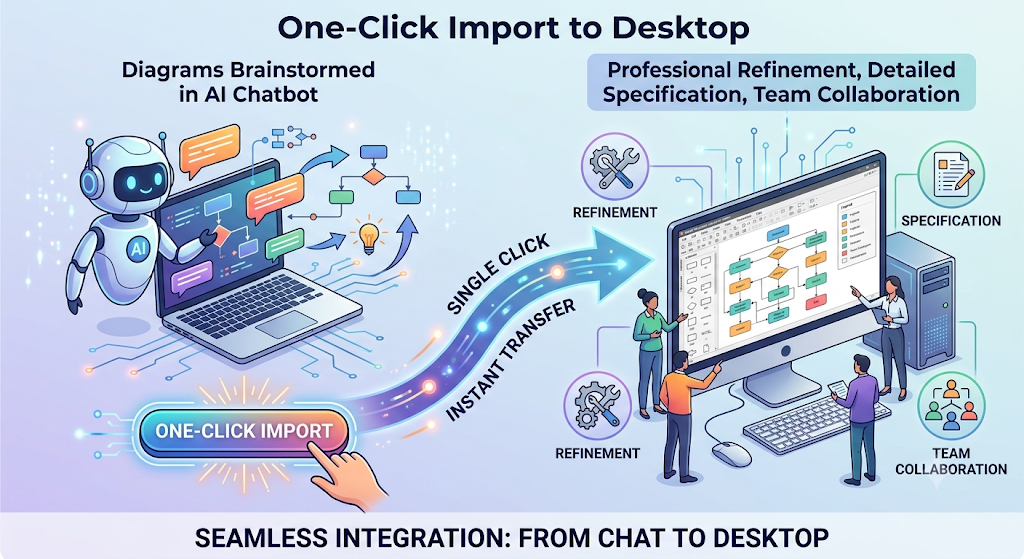
1. One-Click Import to Desktop
Diagrams brainstormed in the AI Chatbot are not dead ends. With a single click, they can be imported into Visual Paradigm Desktop for professional refinement, detailed specification, and team collaboration.
2. VPasCode Integration
For developers who prefer code-like precision, generated diagrams can be edited via the VPasCode editor. This allows for rapid adjustments using a text-based interface without leaving the AI environment, appealing to those who find drag-and-drop slower for minor tweaks.
3. Downstream Automation
Once an AI-generated diagram is imported and refined, the real power of Visual Paradigm kicks in:
-
Code Engineering: Generate Java, C#, or Python source code skeletons directly from Class Diagrams.
-
Database Generation: Transform Entity-Relationship diagrams into SQL scripts for database creation.
Example Workflow:
-
AI generates a Class Diagram for a “User Management System.”
-
Imported to Desktop and refined.
-
Click “Generate Code” → Produces Java classes with getters/setters.
-
Click “Generate Database” → Produces MySQL schema.
Conclusion
Visual Paradigm’s AI features represent a paradigm shift in UML design. By automating the mechanical aspects of diagramming—such as shape placement, connector alignment, and initial drafting—teams can redirect their energy toward system logic, architectural integrity, and requirement clarity.
From conversational generation that turns plain English into structured diagrams, to specialized tools that automate documentation and downstream code generation, Visual Paradigm ensures that your models are not just visual aids, but living, integrated components of your development lifecycle. Whether you are a product manager sketching initial ideas or an architect finalizing technical specs, AI in Visual Paradigm accelerates your journey from concept to implementation.
Related posts:
 Gantt vs PERT Charts: An Agile Project Manager’s Guide to Visual Planning Tools
From Concept to Cloud: A Team’s Journey Implementing AI-Powered Architecture Design with Visual Paradigm
From Idea to Architecture: My Hands-On Review of Visual Paradigm’s AI Cloud Design Studio
Gantt vs PERT Charts: An Agile Project Manager’s Guide to Visual Planning Tools
From Concept to Cloud: A Team’s Journey Implementing AI-Powered Architecture Design with Visual Paradigm
From Idea to Architecture: My Hands-On Review of Visual Paradigm’s AI Cloud Design Studio
 UML Diagram Generators vs. Full Modeling Platforms: Why One Isn’t Enough