The Limitation of Static Images
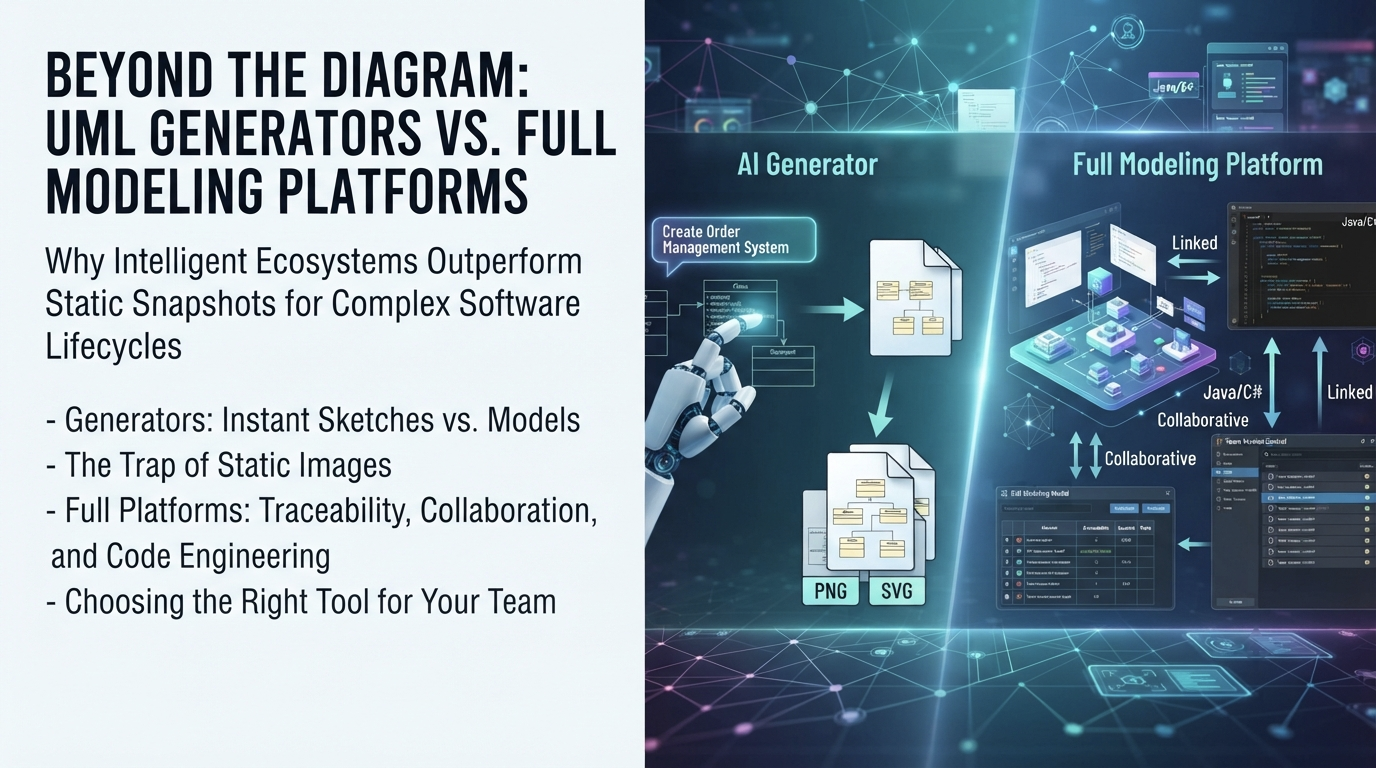
Most standalone AI generators operate on a “fire-and-forget” basis. A user inputs a prompt, the AI generates a visual representation—typically exporting as a PNG, SVG, or a proprietary image file—and the process concludes with an export to documentation.
While this workflow serves well for high-level presentations or quick sketches, it fails when applied to complex, long-term software projects. A static image lacks intelligence and cannot be:
- Linked to code: If a developer modifies a method name in Java, the diagram does not update automatically.
- Traceable: Users cannot easily click a class in the diagram to verify which Use Case it satisfies.
- Collaborative: Multiple team members cannot edit the same model simultaneously without encountering version conflicts.
- Executable: Source code cannot be generated directly from the drawing.
If a workflow stops at the image, it creates a snapshot rather than a model. In modern DevOps and Agile environments, snapshots quickly become obsolete and disconnected from reality.
The Advantage of a Full Modeling Ecosystem
A full modeling platform treats diagrams as data objects rather than mere pictures. When a comprehensive solution is utilized, the diagram becomes a living component of the project database. This enables capabilities that a simple generator simply cannot offer:
1. Model Traceability
In a full platform, relationships are bidirectional. If a requirement is defined in a Use Case diagram, it can be traced down to the specific Classes and Attributes that implement it. If a change occurs in the codebase, impact analysis reveals exactly which diagrams require updating. This traceability serves as the backbone of quality assurance in large-scale systems.
2. Code Engineering (Forward & Reverse)
Generators usually operate in one direction: Text to Image. A full platform supports Code Generation (creating Java, C#, Python, etc., from a Class Diagram) and Reverse Engineering (converting existing codebases back into models). This closes the loop between design and implementation, ensuring that documentation never drifts away from the actual code.
3. Multi-Standard Support
Software architecture rarely relies on UML alone. Enterprise architects often need BPMN for business processes, ArchiMate for strategic alignment, and SysML for system engineering. A dedicated generator might handle one standard well, but a full platform unifies them all under a single interface, allowing seamless transitions between business logic and technical design.
The Role of AI in Modern Workflows
This is where confusion often arises. Many assume that because AI is powerful, it replaces the need for a heavy platform. However, the most effective workflow combines the speed of AI with the depth of a professional platform.
Imagine starting a day with a brainstorming session. A user describes a system to an AI, and within seconds, a valid UML structure appears. Instead of exporting that image to PowerPoint, the user imports it directly into a professional modeling environment. From there, detailed specifications are added, links to database schemas are established, version control is set up, and source code is generated.
This hybrid approach offers the best of both worlds: the rapid ideation of a UML diagram generator and the robust, enterprise-grade management of a full modeling suite.
How Visual Paradigm Bridges the Gap
Visual Paradigm built its ecosystem with this exact philosophy in mind. The company does not aim merely to provide a picture; it aims to deliver a complete software design environment.
The AI-Powered UML Diagram Generator at Visual Paradigm is designed specifically to feed into the broader desktop platform. The following differentiates this approach from competitors:
- Seamless Integration: A user can generate a diagram via chat and click one button to open it in the full Desktop app for deep editing.
- Enterprise Features: Built-in version control, team collaboration, and conflict resolution are included, features that standalone generators typically lack.
- Comprehensive Standards: Support for UML, BPMN, ArchiMate, ERD, SysML, and more exists within a single workspace.
- Documentation Automation: Rich project documentation is automatically generated from models, keeping stakeholders informed without manual writing.
Making the Right Choice for Your Team
If a student or a solo hobbyist works on a small side project, a simple generator might suffice. However, if an organization builds mission-critical software, manages a team, or adheres to strict compliance standards, relying solely on a diagram generator presents a risk.
Organizations need a tool that evolves with the project. They require a platform where the diagram acts as the source of truth, not just a pretty illustration.
Instead of settling for static images, teams should experience the power of a tool that understands the full lifecycle of software design. Exploring how the AI-powered modeling ecosystem transforms workflows from sketching to shipping offers a clear path forward for modern engineering teams.
Related posts:
 From Concept to Cloud: A Team’s Journey Implementing AI-Powered Architecture Design with Visual Paradigm
From Idea to Architecture: My Hands-On Review of Visual Paradigm’s AI Cloud Design Studio
From Confusion to Clarity: My Hands-On Journey Mastering UML State Machines with Visual Paradigm’s AI Tools
From Concept to Cloud: A Team’s Journey Implementing AI-Powered Architecture Design with Visual Paradigm
From Idea to Architecture: My Hands-On Review of Visual Paradigm’s AI Cloud Design Studio
From Confusion to Clarity: My Hands-On Journey Mastering UML State Machines with Visual Paradigm’s AI Tools
 From Text to Diagram: Accelerating UML Design with Visual Paradigm’s AI Suite