Introduction: Why We Finally Adopted BPMN
As a business operations lead who has wrestled with tangled workflows, ambiguous stakeholder expectations, and endless whiteboard sessions, discovering Business Process Modeling Notation (BPMN) felt like finding a universal translator. In today’s fast-paced business environment, misaligned workflows and hidden bottlenecks can quietly cripple productivity. Our team used to rely on generic, free-form flowcharts that meant something different to every department. Transitioning to BPMN was a game-changer. It provided the standardized, precise graphical language we needed to visualize, analyze, and improve our operations with unprecedented clarity.
This guide shares our firsthand experience and practical insights to help you start mapping your own business processes effectively.
What is BPMN? A Practitioner’s Perspective
Business Process Model and Notation (BPMN) is a globally recognized standard maintained by the Object Management Group (OMG). In our experience, it is best thought of as the universal flowchart language specifically designed for business processes. It provides a rich, standardized set of symbols and rules to represent everything from simple task sequences to complex, multi-participant workflows involving decisions, parallel activities, and external communications.
Its primary goal—and the reason it works so well for us—is bridging the communication gap between different stakeholders. Whether it’s business analysts defining the processes, technical teams implementing automation solutions, or end-users executing the tasks, everyone interprets a BPMN diagram the exact same way. This standardization is crucial for effective process management.
Why We Learned BPMN: The Tangible Benefits
Investing time in learning BPMN offered significant, measurable advantages for our organization. The clarity and structure it brings to process representation translate into real-world wins:
-
Enhanced Clarity and Communication: BPMN replaced our ambiguous text descriptions and messy whiteboard sketches with clear, visual models. This common language minimized misunderstandings between departments and external partners.
-
Effective Process Analysis and Improvement: Visualizing a process made it far easier to spot inefficiencies, redundancies, and bottlenecks. We used BPMN diagrams as a foundation for analysis, streamlining workflows and reducing waste. Studies suggest organizations using process modeling can achieve efficiency gains upwards of 20-30% in targeted areas, and our internal metrics reflected similar successes.
-
Foundation for Automation: Our BPMN models provided a clear, ready-to-use blueprint for Business Process Management Systems (BPMS). Many platforms can directly import and execute BPMN diagrams, accelerating our path from process design to automated execution.
-
Improved Compliance and Standardization: Documenting processes using BPMN helped us meet regulatory requirements (like ISO 9001) by providing clear, auditable evidence of how work is performed.
-
Facilitated Collaboration: The diagrams acted as a focal point for discussion, enabling teams to collaboratively design, review, and refine processes, fostering shared understanding and ownership.
Core BPMN Elements: Our Daily Cheat Sheet
BPMN diagrams are constructed using a defined set of graphical elements. Understanding these building blocks was the first step to our successful modeling.
Flow Objects: The Core Actions and Events
These elements define the actual behavior and flow of the process.
-
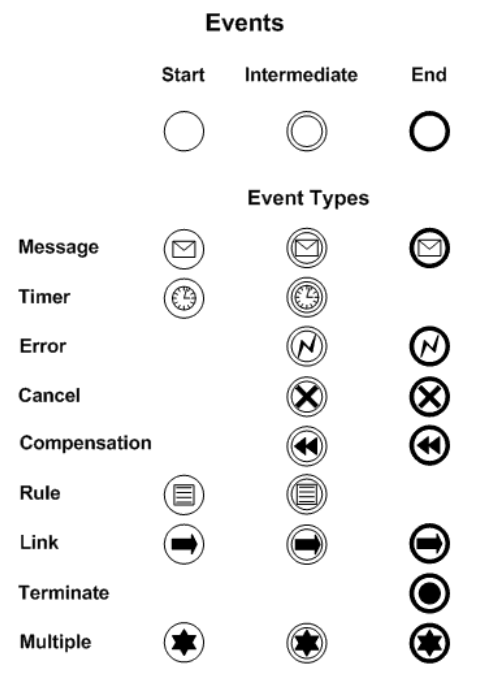
Events (Circles): Represent something that happens.
-
Start Event (Thin single circle): Where a process begins (e.g., a message arriving).
-
Intermediate Event (Double circle): Something that happens during the process (e.g., a time delay).
-
End Event (Thick single circle): Where a process path concludes (e.g., successful completion or an error).
-
-
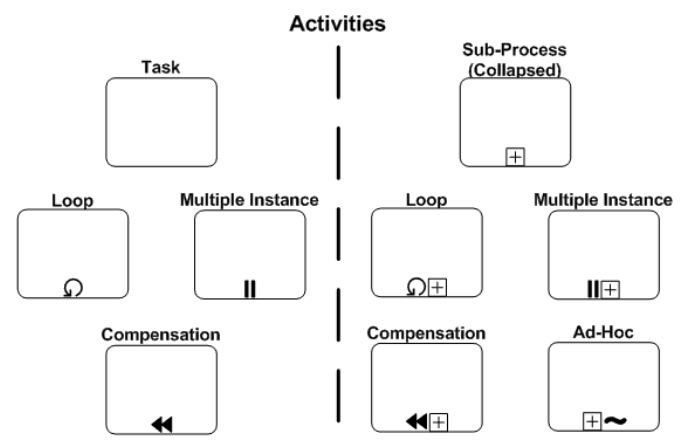
Activities (Rounded rectangles): Represent work performed.
-
Task: An atomic unit of work (e.g., “Approve Invoice”). Can be a User Task (human input) or Service Task (automated).
-
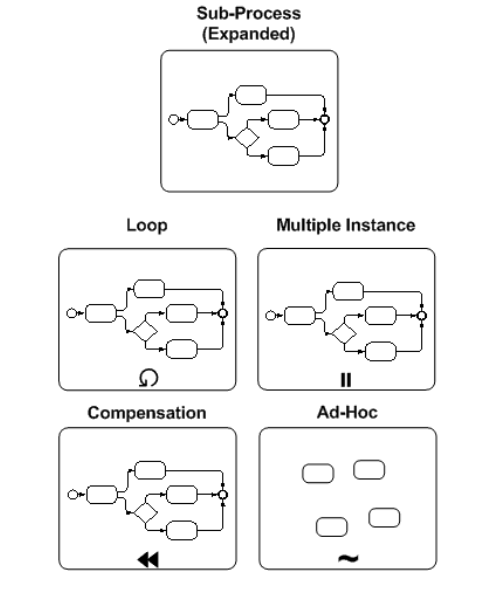
Sub-process (Rounded rectangle with a plus sign): A compound activity containing its own detailed flow, which we use to manage complexity.
-
-
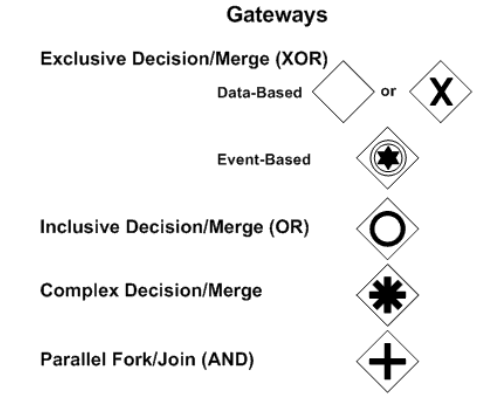
Gateways (Diamonds): Control the divergence and convergence of sequence flows.
-
Exclusive Gateway (Diamond with ‘X’ or empty): A decision point where only one path can be taken.
-
Parallel Gateway (Diamond with ‘+’): Splits the flow into concurrent paths, or merges them, waiting for all to complete.
-
Inclusive Gateway (Diamond with ‘O’): Splits the flow into one or more paths based on conditions.
-
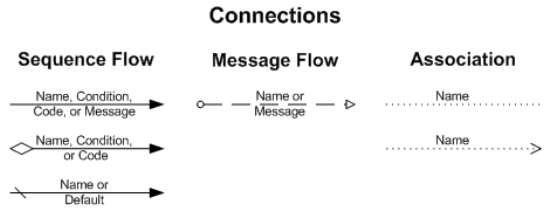
Connecting Objects: Linking the Flow
-
Sequence Flow (Solid line with arrow): Shows the order of activities within a single pool or lane.
-
Message Flow (Dashed line with circle start and arrow end): Represents communication between separate participants (Pools).
-
Association (Dotted line): Links artifacts or text annotations to flow objects.
Swimlanes: Organizing Responsibility
-
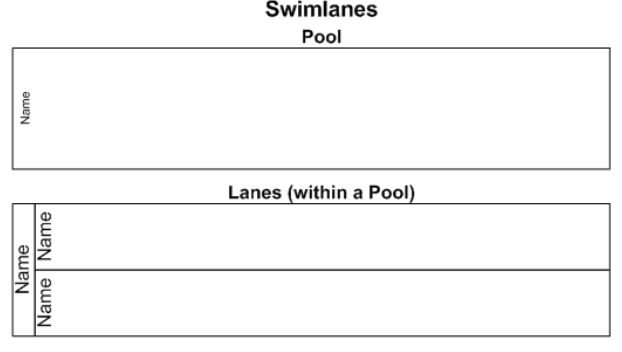
Pools: Represent major participants (e.g., “Customer”, “Sales Department”). Message Flows typically connect Pools.
-
Lanes: Sub-divisions within a Pool, categorizing activities by role or system function (e.g., “Sales Rep” vs. “Sales Manager”). Sequence Flows stay within a single Pool but can cross Lanes.
Artifacts: Adding Context
-
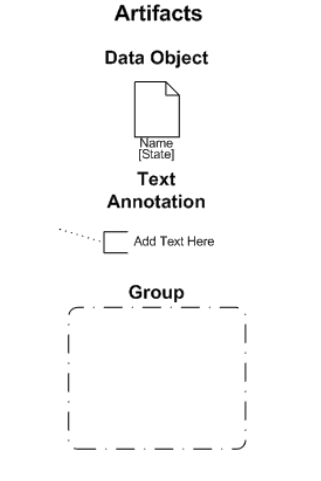
Data Object (Document icon): Represents data required as input or produced as output (e.g., “Purchase Order”).
-
Group (Dashed rounded rectangle): Purely for visual grouping of elements.
-
Annotation (Text bracket): Allows modelers to add explanatory text notes.
Building Our First BPMN Diagram: An Order Processing Win
Here is how we successfully modeled a simplified order processing workflow, step-by-step:
-
Define Scope & Participants: The process starts when a customer places an order and ends when it is shipped. Participants are “Customer” and “Our Company”. We used two Pools. Inside “Our Company”, we added Lanes for “Sales” and “Warehouse”.
-
Start Event: In the “Customer” Pool, we placed a Message Start Event labeled “Order Placed”.
-
Message Flow: A Message Flow connected the Customer’s “Order Placed” to a corresponding Message Start Event in the “Sales” Lane of the “Our Company” Pool, labeled “Receive Order”.
-
Activities & Sequence Flow: Following “Receive Order” in the “Sales” Lane, we added a Task: “Check Stock Availability”, connected by a Sequence Flow.
-
Gateway (Decision): After “Check Stock Availability”, we added an Exclusive Gateway labeled “Stock Available?”.
-
Diverging Paths:
-
Path 1 (Yes): Sequence Flow to a Task in the “Warehouse” Lane labeled “Prepare Shipment”.
-
Path 2 (No): Sequence Flow to a Task in the “Sales” Lane labeled “Notify Customer of Delay”.
-
-
Continuing Path 1: From “Prepare Shipment”, a Sequence Flow led to a Task “Ship Order”.
-
End Event: After “Ship Order”, we added an End Event labeled “Order Shipped”.
-
Refine: We added Data Objects like “Order Details” associated with relevant tasks and annotations for clarity.
Common Pitfalls We Avoided & Best Practices We Swear By
While BPMN is powerful, ineffective modeling can obscure rather than clarify. Here are the lessons we learned the hard way:
Pitfalls to Avoid
-
Overly Complex Diagrams: Trying to map every single exception onto one diagram makes it unreadable. We now use Sub-processes to hide complexity.
-
Incorrect Gateway Usage: Confusing Exclusive, Parallel, and Inclusive gateways is a frequent error. We double-check our logic before finalizing.
-
Mixing Levels of Detail: Combining high-level strategic steps with minute operational details is confusing. We maintain strict consistency.
-
Ignoring Swimlanes: Failing to use Pools and Lanes obscures responsibility. We never skip this step for cross-functional processes.
-
Ambiguous Labeling: We avoid vague labels like “Process Data” in favor of specific actions like “Validate Customer Address”.
Best Practices for Effective Modeling
-
Start Simple, Iterate: We always begin with the “happy path” and gradually add exceptions.
-
Maintain Consistency: We enforce strict naming conventions and detail levels across all diagrams.
-
Left-to-Right Flow: We model time progression from left to right for intuitive reading.
-
Use Swimlanes Effectively: We clearly assign responsibility using Pools for participants and Lanes for roles.
-
Validate with Stakeholders: We regularly review models with the people involved in the process to ensure accuracy and buy-in.
-
Focus on the Goal: We tailor the detail to the objective, whether it’s understanding, improvement, or automation.
BPMN in Action: A Case Study That Proves the Value
Consider a regional bank we consulted for that was struggling with lengthy mortgage application processing times. By meticulously mapping their existing process using BPMN, they identified several critical bottlenecks. The visual model highlighted excessive handoffs between departments (shown by frequent crossing between Lanes and Pools via Message Flows) and redundant data checks. An Exclusive Gateway representing credit score checks often led to delays if manual review was needed, but the subsequent steps weren’t optimized for this common scenario.
Using the BPMN model as a basis for discussion, the bank redesigned the workflow. They introduced parallel processing (using a Parallel Gateway) for certain checks, automated some data validation steps (represented as Service Tasks), and clarified responsibilities using well-defined Lanes. The result was a documented 35% reduction in average application processing time, improved customer satisfaction, and a clearer path for future automation enhancements.
Tooling Spotlight: Why We Chose Visual Paradigm
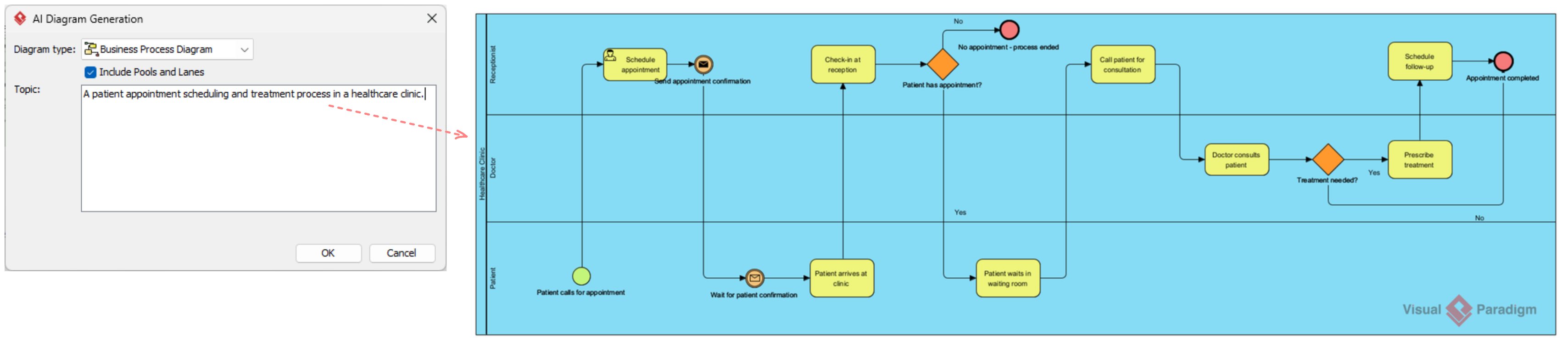
To execute this strategy, tooling matters. We rely heavily on Visual Paradigm for its robust BPMN features and AI capabilities. Its intuitive interface, comprehensive symbol libraries, and AI-powered BPMN generator transform plain text narratives into interactive diagrams seamlessly. The cloud-based collaboration features ensure our entire team stays aligned, while the process simulation tools help us identify bottlenecks before implementation.
Conclusion: Unlocking Process Excellence Together
Business Process Modeling Notation is more than just a flowcharting technique; it’s a critical mindset shift for anyone involved in understanding, managing, or improving business operations. By providing a standard, unambiguous language, BPMN facilitates clear communication, enables insightful analysis, and paves the way for effective automation and continuous improvement.
While the notation has depth, mastering the core elements – Flow Objects, Connecting Objects, Swimlanes, and Artifacts – provides a solid foundation. Start by modeling simple processes you are familiar with, adhere to best practices, leverage powerful tools like Visual Paradigm, and continuously validate your models with stakeholders. Embracing BPMN is a significant, rewarding step towards operational transparency, efficiency, and agility in the ever-evolving landscape of modern business.
Reference
- What is BPMN?: A foundational guide to BPMN basics.
- Mastering BPMN with Visual Paradigm: A professional guide from concept to execution.
- BPMN Tutorial: A step-by-step tutorial for getting started with BPMN diagramming.
- How to Draw a BPMN Diagram: Practical instructions on creating compliant BPMN diagrams.
- Business Process Model and Notation (Wikipedia): An encyclopedic overview of the BPMN standard and specifications.
- BPMN Diagram and Tools Features: An overview of Visual Paradigm’s comprehensive BPMN capabilities.
- Pool and Lane User Guide: Detailed documentation on configuring pools and lanes.
- BPMN for Beginners: A complete, beginner-friendly guide to BPMN.
- Online BPMN Tool Features: Highlights of the cloud-based BPMN tool for collaborative drafting.
- AI-Powered Business Model Canvas: Exploration of AI-driven tools for generating business model canvases.
- Understanding the Motivation Viewpoint: Insights into enterprise architecture motivation viewpoints using ArchiMate.
- Enterprise Architecture Diagram Tool: Features of Visual Paradigm’s enterprise architecture diagramming tool.
- AI BPMN Generator Guide: How Visual Paradigm’s AI transforms text narratives into diagrams.
- Process Simulation Example: A practical example of simulating workflows to identify bottlenecks.
- Business Process Modeling Guide: A comprehensive guide to modeling business processes effectively.
- As-Is to To-Be Business Process: A tutorial on mapping baseline current states alongside optimized future workflows.
- BPMN Modeling Video Tutorial: A video walkthrough demonstrating BPMN modeling techniques and best practices.
- Team Collaboration Guide: An introduction to team collaboration features for shared modeling.
- Mac UML Modeling Guide: A guide to leveraging professional UML and BPMN modeling tools on macOS.
Related posts:
 From Text to Process Flow: A Hands-On Review of Visual Paradigm’s AI-Powered BPMN Generator
 The Definitive Guide to AI-Powered BPMN: Transforming Process Modeling with Visual Paradigm
BPMN for Beginners: Key Concepts & Best Practices with Visual Paradigm’s AI Chatbot
Decoding the Flow: A Beginner’s Guide to Reading BPMN Diagrams with Visual Paradigm
The Definitive Guide to AI-Powered BPMN: Transforming Process Modeling with Visual Paradigm
BPMN for Beginners: Key Concepts & Best Practices with Visual Paradigm’s AI Chatbot
Decoding the Flow: A Beginner’s Guide to Reading BPMN Diagrams with Visual Paradigm