


Introduction
In the modern landscape of software development and project management, documentation has long been viewed as a necessary burden rather than a strategic asset. Teams often struggle with fragmented tools, version control nightmares, and the constant friction of switching between diagramming software, text editors, and communication platforms. The result is often outdated documentation, misaligned teams, and wasted hours reconciling conflicting information.
Visual Paradigm recognized that great ideas are not born in isolation—they thrive through seamless collaboration. To address these industry-wide challenges, Visual Paradigm OpenDocs was conceived as a next-generation online documentation solution. By bridging the gap between project management and documentation, OpenDocs allows teams to create, organize, and manage project specs, requirements, and user stories directly within an intuitive web interface.
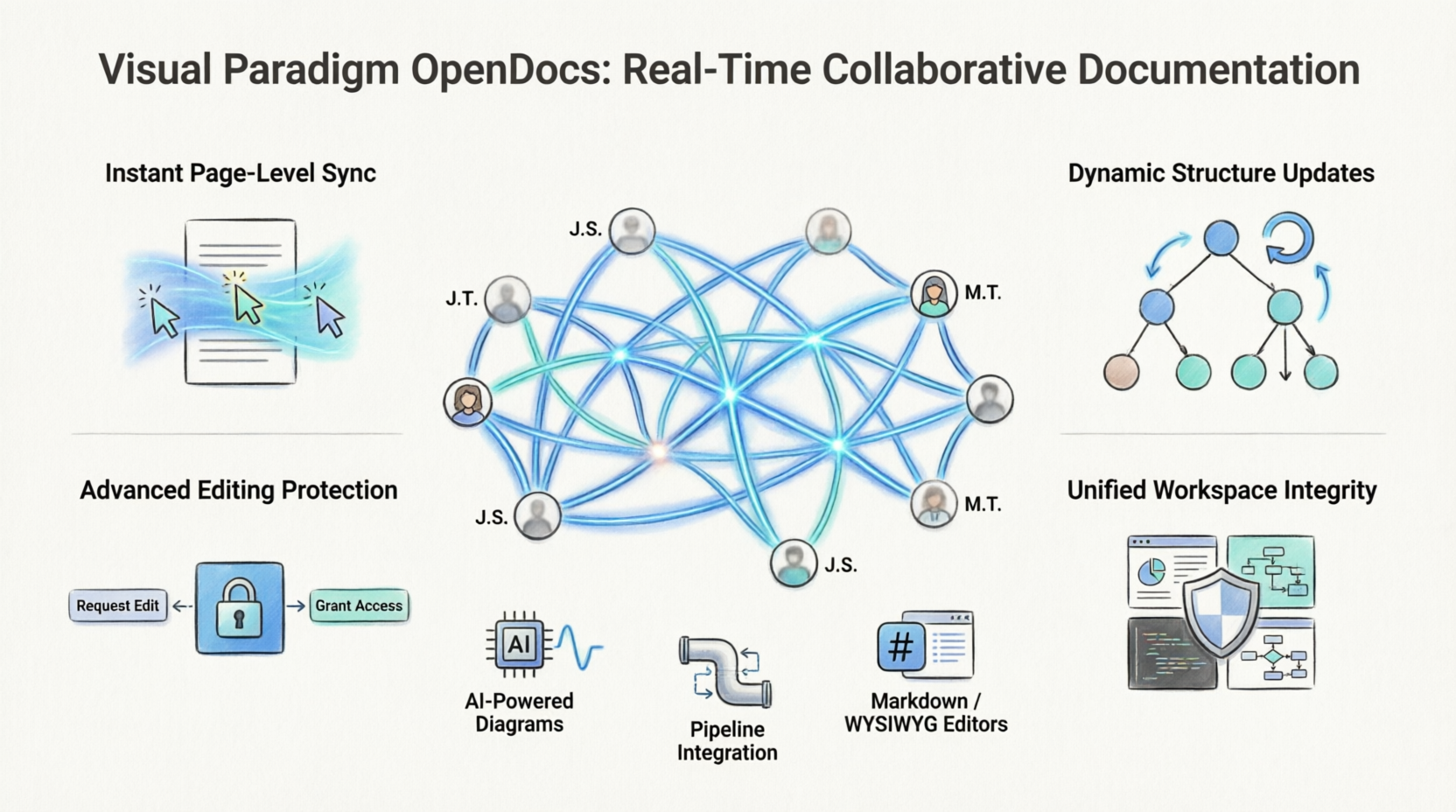
Recent significant updates have transformed OpenDocs into a powerhouse of real-time synchronization and sophisticated editing protections. This case study explores how these enhancements—specifically instant page-level synchronization, dynamic structure updates, and advanced editing protection—are enabling engineering, business, and project teams to work together in a unified digital space without friction, ensuring that documentation remains accessible, searchable, and perfectly aligned with design efforts.
The Challenge: Fragmented Workflows in Complex Projects
Before the advent of integrated platforms like OpenDocs, teams faced several critical pain points:
- Version Control Chaos: Multiple team members working on the same document often led to overwrites, lost changes, and confusion about which version was the “source of truth.”
- Disconnected Tools: Diagrams created in desktop applications had to be exported as static images and manually inserted into documentation, making updates tedious and error-prone.
- Structural Misalignment: Changes to document organization (folders, nodes, sections) were not reflected in real-time, causing team members to navigate outdated roadmaps.
- Collaboration Friction: Lack of real-time visibility into colleagues’ edits meant teams could not truly collaborate interactively, leading to siloed work and delayed feedback loops.
The Solution: Visual Paradigm OpenDocs
Visual Paradigm OpenDocs serves as a centralized hub for all project knowledge. Integrated with Visual Paradigm’s powerful visual modeling tools, it provides a comprehensive platform where documentation and visual design coexist seamlessly. The platform is built on four pillars of innovation that address the core challenges of modern collaborative documentation.
1. Instant Page-Level Synchronization: True Real-Time Collaboration
The cornerstone of the latest OpenDocs update is instant page-level synchronization. This feature enables true real-time collaborative editing, transforming how teams interact with shared documentation.
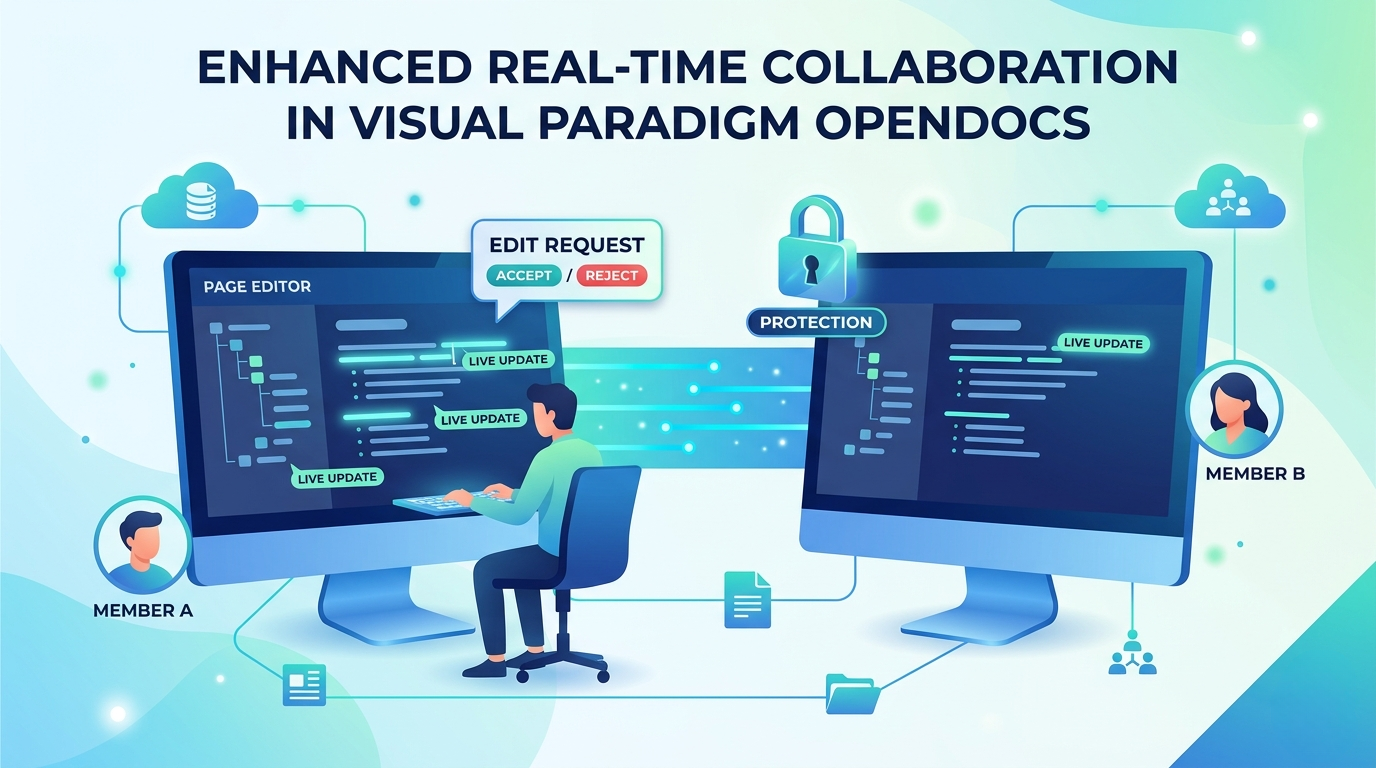
When multiple team members work on the same documentation page, changes appear dynamically on everyone’s screen. There is no need to refresh the browser or wonder whether you are viewing the latest version. As colleagues refine content, add comments, or restructure paragraphs, the updates flow directly onto your screen in real-time. This fosters a truly interactive environment where brainstorming sessions, requirement refinements, and technical specifications can evolve collaboratively, mirroring the fluidity of in-person whiteboard sessions but in a persistent, searchable digital format.
2. Dynamic Structure and Tree Updates: Maintaining Organizational Clarity
Maintaining the organization of complex projects is a team effort, and OpenDocs ensures that structural changes are communicated instantly across the workspace. With enhanced structure-level synchronization, any modifications made to the document tree are reflected immediately for all logged-in users.
This includes:
- Creating new nodes and folders
- Moving existing sections to different locations
- Deleting obsolete content
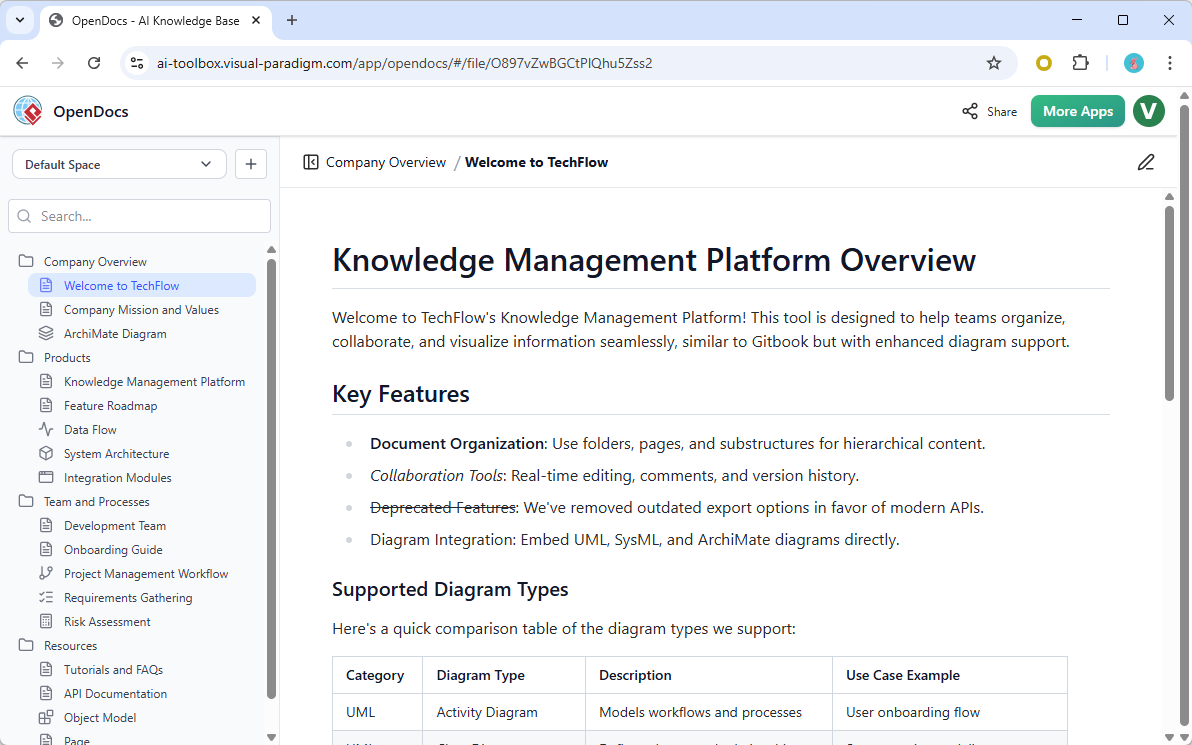
This real-time structural awareness ensures that every team member is always navigating the most current project roadmap. Whether you are a developer looking for the latest API specifications or a product manager reviewing user stories, you can trust that the document hierarchy reflects the current state of the project. This eliminates the confusion of searching for content in outdated folder structures and ensures that knowledge discovery remains efficient and intuitive.
3. Advanced Editing Protection and Conflict Resolution: Safeguarding Data Integrity
While real-time collaboration is powerful, it introduces the risk of accidental overwrites and conflicting edits. Visual Paradigm addressed this challenge with a robust editing rights protection system that manages concurrent editing through an intuitive request-and-grant workflow.
The system operates through three key mechanisms:
Takeover Requests: If a page is already being edited by one team member, subsequent users who attempt to edit the same page are prompted to request access. This prevents unintentional conflicts and ensures that only one person has write access at any given time.
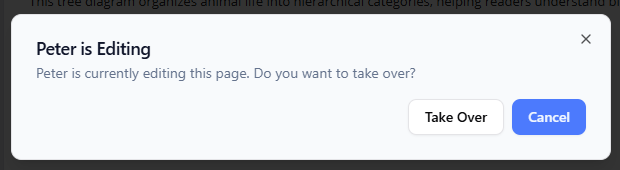
Interactive Permission: The current editor receives a notification when a colleague requests takeover rights. They can then choose to accept or reject the request based on their current workflow. This human-centric approach respects the editor’s context and allows for graceful handoffs.

Grace Periods: Recognizing that editors may need time to finalize their thoughts, the system offers a “Ask again in 30 seconds” option. This provides ample time to complete sentences, save progress, and prepare for the handoff, ensuring that no work is lost in the transition.
This sophisticated conflict resolution mechanism ensures data integrity while maintaining the fluidity of collaboration. Teams can work confidently, knowing that their contributions are protected and that the system intelligently manages concurrent access.
4. Unified Workspace Integrity: Independent Change Tracking
The latest architecture of OpenDocs ensures that every contribution is respected and tracked independently. The system intelligently monitors changes across different pages and structural levels, meaning that work on one section of the project remains secure and unaffected by updates happening elsewhere in the workspace.
This unified workspace integrity provides a stable and reliable collaborative documentation platform where teams can work on multiple aspects of a project simultaneously without fear of interference. Whether one team is refining technical specifications while another is updating user stories, both groups can proceed with confidence, knowing that their work is isolated yet integrated within the broader project context.
Core Capabilities: Beyond Real-Time Collaboration
While the recent updates focus on collaboration enhancements, Visual Paradigm OpenDocs offers a comprehensive suite of features that make it a complete knowledge management solution.
AI-Powered Visual Generation
OpenDocs leverages artificial intelligence to streamline the creation of complex diagrams and visual assets:
- Text-to-Diagram Engine: Users can generate complex diagrams instantly from plain-text descriptions, eliminating the manual effort of drawing each component.
- Diverse Modeling Formats: The platform supports automatic AI generation for flowcharts, Entity Relationship Diagrams (ERDs), UML Component and Composite Structure Diagrams, PERT charts, mind maps, and deployment models.
- AI Conversational Assistant: An integrated chat interface allows users to clarify text, request real-time editing suggestions, or auto-generate inline documentation, making the writing process more efficient and intelligent.
Hybrid Documentation & Content Editing
Recognizing that teams have diverse preferences and skill sets, OpenDocs offers flexible editing options:
- Dual-Editor Support: Users can draft content using a clean, developer-friendly editor with live previews and code blocks, or opt for a standard WYSIWYG editor for non-technical users. This flexibility ensures that both engineers and business stakeholders can contribute effectively.
- Flexible Page Widths: The platform allows adjustments between “Default” width (optimal for long-form reading) and “Full” width settings, enabling users to view sprawling spreadsheets or massive system architecture maps without horizontal scrolling.
- Tabbed Groups Layout: Structured multi-tab blocks allow individual tabs to house fresh pages, reusable system components, external links via iframes, or automated Table of Contents (TOC) trees, providing organized and navigable content structures.
The Pipeline & Ecosystem Synchronization
One of OpenDocs’ most powerful features is its integration with the broader Visual Paradigm ecosystem through “The Pipeline”:
- Centralized Artifact Transit Hub: The Pipeline serves as a secure cloud repository layer that bridges Visual Paradigm Desktop, VP Online, and OpenDocs, ensuring seamless data flow across platforms.
- On-the-Fly Editing: Rather than embedding flat, static screenshots, users can embed live, editable diagram components that can be re-opened and updated directly inside the document page. This ensures that diagrams remain current and interactive.
- Automated Versioning: The system tracks historical revisions of models and assets. When a core model is updated in the desktop app or chatbot ecosystem, changes seamlessly propagate across the documentation workspace, eliminating outdated information.
- Rich Media Syncing: Direct cloud pipelines support advanced assets like interactive digital flipbooks, slideshows, and complex data charts, enriching the documentation experience.
Organization & Sharing
OpenDocs provides robust tools for organizing and distributing knowledge:
- Hierarchical Knowledge Trees: A familiar file-system style folder structure with nested folders allows teams to logically separate massive corporate repositories and product manuals, making navigation intuitive and scalable.
- One-Click Publishing: Teams can share the entire secure, read-only knowledge space with external stakeholders via a single link, requiring no platform login or software installation from viewers. This simplifies client reviews, stakeholder updates, and public documentation releases.
Use Cases: Transforming Industries
Visual Paradigm OpenDocs is versatile enough to serve various industries and use cases:
Software Architecture Documentation: Engineering teams can maintain living documentation that evolves alongside their codebase. AI-generated diagrams keep architectural visuals current, while real-time collaboration ensures that all developers are aligned on design decisions.
Product Requirements Management: Product managers can collaborate with designers and developers in real-time to refine user stories and requirements. The hybrid editor allows for both technical specifications and business-focused narratives within the same document.
HR Onboarding Materials: HR teams can create interactive onboarding guides with embedded videos, flipbooks, and organizational charts. New hires can access these materials via simple links, and HR can update content in real-time as policies evolve.
Technical Manuals and User Guides: Technical writers can produce comprehensive manuals with live diagrams that update automatically when underlying models change. The tabbed layout allows for organized presentation of complex procedures and troubleshooting guides.
Conclusion
Visual Paradigm OpenDocs represents a paradigm shift in how teams approach documentation and knowledge management. By combining real-time collaboration, AI-powered visual generation, and seamless ecosystem integration, it transforms documentation from a static afterthought into a dynamic, living asset that drives project success.
The recent enhancements—instant page-level synchronization, dynamic structure updates, advanced editing protection, and unified workspace integrity—address the core challenges of collaborative documentation. Teams no longer need to worry about version conflicts, outdated structures, or disconnected tools. Instead, they can focus on what matters most: creating great products and delivering value to their customers.
As organizations continue to embrace remote and hybrid work models, the need for robust, intuitive collaboration tools will only grow. Visual Paradigm OpenDocs stands at the forefront of this evolution, offering a comprehensive solution that empowers teams to work together seamlessly, maintain knowledge integrity, and accelerate project delivery. Whether you are documenting complex systems, managing product requirements, or building interactive knowledge bases, OpenDocs provides the foundation for truly collaborative and effective documentation practices.
Reference
- Visual Paradigm OpenDocs Features: Overview of Visual Paradigm OpenDocs capabilities and features for collaborative documentation.
- Visual Paradigm OpenDocs Platform: Official platform page for Visual Paradigm OpenDocs, an AI-powered documentation and knowledge management tool.
- Mastering Visual Paradigm OpenDocs: The Ultimate Guide: Comprehensive guide to AI-powered knowledge management and the Pipeline ecosystem in Visual Paradigm OpenDocs.
- Visual Paradigm’s Pipeline Hands-On Review: Detailed review of Visual Paradigm’s Pipeline integration between Desktop and OpenDocs.
- AI Composite Structure Diagram Generator in OpenDocs: Release announcement for AI-powered composite structure diagram generation in OpenDocs.
- OpenDocs Entity Relationship Diagram (ERD) AI Generation: Update on AI generation capabilities for Entity Relationship Diagrams in OpenDocs.
- Mastering the Pipeline in Visual Paradigm OpenDocs: Complete guide to streamlined knowledge management using the Pipeline in Visual Paradigm OpenDocs.
- AI PERT Chart Generator in OpenDocs: Release information for AI-powered PERT chart generation in Visual Paradigm OpenDocs.
- OpenDocs AI Mind Map Integration Update: Update on AI mind map integration features in Visual Paradigm OpenDocs.
- OpenDocs WYSIWYG Editor Update: Announcement of WYSIWYG editor improvements in the AI knowledge management tool.
- Visual Paradigm OpenDocs: The Complete Developer’s Guide: Comprehensive developer’s guide to AI-powered technical documentation with Visual Paradigm OpenDocs.
- From Model to Manual: A Software Engineer’s Guide: Guide for software engineers on syncing Visual Paradigm Desktop diagrams with OpenDocs.
- Visual Paradigm OpenDocs Tutorial Video: Video tutorial demonstrating Visual Paradigm OpenDocs features and workflows.
- Visual Paradigm OpenDocs Page Width Settings Update: Release notes for page width customization options in OpenDocs.
- OpenDocs Tabbed Group Feature Update: Announcement of the tabbed group layout feature in Visual Paradigm OpenDocs.
- Case Study: Streamlining Knowledge Management with Visual Paradigm OpenDocs Pipeline: Case study examining knowledge management streamlining using the OpenDocs Pipeline.
- From Concept to Knowledge Base: A Third-Party Review: Third-party review of Visual Paradigm OpenDocs workflow from concept to knowledge base.
- AI Diagram to OpenDocs Pipeline: Information on the AI diagram integration pipeline between Visual Paradigm tools and OpenDocs.
- Visual Paradigm OpenDocs Demo Video: Demonstration video showcasing Visual Paradigm OpenDocs capabilities.
- Visual Paradigm OpenDocs Tutorial: Tutorial video for getting started with Visual Paradigm OpenDocs.
- Visual Paradigm OpenDocs Playlist: Collection of videos covering various aspects of Visual Paradigm OpenDocs.
- AI Flowchart Generator OpenDocs Update: Update on AI-powered flowchart generation capabilities in OpenDocs.
Related posts:
 Case Study: Modernizing Our Architecture Documentation with VPasCode – An Product Review
Diagram-as-Code Made Simple: A Comprehensive Guide to Visual Paradigm VPasCode
The Modern Modeler’s Guide: Activity Diagrams with VPasCode & AI
Why UML Remains Relevant in the AI Era: Visual Paradigm, Diagram-as-Code, and Modern Agile
Case Study: Modernizing Our Architecture Documentation with VPasCode – An Product Review
Diagram-as-Code Made Simple: A Comprehensive Guide to Visual Paradigm VPasCode
The Modern Modeler’s Guide: Activity Diagrams with VPasCode & AI
Why UML Remains Relevant in the AI Era: Visual Paradigm, Diagram-as-Code, and Modern Agile