


Introduction: Why I Tested OpenDocs for My Dev Team
As a senior software architect who’s wrestled with fragmented documentation tools for over a decade—from Confluence wikis that became graveyards of outdated specs to Miro boards that never synced with our actual codebase—I was skeptical when I first heard about OpenDocs. Another “all-in-one” platform? Really?
But after spending three weeks integrating OpenDocs into a mid-sized microservices migration project, I’m ready to share an unfiltered, third-party perspective. This isn’t a marketing pitch; it’s a developer-to-developer review of whether Visual Paradigm’s OpenDocs actually delivers on its promise to unify text documentation and visual modeling in a single, AI-enhanced workspace.
If you’re tired of context-switching between your text editor, diagramming tool, and knowledge base, read on. Here’s what OpenDocs gets right, where it falls short, and whether it deserves a spot in your dev toolkit.
What Is OpenDocs, Really?
OpenDocs is Visual Paradigm’s web-based knowledge management platform designed to bridge the gap between technical documentation and visual system modeling. Unlike traditional wikis that treat diagrams as static image attachments, OpenDocs embeds a full-featured diagramming engine directly into its page editor—allowing you to create, edit, and iterate on flowcharts, UML diagrams, and architecture visuals without leaving your document.
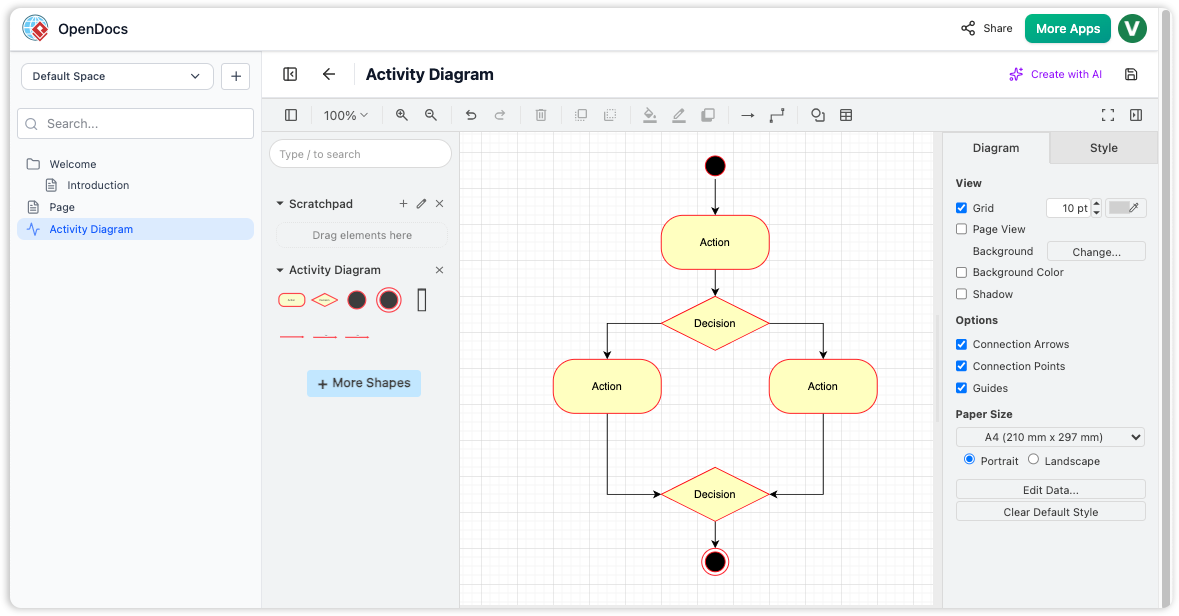
OpenDocs interface showing the integrated diagram editor with a sample Activity Diagram featuring actions, decisions, and flow connectors.
Experience the Power of OpenDocs
Your personal knowledge base and documentation hub.
Get Started with OpenDocs
Why Visual Paradigm
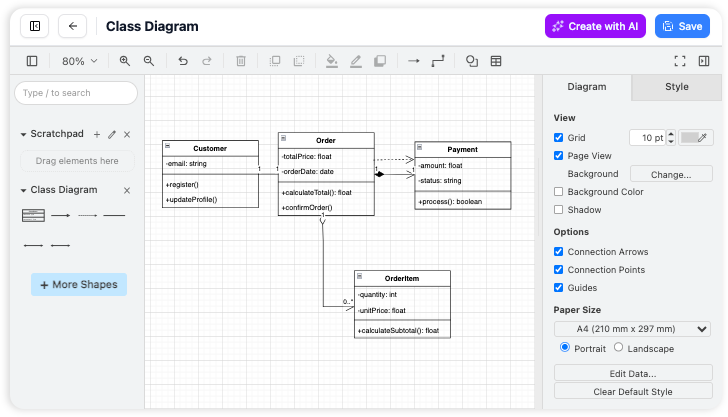
Create diagrams directly on your page
We’ve built a better way. We put a powerful drawing tool right inside your workspace so you can create pictures and write your text in the same spot. It’s one single home for all your work, keeping you focused and organized without the hassle of jumping between different tabs.
AI-Powered Diagram Generation
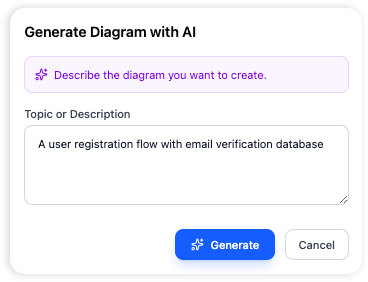
From a sentence to a diagram instantly. You shouldn’t have to fight with your mouse to create a flowchart. Just tell the AI what you need in plain English, and it draws the entire process for you. It’s the fastest way to get your ideas on paper without the manual work.
OpenDocs is your personal knowledge base and documentation hub. It provides an intuitive and flexible platform to create, organize, and share rich content, including text documents and diagrams. Whether you’re building a personal knowledge repository, creating project documentation, or collaborating with a team, OpenDocs offers the tools you need to capture and structure information effectively.
Organization
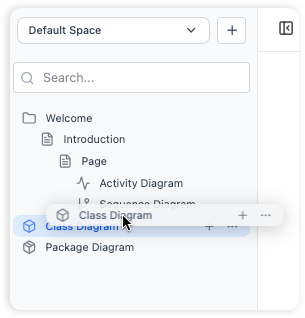
Hierarchical Folder Structure
Organize your documents and diagrams in a familiar tree-like structure with nested folders.
- Logical and scalable organization of your knowledge base
- Drag and drop files and folders to rearrange your hierarchy
Integrated Diagram Editor
Create a wide variety of diagrams directly within OpenDocs.
- Create visual documentation, such as flowcharts, UML diagrams, and mind maps,
- Vast library of shapes and stencils, making it easy to create professional-looking diagrams.
How to Use OpenDocs – Core Workflows
Master the essentials of building, documenting, and sharing your knowledge base.
Structure Knowledge
Build a robust hierarchy using top-level folders and sub-folders. Easily drag and drop to restructure as your projects grow.
Rich Text Editing
Create rich documents with headers, code blocks, and lists. See your formatting instantly with our real-time live preview.
Visual Diagrams
Complement your notes with visual models. Use professional shape libraries and connectors to illustrate complex relationships.
Ready to collaborate? Generate a unique URL to share your entire knowledge base instantly.
Key Benefits
- All-in-One Knowledge Hub: Combine text and diagrams in a single platform, eliminating the need to switch between multiple tools.
- Structure Your Thoughts: Organize knowledge hierarchically with nested folders, making it easy to navigate even large repositories.
- Effortless Collaboration: Share your entire knowledge base with a single click via a secure, read-only link.
- Visually Rich Documentation: Go beyond plain text by creating professional diagrams to illustrate complex processes and systems.
- Accessible Anywhere: Access your documentation from any device using a modern web browser—no desktop installation required.
Getting Started
Follow these steps to set up your workspace and begin documenting your ideas.
1. Launch & Initialize
Open the OpenDocs application. You will be greeted by a welcome screen where you can manage your recent projects.
2. Create and Name Your First Page
Click the “New Page” button in the sidebar to create a document, then give it a descriptive name to stay organized.
3. Write and Format Content
Use the page editor to start writing. You can use rich format tools to add structure and emphasis to your notes.
4. Generate Visual Diagrams
Click the “New Diagram” button to open the visual editor, allowing you to create flowcharts or models to complement your text.
5. Organize with Folders
Create new folders via the sidebar and simply drag and drop your pages or diagrams into them to build a structured knowledge base.
Frequently Asked Questions
Everything you need to know about getting the most out of OpenDocs.
Can I import existing documents into OpenDocs?
OpenDocs is designed for creating content within the application. Currently, there is no direct import feature for existing files.
What types of diagrams can I create?
The integrated diagram editor supports a wide variety of diagrams, including flowcharts, UML diagrams, network diagrams, mind maps, and more.
Can I export my documents to other formats?
The application is focused on sharing within the platform. At this time, there is no direct export functionality to other file formats like PDF or Word.
Is there a version history for my documents?
OpenDocs does not currently have a built-in version history feature. We recommend maintaining regular backups of your key documentation.
Can I share a single page?
The sharing feature is designed to share the entire knowledge base to provide full context. There is no option to share individual pages or folders.
Is OpenDocs available as a desktop app?
OpenDocs is a web-based application, which means you can access it from any modern web browser without any installation required.
Who develops OpenDocs?
OpenDocs is developed and offered by Visual Paradigm, a leading provider of professional modeling and diagramming software tools.
## How to track the history revision of the OpenDocs Page: Browse Share History: Stay Organized with OpenDocs
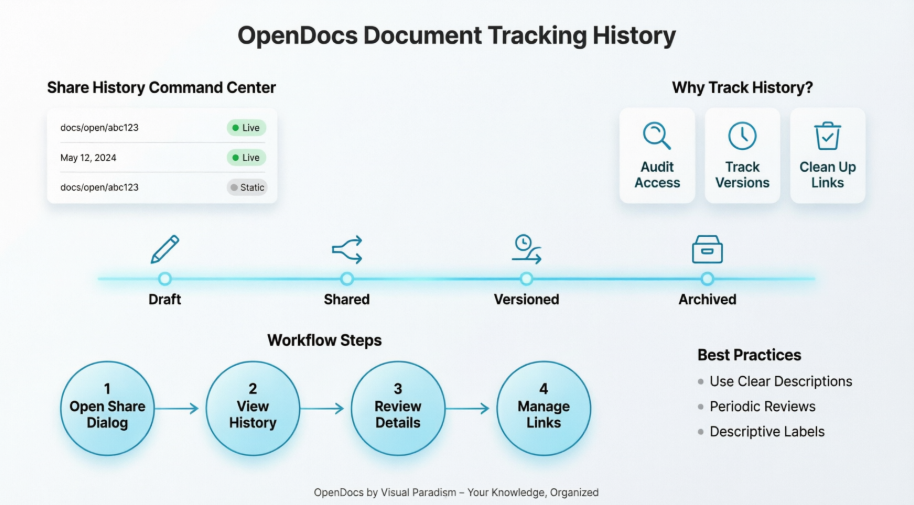
In our recent updates, we’ve covered how to select specific pages, choose between static and live modes, and embed content. But once you have shared several different versions of your project, how do you keep track of them? Today, we are exploring Browse Share History in Visual Paradigm OpenDocs.
Think of the Share History as your command center. As a professional knowledge management platform, we believe that staying organized is just as important as the information itself.
Why is Share History Important?
When you use a knowledge management tool for large projects, you might generate multiple share links for different stakeholders. Share History allows you to:
- Audit Your Access: See exactly which pages were shared and when.
- Track Versions: Distinguish between different Static Snapshots you’ve sent out over the months.
- Clean Up: Identify old or outdated links that are no longer needed.
How to Browse Your History
Accessing your history is straightforward and integrated directly into your workflow:
- Open the Share Dialog: Click the Share button in the top right corner.
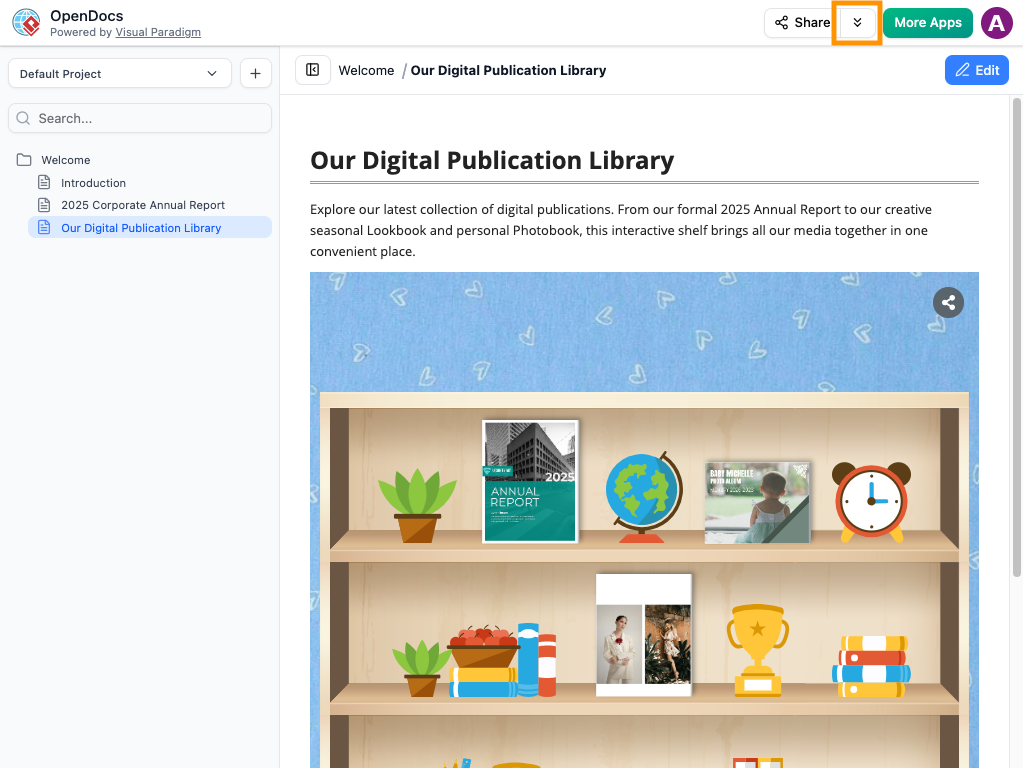
- View History: Look for the Browse Share History option (typically located within the sharing interface).
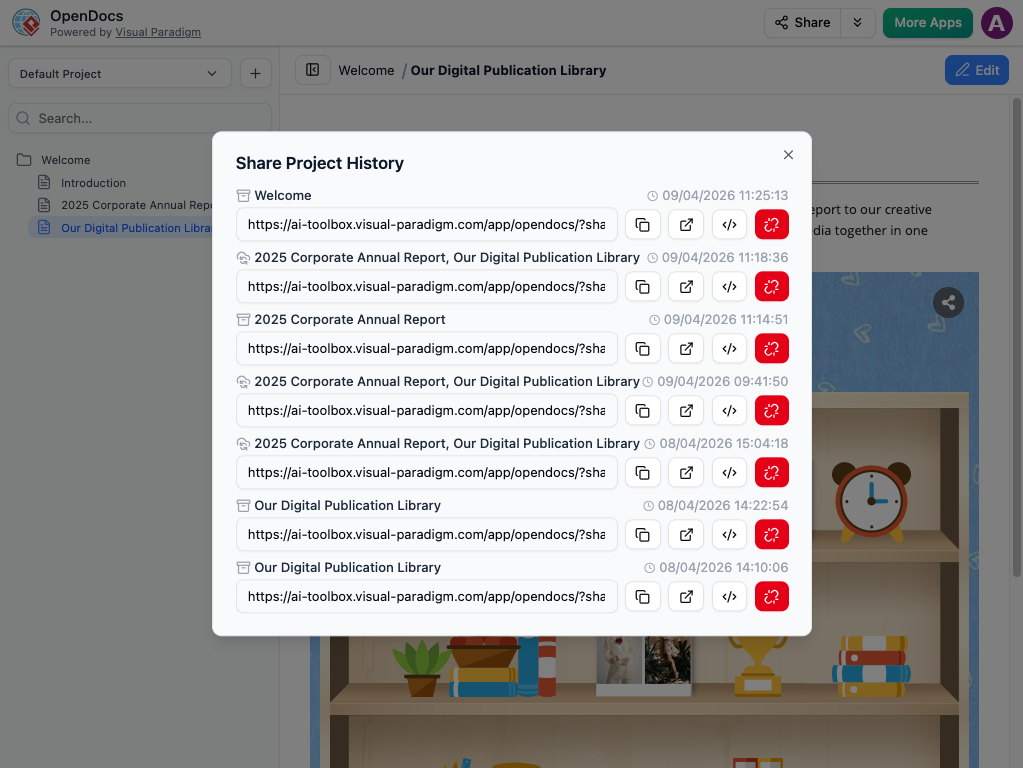
- Review Details: Here, you will see a list of all active and past shares, including their descriptions, the date they were created, and whether they are “Live” or “Static.”
- Manage Links: From this view, you can quickly copy a URL again if a stakeholder loses their link, or grab the embed code for an existing share.
Best Practices for Organized Sharing
To get the most out of your knowledge management platform, we recommend these habits:
- Use Clear Descriptions: When you share, use the description field (e.g., “Internal HR Policy – July Update”). This makes your Share History much easier to read later.
- Periodic Reviews: Check your history once a month to ensure you aren’t sharing pages that have become obsolete.
Want to see your sharing history? Visit the OpenDocs feature page.
Developer Perspective: What OpenDocs Gets Right (and Where It Stumbles)
✅ The Wins
1. True Integration, Not Just Embedding
Most tools let you attach a diagram. OpenDocs lets you edit it inline. As someone who’s wasted hours exporting from Lucidchart, uploading to Confluence, then realizing the labels are misaligned—this is transformative. The diagram editor supports UML, ERD, BPMN, and flowcharts with professional stencils, and changes sync instantly with your content.
2. AI That Actually Saves Time
The AI diagram generator isn’t just a gimmick. Typing “Show me the authentication flow for our OAuth2 implementation with refresh tokens” produced a usable sequence diagram in seconds. Yes, I tweaked the styling afterward, but it eliminated the blank-canvas paralysis that kills productivity.
3. Folder Structure That Scales
The hierarchical organization feels intuitive for developers accustomed to file systems. Drag-and-drop reordering, nested folders, and clear visual indicators make it easy to restructure documentation as projects evolve—no more “Documentation_v2_FINAL_revised” chaos.
4. Zero-Install Accessibility
Being web-based means my remote team accesses the same knowledge base from Windows, macOS, and Linux without configuration headaches. No more “works on my machine” documentation issues.
⚠️ The Caveats
1. No Native Export to PDF/Word
If your organization requires formal document deliverables, you’ll need to screenshot or copy-paste content. For internal agile teams, this isn’t a blocker—but enterprise compliance folks may push back.
2. Sharing Is All-or-Nothing
You can share the entire knowledge base via a read-only link, but not individual pages. For large repos with sensitive sections, this limits granular access control. Workaround: maintain separate OpenDocs workspaces for different confidentiality levels.
3. Version History Isn’t Built-In
While Share History tracks shared links, there’s no native document versioning. I mitigated this by prefixing page titles with dates (e.g., 2026-04-API-Spec-v2) and maintaining a CHANGELOG.md page—but native Git-like versioning would be a welcome addition.
4. No Bulk Import for Legacy Docs
Migrating existing documentation requires manual copy-paste. For teams with extensive Confluence or Notion histories, this adds upfront effort. Visual Paradigm has indicated this is on the roadmap, but it’s not available today.
Who Should Use OpenDocs?
| Role | Why It Fits |
|---|---|
| Software Architects | Centralize system diagrams alongside architectural decision records (ADRs) with live-editable visuals |
| DevOps Engineers | Document infrastructure workflows with flowcharts that stay synchronized with runbooks |
| Product Managers | Link user stories to process diagrams without switching tools |
| Technical Writers | Embedding interactive diagrams for developer audiences |
| Consultants | Rapidly generate client-facing documentation with AI-assisted diagram creation |
Conclusion: Should You Adopt OpenDocs?
After three weeks of real-world use, OpenDocs has earned a permanent spot in my toolkit—not as a replacement for every documentation need, but as the primary hub for technical specifications and system architecture.
Adopt OpenDocs if:
- You value keeping diagrams and text in a single, searchable workspace
- Your team wants professional diagramming without leaving the editor
- You need to rapidly prototype visual explanations of complex systems
- You prefer web-based tools with zero client installation
Look elsewhere if:
- You require granular page-level sharing permissions
- Your workflow depends on exporting to formal document formats
- You need robust native version control for every edit
- You’re migrating massive existing documentation libraries and need bulk import
For most agile development teams, the productivity gains from reduced context-switching and AI-assisted diagramming outweigh the current limitations. Visual Paradigm’s active development cadence suggests many caveats will be addressed in future updates.
My recommendation: Start with a pilot project. Create your API documentation or onboarding guide in OpenDocs, invite your team to collaborate, and measure the time saved versus your previous workflow. In my experience, the “aha moment” comes when a junior developer edits a sequence diagram directly within a spec document—and the senior architect reviews it without leaving the page. That’s the unified workflow OpenDocs delivers.
References
- OpenDocs Feature Overview: Official Visual Paradigm page detailing OpenDocs capabilities, integration options, and use cases for technical documentation and diagramming.
- Visual Paradigm OpenDocs: The Complete Guide to AI-Powered Knowledge Management: Comprehensive third-party guide covering setup, AI features, and best practices for team adoption.
- OpenDocs AI-Powered Knowledge Platform Release Notes: Official release documentation highlighting new features, improvements, and roadmap items for the OpenDocs platform.
- Visual Paradigm OpenDocs: The Complete Developer’s Guide: Developer-focused tutorial covering diagram integration, and collaboration patterns.
- Sync AI Diagram to OpenDocs: Pipeline Guide: Technical documentation for integrating diagrams from Visual Paradigm Desktop/Online into OpenDocs via the Pipeline feature.
- OpenDocs Review: AI-Powered Knowledge Platform for Team Collaboration: Independent review evaluating OpenDocs’ impact on team workflows, collaboration features, and ROI.
- OpenDocs WYSIWYG Editor Update: Release notes detailing the addition of WYSIWYG editing capabilities.
- Streamline Documentation with Visual Paradigm Desktop to OpenDocs: Video tutorial demonstrating the workflow for pushing diagrams from Visual Paradigm Desktop into OpenDocs.
- Visual Paradigm Online to OpenDocs Export Guide: Documentation for exporting diagrams created in Visual Paradigm Online directly into OpenDocs workspaces.
- AI Breakdown Structure Chart Maker in OpenDocs: Feature spotlight on AI-assisted creation of work breakdown structures and hierarchical charts.
-
OpenDocs Tool Page: Central hub for accessing the OpenDocs application, feature documentation, and getting started resources.
Related posts:
 Gantt vs PERT Charts: An Agile Project Manager’s Guide to Visual Planning Tools
From Concept to Cloud: A Team’s Journey Implementing AI-Powered Architecture Design with Visual Paradigm
From Idea to Architecture: My Hands-On Review of Visual Paradigm’s AI Cloud Design Studio
Gantt vs PERT Charts: An Agile Project Manager’s Guide to Visual Planning Tools
From Concept to Cloud: A Team’s Journey Implementing AI-Powered Architecture Design with Visual Paradigm
From Idea to Architecture: My Hands-On Review of Visual Paradigm’s AI Cloud Design Studio
 UML Diagram Generators vs. Full Modeling Platforms: Why One Isn’t Enough