
Mastering Use Case Diagrams: A Step-by-Step Guide to System Modeling
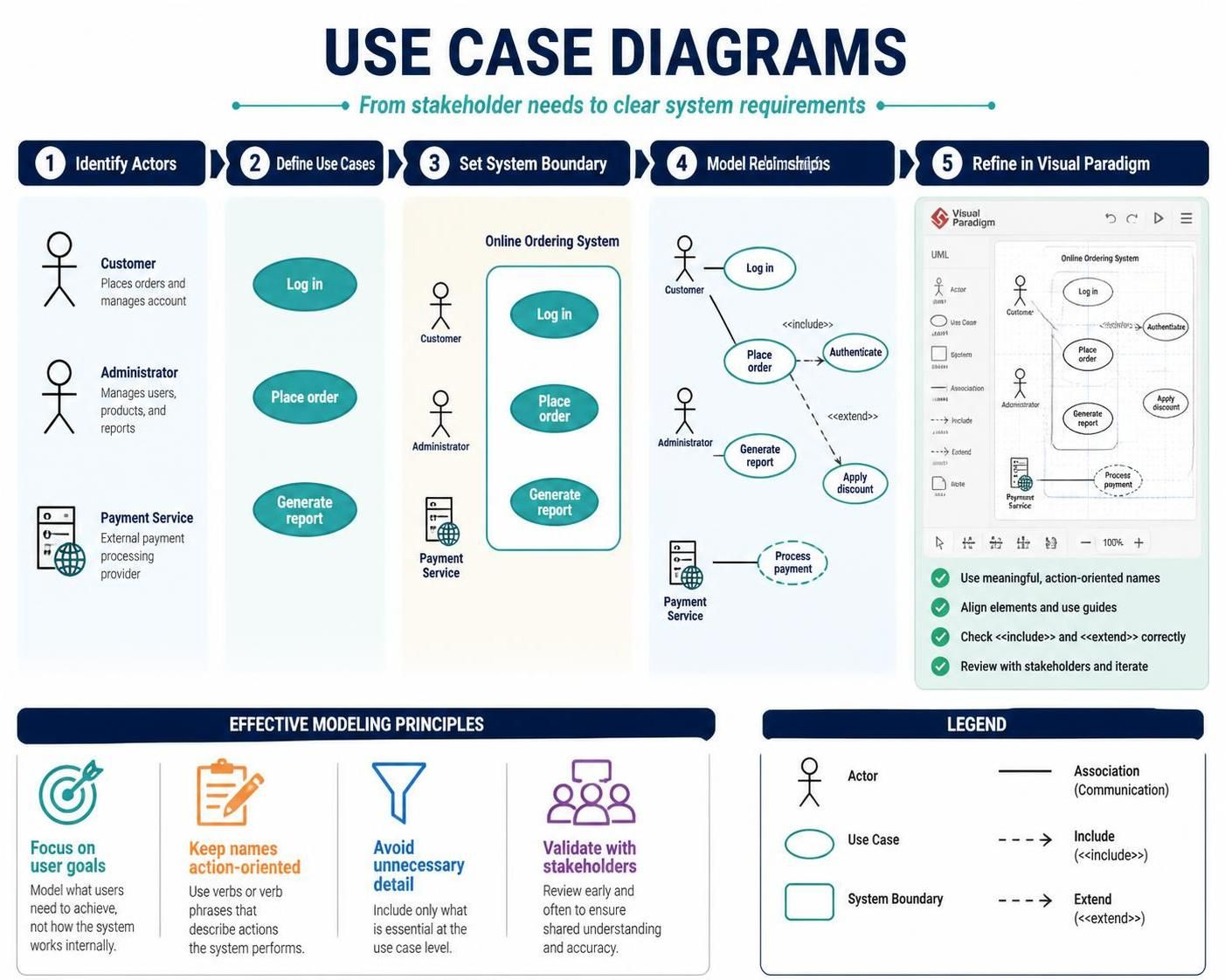
In the complex landscape of software development and systems analysis, clarity is paramount. Before a single line of code is written, stakeholders must agree on what the system should do. This is where Use Case Diagrams come into play. As a fundamental component of the Unified Modeling Language (UML), use case diagrams provide a high-level visual summary of the functional requirements of a system. They map out who interacts with the system (actors) and what they can achieve (use cases).
The 5-Step Workflow for Modeling Systems
Creating a robust use case diagram is not about drawing shapes randomly; it is a structured process that transforms vague stakeholder needs into precise system requirements. Based on the industry-standard workflow, here is how to build a system model from scratch.
1. Identify Actors
The journey begins by identifying the Actors. An actor represents any external entity that interacts with the system. In the context of an Online Ordering System, actors are not just human users. They can be:
- Customer: A user who places orders and manages their account.
- Administrator: A user who manages products, users, and generates reports.
- Payment Service: An external system or automated service that processes payments.
2. Define Use Cases
Once you know who is interacting with the system, you must define Use Cases. A use case is a specific goal or function that an actor wants to achieve. These should be described using action-oriented verbs. For our system, the primary use cases include:
- Log in: Authenticating the user.
- Place order: The core transaction of the system.
- Generate report: A data analysis task for the administrator.
3. Set System Boundary
To prevent scope creep and clarify what is included in the current project, you must define the System Boundary. This is the box that encapsulates all the use cases. Anything inside the box is part of the system; anything outside is an actor. This visual distinction helps developers and stakeholders understand where the software ends and the external environment begins.
4. Model Relationships
Connecting actors to use cases is the most critical step. You must define the type of relationship:
- Association: A simple line indicating a user can perform a task.
- Include (<
>): Mandatory behavior. For example, Place order includes Authenticate because you cannot place an order without logging in first. - Extend (<
>): Optional behavior. For example, Apply discount is an extension of Place order—it only happens if the customer qualifies for a deal.
5. Refine in Visual Paradigm
Finally, the modeling process is refined using professional tools like Visual Paradigm. This stage involves cleaning up the diagram, ensuring alignment, and verifying that all <
Effective Modeling Principles
To ensure your diagrams are useful, adhere to these core principles:
- Focus on User Goals: Model what users need to achieve, not how the system works internally.
- Keep Names Action-Oriented: Use verb phrases (e.g., “Place Order”) rather than nouns (e.g., “Order”).
- Avoid Unnecessary Detail: Use case diagrams are high-level. Do not clutter them with data fields or UI buttons.
- Validate with Stakeholders: Review the diagram early and often to ensure shared understanding.
Understanding the Legend
When reading or creating these diagrams, familiarity with the standard notation is essential. Here is the breakdown of the symbols used in the diagram above:
| Actor (Stick Figure) | Represents a user, system, or role that interacts with the system. |
| Use Case (Oval) | Represents a specific function or goal (e.g., Log in, Place order). |
| System Boundary (Rectangle) | Defines the scope of the system being modeled. |
| Association (Solid Line) | Indicates communication or interaction between an actor and a use case. |
| Include/Extend (Dashed Arrow) | <<include>> denotes mandatory behavior; <<extend>> denotes optional behavior. |