
Mastering UML Sequence Diagrams: Modeling Break Fragments in Visual Paradigm
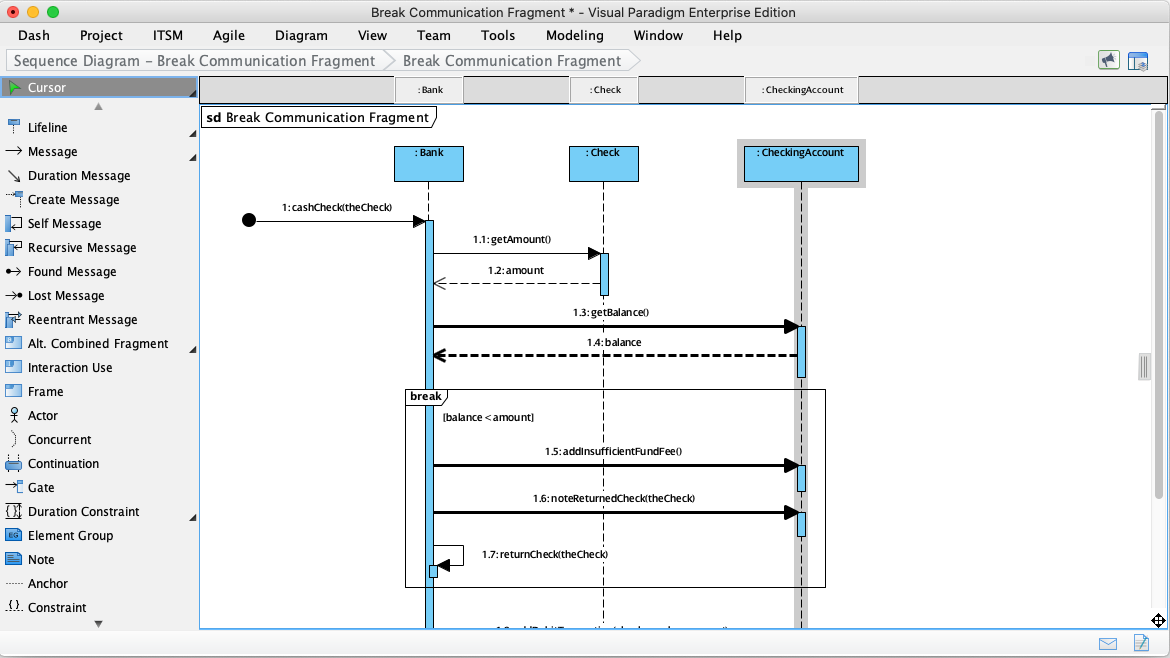
Sequence diagrams are the backbone of object-oriented system design, offering a dynamic view of how software components interact over time. Whether you are debugging a race condition or designing a new feature, visualizing interactions provides the clarity needed to make informed decisions. In this tutorial, we will walk through the architecture of a “Break Communication” scenario using Visual Paradigm, focusing on how to model conditional logic using the break combined fragment.
We will analyze a specific interaction where a Bank object attempts to cash a check, but the process is interrupted due to insufficient funds. This scenario perfectly illustrates the power of standard UML modeling to handle real-world exception handling.
Understanding the Components
Before diving into the logic, let’s identify the key actors and objects involved in this diagram. In the Visual Paradigm interface, these are represented by Lifelines.
- :Bank: The initiating object responsible for processing the transaction.
- :Check: The object representing the check being deposited or cashed.
- :CheckingAccount: The object representing the destination account where funds are verified.
Each lifeline has a vertical dashed line extending downward, representing the passage of time. The blue rectangles (activation bars) on these lines indicate when an object is actively performing an operation.
Step-by-Step: Modeling the Interaction
To build this diagram in Visual Paradigm, you start by adding your lifelines and then connecting them with messages. The interaction in our example follows a logical flow:
- The Initiation (Message 1): The process begins with an asynchronous message
1:cashCheck(theCheck)sent to the :Bank lifeline. This triggers the bank’s processing logic. - Information Gathering (Messages 1.1 & 1.3): To validate the check, the bank queries the check object for the amount (
1.1:getAmount()) and subsequently queries the checking account for the current balance (1.3:getBalance()). - Receiving Data (Messages 1.2 & 1.4): The :Check and :CheckingAccount lifelines return the data using dashed arrows (
1.2:amountand1.4:balance), representing return messages.
Implementing Logic with the ‘break’ Fragment
This is the critical part of the architecture. The diagram demonstrates a conditional flow where the standard process is interrupted if a specific condition is met. This is achieved using a Combined Fragment with the operator break.
In the Visual Paradigm interface, you drag an Alt. Combined Fragment or specifically a Break operator onto the diagram. A frame is created with the label break in the top-left corner. Inside this frame, you define the condition.
The condition for this specific interaction is (balance < amount). If the account balance is less than the check amount, the system enters this break fragment. This signals that the normal flow of the sequence diagram is “broken” or interrupted.
Handling the Exception Flow
Once inside the break fragment, the interaction proceeds with specific exception handling steps:
- Adding a Fee (Message 1.5): The bank sends a message
1.5:addInsufficientFundFee()to the checking account. This models the business logic of penalizing the account holder. - Returning the Check (Message 1.6): The bank sends
1.6:noteReturnedCheck(theCheck)back to the check object. This action effectively returns the check to the owner. - Termination (Message 1.7): Finally, the bank sends a return message
1.7:returnCheck(theCheck). This closes the interaction for this specific lifeline, completing the exception handling sequence.
By using the break fragment, we ensure that the diagram clearly communicates that if the condition is false (i.e., funds are sufficient), the steps inside the frame are skipped, and the standard flow continues.
Why Use Visual Paradigm for Sequence Diagrams?
Creating professional-grade sequence diagrams requires robust tooling. Visual Paradigm is a leading UML modeling software that offers comprehensive support for sequence diagrams and other UML artifacts. It bridges the gap between design and implementation through several key features:
- Intuitive Interface: Drag-and-drop functionality makes it easy to add lifelines, messages, and fragments.
- Standard Compliance: Fully supports UML 2.x standards, ensuring your diagrams are universally understood.
- Code Engineering: Visual Paradigm can generate code skeletons from sequence diagrams and reverse-engineer diagrams from existing code.
- Collaboration Features: Supports team collaboration with version control integration and real-time sharing options.
Whether you are debugging a tricky race condition or designing a new feature, sequence diagrams provide the clarity needed to make informed decisions. Leveraging powerful tools like Visual Paradigm further streamlines this process, allowing you to focus on design logic rather than drawing mechanics.
Conclusion
Sequence diagrams are more than just pretty pictures; they are vital communication tools that bridge the gap between abstract requirements and concrete implementation. By mastering the components—lifelines, messages, activation bars, and combined fragments—you can accurately model complex software behaviors.
As software systems continue to evolve, the ability to visualize interactions remains a cornerstone of effective software engineering. Using Visual Paradigm, you can quickly prototype interactions, validate logic with stakeholders, and generate documentation that stays in sync with your development process.