
Mastering UML Class Diagrams with VPasCode: A Deep Dive into Order Management Architecture
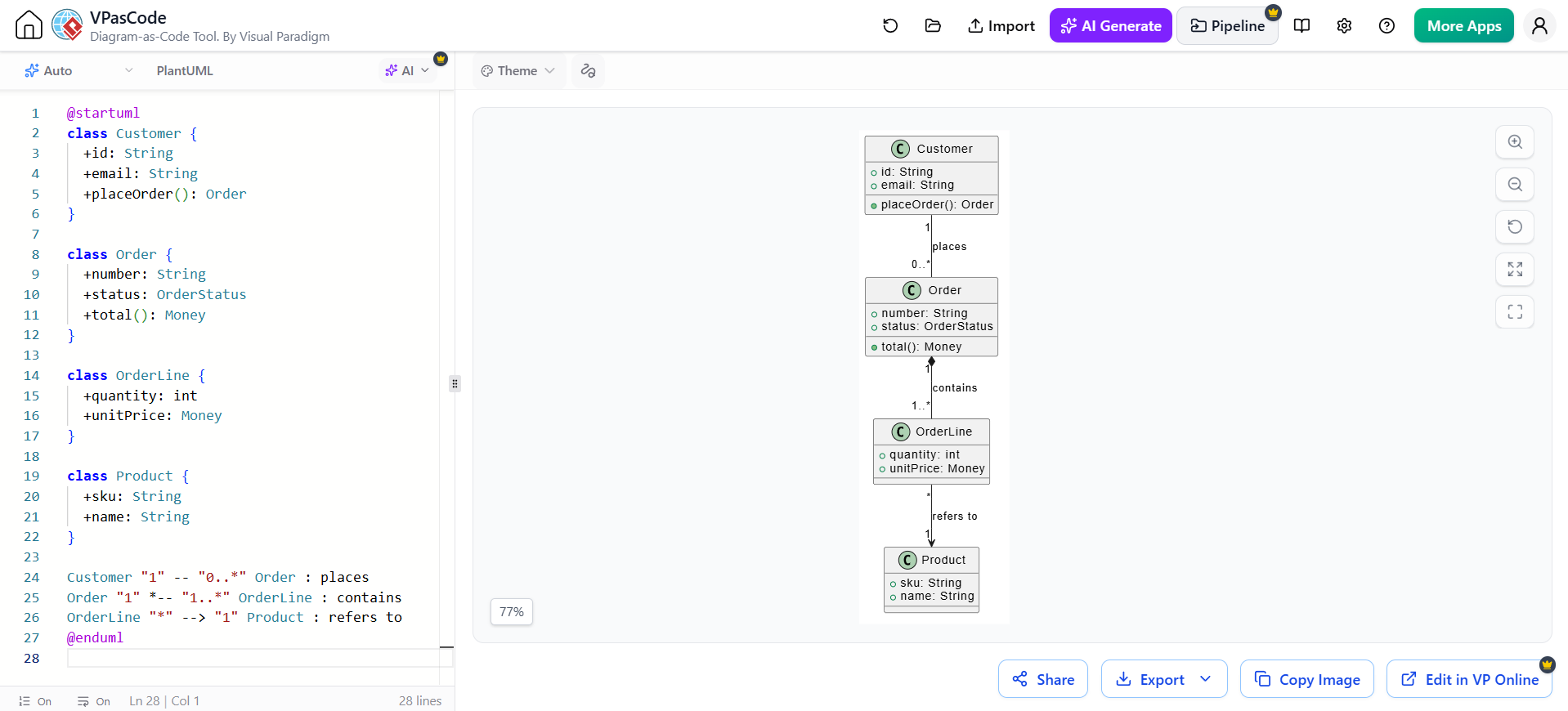
In the world of software engineering, few diagrams are as fundamental to understanding system structure as the UML Class Diagram. It serves as the blueprint for your object-oriented design, detailing the classes, their attributes, operations, and the critical relationships that bind them together. This tutorial explores how to leverage VPasCode (Diagram-as-Code) by Visual Paradigm to model a robust Order Management System, transitioning seamlessly from code to visual representation.
Understanding the Domain Model
Before diving into the syntax, we must understand the business logic behind the diagram. The provided example models a standard e-commerce scenario involving four core entities:
- Customer: The actor initiating the transaction.
- Order: The container for a specific transaction, holding metadata like status and total cost.
- OrderLine: The detailed breakdown of items within an order (the “many-to-many” bridge).
- Product: The catalog item being purchased.
This structure allows for a flexible system where one customer can place multiple orders, and a single order can contain various products.
Step-by-Step Implementation with VPasCode
VPasCode allows developers to write UML diagrams using text-based syntax, which is then rendered into a visual diagram. This approach is excellent for version control and rapid prototyping. Let’s break down the code structure line by line.
1. Defining the Classes
Each class is defined using the class keyword. Attributes and methods are listed inside the block. In UML syntax, the + symbol denotes public visibility, meaning these members are accessible from outside the class.
class Customer {
  +id: String
  +email: String
  +placeOrder(): Order
}

class Order {
  +number: String
  +status: OrderStatus
  +total(): Money
}
Notice the type definitions. For instance, : String or : int defines the data type, while (): Order indicates a method that returns an Order object.
2. Establishing Relationships
Relationships are the most critical part of a class diagram, as they define how objects interact. VPasCode uses specific symbols to denote these associations.
Association: Customer and Order
The line Customer "1" -- "0.." Order : places defines a standard association. The multiplicities are key here:
"1"(on the Customer side): One specific instance of Customer."0.."(on the Order side): Zero or many instances of Order.
This translates to: “One Customer can place zero or many Orders.”
Composition: Order and OrderLine
The relationship between an Order and its lines is stricter. The syntax Order "1" -- "1.." OrderLine : contains uses a filled diamond (), which represents Composition.
Composition implies a strong ownership lifecycle. If the Order is deleted, the OrderLine objects effectively cease to exist because they have no meaning without the order. This is different from simple association.
Dependency: OrderLine and Product
Finally, OrderLine "" --> "1" Product : refers to uses an open arrow. This represents a Dependency. It indicates that OrderLine uses or refers to Product data (like the name or SKU) but does not own it. Multiple OrderLines can refer to the same Product.
Visualizing the Architecture
When you run this code in the VPasCode editor, it generates a clean, hierarchical view of your system. The visual output renders the textual definitions into boxes and connectors, making the complexity of the relationships immediately obvious to stakeholders.
@startuml
class Customer {
  +id: String
  +email: String
  +placeOrder(): Order
}
class Order {
  +number: String
  +status: OrderStatus
  +total(): Money
}
class OrderLine {
  +quantity: int
  +unitPrice: Money
}
class Product {
  +sku: String
  +name: String
}

Customer "1" -- "0..*" Order : places
Order "1" *-- "1..*" OrderLine : contains
OrderLine "*" --> "1" Product : refers to
@endumlConclusion
By utilizing VPasCode, you can maintain your system architecture in code form, ensuring it stays in sync with your actual implementation. Whether you are a developer or a system architect, mastering these diagram-as-code tools allows for more efficient communication and a deeper understanding of the domain model.