
Mastering AI Domain Modeling with VP AI Ecosystem: Extracting Classes
In the realm of software engineering, the gap between abstract problem statements and concrete software architecture is often where projects fail. Historically, creating a Class Diagram required a deep dive into requirements, manual identification of entities, and hours of iterative sketching. However, modern tools like Visual Paradigm have revolutionized this workflow using AI Textual Analysis.
This tutorial explores the specific phase of the AI modeling wizard where the system identifies “Candidate Classes.” We will analyze a real-world scenario involving an ATM System to understand how AI distinguishes between actual domain objects and incidental nouns, laying the foundation for a robust architecture.
The Role of AI Textual Analysis
Before diving into the code or the visual elements, it is crucial to understand the underlying logic of the AI Textual Analysis tool. The system does not merely count words; it performs semantic analysis on the problem statement.
When a user provides a specification (e.g., “The system must allow a user to withdraw cash from their account”), the AI scans the text to find:
- Nouns: Potential entities (User, Cash, Account).
- Verbs: Potential operations or methods (Withdraw, Validate).
- Relationships: How nouns interact (A User owns an Account).
The goal of this step is to generate a “Candidate List.” These are the potential building blocks of your system that require further scrutiny before being finalized in the Class Diagram.
Deconstructing the Candidate List: The ATM Example
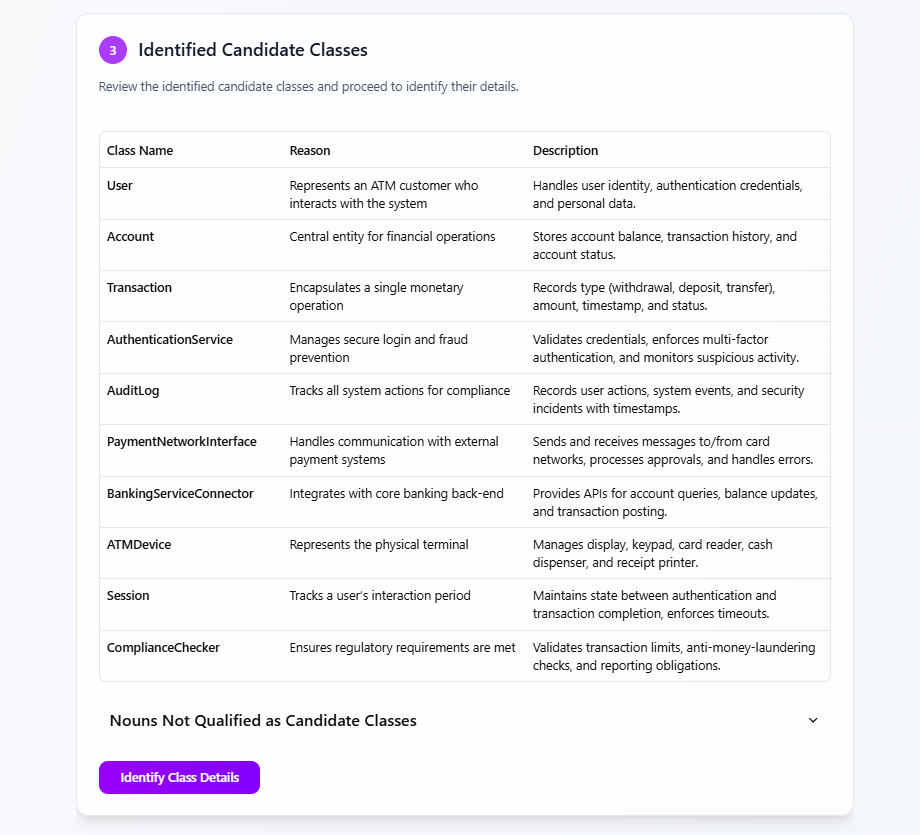
Let’s analyze the data presented in the interface shown above. The tool has processed a specification for a banking application and generated a table of candidates. We will break down the logic behind these specific classes.
1. The Core Domain Entities
The AI correctly identified the fundamental business objects that hold data. In the ATM Domain, these are:
- User: The primary actor interacting with the system. The AI notes this class handles identity and credentials.
- Account: The financial repository. This is the central entity for operations like balance checks.
- Transaction: The history of events. This class encapsulates the atomic operation (e.g., a withdrawal).
2. The System & Infrastructure Classes
A sophisticated model must also account for the system’s internal behavior and hardware interfaces. The AI successfully isolated:
- AuthenticationService: A crucial class for security. It manages the logic for logging in and preventing fraud.
- ATMDevice: This represents the physical hardware (dispenser, printer). This is vital for modeling the physical constraints of the software.
- Session: A transient object that tracks the user’s active period, ensuring security timeouts are enforced.
Filtering Noise: “Nouns Not Qualified”
One of the most difficult tasks for a novice modeler is knowing what not to include. The interface displays a section titled “Nouns Not Qualified as Candidate Classes.”
The AI has likely filtered out words like “Cash,” “Receipt,” or “Time.” Why? In object-oriented design, “Cash” is often a value or an attribute of a Transaction, not a standalone class. “Receipt” might be a generated document rather than a persistent entity. This filtering is essential to prevent “Over-Modeling,” where the diagram becomes cluttered with irrelevant entities.
Step-by-Step: From Candidate to Class
The wizard guides you through a logical progression. Once the candidates are identified, you must review them. Here is the technical workflow:
- Review: The user examines the “Reason” and “Description” columns.
- Refine: If the AI missed a class (e.g.,
Card), the user can manually add it. If it included a noise word, the user can discard it. - Map Relationships: The system then asks how these classes connect. For example: One User has Many Accounts.
- Generate: The final class diagram is rendered with the correct multiplicities.
Technical Implementation: Mermaid Diagram of the Domain
To visualize how these identified candidate classes would eventually relate to one another in a standard UML Class Diagram, we can represent the relationships using Mermaid syntax. This diagram illustrates the structure derived from the AI’s extraction.
classDiagram
    class User {
        +String userId
        +String password
        +authenticate() bool
    }

    class Account {
        +String accountNumber
        +decimal balance
        +withdraw(amount) bool
    }

    class Transaction {
        +String type
        +decimal amount
        +timestamp time
    }

    class AuthenticationService {
        +validateCreds() bool
        +detectFraud() bool
    }

    class ATMDevice {
        +dispenseCash()
        +readCard()
    }

    class Session {
        +start()
        +end()
        +checkTimeout()
    }

    User "1" -- "*" Account : owns
    Account "1" -- "*" Transaction : generates
    User "1" -- "1" Session : creates
    ATMDevice "1" -- "1" Session : manages
    AuthenticationService .. User : validates
As you can see in the code block above, the User class connects to Account with a “1-to-many” relationship, reflecting the real-world requirement that one customer can hold multiple bank accounts.
Best Practices for AI-Assisted Modeling
While AI is powerful, it acts as a powerful assistant, not a replacement for architectural judgment. When using the AI Textual Analysis tool, keep these principles in mind:
- Context Matters: If your specification is vague (“The system handles payments”), the AI might suggest a generic
Paymentclass. If the spec is specific (“The system processes credit card transactions”), the AI will likely suggestPaymentNetworkInterface. - Separation of Concerns: Notice the inclusion of
BankingServiceConnector. This suggests the AI recognized a need for an external interface. Always ensure your model separates the core domain logic from the external system integration logic. - Validation: Always review the “Reason” column. Does the AI’s justification for creating a class actually match your business rules? If the AI says a class exists “because it appears in the text,” but it doesn’t hold data or behavior, consider removing it.
Conclusion
The “Identified Candidate Classes” step is the bridge between natural language requirements and structured software design. By leveraging AI to extract these entities, modelers can bypass the initial confusion of where to start and move directly to refining the architecture. Whether you are a novice or an expert, understanding how the AI interprets your specification is the key to generating accurate, high-quality Class Diagrams.