
Mastering UML Sequence Diagram Numbering: A Visual Paradigm Guide
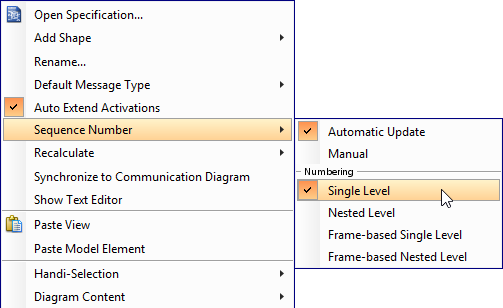
When designing complex software systems, UML Sequence Diagrams are essential for visualizing the dynamic interactions between objects over time. However, as diagrams grow in complexity—incorporating loops, conditionals, and nested frames—the readability of message flow can become challenging. One of the most critical features for maintaining clarity in these diagrams is Sequence Numbering. In this tutorial, we will explore the architecture of message numbering within Visual Paradigm, specifically focusing on the distinction between Single Level and Nested Level numbering strategies.
Understanding the Scope of Sequence Numbering
Before diving into the specific tools, it is vital to understand the concept of “Scope” in modeling. When you specify the scope for numbering, you are essentially defining the boundary where the message counter should reset. This decision impacts how a viewer traces the flow of logic through your system.
In Visual Paradigm, the numbering system offers two primary modes:
- Diagram-based: The numbering resets only when you start a new diagram. Within a single diagram, numbers continue incrementally regardless of frames.
- Frame-based: The numbering resets whenever a new frame (such as an Alt, Loop, or Opt frame) begins. This is crucial for modularizing complex logic.
Deep Dive: Diagram-Based Numbering (Single Level)
The most fundamental approach to organizing a sequence diagram is Diagram-based Numbering, often referred to as Single Level numbering. This method treats the entire diagram as a single, continuous narrative thread.
How to Apply Single Level Numbering
To activate this feature in Visual Paradigm, follow these precise steps:
- Open your UML Sequence Diagram.
- Right-click on the empty background area of the diagram (ensure you are not clicking on a specific participant or message).
- Navigate to the Sequence Number menu option.
- Select Single Level from the submenu.
Note: The menu hierarchy may look like this in the software interface:
Right-Click on Background
  └── Sequence Number
       └── Single Level (Selected)
Behavioral Analysis
Once Single Level is selected, Visual Paradigm applies a strict linear increment to your messages. As illustrated in the context of this tutorial, even if you introduce complex frame elements (like Alt frames for conditions or Loop frames for iterations), the numbering sequence does not restart.
For example, if you have a message numbered 1, followed by a frame containing messages 2, 3, and 4, and then a message outside the frame, it will be numbered 5. This ensures that the global order of events is preserved, which is particularly helpful when referencing specific steps in a high-level architectural overview.
Conclusion
Understanding the “Single Level” numbering mode is the first step toward mastering UML Sequence Diagrams in Visual Paradigm. By keeping the numbering linear across the entire diagram, you ensure a clear, unbroken timeline of interactions. This is particularly effective for simple to medium-complexity systems where the linear flow of events is the primary focus.