
Mastering Robot Logic: General Flowcharts with Visual Paradigm
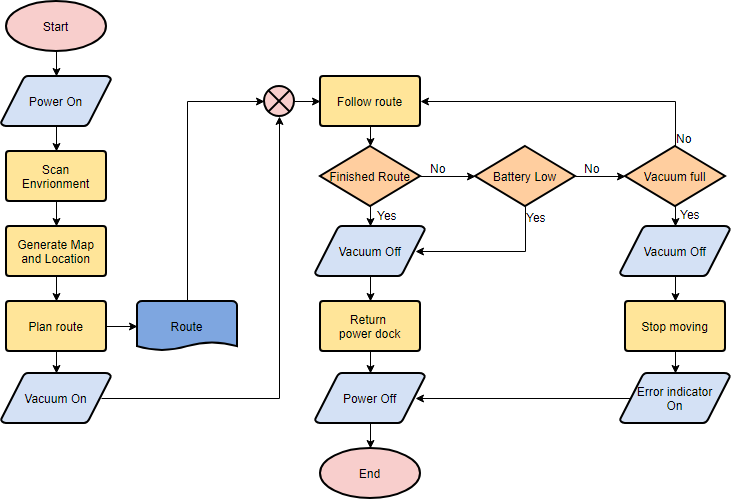
Welcome to this comprehensive tutorial on understanding General Flowcharts. In the world of software engineering and system design, visualizing logic is often as important as writing the code itself. The image provided is a classic example of a General Flowchart, representing the autonomous logic of a robotic vacuum cleaner. It demonstrates how standard symbols are combined to create a complete workflow, from initialization to error handling.
In this guide, we will break down the anatomy of this diagram, explain the specific symbols used, and analyze the logical flow of the robot’s decision-making process. We will also discuss how to utilize professional tools like Visual Paradigm to create these models efficiently.
Understanding the Anatomy of the Flowchart
A General Flowchart is distinct because it uses a variety of symbols to represent different types of actions, inputs, and decisions. Unlike a simple sequence chart, this diagram includes loops, conditional branching, and data storage elements.
1. The Initialization Phase (Left Column)
The workflow begins on the far left with the initialization sequence. This phase prepares the robot for its task.
- Terminator (Oval): The pink “Start” oval marks the entry point of the process.
- Input/Output (Parallelogram): The light blue shapes represent data entry or display. For example, Power On and Vacuum On are physical actions initiated by the system.
- Process (Rectangle): The yellow boxes represent calculations or data generation. Scan Environment, Generate Map and Location, and Plan route are all computational tasks performed by the robot’s CPU.
- Document/Storage (Wavy Shape): The blue shape labeled Route represents a specific type of data output, likely a file or a stored path that the robot will follow.
2. The Decision Logic (Right Column)
The core of this flowchart lies in the decision-making loop. Once the robot starts Follow route, it enters a continuous cycle of monitoring and acting.
- Decision (Diamond): The orange diamonds are critical nodes. They ask a question with a “Yes” or “No” answer, directing the flow of control.
- Logic Flow: The robot checks if the Finished Route. If “Yes,” it checks battery status. If “No,” it continues following the path.
Deep Dive: The Battery and Vacuum Logic
This flowchart features a complex branching logic that handles hardware constraints. Let’s trace the path when the robot detects low battery or a full dustbin.
If the robot determines that it has Finished Route (Yes), it immediately checks if the Battery Low. If the battery is indeed low, the robot must Vacuum Off, Return power dock, and finally Power Off at the end.
However, if the battery is Not Low, the robot checks if the Vacuum full. This creates a secondary failure path: if the vacuum is full, the robot must Vacuum Off, Stop moving, and turn on an Error indicator before eventually powering off.
Implementing This Logic with Visual Paradigm
Creating such a detailed diagram manually can be time-consuming and prone to formatting errors. This is where professional CASE (Computer-Aided Software Engineering) tools become essential. Visual Paradigm is an industry-standard tool that allows you to model these flows using drag-and-drop interfaces.
When using Visual Paradigm, you can:
- Drag-and-Drop Symbols: Simply drag the “Decision” diamond onto the canvas to create a branching point.
- Connectors: Use the “Flow” tool to link the “Start” oval to the “Scan Environment” process.
- Validation: The software will automatically check for common logic errors, such as unreachable code or infinite loops.
By leveraging the capabilities of Visual Paradigm, you ensure that your diagrams are not only accurate representations of the logic but also maintain a professional standard suitable for technical documentation.
Conclusion
By understanding how these symbols interact, you can decode the complex logic of almost any automated system. Whether you are debugging a robot’s firmware or planning a new software feature, mastering the General Flowchart is a fundamental skill for any technical professional.