
Architecting Hotel Reservations with Visual Paradigm’s Unified Platform
In the realm of software engineering, the gap between abstract requirements and concrete implementation is often bridged by Use Case Diagrams. These diagrams serve as the blueprint for system functionality, mapping out how users (actors) interact with the system to achieve specific goals.
As illustrated in the OpenDocs interface from Visual Paradigm, creating these diagrams is no longer a siloed activity. Instead, it is part of a continuous lifecycle where models created in Visual Paradigm Desktop are automatically synchronized into OpenDocs. This creates a “living” documentation system where the visual representation of your architecture is always in sync with your project’s narrative.
Deconstructing the Hotel Room Booking System
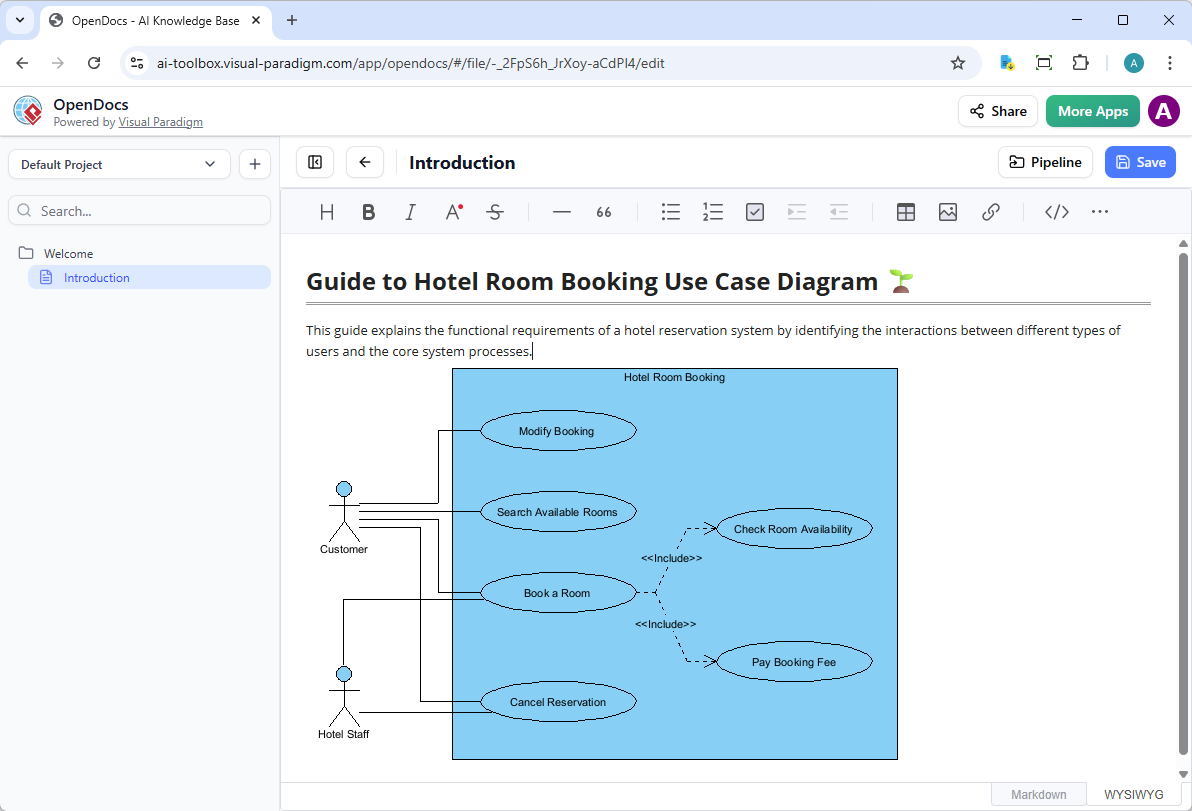
The diagram presented in the OpenDocs view depicts a classic reservation system. It defines the boundaries of the system (“Hotel Room Booking”) and identifies the external entities that interact with it. Let’s analyze the specific architectural components shown.
1. Identifying the Actors
Actors represent the roles played by users or external systems. In this specific architecture, we see two distinct roles:
- Customer: The primary external agent. They are responsible for initiating the booking process, searching for availability, and managing their reservations. The stick figure icon with a blue head is the standard UML representation for a human actor.
- Hotel Staff: A secondary actor. While often implied in customer-facing systems, explicitly modeling “Hotel Staff” is crucial for defining administrative capabilities, such as cancelling reservations on behalf of a guest or managing disputes.
2. Defining the System Boundary
The large blue rectangle labeled “Hotel Room Booking” represents the system boundary. Everything inside this box is part of the software application’s responsibility. Anything outside is external to the application’s logic. This boundary is vital for scope management; it clearly delineates what the system must do versus what it delegates to the user or staff.
3. Analyzing Functional Requirements (Use Cases)
The ovals within the boundary represent Use Cases. These are the specific actions the system can perform:
- Modify Booking: Allows a user to change details of an existing reservation.
- Search Available Rooms: The query mechanism to find inventory.
- Book a Room: The primary transactional use case to finalize a reservation.
- Cancel Reservation: The process to void a booking.
The Power of <> Relationships
One of the most critical architectural decisions in this diagram is the use of the include relationship. Notice the dashed arrows labeled <<Include>> originating from “Book a Room.”
In Use Case modeling, an include relationship signifies that the behavior of one use case (the base) always requires the behavior of another use case (the included). It is a mandatory dependency.
Here, the system logic dictates that you cannot simply “Book a Room” in isolation. The diagram explicitly enforces two mandatory sub-processes:
- Check Room Availability: The system must verify inventory before a transaction can proceed.
- Pay Booking Fee: The system must process a financial transaction to validate the booking.
This architectural choice promotes modularity. Instead of repeating the logic for “Checking Availability” inside every possible booking scenario, the system centralizes this logic. If the payment gateway changes or the availability check algorithm is updated, it only needs to be changed in one place within the model.
From Model to Documentation: The VP Ecosystem
The screenshot provided shows the result of the Visual Paradigm pipeline. By using the “Pipeline” feature in OpenDocs, the diagram is not just a static image; it is a rendered artifact from the source model.
This workflow ensures that:
- Consistency is Maintained: If the “Customer” actor is renamed in the diagram to “Guest” in Visual Paradigm Desktop, the change propagates to the documentation.
- Context is Provided: As seen in the text above the diagram, the “Introduction” section explains the functional requirements, providing the necessary context that a standalone image might lack.
- Collaboration is Streamlined: Stakeholders can view the “Living Document” without needing to install the heavy Visual Paradigm software.