
Mastering Core BPMN Elements: A Visual Guide to Process Modeling
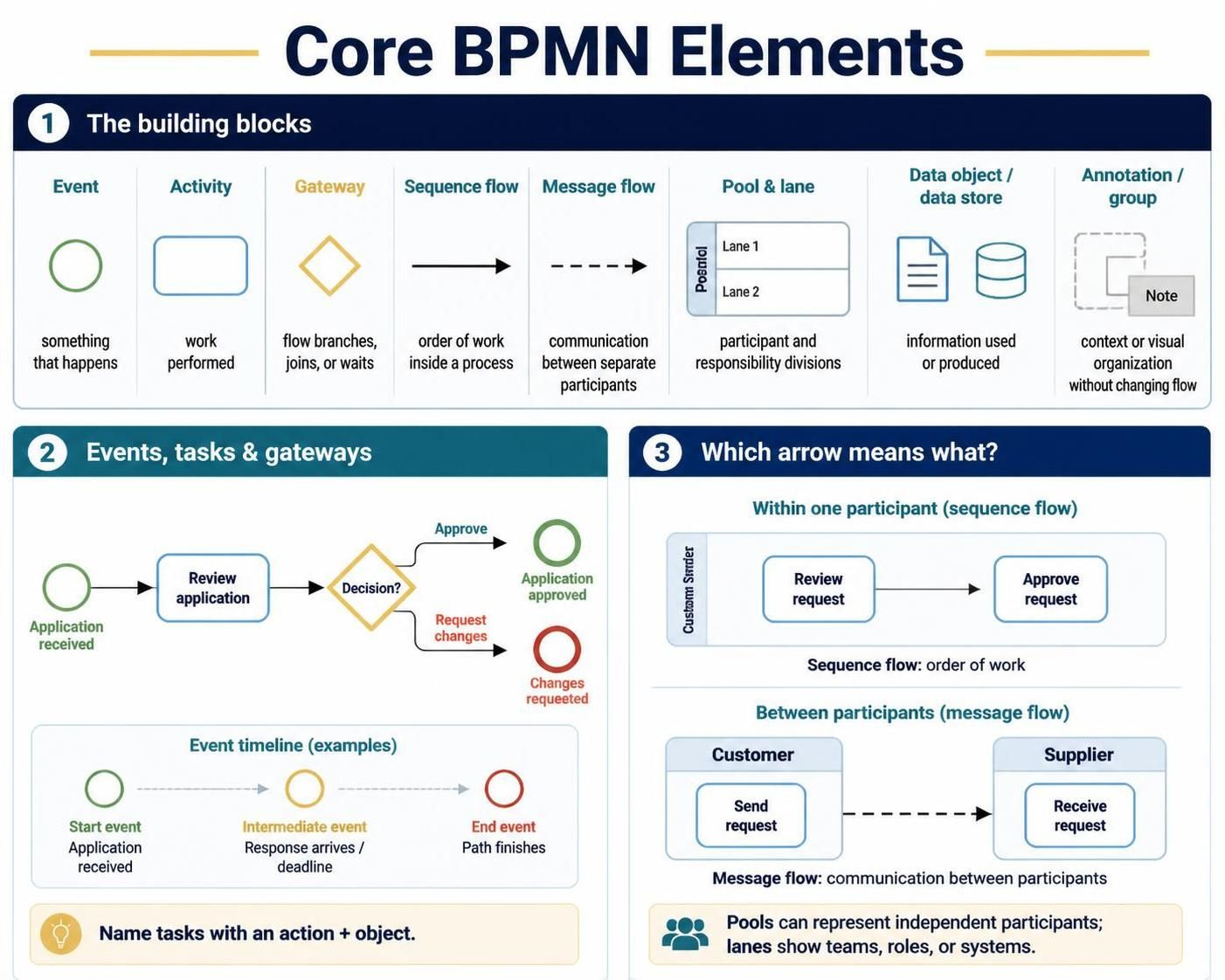
Business Process Model and Notation (BPMN) is the universal language for business process management. It allows business stakeholders and IT professionals to collaborate effectively by providing a graphical notation that is both intuitive for business users and precise enough for technical implementation. This tutorial breaks down the fundamental building blocks of BPMN, explaining how to construct clear, executable process diagrams using the concepts illustrated in the standard reference guide.
1. The Building Blocks of BPMN
Most complex process diagrams can be deconstructed into a small set of familiar symbols. Understanding these core elements is the prerequisite for modeling any workflow. The notation is divided into functional categories:
Flow Objects and Connectors
The heartbeat of a BPMN diagram consists of Events, Activities, and Gateways, connected by flow lines. These elements define what happens, what work is done, and how the process moves.
- Event (Circle): Represents something that happens or affects the process. It is a “thing” rather than an action. Common examples include a process starting, a message arriving, a timer expiring, or an outcome occurring.
- Activity (Rounded Rectangle): Represents work being performed. This could be a human task (e.g., a person reviews an application) or a system task (e.g., a system issues a receipt).
- Gateway (Diamond): Represents a point where the flow branches, joins, or waits for an event. It controls the routing logic, such as deciding to approve or reject, or proceeding on one of several conditions.
Connectors dictate the direction and type of interaction:
- Sequence Flow (Solid Arrow): Represents the order of steps within a process. It connects activities and events to show the logical flow of control.
- Message Flow (Dashed Connector): Represents communication between separate participants. It is crucial for collaboration diagrams, showing how a customer sends a request to a supplier.
Swimlanes and Context
To organize complexity, BPMN uses containers and grouping elements:
- Pool and Lane: A Pool represents a participant (such as an organization or a distinct process). Lanes within a pool divide the process by responsibility, showing which teams, roles, or systems are responsible for specific tasks.
- Data Object / Data Store: Represents information used or produced. This includes application forms, case records, or database entries.
- Annotation / Group: Used for supporting explanations or visual organization. These add context without changing the actual process flow.
2. Events, Tasks, and Gateways in Detail
While the symbols are simple, their specific types convey critical timing and logic information.
The Lifecycle of an Event
Events are categorized by their position in the timeline:
- Start Events: Mark the trigger or beginning of a process. For example, “Application received.”
- Intermediate Events: Represent something that occurs during the process, such as receiving a response or waiting for a deadline.
- End Events: Show how a path finishes. Different end events (like a red circle) can make distinct outcomes explicit, such as “Changes requested.”
Tasks and Routing
Tasks are the units of work. When modeling, you should name them using an Action + Object structure to ensure clarity. For instance, use “Review application” instead of just “Review.”
Gateways represent routing logic. A gateway should make it clear whether the process:
- Chooses exactly one path (e.g., Approval vs. Rejection).
- Follows multiple paths simultaneously.
- Waits for one of several events (an OR-Split or AND-Join).
3. Distinguishing Flow Types
One of the most common errors in process modeling is confusing the type of arrow used. The visual distinction is vital for understanding the architecture.
Sequence Flow: Order of Work
Sequence flows (solid arrows) are used within one participant. They dictate the internal logic. For example, inside a “Customer” pool, a solid arrow connects “Review request” to “Approve request.”
Message Flow: Communication
Message flows (dashed arrows) are used between participants. They bridge the gap between different pools. For example, a dashed arrow connects “Send request” in the “Customer” pool to “Receive request” in the “Supplier” pool.
By mastering these core elements—Events, Activities, Gateways, and the distinction between Sequence and Message flows—you can build robust, scalable process diagrams that serve as the foundation for process improvement and automation.