
Mastering Use Case Modeling: Car Washing System with VP AI Ecosystem
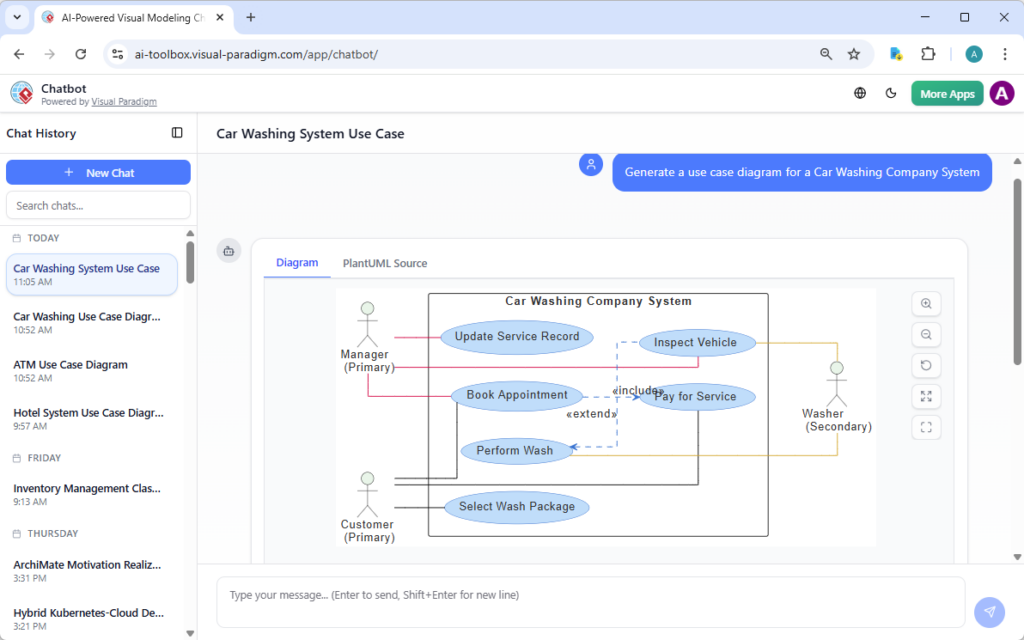
Designing robust software systems requires more than just coding; it requires a deep understanding of requirements and interactions. In the world of software engineering, the Use Case Diagram is the gold standard for visualizing these interactions between users (actors) and the system itself.
This tutorial explores how to architect a Car Washing System using the AI-powered Visual Paradigm ecosystem. We will walk through the logical flow of a car wash, define the actors involved, and translate these requirements into a formal PlantUML model.
1. The System Boundary: Defining the Scope
Before drawing a single line, we must define what is inside the system and what is outside. In our scenario, the system is the Car Washing Company System.
- System Boundary: The box representing the system encapsulates the business logic.
- Internal Processes: Actions like “Perform Wash” or “Inspect Vehicle” happen inside this boundary.
- External Actors: Entities like the “Customer” or “Manager” exist outside the boundary but interact with the system.
2. Identifying the Actors
Actors represent the roles users play when interacting with the system. In this specific architecture, we have three distinct roles:
- Customer (Primary Actor): The core user who initiates the process. Their goal is to get their car cleaned.
- Manager (Primary Actor): An administrative user responsible for data integrity. They handle records and bookings.
- Washer (Secondary Actor): An operator who performs the physical work. Unlike the customer, they do not initiate the request but respond to it.
3. Mapping the Use Cases (The Logic)
Let’s break down the specific functions (use cases) required for this workflow:
- Select Wash Package: The starting point for the Customer. They must define the service level.
- Book Appointment: A scheduling function available to the Manager.
- Inspect Vehicle: A critical step where the Washer checks for pre-existing damage or specific dirt levels.
- Perform Wash: The core execution of the service.
- Pay for Service: The financial transaction.
- Update Service Record: The administrative closure of the loop.
4. Visualizing Relationships: Include vs. Extend
The most complex part of modeling is determining how these use cases relate. We use two specific types of relationships in UML:
The «include» Relationship
An include relationship means that one use case must call another to complete its function. It represents mandatory behavior.
In our diagram, Pay for Service includes Book Appointment. This implies that to finalize the payment, the system must ensure an appointment exists. It is a mandatory step.
The «extend» Relationship
An extend relationship represents optional or conditional behavior. It happens only under specific circumstances.
Here, Inspect Vehicle extends Perform Wash. This means the car is washed by default, but the inspection is an optional add-on that might occur before or after the wash depending on the protocol.
5. Generating the Model: PlantUML Syntax
Modern AI tools, like the Visual Paradigm AI Chatbot, allow you to generate these diagrams from natural language. However, understanding the underlying code is essential for debugging and refining.
The code below represents the logic described above. Notice how the actors are defined as participant and the relationships are defined using arrows with specific stereotypes (<<include>>, <<extend>>).
@startuml
left to right direction
skinparam packageStyle rectangle

actor "Customer (Primary)" as Customer
actor "Manager (Primary)" as Manager
actor "Washer (Secondary)" as Washer

rectangle "Car Washing Company System" {
    usecase "Select Wash Package" as UC1
    usecase "Book Appointment" as UC2
    usecase "Perform Wash" as UC3
    usecase "Pay for Service" as UC4
    usecase "Inspect Vehicle" as UC5
    usecase "Update Service Record" as UC6

    ' Customer connects to the start
    Customer --> UC1
    Customer --> UC4

    ' Manager connects to booking
    Manager --> UC2
    Manager --> UC6

    ' Washer connects to inspection and pay
    Washer --> UC5
    Washer --> UC4

    ' Mandatory logic: Payment requires Booking
    UC4 ..> UC2 : <>

    ' Optional logic: Inspection extends Washing
    UC5 ..> UC3 : <>
}
@enduml
6. Refinement and Best Practices
When using AI to generate diagrams, treat the output as a draft specification. While the visual structure is correct, you must validate the business rules. For example, does the Manager really need to “Update Service Record” directly, or does the system do it automatically?
Once the diagram is validated, you can send it to the next steps in the Visual Paradigm ecosystem, such as the VPasCode tool for text-level edits or the Pipeline for generating code skeletons.