
Mastering the VP Unified Platform and AI Ecosystem for Connected Workflows
In the complex landscape of modern enterprise software development and systems engineering, professionals often face the “tool fragmentation” problem. You might have a powerful desktop application for heavy-duty architecture modeling, a web-based tool for agile planning, and a separate suite for documentation. Switching between these silos disrupts the flow of thought and creates version control nightmares.
The Visual Paradigm Unified Platform is the architectural solution to this fragmentation. It acts as a central nervous system for the entire Visual Paradigm ecosystem, bridging the gap between the robust capabilities of the Desktop client and the accessibility of Web Apps. This tutorial breaks down the platform’s core architecture, the synergy between environments, and how to leverage connected workflows for maximum productivity.
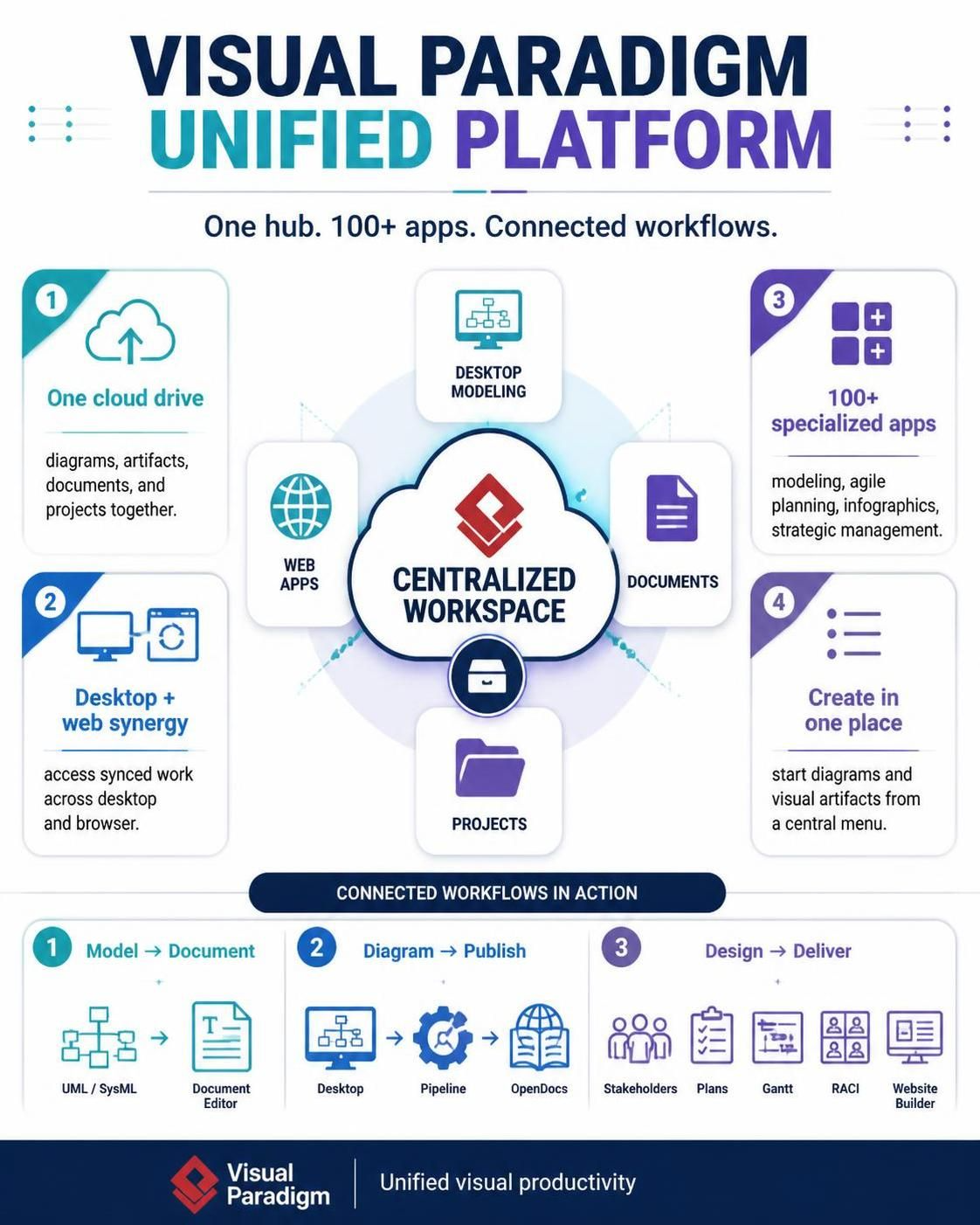
1. The Core Architecture: A Centralized Workspace
At the heart of the Visual Paradigm ecosystem is the concept of a Centralized Workspace. Unlike traditional setups where a project file (like a .vpj) is stored locally on a hard drive, the Unified Platform treats the “Cloud Drive” as the source of truth.
The One Cloud Drive
This feature is the foundational pillar of the platform. It unifies diagrams, artifacts, documents, and projects into a single, accessible repository. When you utilize the One Cloud Drive, you are essentially creating a cloud-based project repository that is:
- Accessible Anywhere: Whether you are working from a local machine or a remote browser, you are accessing the exact same data.
- Version Controlled: Changes made in one environment are reflected in the other, eliminating the need for manual file syncing (like copying .zip files via email).
- Collaborative: Multiple stakeholders can access the same project artifacts without conflict.
2. Desktop + Web Synergy: The Fluid Workflow
One of the most powerful features of the Unified Platform is the seamless transition between Desktop Modeling and Web Apps. This is not merely a “cloud backup” feature; it is a “live sync” architecture.
How the Synergy Works
The architecture allows you to start a task in one environment and finish it in another without data loss or manual export/import steps. Consider the following workflow:
- Heavy Lifting on Desktop: You start your project in the Visual Paradigm Desktop application. This environment is optimized for performance, allowing you to handle massive diagrams, complex SysML models, and generate extensive documentation without browser memory constraints.
- Real-Time Cloud Sync: As you save your work, the project is instantly updated in the Centralized Workspace.
- Review and Agile on Web: You then log into the Visual Paradigm Online interface (Web Apps) from a different device or browser. The project appears exactly as you left it. You can now switch to an Agile planning app or a lightweight diagramming tool to review the architecture or update user stories.
- Return to Desktop: When you return to your desktop environment, all changes made in the web view are already present in your local model.
💡 Pro Tip: The “Local” vs. “Cloud” Distinction
When working in the Unified Platform, always ensure your project is saved to the Cloud Drive rather than just a local folder. If you save a project to a local folder on your desktop, you break the “synergy” loop, and the Web Apps will not be able to access or sync those changes in real-time.
3. The Ecosystem: 100+ Specialized Apps
The Unified Platform is not just a viewer; it is an app store for enterprise productivity. The platform aggregates over 100 specialized apps into a single hub. This allows you to modularize your workflow based on your role:
- System Architects: Utilize the Desktop Modeling tools for deep-dive architectural design.
- Product Managers: Switch to the Agile Planning apps to manage backlogs and sprints directly linked to the architecture.
- Business Analysts: Use the strategic management and infographic apps to visualize the business landscape.
This modularity ensures that you are not bogged down by the entire suite of tools if you only need specific functionality for a particular task.
4. Connected Workflows in Action
The true power of the platform is realized in its Connected Workflows. These are pre-defined sequences of actions that link different tools together automatically. The platform automates the “hand-off” between phases of the software development lifecycle.
Workflow A: Model → Document
Traditionally, creating a documentation package from a complex system model involves manually exporting images and text. In the Unified Platform:
- You create a UML or SysML model in the Desktop or Web app.
- The system uses the Document Editor to automatically pull these diagrams and their associated metadata.
- The result is a cohesive, professional document that stays synchronized with the model. If the model changes, the document updates.
Workflow B: Diagram → Publish
Sharing technical diagrams with stakeholders often requires converting them to PDFs or static images. The Unified Platform streamlines this via the Pipeline and OpenDocs:
- From the Desktop, you trigger a pipeline action.
- The system processes the diagram and publishes it via the OpenDocs feature.
- Stakeholders can view the diagrams in a web browser without needing to install any software, ensuring broad accessibility.
Workflow C: Design → Deliver
The final stage of the workflow focuses on delivery and management. Once the design is complete, the platform connects to tools that help manage the delivery phase:
- Stakeholder Management: Identify who needs to review the design.
- Project Planning: Convert the design requirements into Plans and Gantt charts.
- Process Management: Define roles and responsibilities using RACI matrices.
- Web Publishing: Use the Website Builder to create a public-facing portal for the project documentation.
Conclusion
The Visual Paradigm Unified Platform represents a shift from using software tools as isolated islands to viewing them as a cohesive, interconnected ecosystem. By centralizing your workspace and enabling fluid transitions between desktop power and web accessibility, it removes the friction from the engineering process. Whether you are a system architect designing a new architecture or a product manager tracking a sprint, the Unified Platform provides the infrastructure to keep your artifacts connected and your workflow uninterrupted.