
Centralize Your UML Model: Banking Domain to VPasCode Pipeline
In the modern software development lifecycle, the gap between design and deployment is often bridged by version control and collaborative platforms. Visual Paradigm offers a powerful mechanism to bridge this gap: the Pipeline. This tutorial explains how to transition a static UML Class Diagram—specifically a banking domain model—into a centralized artifact repository. By exporting to the Pipeline, you transform a local design file into a shared asset that can be managed, tracked, and potentially converted into code.
Understanding the Domain Model
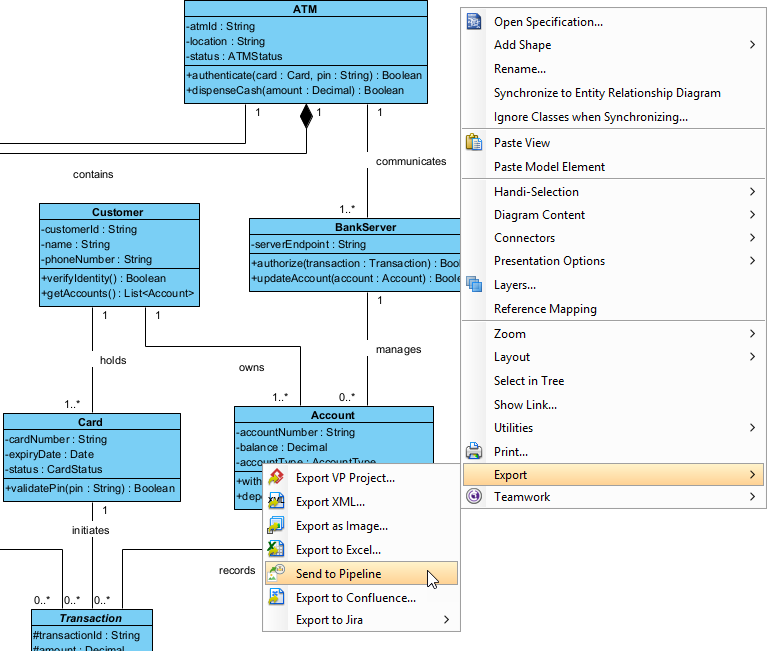
Before we begin the export process, let’s analyze the system architecture depicted in the diagram. This is a Class Diagram representing a simplified banking system. It defines the static structure of the application by outlining classes, their attributes, operations, and the relationships between them.
The model consists of five primary entities:
- ATM: The physical terminal. It has attributes like
atmIdandlocation, and critical operations such asauthenticateanddispenseCash. - BankServer: The backend logic. It manages communication with the ATM and holds methods like
authorizeandupdateAccount. - Customer: The end-user, defined by identity details like
phoneNumberandcustomerId. - Card: The physical interface for the customer, containing security data like
pinandexpiryDate. - Account & Transaction: These represent the financial ledger and the history of movements.
Mapping the Relationships
The power of this diagram lies in the connections (associations) between the classes. For example, the diagram shows a Composition relationship (indicated by the filled diamond) between ATM and BankServer. This implies that the BankServer is a part of the ATM’s lifecycle or architecture in this specific context.
Furthermore, the Customer class has a relationship with the Card and Account classes. The multiplicity 1 and 1.. indicates that one Customer must hold at least one Card, and conversely, one Card is associated with exactly one Customer. These constraints are vital for the database schema generation that might follow the export.
Step-by-Step: Exporting to the Pipeline
The Visual Paradigm Pipeline acts as a central repository for your project assets. Unlike a standard file export (like saving an XML or Image), sending an artifact to the Pipeline ensures that your diagram is versioned and accessible to other team members or tools within the ecosystem.
Initiating the Export
To begin, locate the background of your diagram canvas. You do not need to select a specific class or line; the action applies to the diagram as a whole.
- Right-click on an empty area of the diagram background. This triggers the local context menu.
- Navigate to the Export submenu. You will see a list of standard export formats such as “Export as Image,” “Export to Excel,” or “Export to Jira.”
- Locate and select Send to Pipeline. This is the specific command that uploads the artifact to the server-side repository.
Configuring the Artifact
Upon selecting the command, a dialog box titled Send to Pipeline will appear. This step is crucial for identifying your asset within the system.
You must enter an Artifact Name. Visual Paradigm attempts to be helpful by pre-filling this field with the name of the diagram (e.g., “BankingSystemModel”).
Artifact Name: BankingSystemModel
Status: Ready to Send
You can accept this default name or modify it to match your project’s naming conventions. Consistency in artifact naming is key for automated workflows later on.
The Result: From Design to Code
Once you click OK, the system initiates a background process. You will see a progress dialog indicating the upload status. Upon completion, the artifact is no longer just a local file; it is now a registered entity in the Pipeline.
This opens up advanced capabilities. If your organization uses VPasCode, this diagram can now be processed into a codebase. Because the diagram uses standard UML notation, the Pipeline can generate the corresponding Java, C#, or C++ classes, effectively turning your visual model into functional boilerplate code.