
Mastering VPasCode: AI Chatbot-Driven Diagram-as-Code for Architecture
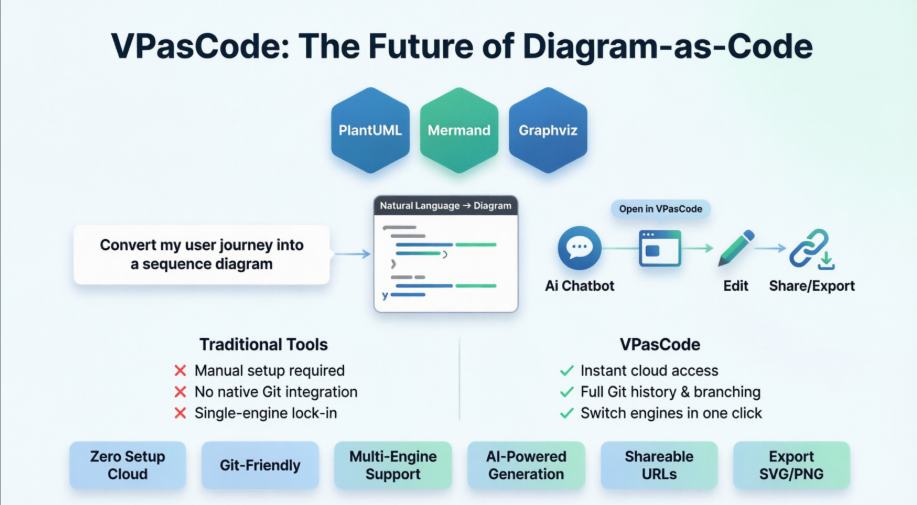
In the rapidly evolving landscape of software engineering, the disconnect between code implementation and architectural documentation has never been wider. Developers often find themselves maintaining static images that quickly become obsolete, or wrestling with complex, proprietary tools that lack version control. Enter VPasCode (Visual Paradigm as Code), a revolutionary platform designed to bridge this critical divide. This tutorial explores how VPasCode utilizes a “Diagram-as-Code” (DaC) philosophy combined with AI to streamline the creation of technical diagrams.
Understanding the Diagram-as-Code Paradigm
Traditional diagramming tools often rely on a “click-and-drag” interface, which creates files that are difficult to version control and prone to manual errors. VPasCode flips this model by treating diagrams as text. Instead of drawing boxes and lines manually, you define the structure and relationships using code. This approach offers several immediate benefits:
- Version Control: Since diagrams are text-based, they can be stored in Git repositories alongside your source code, allowing for diff tracking and history.
- Reusability: You can define common patterns as templates or libraries.
- Automation: Diagrams can be generated programmatically from your codebase.
Core Components of the VPasCode Architecture
The architecture of VPasCode is built on a “Zero Setup Cloud” environment that supports multiple industry-standard engines. This multi-engine support is crucial for flexibility, allowing teams to choose the best syntax for their specific needs.
1. The Multi-Engine Support System
VPasCode does not lock you into a single syntax. As illustrated in the platform’s architecture, it integrates three distinct, powerful rendering engines:
- PlantUML: The industry standard for UML diagrams. It excels in creating complex class diagrams, sequence diagrams, and component maps with a very human-readable syntax.
- Mermaid.js: A popular choice for web-based documentation (often used in GitHub READMEs). It is lightweight and integrates seamlessly with Markdown.
- Graphviz: A powerhouse for directed graphs and network diagrams. It is ideal for complex dependency trees and flowcharts where automatic layout algorithms are preferred.
By unifying these engines under one roof, VPasCode allows you to switch engines instantly. A PlantUML sequence diagram can be converted to Mermaid syntax with a single click, ensuring that your documentation remains compatible with different toolchains.
The AI-Powered Workflow: From Natural Language to Diagram
The most significant innovation in the VPasCode ecosystem is its AI Chatbot integration. Traditionally, writing DaC requires a steep learning curve—you must memorize specific syntax for every element. VPasCode changes this dynamic by allowing you to interact with the system using natural language.
Step-by-Step: Generating a Sequence Diagram with AI
Imagine you need to document a “User Login” process. Instead of writing code, you simply describe the flow to the VPasCode AI Chatbot.
Input Prompt:
"Convert my user journey into a sequence diagram. The user enters credentials, the system validates them against the database, and if successful, returns a token."Once the AI generates the diagram, the workflow proceeds through three distinct stages:
- Generation: The AI interprets the natural language and outputs the corresponding PlantUML or Mermaid code.
- Visualization & Edit: The code is rendered into a visual diagram. You can then click “Edit” to tweak the syntax manually or refine the AI’s output if the visual layout needs adjustment.
- Export & Share: The final diagram can be shared via a unique URL or exported as high-quality SVG/PNG assets for documentation.
Why VPasCode Beats Traditional Tools
The comparison between traditional diagramming tools and the VPasCode approach highlights the efficiency gains of the new paradigm.
| Feature | Traditional Tools | VPasCode |
|---|---|---|
| Setup | Manual installation required | Instant cloud access (Zero setup) |
| Versioning | No native Git integration | Full Git history & branching support |
| Flexibility | Single-engine lock-in | Switch engines in one click |
Furthermore, VPasCode is “Git-Friendly.” This means that your diagrams are no longer orphaned assets but are integrated into the software development lifecycle (SDLC). You can commit changes to your architecture just as you would commit code changes.
Code Example: The PlantUML Syntax
To truly understand the power of DaC, let’s look at the code generated by the AI for the “User Login” scenario mentioned earlier. In VPasCode, this is handled via PlantUML syntax.
@startuml
actor User
participant "Login System" as LS
database "User DB" as DB

User -> LS: Enter Credentials
activate LS
LS -> DB: Validate User
activate DB
DB --> LS: Return Success
deactivate DB
LS --> User: Return Token
deactivate LS
@enduml
As you can see, the code is readable, concise, and describes the logic rather than the visual positioning. The diagramming engine handles the heavy lifting of layout.
Conclusion
VPasCode represents a shift towards more agile, maintainable, and AI-assisted documentation. By combining the flexibility of Diagram-as-Code with the speed of AI generation and the robustness of multi-engine support, it solves the “outdated documentation” problem that has plagued software teams for decades. Whether you prefer the syntax of PlantUML, Mermaid, or Graphviz, VPasCode provides the cloud-based infrastructure to manage your architectural vision effortlessly.