
Mastering VPasCode: AI Fixes PlantUML Syntax in Visual Paradigm
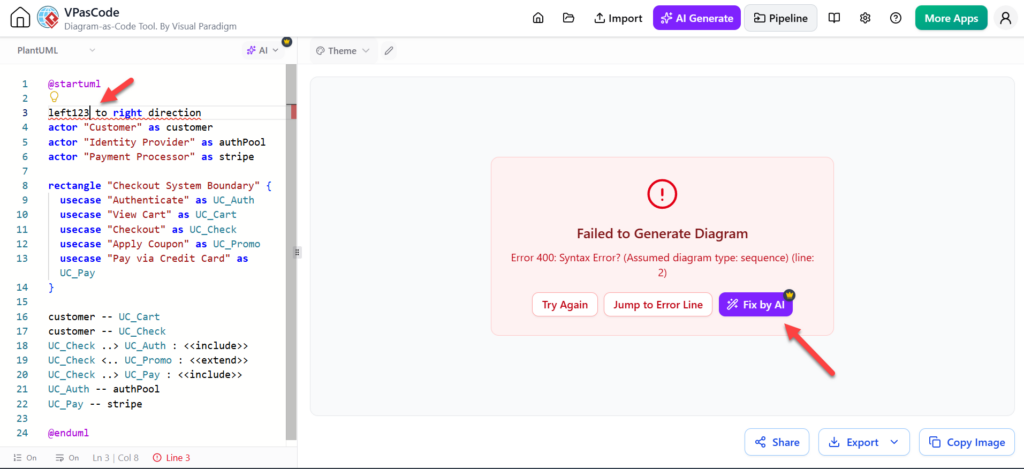
In the world of model-driven engineering and documentation, “Diagram-as-Code” has become the gold standard for maintaining version control and precision. Visual Paradigm’s VPasCode tool allows developers to define complex system architectures using text-based syntax, specifically leveraging the PlantUML language. However, even experienced engineers frequently encounter syntax errors—missing delimiters, malformed actors, or invalid relationships—that prevent rendering. This tutorial explores the architecture of VPasCode and demonstrates how its AI-assisted code error fixing capabilities streamline the debugging process.
The Architecture of VPasCode
VPasCode operates as a specialized code editor integrated into the Visual Paradigm ecosystem. Unlike traditional drag-and-drop modeling tools, VPasCode treats the diagram definition as a script. This architecture offers two primary advantages:
- Version Control: Diagrams can be stored in Git repositories alongside application source code.
- Reproducibility: Diagrams are generated deterministically from a single source of truth.
The editor parses the code on the left and attempts to render the visual representation on the right. When the parser encounters an anomaly, it triggers a “Failed to Generate Diagram” state, providing specific error messages like Error 400: Syntax Error.
Common Syntax Pitfalls in PlantUML
Before utilizing the AI fixer, it is essential to understand the structural integrity required for PlantUML. The screenshot provided highlights a classic error scenario. Let’s analyze the code snippet:
@startuml
left23 to right direction
actor "Customer" as customer
...
In this example, the error occurs on line 2. The directive left23 to right direction is syntactically invalid. The correct syntax for changing the layout direction in PlantUML is typically left to right direction or top to bottom direction. The number 23 has likely been a typo or a copy-paste error from a previous context.
Why AI Error Fixing is Critical
When the parser fails, it often provides a line number but not the semantic solution. AI capabilities in VPasCode bridge this gap. The AI model analyzes the context of the error—understanding the intended layout and the surrounding code blocks—to propose a corrected version. This is particularly useful when:
- Missing Delimiters: Forgetting a closing brace
}or an end statement. - Malformed Participants: Incorrectly naming actors or components (e.g., using spaces without quotes).
- Invalid Relationships: Using arrow types that do not exist in the selected engine.
- Engine Incompatibility: Copying examples that work in Mermaid but fail in PlantUML.
Step-by-Step: Utilizing the “Fix by AI” Feature
The workflow for resolving errors in VPasCode is designed to be iterative and user-centric. Follow these steps to leverage the AI assistant:
- Identify the Error: Look for the red exclamation mark icon and the
Error 400message in the rendering pane. - Analyze the Context: Review the code on the left. Note the specific line highlighted (e.g., Line 3 in the example).
- Invoke the AI: Click the Fix by AI button. This triggers the AI engine to analyze the code block.
- Review the Proposals: The AI will often suggest correcting the syntax (e.g., changing
left23toleftor removing the number). It may also identify if the diagram engine type (Sequence vs. Use Case) is mismatched with the syntax used. - Validate the Result: Once the code is updated, the diagram renders. Always verify that the visual output matches your logical intent.
Best Practices for AI-Assisted Modeling
While AI tools are powerful, they function best when guided by human intent. The documentation emphasizes that AI correction is most effective when the user understands the intended result. Blindly accepting fixes can lead to subtle modeling errors.
Always review the proposed fix to ensure that:
- The semantic meaning of the diagram remains unchanged.
- The layout direction aligns with your documentation standards.
- No critical components were accidentally removed during the fix.
By combining the precision of code-based modeling with the speed of AI error correction, VPasCode transforms the diagramming process from a manual chore into an efficient engineering workflow.