
Build Online Order Use Cases with VPasCode and PlantUML
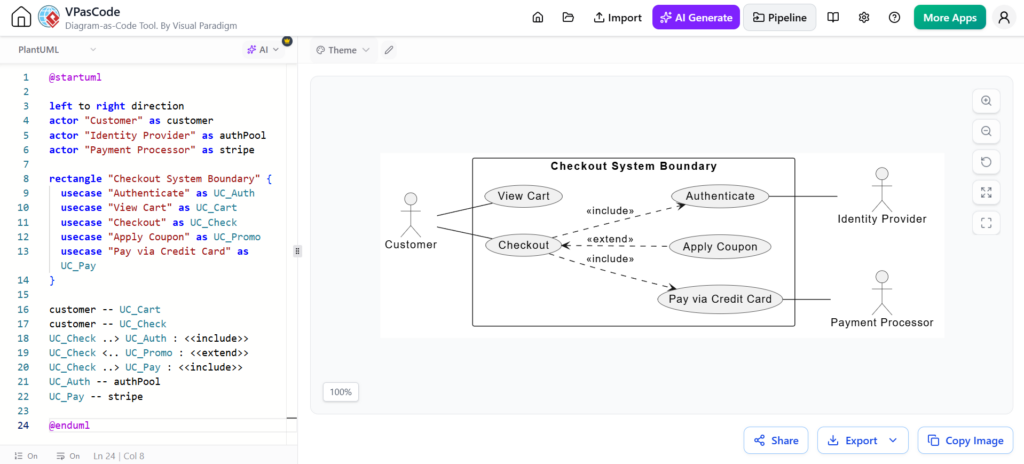
Welcome to this comprehensive tutorial on modeling system requirements using VPasCode, Visual Paradigm’s powerful diagram-as-code tool. In this guide, we will dissect the architecture of a “Checkout System” based on the provided context. We will explore how to define actors, boundaries, and complex relationships like <<include>> and <<extend>> using the PlantUML syntax engine.
Unlike traditional drag-and-drop tools, VPasCode allows for a “Write-Once, Render-Anywhere” approach. By writing code, you gain precise control over the layout logic and can version-control your diagrams alongside your software codebase.
1. Defining the Environment and Actors
The first step in any PlantUML diagram is defining the scope and the external entities (actors) that interact with the system. In our checkout scenario, we have three distinct entities: the user, the identity verification service, and the payment gateway.
VPasCode allows us to assign aliases to these actors to make the relationship definitions cleaner later on.
@startuml
left to right direction

actor "Customer" as customer
actor "Identity Provider" as authPool
actor "Payment Processor" as stripe
Key Concepts:
@startuml: Initializes the PlantUML engine.left to right direction: Sets the global flow of the diagram from left to right, preventing the automatic layout engine from scattering elements randomly.actor "Label" as alias: Defines a stick figure actor. “Label” is what appears on the diagram, while “alias” is the variable name used in the relationship lines (e.g.,customer).
2. Establishing System Boundaries
One of the most critical aspects of a Use Case Diagram is defining what is “inside” the system and what is “outside.” This boundary separates the internal logic from external triggers.
In VPasCode, we use the rectangle command to create a frame. This is essential for grouping use cases and showing containment.
rectangle "Checkout System Boundary" {
    usecase "Authenticate" as UC_Auth
    usecase "View Cart" as UC_Cart
    usecase "Checkout" as UC_Check
    usecase "Apply Coupon" as UC_Promo
    usecase "Pay via Credit Card" as UC_Pay
}
By wrapping the usecase definitions inside the rectangle block, we ensure that the “Checkout System Boundary” visually surrounds these functions. This visual separation is vital for stakeholders to understand system scope.
3. Mapping Relationships and Logic
Once the actors and use cases are defined, we map their interactions. The syntax here is powerful because it explicitly defines the nature of the dependency.
Basic Associations
First, we connect the main user to the primary actions. The double dash -- creates a standard association line.
customer -- UC_Cart
customer -- UC_Check
Dependencies: Include vs. Extend
The logic of a checkout system is rarely linear. It often branches. VPasCode handles complex logic like mandatory steps and optional extensions elegantly.
UC_Check ..> UC_Auth : <>
UC_Check ..> UC_Promo : <>
UC_Check ..> UC_Pay : <>
UC_Auth ..> authPool : <>
UC_Pay ..> stripe : <>
Technical Explanation of Relationships:
..>(Dotted Arrow): Represents a dependency relationship.<<include>>: Indicates that the source use case (Checkout) always requires the target use case (Authenticate) to execute. It is a mandatory behavior.<<extend>>: Indicates that the source use case (Checkout) may trigger the target use case (Apply Coupon) under specific conditions (e.g., if the user has a coupon code).
4. Leveraging the VPasCode Workflow
The screenshot provided demonstrates the Real-time Text-to-Diagram workflow. This is the core value proposition of the tool.
- Immediate Feedback: As the developer types
UCCheck ..> UCAuth, the diagram on the right updates instantly. There is no need to click “Generate” or switch applications. - Layout Management: The tool automatically resolves overlapping lines. Notice how the “Customer” is aligned on the left, and the “Identity Provider” and “Payment Processor” are aligned on the right, creating a clean logical flow.
- Refactoring: If you want to change the direction of the diagram from “left to right” to “top to bottom,” you simply change one line of text at the top of the file, and the entire diagram reorganizes itself.
Conclusion
By using VPasCode, you transform the diagramming process from a manual, artistic task into a structured, logical coding exercise. This approach ensures that your architectural documentation is consistent, version-controlled, and easy to update as requirements evolve.