
Mastering Optional Logic in UML Sequence Diagrams with VPasCode
In modern software architecture, user interactions are rarely linear. Systems must handle branching logic, such as handling user preferences or conditional workflows. This is where the Optional (or opt) combined fragment comes into play in UML Sequence Diagrams. Using Visual Paradigm’s VPasCode, a Diagram-as-Code tool, developers can define these complex interactions with precision and clarity.
Understanding the Scenario: The Checkout Process
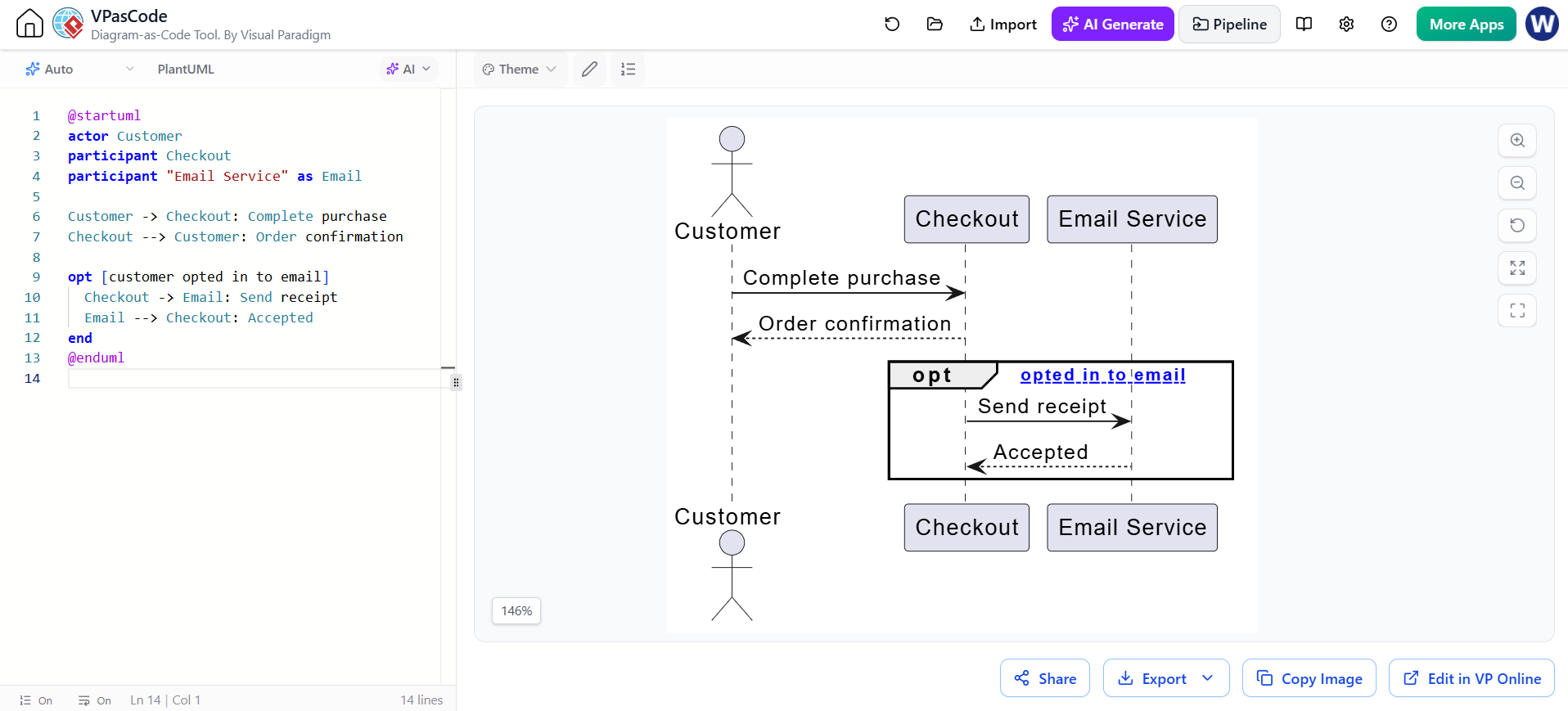
The diagram provided illustrates a classic e-commerce interaction. A Customer initiates a purchase, triggering a Checkout process. While the core transaction (completing the purchase and receiving confirmation) is mandatory, the receipt of an email is optional. This specific business rule—where a user might or might not opt into a newsletter or receipt email—requires a conditional logic block in the diagram.
Core Components of the Sequence
Before diving into the logic, let’s break down the participants and the mandatory flow:
- Actor (Customer): The human user initiating the sequence.
- Participant (Checkout): The primary system component handling the transaction logic.
- Participant (Email Service): A secondary system component responsible for communication.
The core interaction is straightforward: the Customer sends a Complete purchase message, and the Checkout system responds with an Order confirmation. This happens regardless of other settings.
Decoding the Optional Fragment
The power of this diagram lies in the opt block. In UML, a Combined Fragment defines a specific behavior that happens under certain circumstances. The opt (optional) fragment indicates that the enclosed messages are not guaranteed to occur.
In the code snippet below, we see how this is implemented:
opt [customer opted in to email]
  Checkout -> Email: Send receipt
  Email --> Checkout: Accepted
end
The opt keyword starts the optional block. The text inside square brackets, [customer opted in to email], serves as the Guard Condition. This text acts as a label explaining why the interaction happens. If the system state evaluates this condition as false, the entire block is skipped.
Step-by-Step Logic Analysis
- Condition Check: The system checks if the
customer opted in to emailflag is true. - Message Exchange:
- If true,
Checkoutsends a synchronous messageSend receipttoEmail. Emailprocesses the request and returns an asynchronous responseAccepted(indicated by the dotted arrow).
- If true,
- Termination: The
endkeyword closes the optional block, allowing the sequence to return to normal flow.
Why Use Diagram-as-Code?
While graphical editors are intuitive, tools like VPasCode offer distinct advantages for managing complex diagrams:
- Version Control Friendly: Unlike binary image files, code is text-based. You can track changes to your sequence diagrams using Git, allowing you to see exactly who modified the logic of the email service interaction.
- Standardized Syntax: Using PlantUML syntax ensures that diagrams adhere strictly to UML standards, reducing ambiguity in how the “optional” logic is interpreted by stakeholders.
- Scalability: Adding new participants or messages is as simple as adding a line of text, rather than manually dragging and connecting shapes.
Conclusion
By mastering the opt block, you can create system architecture diagrams that accurately reflect the conditional nature of real-world applications. Whether you are designing a payment gateway, a user login flow, or an email notification system, VPasCode provides the robust syntax needed to model these scenarios efficiently.