
Mastering UML Sequence Diagrams: A Deep Dive into Core Structural Elements
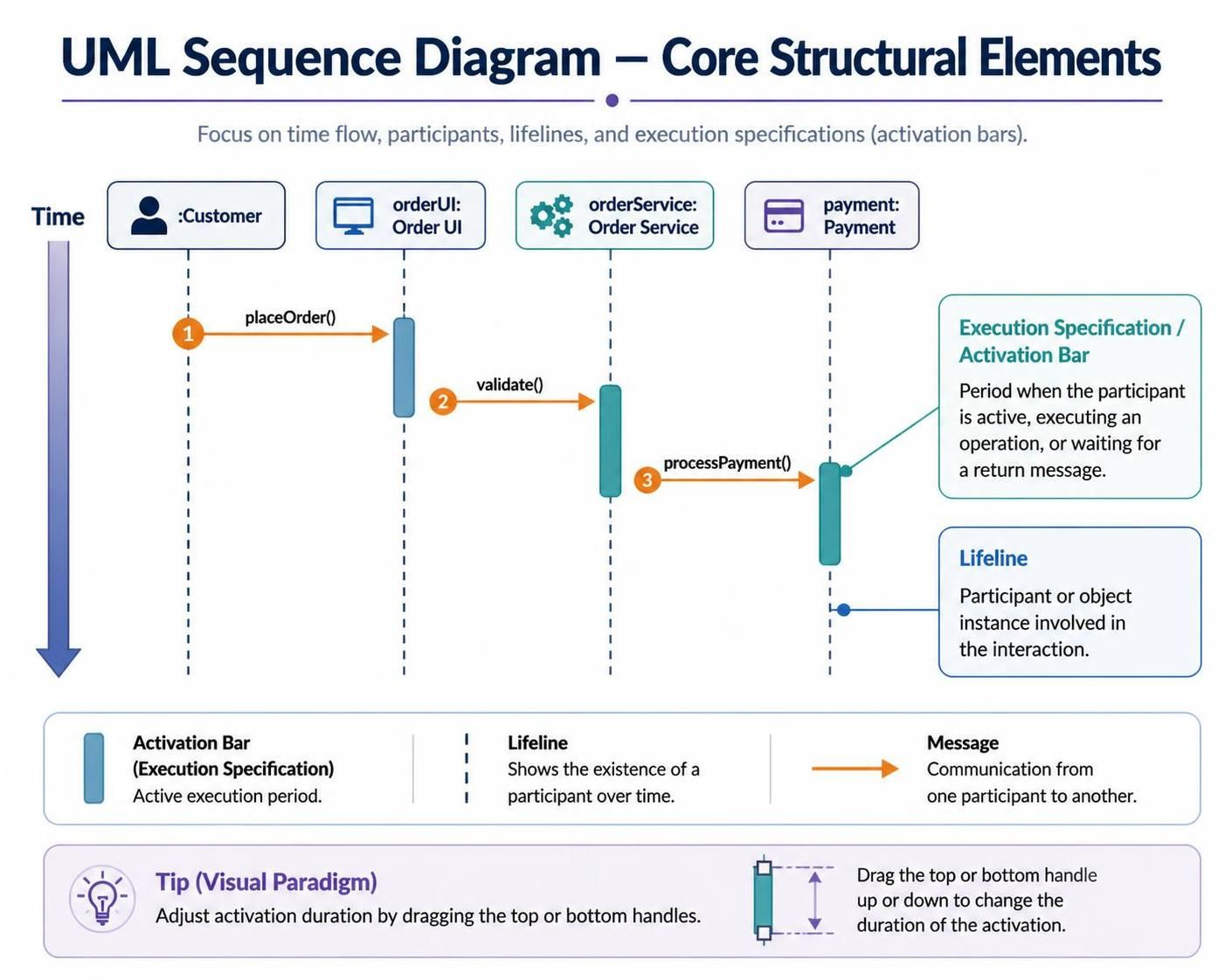
Sequence diagrams are the heartbeat of interaction modeling in software engineering. They provide a dynamic view of the system, illustrating how objects communicate over time to perform a specific function. Unlike static class diagrams that define structure, sequence diagrams tell the story of a system in action.
In this tutorial, we will dissect the fundamental anatomy of a UML Sequence Diagram, focusing on the vertical and horizontal axes, lifelines, and execution specifications. By the end of this guide, you will have a clear understanding of how to construct and interpret these diagrams using Visual Paradigm.
The Foundation: Axes and Participants
Before drawing a single message, one must establish the context. Every sequence diagram rests on two primary axes:
- Vertical Axis (Time): This represents the flow of time, moving strictly from top to bottom. The further down the diagram, the later the event occurs in the interaction sequence.
- Horizontal Axis (Participants): This defines the “actors” or components involved in the interaction. These are laid out across the top of the diagram.
Understanding these axes is crucial because the position of a message arrow relative to these axes tells the reader not just what happened, but when it happened and who was involved.
Defining Lifelines
Lifelines are the vertical dashed lines that extend downwards from the participant objects at the top. They represent the individual participants or object instances involved in the interaction.
Key Characteristics of Lifelines:
- Existence: A lifeline signifies that an object exists for the duration of the interaction. If an object does not have a lifeline in a specific diagram, it is not part of this particular scenario.
- Notation: Typically, a lifeline is represented by a rectangle containing the object’s name (e.g.,
:Customerorcustomer: Customer) at the top, connected to a vertical dashed line.
The Engine of Interaction: Execution Specifications
While the lifeline shows that an object exists, it doesn’t tell us when it is doing work. This is where the Execution Specification, commonly known as an Activation Bar, comes into play.
Activation bars are thin vertical rectangles overlaid directly onto the lifeline. They are critical for visualizing the state of an object during the interaction.
What Activation Bars Indicate
An activation bar marks the period during which an element is active. This includes:
- Executing an operation.
- Performing internal processing logic.
- Waiting for a return message from a lower-level object.
When you see a long activation bar, it implies that the object is busy for an extended duration. When the bar ends, the object is no longer active and is likely waiting for an external event or has completed its task.
Technical Deep Dive: Controlling Duration in Visual Paradigm
In the context of the Visual Paradigm modeling tool, managing the visual representation of time is as important as the logic itself. The duration of an activation bar is not arbitrary; it must align with the sequence of messages.
Visual Paradigm offers intuitive controls for this. You can drag the top or bottom handles of an execution specification to precisely adjust the duration of an object’s activity. This allows you to:
- Stretch an activation bar to visually represent a long processing time.
- Shorten it to indicate a quick, synchronous operation.
- Ensure that the visual alignment of bars matches the logical flow of your system architecture.
Summary of Core Elements
To successfully model a system architecture, remember these core components:
- Time: Always flows downwards.
- Lifelines: Define the participants and their existence.
- Messages: The arrows that denote communication between participants.
- Execution Specifications: The bars that define active periods and operational duration.
By mastering these structural elements, you ensure that your sequence diagrams are not just drawings, but precise, readable blueprints of your system’s behavior.