
Mastering UML Sequence Diagrams: The Appointment Booking Logic
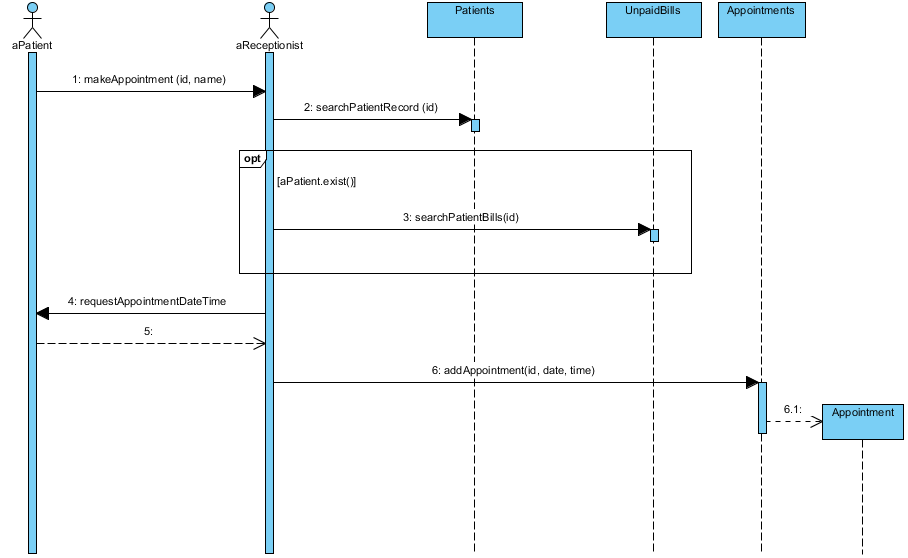
In the world of software engineering, understanding how different parts of a system interact over time is crucial. One of the most effective tools for visualizing these interactions is the UML Sequence Diagram. In this tutorial, we will break down a real-world example: an Appointment Booking System. We will walk through the actors, the object interactions, and the conditional logic required to successfully schedule a patient’s visit.
Understanding the Core Components
Before diving into the message flow, let’s identify the key participants (or “lifelines”) depicted in the architecture. These represent the different roles or system objects involved in the process.
- Actors: These are the external entities initiating the process.
aPatient: The individual seeking an appointment.aReceptionist: The staff member who processes the request.
- System Objects (Entities): These represent internal system modules.
Patients: A module managing patient records.UnpaidBills: A module handling financial records.Appointments: A module managing the schedule.
Step-by-Step Interaction Flow
The diagram illustrates a logical sequence of events. Let’s analyze the flow from start to finish.
1. The Initial Request
The process begins when the Receptionist initiates a call to the Patient object (or system interface) to start the booking. In the diagram, this is represented by the solid arrow labeled makeAppointment(id, name).
2. Verifying Patient Identity
Once the request is received, the system must ensure the patient exists in the database. The Receptionist object sends a synchronous message to the Patients object:
2: searchPatientRecord(id)3. Conditional Logic: Checking Financial Status
Here is where the logic gets interesting. The diagram uses an Alt (Alternative) or Opt (Optional) combined frame to represent a conditional check. Inside this frame, there is a guard condition: [aPatient.exist()].
This means: “Only if the patient exists in the system, proceed with the following steps.”
If this condition is met, the system triggers a check on the UnpaidBills object:
3: searchPatientBills(id)This step is critical for business logic. It ensures that a new appointment is not scheduled for a patient who has outstanding debts, or it simply logs the financial status before proceeding.
4. Requesting Availability
After the necessary checks (and assuming no blockers), the Receptionist needs to know when the patient is free. The system sends a message back to the patient context:
4: requestAppointmentDateTime5. The Response
Once the patient provides the date and time, the Receptionist object acknowledges this input. This is shown as a dashed arrow labeled 5:, representing an asynchronous return message or acknowledgment.
6. Finalizing the Appointment
The final step is the most critical: persisting the data. The Receptionist object sends a command to the Appointments object to create the record:
6: addAppointment(id, date, time)Upon receiving this command, the Appointments object instantiates a new Appointment object (labeled 6.1), effectively completing the booking process.
Why Use Sequence Diagrams?
By visualizing the appointment process as a sequence of messages, developers and stakeholders can easily identify:
- Latency Points: Where might the system wait for a response?
- Dependencies: Does the Appointments module rely on the Patients module?
- Logic Gaps: What happens if the patient doesn’t exist? (The diagram implies a check, but the failure path is another area to explore).
Mastering these diagrams allows you to design robust systems that handle complex business rules like the one shown above.