
Building an Online Order Process with VPasCode: A BPMN AI Context Diagram
In modern business process modeling, the gap between conceptual thinking and technical execution has historically been a significant hurdle. Modelers often struggle with the strict syntax of BPMN 2.0, requiring precise knowledge of gateways, events, and message flows. Visual Paradigm addresses this friction through its AI Diagram Generation capabilities, allowing users to translate plain-English narratives directly into standard-compliant diagrams.
This tutorial demonstrates how to leverage the AI BPMN Diagram Generator to construct a complex Order Fulfillment Process Context Diagram. We will walk through the input requirements, the generation logic, and the structural analysis of the resulting architecture.
Step 1: Defining the Narrative Input
The foundation of AI-driven modeling is a clear, descriptive prompt. The AI engine does not rely on complex data structures but rather on semantic understanding of natural language. To generate a robust diagram, your input must define the scope, the actors, and the critical business events.
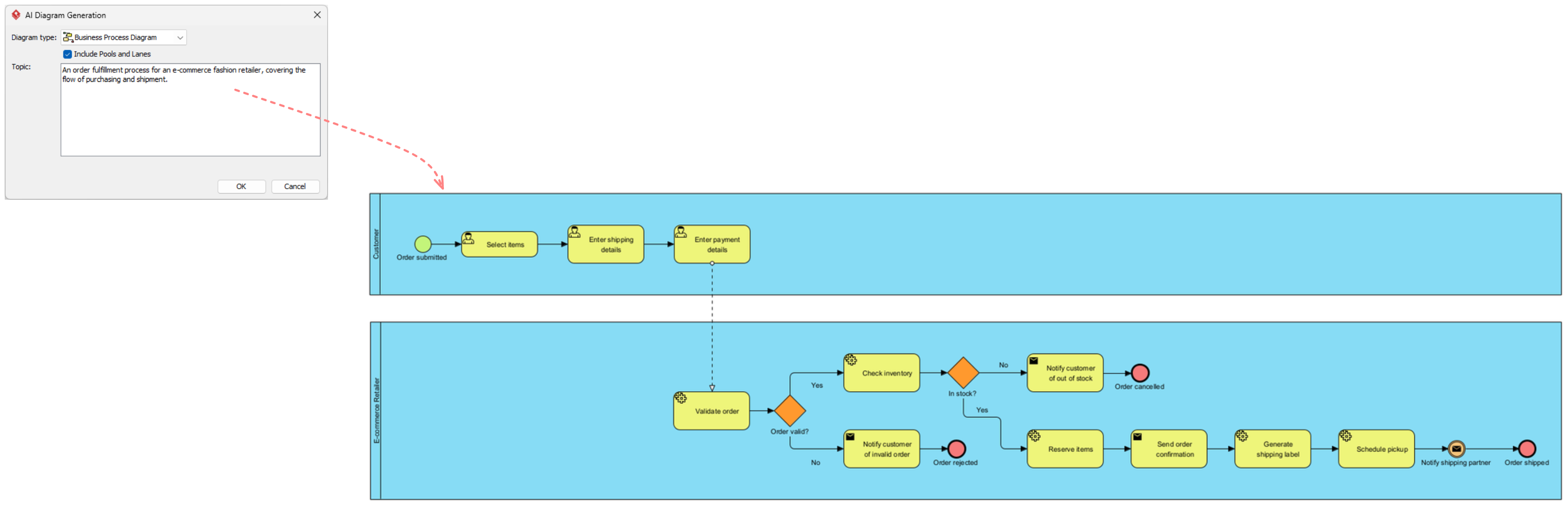
Open the AI Diagram Generation tool within Visual Paradigm. In the ‘Topic’ field, provide a concise summary of the process. For this tutorial, we will use the following prompt:
An order fulfillment process for an e-commerce fashion retailer, covering the flow of purchasing and shipment.Why This Input Works
This narrative is effective because it identifies three key components:
- Subject: Order fulfillment process.
- Context: E-commerce fashion retailer.
- Scope: Purchasing and shipment flow.
Step 2: Configuring the Diagram Scope
Before executing the generation, you must configure the structural properties of the diagram. In the dialog box, you will encounter the option to Include Pools and Lanes.
Recommendation: Always select this option when modeling business processes. Pools represent high-level participants (e.g., the Customer), while Lanes represent specific roles or departments within those participants (e.g., the E-commerce Retailer). This structure is essential for maintaining a clear “handshake” between external actors and internal systems.
Step 3: Analyzing the Generated Architecture
Once you click OK, the AI processes the narrative and constructs the diagram. The resulting image displays a sophisticated flow divided into two distinct pools: the Customer and the E-commerce Retailer.
1. The Customer Pool (External Flow)
The top lane represents the external actor. The AI correctly identifies the initiation points for the process:
- Order Submitted: The Start Event.
- Select Items: A User Task performed by the customer.
- Enter Shipping Details: Another User Task.
- Enter Payment Details: The final task before the message is passed to the internal system.
2. The E-commerce Retailer Pool (Internal Logic)
The bottom lane reveals the complex business logic required to fulfill the order. The AI has automatically introduced decision gateways and parallel flows.
Validation and Inventory Logic
Notice how the AI handles the Validate Order task. Immediately following this, it places a Gateway (the diamond shape) to split the flow based on the validity of the order:
- Invalid Path: If the order is invalid, the flow branches to “Notify customer of invalid order” and terminates.
- Valid Path: If valid, the process moves to Check Inventory.
Stock Management
The AI demonstrates intelligent handling of conditional logic in the inventory check:
Check Inventory -> [Gateway: In Stock?]
   |-- No --> Notify customer of out of stock --> End Event
   |-- Yes --> Reserve Items --> Send order confirmation --> ...
3. Fulfillment and Shipping
The tail end of the process handles the physical logistics. The AI includes tasks such as Generate shipping label and Schedule pickup, culminating in the final “Order Shipped” event. It also includes a notification step for the shipping partner, ensuring the data flow is complete.
Conclusion
By utilizing the AI Diagram Generator in Visual Paradigm, complex business logic that typically requires hours of manual configuration can be generated in seconds. The resulting diagram is not merely a representation; it is a functional model that accurately reflects the nuances of an e-commerce fulfillment workflow.