
Mastering BPMN Swimlanes and Pools: A Technical Guide to Process Architecture
In the realm of Business Process Management (BPM), clarity is paramount. When processes become complex, involving multiple departments, distinct roles, or even external organizations, a simple linear flowchart often fails to capture the necessary context. This is where the structural power of BPMN (Business Process Model and Notation) shines. Specifically, the concepts of Pools and Swimlanes provide the architectural framework required to visualize who is responsible for what within a process.
This tutorial delves into the system architecture of BPMN containers, explaining how to model complex interactions and ensuring your diagrams communicate precise responsibilities.
Understanding the Hierarchy: Pools vs. Lanes
To effectively model a system, one must understand the container hierarchy. BPMN uses a container-based approach where processes are nested within specific boundaries.
1. The Pool: The Boundary of Responsibility
Think of a Pool as a distinct container that represents a participant in a process. In technical modeling terms, a pool is a “black box” boundary. It defines the scope of the process and the entity responsible for it.
- Independent Participants: A pool represents an autonomous entity. This could be an entire organization, a specific company, or a distinct business unit.
- Isolation: Activities inside a pool are generally independent of activities in another pool unless a message flow connects them. This separation is crucial for modeling external interactions (e.g., a customer interacting with a vendor).
2. The Lane: Internal Segmentation
Once you have defined the participant (the Pool), you must organize the internal complexity. This is achieved using Lanes (often collectively called Swimlanes).
- Sub-divisions: Lanes are horizontal or vertical partitions within a single pool.
- Role-Based Organization: Unlike pools, lanes do not represent independent entities; they represent subdivisions of the single entity within the pool.
- Categorization: Lanes are typically used to organize activities by:
- Department: e.g., Sales, IT Support, Logistics.
- Role: e.g., Manager, Clerk, Customer.
- System: e.g., ERP System, Web Interface.
Architectural Visualization: The Diagram Structure
When you look at a standard BPMN diagram, you are looking at a structured grid. The visual hierarchy is strictly enforced to ensure readability.
graph TD
    A[Pool Container] --> B[Lane 1: Customer]
    A --> C[Lane 2: Sales Dept]
    A --> D[Lane 3: Inventory System]

    style A fill:#e1f5fe,stroke:#01579b,stroke-width:2px
    style B fill:#b3e5fc,stroke:#01579b
    style C fill:#b3e5fc,stroke:#01579b
    style D fill:#b3e5fc,stroke:#01579b
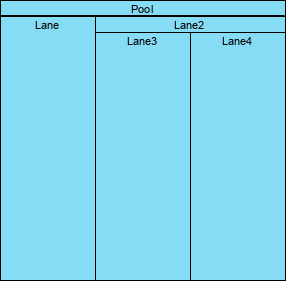
In a standard visual representation, such as the one illustrated below, you will see a single large rectangle (the Pool) divided into vertical or horizontal sections (the Lanes). Each section holds specific tasks (activities) relevant to that specific role.
How to Interpret the Layout
- Top Header: The top section labeled “Pool” defines the overarching entity.
- Sub-headers: Below the pool header, you will see the names of the lanes (e.g., “Lane 1”, “Lane 2”, “Lane 3”). These are the sub-organizations.
- Content Area: The large blue areas below the lane headers are where the actual process flows, tasks, and events reside.
Implementation Best Practices in Visual Paradigm
When utilizing Visual Paradigm to create these diagrams, it is important to adhere to specific modeling standards to ensure the diagram is valid and semantically correct.
Creating the Structure:
- Add a Pool: Start by dragging a “Pool” element onto the canvas. This creates the main container.
- Add Lanes: Right-click on the Pool (or inside the Pool area) and select “Add Lane”. You can add multiple lanes to create a grid.
- Assign Roles: Rename the Lanes to reflect the specific roles (e.g., “Sales”, “IT”, “Customer”).
- Connect Tasks: Drag process tasks into the specific lanes where they belong. Ensure that tasks within the same lane are connected via Sequence Flows.
Advanced Modeling: Nested Pools
For highly complex systems, you may encounter the concept of Nested Pools. This is when a Pool is placed inside another Pool. This is often used to represent a “Process within a Process” or a “Business Unit within a Company.”
Example Scenario:
- Outer Pool: “Global Logistics Corp”
- Inner Pool: “Shipping Division”
- Outer Lanes: “Management”, “Operations”
- Inner Lanes: “Truck Driver”, “Warehouse”, “Dispatch”
This nesting allows for granular control over scope while maintaining the hierarchical relationship between the division and the main organization.
Conclusion
Mastering the use of Pools and Lanes is essential for creating professional-grade BPMN diagrams. By correctly identifying the participant (Pool) and the specific role (Lane), you transform a chaotic list of tasks into a structured, readable architectural map. Always ensure your diagrams follow the strict hierarchy defined in the BPMN specification to maintain clarity and consistency.