What Makes an AI SysML Modeling Tool Truly Powerful?
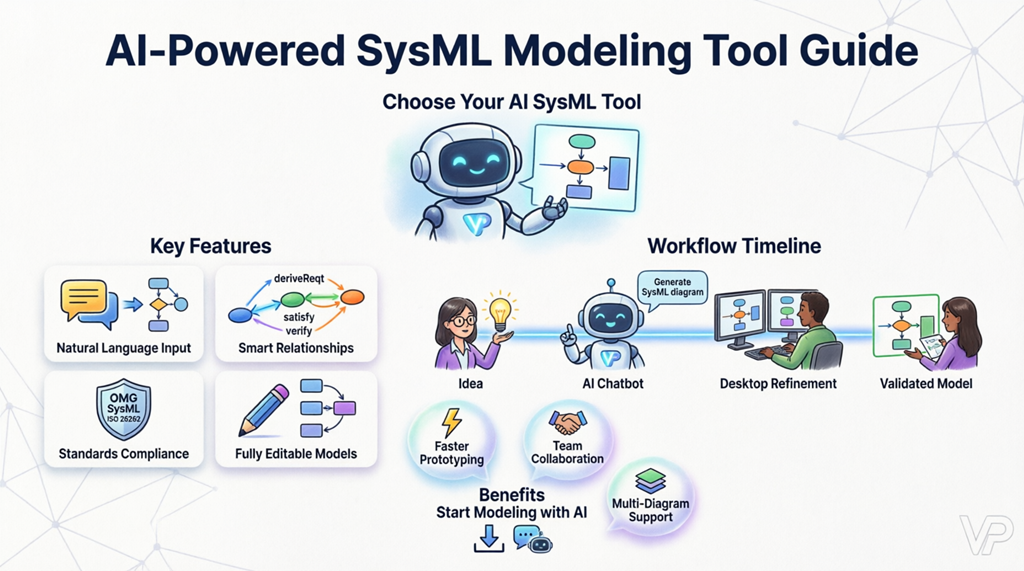
Not all modeling tools are created equal. When evaluating an AI-powered SysML diagram maker, prioritize these capabilities:
- Natural language to model conversion: The best AI requirement diagram generator lets you describe system goals in plain English and instantly produces standards-compliant SysML artifacts.
- Intelligent relationship mapping: Look for an intelligent SysML modeling tool that automatically suggests and creates deriveReqt, satisfy, verify, and refine relationships to maintain traceability.
- Standards compliance: Ensure your AI-driven architecture design tool generates diagrams that adhere to OMG SysML specifications and integrate with industry frameworks.
- Seamless editability: A professional AI-powered SysML requirement diagram tool should output fully editable models, not static images, enabling continuous refinement.
- Multi-diagram support: The most versatile AI visual modeling platform supports UML, ArchiMate, C4, and other notations alongside SysML for end-to-end system design.
How AI Transforms Requirement Elicitation and Modeling
Traditional requirement gathering often involves manual transcription, inconsistent formatting, and fragmented documentation. An AI requirement diagram generator changes this paradigm by acting as an intelligent partner throughout the modeling lifecycle:
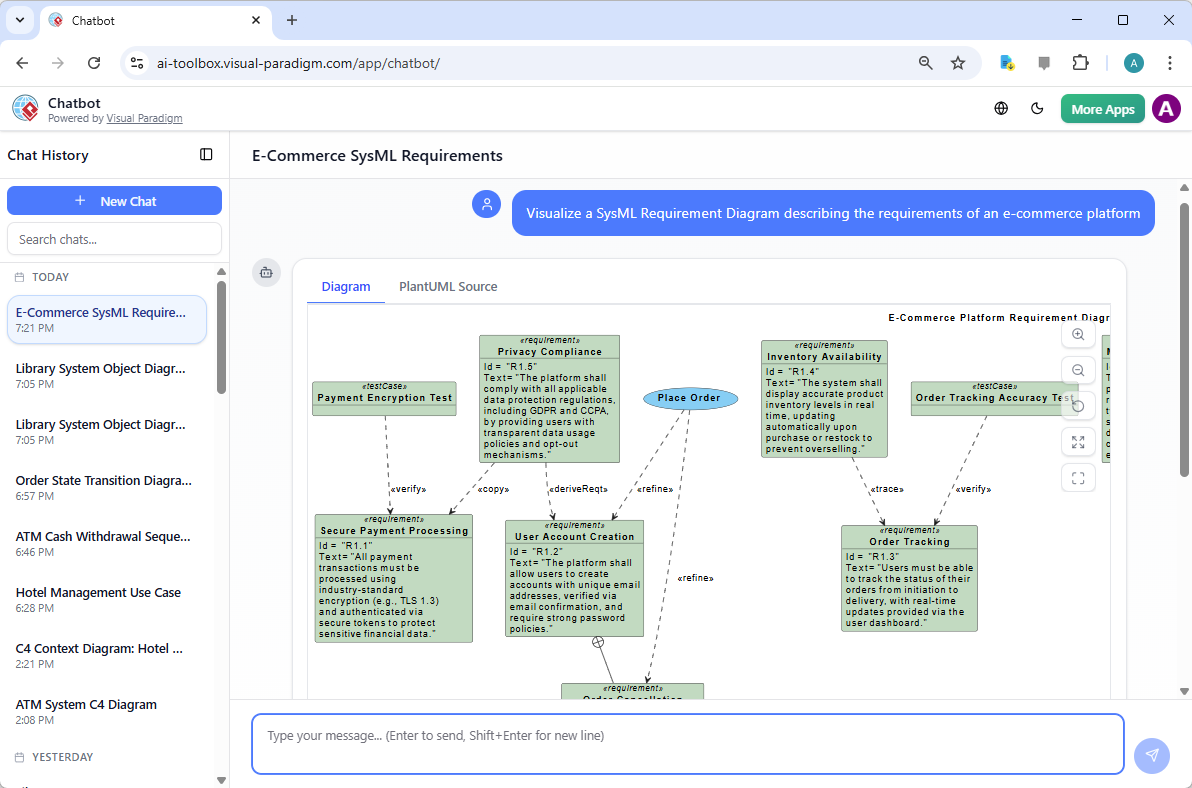
- Accelerated prototyping: Describe a system concept—like a global e-commerce platform with secure payment processing—and watch as your AI SysML diagram maker instantly structures requirements into a hierarchical diagram.
- Context-aware suggestions: Advanced AI visual modeling software recognizes domain patterns, automatically proposing performance constraints, security requirements, or regulatory compliance items relevant to your project type.
- Reduced onboarding friction: With a conversational AI modeling assistant, stakeholders without deep SysML expertise can contribute meaningfully to requirement definition, democratizing model creation across teams.
- Iterative refinement: As your understanding evolves, simply update your natural language description; the automated SysML diagram creator adapts the model while preserving established relationships and traceability links.
Experience this workflow firsthand with the Visual Paradigm AI Chatbot, where you can describe complex system goals and witness real-time generation of a SysML Requirement Diagram. Learn more about its multi-language capabilities in the latest release notes.
Visual Paradigm: A Comprehensive AI-Powered SysML Solution
For teams seeking a professional AI-powered SysML requirement diagram tool that scales from initial ideation to detailed engineering, Visual Paradigm offers an integrated ecosystem designed for modern systems engineering challenges.
Conversational Modeling for Rapid Ideation
Start with the cloud-based AI Chatbot to brainstorm and generate initial requirement structures. This interface bridges conceptual thinking and formal documentation, providing immediate visual feedback on requirement hierarchy, dependencies, and key attributes like priority and risk.
Desktop Power for Deep Engineering
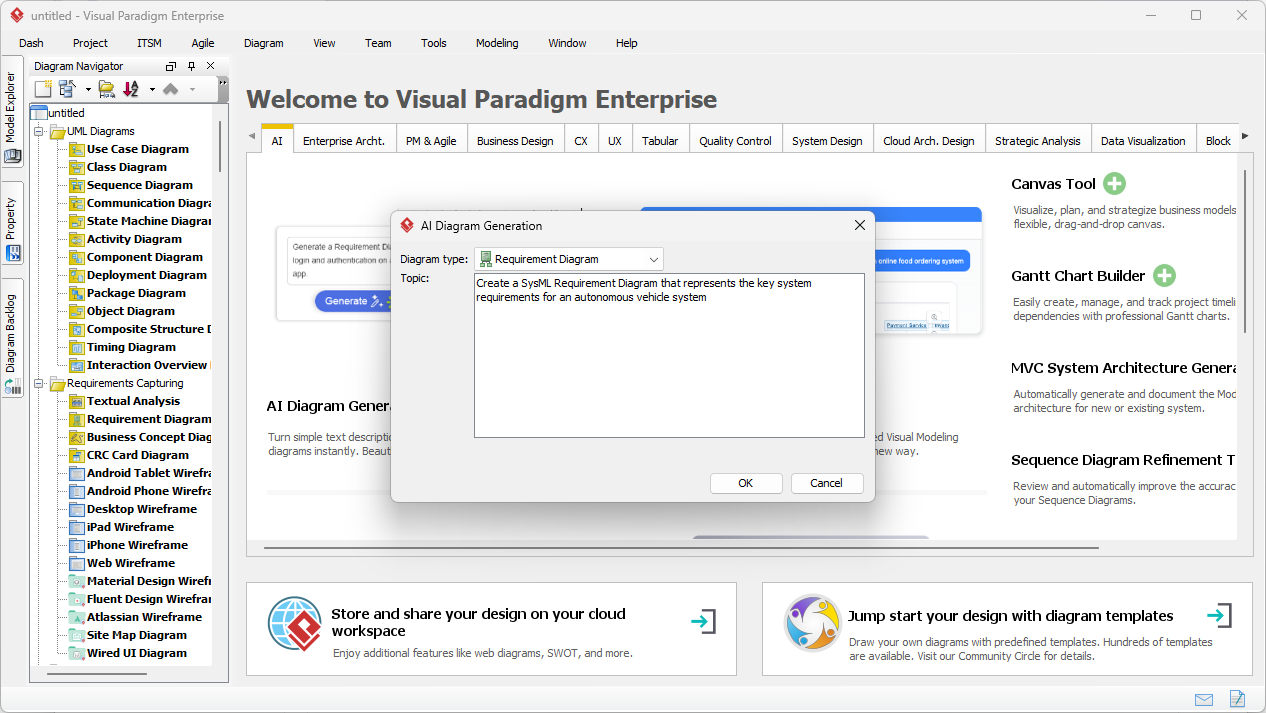
When your project demands advanced analysis, transition seamlessly to Visual Paradigm Desktop. The AI Diagram Generation dialog allows you to input comprehensive system descriptions—for example, autonomous vehicle navigation—and receive a sophisticated SysML model with inferred requirement blocks, unique identifiers, and hierarchical containment.
Automated Traceability for Compliance and Quality
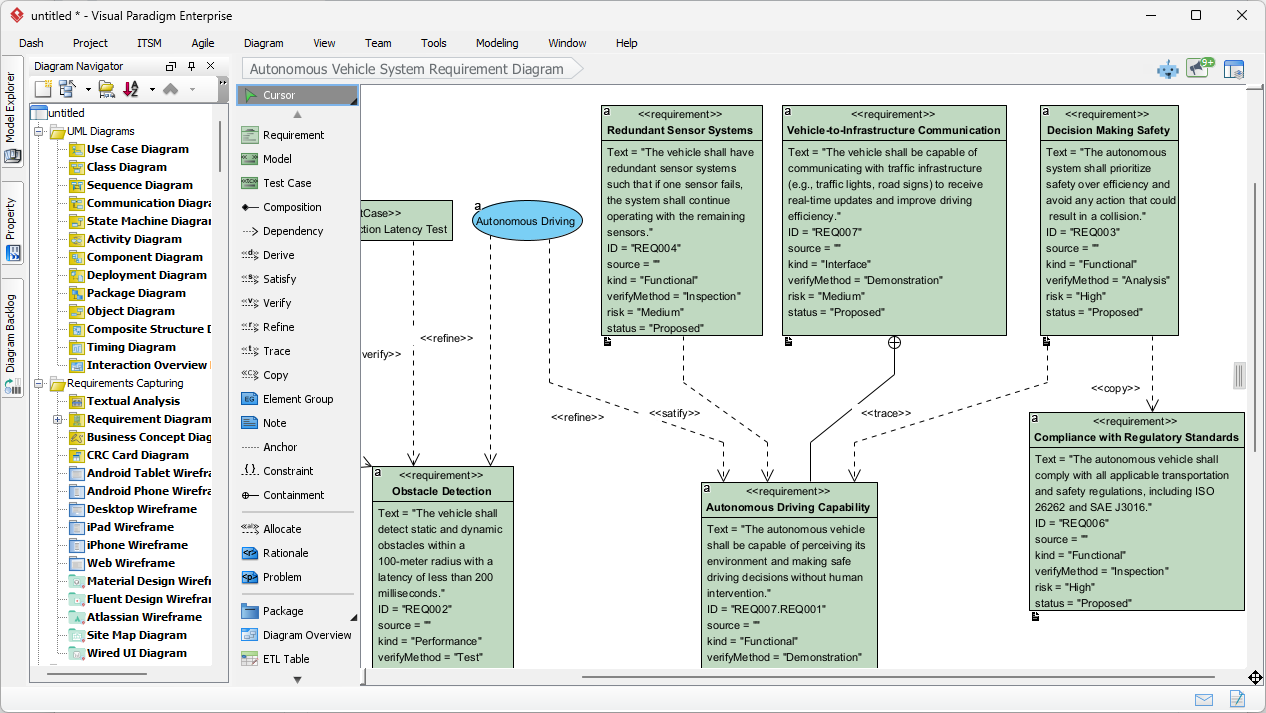
One of the most valuable features of this intelligent SysML modeling tool is its ability to automatically establish meaningful relationships between requirements, design elements, and verification artifacts. When modeling safety-critical systems like autonomous vehicles, the AI identifies critical safety goals and links them to specific performance constraints such as obstacle detection latency or redundant sensor systems. The resulting diagram incorporates standardized SysML relationship types, creating a robust framework for verification and validation essential for compliance with standards like ISO 26262.
Practical Workflow: From Idea to Validated Model
- Define your scope: Begin with a clear, concise description of your system’s purpose and key capabilities.
- Engage the AI assistant: Use the conversational interface or diagram generation dialog to input your description. Be specific about functional needs, performance targets, and constraints.
- Review and refine: Examine the generated SysML diagram. The AI requirement diagram generator provides a strong foundation, but your expertise ensures contextual accuracy.
- Enhance relationships: Leverage automated suggestions for deriveReqt, satisfy, and verify links, then customize as needed to reflect your project’s unique traceability needs.
- Integrate and iterate: Connect your requirement model to design diagrams, test cases, or documentation within the same environment. As requirements evolve, regenerate or adjust with AI assistance.
Advanced Capabilities for Enterprise-Grade Modeling
Beyond core diagram generation, a top-tier AI visual modeling platform delivers features that support complex, collaborative engineering efforts:
- Multi-standard support: Work with SysML, UML, ArchiMate, BPMN, and more within a single environment, ensuring consistency across business, software, and systems models.
- Team collaboration: Share models, track changes, and maintain a single source of truth across distributed teams.
- Export and integration: Generate documentation, reports, or code skeletons; integrate with ALM tools, version control, or CI/CD pipelines.
- Customization: Tailor requirement types, stereotypes, and templates to match your organization’s methodology or industry standards.
- AI-assisted impact analysis: When a requirement changes, the intelligent modeling tool can highlight downstream effects on design elements, test cases, and related requirements—reducing risk in complex projects.
Explore how to understand requirement diagrams in UML and SysML or learn to draw requirement diagrams step-by-step in Visual Paradigm.
Getting Started: Resources and Next Steps
Ready to experience how an AI-powered SysML requirement diagram tool can elevate your engineering practice? Begin with these curated resources:
- Download Visual Paradigm Desktop to access the full-featured modeling suite with AI diagram generation.
- Launch the AI Chatbot for instant, conversational creation of SysML diagrams.
- Learn more about AI visual modeling capabilities and use cases.
- Consult the Requirement Diagram Guide for comprehensive creation and management techniques.
- Discover advanced requirement diagram features like traceability and validation workflows.
- Follow the Beginner’s Guide to Requirement Diagrams in SysML for foundational modeling concepts.
- Learn to customize requirement types for specialized domain modeling.
- Explore programmatic control via the Visual Paradigm OpenAPI for Requirement Diagrams.
- Jumpstart your projects with free requirement diagram templates.
- Check out the Requirement Diagram Generator on GitHub for open-source automation ideas.
- Deepen your SysML knowledge with guidance on timing diagrams and other complementary notations.
- Master requirement lifecycle management with the guide on creating and managing requirements.
Conclusion: Elevate Your Systems Engineering with Intelligent Modeling
Choosing the right professional AI-powered SysML requirement diagram tool is an investment in clarity, efficiency, and quality. By leveraging an AI requirement diagram generator that understands natural language, enforces standards, and automates traceability, your team can focus less on diagram mechanics and more on solving the hard problems that define successful systems. Visual Paradigm’s integrated approach—combining conversational AI, desktop-grade modeling, and extensive standards support—provides a future-ready foundation for teams navigating increasing system complexity. Start exploring today, and transform how you capture, communicate, and validate what your system must do.