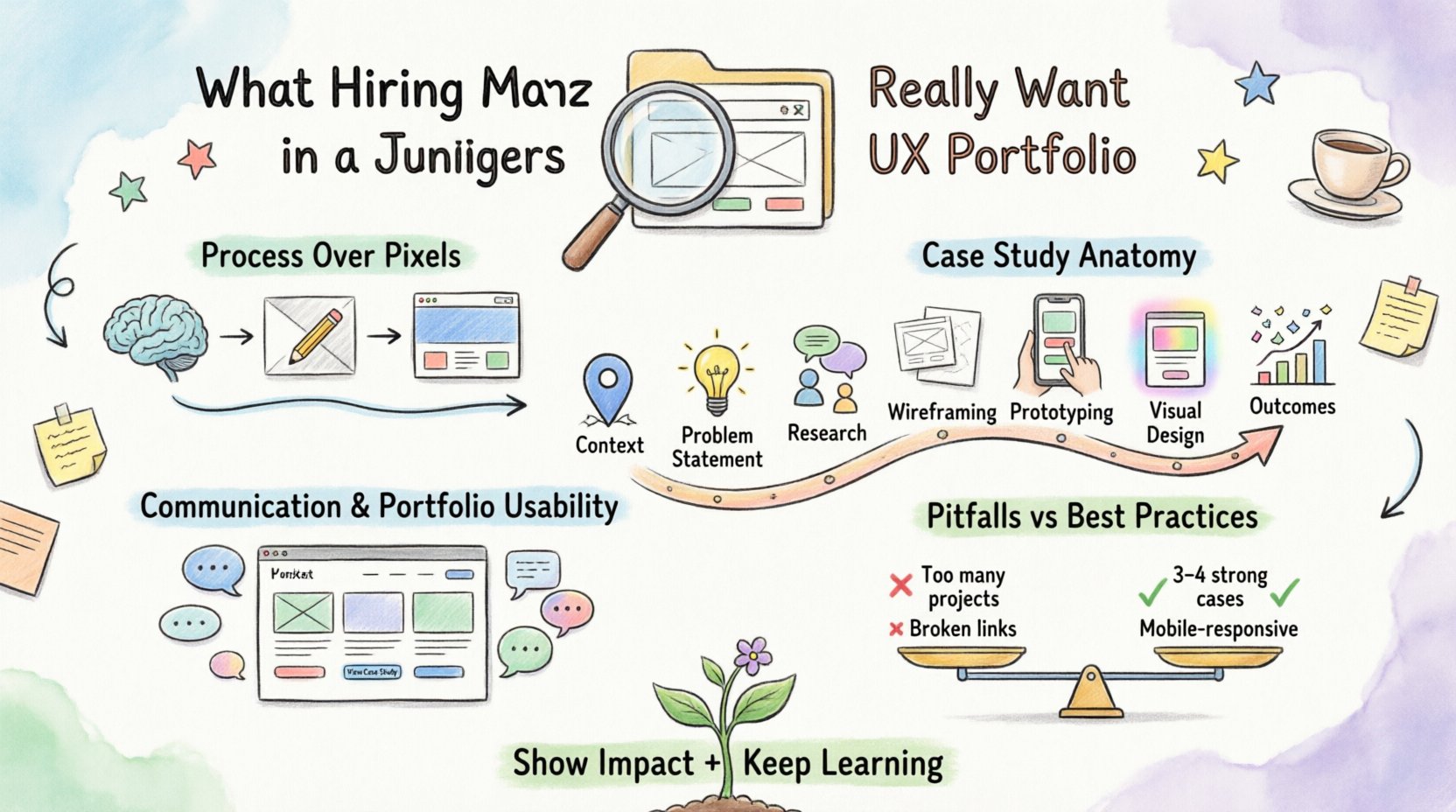
Entering the field of user experience design requires more than just an understanding of aesthetics or a collection of pretty images. Hiring managers and recruiters see hundreds of applications for every single opening. They are looking for evidence of critical thinking, problem-solving abilities, and a genuine passion for the user. A junior UX portfolio is not a gallery; it is a demonstration of your professional potential.
This guide breaks down exactly what hiring managers evaluate when they open your portfolio. We will move past surface-level advice and discuss the structural, strategic, and communicative elements that distinguish a strong candidate from the rest. Your portfolio is the primary vehicle for your career, and understanding its mechanics is the first step toward landing your first role.
🧠 The Mindset Shift: Process Over Pixels
Many entry-level designers make the mistake of focusing too heavily on the final visual output. They spend days perfecting colors and typography but leave the research and reasoning vague. Hiring managers know that tools change, but problem-solving skills remain constant. They want to see how you think, not just what you created.
When reviewing a portfolio, a hiring manager asks themselves specific questions. If the answer is not clear within the first thirty seconds, the application may be overlooked. These questions include:
Did this person understand the problem they were solving?
How did they gather information to make decisions?
What happened when things went wrong during the process?
Can they explain their design choices clearly?
Do they care about the outcome for the user?
To answer these effectively, you must shift your mindset. Your work is not a collection of screenshots; it is a story of discovery. Every image, wireframe, or user flow map should serve a narrative purpose. It should show the path from ambiguity to clarity.
📂 Anatomy of a Strong Case Study
A standard case study in a UX portfolio follows a logical flow. It mimics the actual workflow of a design team. While you may not have had a formal job with a team, you can structure your personal or academic projects to reflect professional standards. Here are the core components that hiring managers expect to see.
1. Context and Background
Start by setting the stage. What was the project? Who was the client or user base? What was the business goal? Avoid vague statements like “I designed an app.” Instead, specify the domain. Was it a fintech solution? A healthcare dashboard? A local delivery service?
Be specific about your role. If this was a team project, clearly state what you contributed. Did you conduct user interviews? Did you create the wireframes? Did you handle the visual design? Honesty about scope builds trust.
2. The Problem Statement
A design project exists because a problem needs solving. Clearly articulate what that problem is. Is it a high drop-off rate? Is it confusion in the navigation? Is it accessibility barriers? The problem statement should be concise and measurable.
Example of a weak statement: “The app was hard to use.” Example of a strong statement: “Users were abandoning the checkout process at the payment screen due to unclear error messages.”
3. Research and Discovery
This section is often the most critical for junior designers. It proves you do not rely on gut feelings. Describe the methods you used to gather insights. Common methods include:
User Interviews: One-on-one conversations to understand motivations.
Surveys: Quantitative data from a larger audience.
Competitive Analysis: Reviewing similar solutions to identify gaps.
Personas: Archetypes representing your target users.
Empathy Maps: Visualizing what users say, think, feel, and do.
Do not just list these methods. Show the findings. What did the data tell you? If you found that users were confused by a specific icon, show the evidence. Photos of sticky notes, screenshots of interview transcripts, or charts of survey results add authenticity.
4. Ideation and Wireframing
Show how you moved from research to solution. Hiring managers want to see the evolution of ideas. Include low-fidelity sketches or wireframes. This demonstrates that you considered multiple options before committing to a design.
If you can, explain why you rejected certain ideas. “We discarded the hamburger menu because user testing showed it was not discoverable on mobile devices.” This shows decision-making capability.
5. Prototyping and Testing
Describe how you validated your design. Did you create a clickable prototype to test flows? Did you conduct usability testing sessions? What feedback did you receive?
Highlight how you iterated based on feedback. A design that never changes suggests a lack of testing. A design that evolves shows responsiveness to user needs. Show a “Before and After” comparison of a screen to illustrate the impact of your testing.
6. Visual Design and Final Screens
Now you can show the polished visuals. This is where the aesthetic appeal comes in, but it must be grounded in the previous steps. Ensure the visuals are high quality, but do not let them overshadow the process. Use mockups to show the design in context, such as on a mobile device or desktop browser.
7. Outcomes and Impact
If possible, quantify the results. Did the redesign increase sign-ups? Did it reduce support tickets? If you do not have real data, discuss the learning outcome. “The project taught me the importance of clear feedback loops.” Be realistic. If the project was academic, focus on the skills gained and the hypothetical business value.
⚖️ Common Pitfalls vs. Best Practices
To ensure your portfolio stands out, it helps to understand what does not work. The table below outlines common mistakes and how to correct them.
Common Mistake | Why It Hurts | Best Practice |
|---|---|---|
Too Many Projects | Overwhelms the reader and dilutes focus. | Include 3-4 strong, detailed case studies. |
Final Screens Only | Shows no process or problem-solving. | Show sketches, wireframes, and iterations. |
Vague Descriptions | Leaves hiring managers guessing about your role. | Use specific metrics and clear role definitions. |
Broken Links | Signals lack of attention to detail. | Test all links and buttons before publishing. |
Ignoring Mobile | Most users browse on phones. | Ensure your portfolio is fully responsive. |
No Contact Info | Missed opportunity for connection. | Make your email and LinkedIn easily accessible. |
🗣️ Communication and Soft Skills
Design is a collaborative field. You will work with product managers, developers, marketers, and stakeholders. Your portfolio is a proxy for your communication skills. If you cannot explain your work clearly in writing, it suggests you will struggle in meetings.
Consider the following aspects of communication within your portfolio:
Clarity: Avoid jargon where possible. Explain technical terms if you must use them.
Tone: Maintain a professional yet approachable voice.
Formatting: Use headings, bullet points, and whitespace to make text scannable.
Honesty: If you made a mistake, admit it. Describe how you fixed it.
Hiring managers are looking for candidates who can advocate for the user while balancing business goals. Your writing should reflect this balance. Do not say “I made it beautiful.” Say “I designed a solution that improved task completion time while maintaining brand guidelines.”
🖥️ The Usability of Your Own Portfolio
Your portfolio website is the first test of your design skills. If the navigation is confusing, the load times are slow, or the text is hard to read, it casts doubt on your ability to design usable products. You are the first user experience case study.
Ensure the following elements are present:
Clear Navigation: Users should know where they are and how to get to the main case studies.
Fast Load Times: Optimize images. Large files can cause frustration.
Accessibility: Use proper contrast ratios and alt text for images.
Search Function: Allow users to filter by industry or project type.
About Page: Tell your story. Why do you design? What drives you?
Do not overcomplicate the site. A clean, functional layout demonstrates confidence in your work. Complex animations or hidden menus are often unnecessary distractions for a hiring manager who wants to see your work quickly.
📈 Metrics and Evidence of Impact
While junior designers may not have access to enterprise-level analytics, they should still strive to show impact. This does not always mean revenue figures. It can mean user satisfaction scores, task success rates, or engagement metrics.
If you do not have access to real data, you can use hypothetical scenarios based on your research. Clearly label them as estimates. For example:
Heuristic Evaluation: Show a list of usability issues you found before and after your redesign.
Task Analysis: Describe how many steps a user took to complete a task before and after.
User Feedback: Quote a participant saying the new flow was easier to understand.
Quantifying results shows that you care about the bottom line. It shifts the conversation from “I made this” to “This solved a problem.” Even if the numbers are small, they demonstrate a mindset focused on results.
🔄 Continuous Learning and Growth
The field of user experience changes rapidly. Hiring managers want to see that you are committed to learning. This does not mean you need a certification for every new tool. It means showing curiosity.
Include a section on what you are currently studying. Are you reading books on psychology? Are you following industry blogs? Are you experimenting with new interaction patterns? Mentioning a recent course or a specific article you analyzed shows intellectual curiosity.
You can also mention side projects. These demonstrate passion and the ability to work independently. They can be apps you built, websites you redesigned, or even physical products you analyzed.
🤝 The Interview Connection
Your portfolio is often the starting point for an interview. It provides the script. Be prepared to walk through every case study in your portfolio. You should be able to discuss the process without looking at the screen.
Prepare for questions like:
What was the most challenging part of this project?
How did you handle conflicting feedback from stakeholders?
If you had more time, what would you improve?
How did you prioritize features?
Review your work critically before applying. If you cannot answer these questions confidently, revisit that case study. Add more detail to the research or testing sections. The goal is to be able to defend your decisions with logic and evidence.
🎯 Final Thoughts on Portfolio Strategy
Building a junior UX portfolio is a marathon, not a sprint. It requires patience, iteration, and honest reflection. There is no single template that guarantees success, but there are principles that guide hiring managers in their decision-making.
Focus on quality over quantity. It is better to have three deep case studies than ten shallow ones. Show your thinking process. Be transparent about your contributions. Ensure your own site is functional and accessible. Communicate clearly.
Remember, you are not just selling a design. You are selling your potential. Hiring managers are investing in a person who will grow with the team. Demonstrate that you are curious, resilient, and user-focused. When you align your portfolio with these values, you move from being just another applicant to a compelling candidate.
Keep refining your work. Seek feedback from peers and mentors. The design industry values those who are willing to listen and adapt. Your portfolio is a living document. Update it as you learn new skills and complete new projects. Stay consistent, stay authentic, and let your work speak for itself.