In the landscape of agile development, the user story serves as the fundamental unit of work. It is the bridge between business needs and technical implementation. However, a common friction point arises when these stories lack the right balance of information. Some teams struggle with narratives that are overly prescriptive, while others face stories that offer too little guidance. Finding the equilibrium is critical for maintaining velocity and quality. This guide explores the indicators of poor granularity and how to navigate the complexity of requirement specification without stifling creativity or inviting ambiguity.
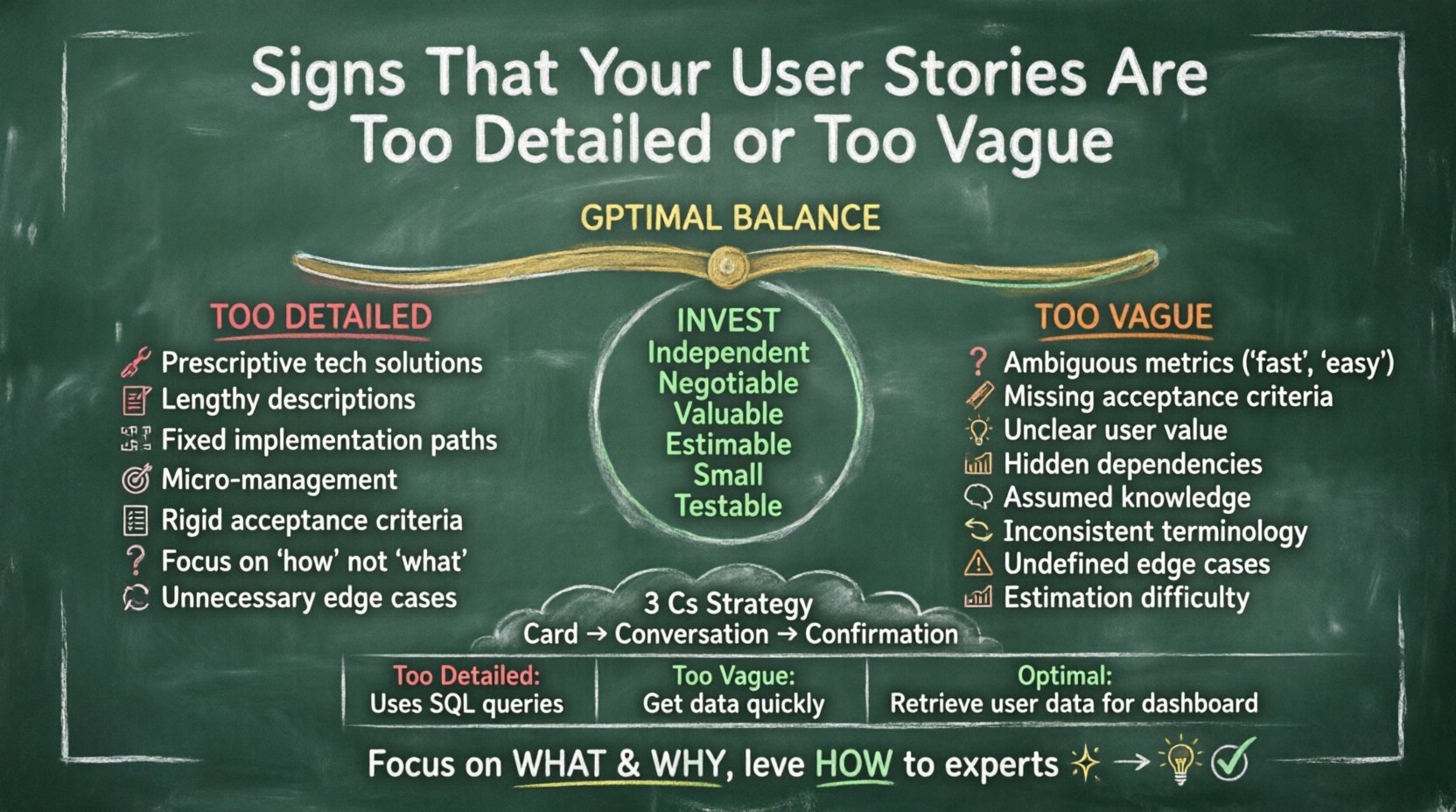
Understanding the Goldilocks Zone for Requirements 🧩
User stories are not contracts; they are placeholders for conversation. The goal is to capture enough context to enable a team member to understand the intent without dictating the exact technical solution. When the detail level skews too far in either direction, the workflow suffers. Too much detail restricts the developer’s ability to find optimal solutions. Too little detail forces the team to guess, leading to rework. This middle ground is often referred to as the “Goldilocks Zone” of agile requirements. It requires a keen understanding of the INVEST model, where stories are Independent, Negotiable, Valuable, Estimable, Small, and Testable.
When a story is well-crafted, it empowers the team. It provides the “what” and the “why,” leaving the “how” to the experts executing the work. If the team spends more time debating the story text than building the feature, the specification is likely flawed. This text breaks down the specific signals that suggest your backlog items are not ready for the sprint.
🛑 Red Flags: When Stories Are Too Detailed
Over-specification is a subtle trap. It often stems from a desire to be thorough or a fear of ambiguity. However, excessive detail in the acceptance criteria or description section can lead to several negative outcomes. Here are the specific signs that your user stories have crossed into the territory of too much information.
- Prescriptive Technical Solutions: The story explicitly states which database tables to use, which algorithms to implement, or specific API endpoints to hit. This removes the developer’s agency to choose the best technical approach.
- Lengthy Descriptions: A single story contains multiple paragraphs of background context, historical reasons, and complex logic flows. This makes it difficult to scan quickly during planning or daily stand-ups.
- Fixed Implementation Paths: The narrative implies there is only one way to solve the problem. It ignores alternative approaches that might be more performant or maintainable.
- Micro-Management of Work: The story breaks down tasks that should be handled by the team collectively. It dictates the steps rather than the outcome.
- Rigid Acceptance Criteria: The criteria are so specific that any deviation, even if it achieves the same result, causes the story to fail validation.
- Focus on “How” Instead of “What”: The description spends more time on the mechanics of the feature than the value it provides to the end user.
- Unnecessary Edge Cases: The story attempts to cover every possible edge case upfront, making the story too large to complete in a single iteration.
When stories are too detailed, they become brittle. If a requirement changes slightly, the entire story may need to be rewritten because it is tied to specific implementation details. This reduces the agility of the team. Developers may feel like order-takers rather than problem solvers. They stop thinking critically about the architecture because the path is already drawn.
🧐 Warning Signs: When Stories Are Too Vague
On the opposite end of the spectrum lies ambiguity. While some flexibility is necessary, a lack of clarity creates uncertainty. This is often where estimation errors originate. If the team cannot clearly define what “done” looks like, the sprint goal becomes unreachable. Here are the indicators that your user stories lack sufficient detail.
- Ambiguous Success Metrics: Terms like “fast,” “easy,” “modern,” or “efficient” are used without specific definitions. These are subjective and lead to different interpretations among team members.
- Missing Acceptance Criteria: There is no clear list of conditions that must be met for the story to be considered complete.
- Unclear User Value: The “As a… I want… So that…” format is present, but the “So that” section is weak or missing. The business value is not articulated.
- Hidden Dependencies: The story relies on other features or data states that are not mentioned in the description or linked items.
- Assumed Knowledge: The narrative assumes the reader knows specific business rules that are not documented anywhere else.
- Inconsistent Terminology: The story uses different terms for the same concept, causing confusion about whether they refer to the same data point.
- Undefined Edge Cases: The story covers the happy path but ignores error handling, empty states, or validation rules.
- Difficulty in Estimation: Team members give widely varying time estimates for the same story because the scope is unclear.
Vague stories lead to assumptions. When developers assume requirements, they often build features that do not match the stakeholder’s expectations. This results in a high rate of rework. Testing becomes difficult because the criteria for passing are subjective. The team loses trust in the planning process when they realize the scope was misunderstood.
📊 Side-by-Side Comparison of Story Quality
Visualizing the difference between a poorly scoped story and a well-balanced one can clarify the concepts. The following table highlights the distinctions in language, structure, and intent.
| Feature | Too Detailed Story | Too Vague Story | Optimal Balance |
|---|---|---|---|
| Implementation | Uses SQL queries to fetch data. | Get the data quickly. | Retrieve user data for the dashboard. |
| Success Metric | Load time must be under 200ms. | Make it fast. | Page load under 2 seconds on 3G. |
| Scope | Includes login, search, and settings. | Improve the user experience. | Allow users to reset their password. |
| Value | Automate the email process. | Send emails. | Notify users when their order ships. |
| Outcome | Restricts technical choice. | Leads to rework. | Enables team autonomy. |
Notice how the optimal balance focuses on the outcome and the boundary conditions without dictating the internal machinery. It provides enough constraints to ensure quality but enough freedom to allow innovation.
🛠️ The Impact on Development Teams
The quality of your user stories directly influences the health of your development team. When stories are misaligned, the impact ripples through the entire workflow. Understanding these consequences helps in prioritizing the refinement of the backlog.
Estimation Accuracy
Accurate estimation relies on a clear understanding of scope. If a story is too vague, estimates become guesses. If it is too detailed, estimates might focus on the prescribed solution rather than the actual effort required. This leads to sprint overcommitments or underutilization of capacity.
Developer Morale
Developers need intellectual stimulation. Being told exactly how to code a feature can feel restrictive and demeaning. Conversely, being asked to guess requirements creates anxiety. A balanced story respects the developer’s expertise while providing clear direction.
Testing and Quality Assurance
Testers rely on acceptance criteria to create test cases. If the criteria are missing or ambiguous, tests are incomplete. If the criteria are too rigid, tests might miss broader functionality issues. Clear boundaries allow testers to focus on edge cases and user experience rather than clarifying the requirements.
Stakeholder Satisfaction
Stakeholders want to see value delivered. If stories are vague, they may feel the team is not making progress because nothing specific is defined. If stories are too detailed, they may feel the team is moving too slowly because every small detail is being debated. The right balance ensures transparency and progress.
✅ Strategies to Refine Your Stories
To achieve the right level of detail, teams must adopt specific practices during backlog refinement and sprint planning. These strategies help maintain consistency and quality without adding unnecessary overhead.
Focus on the Three Cs
The Card, Conversation, and Confirmation model is a foundational concept. Treat the written story as a card that triggers a conversation. The details should emerge during that discussion, not be forced into the text beforehand. Use the written content to confirm understanding after the conversation has occurred.
Use Acceptance Criteria Wisely
Acceptance criteria should define the boundaries of the story, not the implementation. Use bullet points to list specific conditions. Consider using the Given-When-Then format. This structure encourages thinking about scenarios rather than steps.
Define Definition of Done (DoD)
A global Definition of Done helps reduce the need for story-specific details. If your DoD includes code review, unit testing, and security checks, you do not need to repeat that in every story. This keeps the story focused on the feature itself.
Iterative Refinement
Do not expect a story to be perfect the first time. Refine stories as they approach the top of the backlog. Start with high-level ideas and add detail only when the team is ready to pull the work into a sprint. This prevents premature optimization of requirements.
Involve the Whole Team
Product owners often write the initial drafts, but developers and testers should contribute to the final definition. Their perspective on technical constraints and testing needs ensures the story is realistic and testable.
🔄 Common Pitfalls to Avoid
Even with good intentions, teams often fall into traps that degrade story quality. Awareness of these pitfalls helps in self-correcting the process.
- Copy-Pasting Requirements: Copying requirements from a document without translating them into user-centric language. This often results in technical jargon in the story.
- Ignoring the User: Focusing on system capabilities rather than user needs. The story should always start with the user’s goal.
- Over-Refinement: Spending weeks refining a story that will not be worked on for months. Time spent on future stories is better spent on current ones.
- Skipping the Conversation: Relying solely on the written text to convey meaning. If the text is the only communication channel, it will inevitably fail.
- Confusing Tasks with Stories: Writing tasks like “Fix bug on page 3” instead of a user story. Tasks support stories but do not replace them.
- One-Size-Fits-All: Applying the same level of detail to every story. A minor UI tweak requires less detail than a complex payment integration.
📉 Measuring the Impact of Better Stories
How do you know if your storytelling has improved? Look for specific metrics and qualitative shifts within the team.
- Reduced Rework: Fewer bugs or features that need to be rebuilt due to misunderstanding.
- Consistent Velocity: Sprint completion rates become more predictable as scope is clearer.
- Faster Planning: Sprint planning meetings take less time because questions are answered in the story text.
- Higher Quality Outputs: Testers find fewer ambiguities during the testing phase.
- Team Autonomy: Developers feel more confident making decisions without constant clarification.
🔍 Conclusion
Mastering the art of the user story is a continuous practice. It requires constant attention and adjustment as the team and product evolve. There is no static perfect state. The goal is to create an environment where requirements are clear enough to guide action but flexible enough to allow innovation. By recognizing the signs of too much or too little detail, teams can calibrate their backlog to support sustainable development.
Remember that the story is a tool for collaboration, not a contract for performance. When the focus shifts from writing perfect text to facilitating clear understanding, the entire process improves. Keep the conversation alive, keep the criteria specific but not prescriptive, and always prioritize the user’s value over the system’s mechanics. This approach ensures that your team remains agile, responsive, and capable of delivering high-quality software consistently.