Usability testing is the backbone of user-centered design. It transforms assumptions into evidence, ensuring that the interfaces you build actually solve problems for real people. However, many new designers hesitate to conduct research because they assume it requires a massive budget, a dedicated research lab, or expensive agency support. This is a misconception. You can gather high-quality, actionable insights without spending thousands of dollars.
This guide provides a comprehensive roadmap for executing effective usability tests when resources are limited. We will cover everything from defining objectives to analyzing data, all while maintaining strict financial discipline. Whether you are a freelancer, a startup employee, or a student, these methods allow you to validate your work early and often.
Why Budget-Friendly Testing Matters 🧠
Skipping user research due to cost is a false economy. Fixing a usability issue after development costs significantly more than identifying it during the design phase. By adopting a lean testing approach, you reduce risk and increase the likelihood of product success. The goal is not to eliminate all costs but to allocate resources where they yield the highest return on investment.
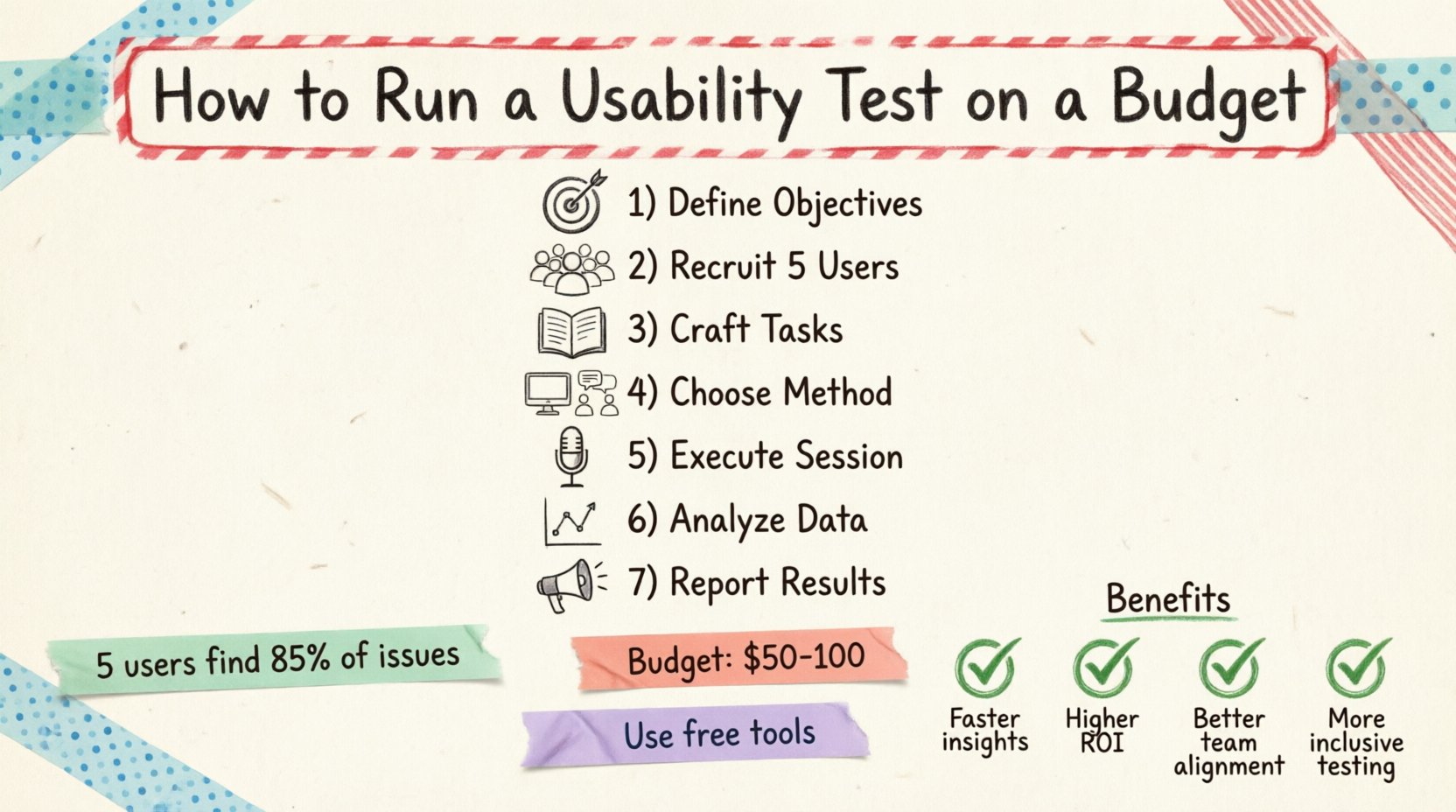
Key benefits of running low-cost tests include:
- Early Validation: Catch major navigation or logic errors before writing code.
- Stakeholder Buy-in: Concrete evidence is more persuasive than personal opinion when discussing design changes.
- Confidence: Knowing real users can complete tasks gives you the authority to defend your design decisions.
- Resource Efficiency: Small tests prevent wasted development time on features nobody wants.
Phase 1: Define Clear Objectives 🎯
Before recruiting a single participant, you must understand what you are trying to learn. A test without a goal is just an observation session. Clear objectives dictate the number of participants needed, the complexity of tasks, and the metrics you will track.
Identify the Core Problem
Ask yourself what specific part of the experience is uncertain. Are users struggling to find the checkout button? Do they understand the pricing tiers? Is the onboarding flow too long? Narrowing the scope helps you design focused tasks.
Set Success Metrics
Define what success looks like for this session. Common metrics include:
- Completion Rate: Did the user finish the task?
- Time on Task: How long did it take to complete the activity?
- Error Rate: How many mistakes were made?
- Subjective Satisfaction: How did the user feel about the experience?
Phase 2: Participant Recruitment 👥
One of the biggest misconceptions about usability testing is that you need hundreds of participants. Research indicates that testing with just five users can uncover about 85% of usability issues. For a budget-conscious approach, you can find these users without paying for expensive panels.
Who to Recruit
Your participants should match your target audience profile. You need people who represent the actual users of your product. Look for the following characteristics:
- Demographics: Age, location, and occupation relevant to the product.
- Experience Level: Novice users vs. power users may interact differently.
- Device Usage: Ensure they use the devices you are testing on (mobile, desktop, tablet).
Where to Find Participants
Without a budget for recruitment agencies, you must leverage existing networks. Here are effective channels:
- Internal Networks: Colleagues from other departments who are not involved in the project.
- Social Media: Post in relevant community groups or forums where your target audience hangs out.
- Friends and Family: Ask for referrals. They might know someone who fits the criteria.
- Customer Support Logs: Reach out to users who have contacted support recently; they often have pain points to share.
Incentives
While money is not required, offering a small token of appreciation is standard practice. This could be a digital gift card, a coffee voucher, or access to a beta feature. It shows respect for their time and encourages participation.
Phase 3: Crafting Effective Tasks 📝
The quality of your test depends on the quality of your tasks. A well-written task is specific enough to be actionable but open enough to allow natural behavior. Avoid leading questions that suggest the correct answer.
Task Structure
Each task should represent a realistic goal the user would have. For example, instead of saying “Click the search icon,” say “Find a pair of running shoes under $100.” This encourages the user to engage with the search functionality naturally.
Writing Guidelines
- Be Concise: Keep instructions short and clear.
- Avoid Specific Paths: Do not tell them which menu to click. Let them figure it out.
- Use Real Language: Use terminology your users would use, not internal jargon.
- Set Context: Provide a scenario. “You are planning a weekend trip…”
Phase 4: Choosing the Right Method 🛠️
There are various ways to conduct a test. The method you choose impacts your budget, time, and data richness. You can categorize these into remote and in-person settings.
Remote vs. In-Person
| Method | Cost | Pros | Cons |
|---|---|---|---|
| In-Person | Low to Medium | Direct observation, body language cues, high rapport. | Requires travel, physical space, scheduling logistics. |
| Remote Moderated | Low | Flexible scheduling, participants from anywhere, screen sharing. | Dependent on internet connection, less control over environment. |
| Remote Unmoderated | Low | Scalable, can run at any time, no moderator needed. | No follow-up questions, limited interaction, lower completion rates. |
Recommended Approach for Beginners
Start with remote moderated testing using video conferencing software. It offers the best balance of cost and insight. You can observe the user’s screen and hear their reactions in real-time. This allows you to ask clarifying questions if they get stuck.
Phase 5: Executing the Session 🎤
The actual testing session is where you gather data. Your role is to facilitate, not to guide. It is crucial to remain neutral and avoid influencing the user’s behavior.
The Script
Prepare a script to ensure consistency across all participants. It should include:
- Welcome: Introduce yourself and the purpose of the test.
- Disclaimer: Remind them that you are testing the product, not them.
- Think Aloud Protocol: Ask them to verbalize their thoughts as they navigate.
- Task List: Present the scenarios one by one.
- Closing: Thank them and ask final questions.
Managing Silence
When a user is working on a task, silence is golden. Resist the urge to jump in and help if they hesitate. Let them struggle briefly. This struggle often reveals where the design is confusing. If they are stuck for more than 30 seconds, offer a gentle nudge rather than a solution.
Recording Data
You need a way to capture what happens. If you cannot afford professional recording software, use built-in features in your video calling tool to record the screen and audio. Additionally, have a dedicated note-taker if possible. If you are moderating alone, use a simple spreadsheet to track issues as they occur.
Phase 6: Analysis and Synthesis 📊
Data collection is only half the work. You must analyze the findings to identify patterns. Look for recurring issues across different participants. One user struggling with a button is an anomaly; three users struggling is a systemic problem.
Categorizing Findings
Group issues by type to understand the nature of the problem. Common categories include:
- Navigation: Users cannot find where they need to go.
- Content: Users do not understand the text or images.
- Functionality: Buttons do not work or forms fail to submit.
- Visual Design: Elements are not clear or aesthetically confusing.
Severity Rating
Not all issues are equal. Use a severity scale to prioritize fixes. A common framework includes:
- 1 – Minor: Annoyance, but workarounds exist.
- 2 – Moderate: Requires extra effort or causes confusion.
- 3 – Major: Prevents task completion or causes frustration.
Affinity Mapping
Write each issue on a sticky note (digital or physical). Group similar notes together. This visual clustering helps identify the root causes and helps stakeholders see the volume of problems in specific areas.
Phase 7: Reporting and Communication 📢
Stakeholders often lack the time to read raw data. Your report must summarize the key findings clearly and propose actionable solutions. Keep the presentation focused on the business impact.
Report Structure
- Executive Summary: A one-page overview of key findings and recommendations.
- Methodology: Briefly explain who tested and how.
- Key Findings: Highlight the top 3-5 critical issues.
- Video Clips: If possible, include short clips of users struggling.
- Recommendations: Specific design changes to address the issues.
Telling the Story
Use quotes from participants to humanize the data. Instead of saying “Users found the menu confusing,” say “One participant stated, ‘I looked everywhere for the settings menu, I didn’t know it was there.'” This emotional connection drives action.
Budget Breakdown 💰
To illustrate the low cost of this approach, here is a sample budget breakdown for a single testing round.
| Item | Estimated Cost | Notes |
|---|---|---|
| Participant Incentives | $50 – $100 | 5 users @ $10-$20 each. |
| Video Conferencing | $0 | Use free tier of common platforms. |
| Screen Recording | $0 | Use built-in OS tools. |
| Recruitment | $0 | Use social networks and referrals. |
| Time Investment | Variable | Preparation and analysis time. |
The primary cost here is time. However, compared to the cost of developing a flawed feature, this investment is negligible.
Common Pitfalls to Avoid ⚠️
Even with a small budget, mistakes can invalidate your results. Be aware of these common traps.
Testing Too Early
Do not test a sketch on paper with a complex flow. Ensure the prototype has enough fidelity for users to understand the interaction. If it looks like a wireframe, users will hesitate to interact.
Testing Too Late
Conducting tests after the code is deployed is often too late for major changes. Test on the design prototype before development begins.
Biased Questions
Avoid asking “Do you like this?” Users tend to say yes to be polite. Instead ask “What would you do next?” or “How easy was this to find?”
Ignoring Non-Verbal Cues
Watch for sighs, furrowed brows, or hesitation. These are indicators of frustration even if the user says everything is fine.
Ethics and Privacy 🛡️
When handling user data, even informally, you must adhere to ethical standards. Participants trust you with their feedback.
- Consent: Always ask for permission to record audio and video.
- Confidentiality: Do not share user names or personal details in reports.
- Right to Withdraw: Remind users they can stop the test at any time.
- Data Security: Delete recordings after analysis unless explicit permission is granted for archival.
Frequently Asked Questions ❓
Can I test without a prototype?
Yes, you can test on live products or even paper sketches. However, the fidelity must match the questions you are asking. If you ask about clicking, the target must be clickable.
How many tests do I need?
For a budget approach, one round with 5 users is a good baseline. If you have the time, run iterative rounds. Test, fix, test again.
What if a participant is uncooperative?
Thank them and end the session. Do not force them. Document the reason for non-completion and move to the next candidate.
Do I need a dedicated room?
No. Remote testing eliminates the need for a physical lab. If testing in person, a quiet corner in an office or a conference room works fine.
Final Thoughts 🚀
Running a usability test on a budget is not about cutting corners; it is about being resourceful. It requires discipline in recruitment, precision in task design, and rigor in analysis. By following this guide, you can integrate user feedback into your workflow without straining your finances.
Start small. Pick one feature, find five users, and learn. The insights you gain will pay for the time you spent organizing the test many times over. Embrace the process, stay curious, and let the users guide your design.
Remember, the best designs are not the ones that look the most beautiful on a screen, but the ones that work seamlessly for the people using them. Your budget is an opportunity to focus on what truly matters: the human experience.