Creating high-quality user stories is not merely a documentation task; it is a collaborative act of definition. When product owners, designers, and developers sit together to craft requirements, the resulting clarity reduces ambiguity and accelerates delivery. This guide outlines a structured approach to facilitating story writing workshops that bring development teams closer to the value they are building.
Too often, requirements arrive as vague tickets that developers must interpret. This interpretation gap leads to rework, delays, and frustration. By shifting the narrative to a collaborative workshop format, teams ensure that technical constraints and user needs are understood from the start. The goal is to build a shared mental model of the work before a single line of code is written.
Preparing for the Session 📅
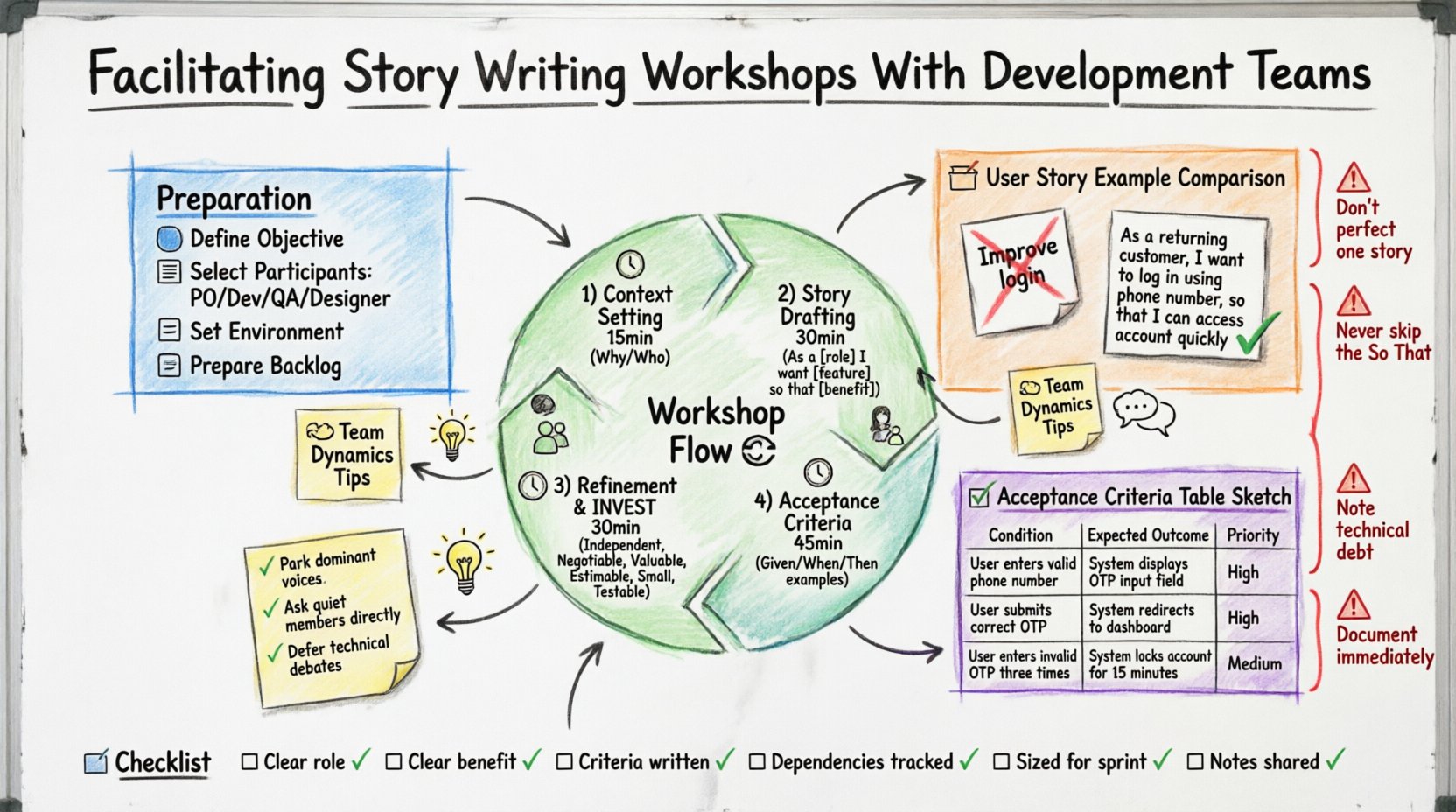
Success in a workshop begins before the first hour starts. Preparation ensures that participants are aligned and ready to contribute meaningfully. Rushing into a session without context often results in superficial discussions.
- Define the Objective: Are you refining a large Epic into smaller stories? Are you clarifying acceptance criteria for a complex feature? Set a clear goal.
- Select Participants: You need the Product Owner (or representative) to define value, the Developers to estimate feasibility, and the QA Engineer to challenge edge cases. Designers should join if UI is involved.
- Set the Environment: Whether virtual or physical, ensure the space allows for visibility. Everyone must see the same board or screen. Noise-canceling headphones or a quiet room helps focus.
- Prepare the Backlog: Have the high-level features identified beforehand. Do not start from zero during the workshop; start from a prioritized list.
The Workshop Flow 🔄
A structured agenda keeps the group moving. Without a timeline, discussions can drift into technical deep dives that stall progress. Here is a recommended flow for a standard two-hour session.
1. Context Setting (15 Minutes)
Start by reviewing the “Why.” Why are we building this? Who is it for? This aligns the team on the business value. If the team does not understand the problem, they cannot solve it effectively.
2. Story Drafting (30 Minutes)
Work through the backlog items one by one. Use the standard User Story format. Read the initial draft aloud. Invite the developers to ask clarifying questions immediately. Do not move on until the story makes sense to the people who will build it.
3. Refinement and INVEST (30 Minutes)
Apply the INVEST criteria to ensure quality. Independent, Negotiable, Valuable, Estimable, Small, and Testable. If a story is too large, break it down. If it is dependent on another story, note the dependency.
4. Acceptance Criteria (45 Minutes)
This is the most critical part. Define what “Done” looks like. Use specific examples. Avoid vague terms like “fast” or “user-friendly.” Be precise about inputs and outputs.
Structuring the User Story 🧱
A well-written story follows a specific pattern that balances brevity with clarity. The standard template focuses on the user, the action, and the benefit.
Format: As a [role], I want [feature], so that [benefit].
While this template is common, the content matters more than the syntax. Below are examples of how to refine a vague statement into a actionable story.
- Vague: “Improve the login process.”
- Problem: No user, no feature, no benefit.
- Specific: “As a returning customer, I want to log in using my phone number, so that I can access my account quickly without remembering a password.”
- Improvement: Role is defined, feature is specific, benefit is clear.
When writing these stories, avoid technical jargon in the title. The story describes the user need, not the database schema. Technical implementation details belong in the comments or task breakdowns, not the user story itself.
Defining Acceptance Criteria ✅
Acceptance criteria act as the contract between the team and the product owner. They define the boundaries of the story. If these criteria are not met, the story is not complete.
Use a table to track these criteria during the workshop to keep them organized.
| Condition | Expected Outcome | Priority |
|---|---|---|
| User enters an invalid email | System displays error message immediately | High |
| Network connection is lost | System saves draft locally and retries later | Medium |
| User enters valid credentials | Redirect to dashboard within 2 seconds | High |
Best Practices for Criteria:
- Be Specific: Instead of “The button should be green,” use “The button should match color code #00FF00.”
- Cover Edge Cases: What happens when the database is empty? What happens if the user cancels the action?
- Use Given/When/Then: This structure helps QA engineers write automated tests later. It separates context, action, and result.
- Keep it Testable: If you cannot write a test case for it, it is not a valid acceptance criterion.
Managing Team Dynamics 🤝
Facilitating a workshop involves more than managing time; it involves managing people. Different personalities bring different strengths and challenges to the room.
Handling Dominant Voices
Some participants may talk over others or steer the conversation too quickly. As the facilitator, you must gently intervene. Use phrases like, “That is an interesting point, let’s park that for the Q&A, and let’s hear from [Name] first.” This ensures diverse input without shutting anyone down.
Encouraging Quiet Members
Developers often prefer thinking before speaking. Direct questions help. Ask, “Does anyone have a technical concern with this approach?” or “What could go wrong with this logic?” Silence is not agreement; it often means confusion.
Resolving Technical Debates
It is easy to get stuck in architectural arguments during a story session. If the discussion shifts from “what” to “how” and stalls, acknowledge the importance but defer the decision. Say, “We will note this architectural decision and revisit it during the design spike, but let’s finalize the user flow first.”
Roles and Responsibilities 🎭
Clarity on who does what prevents confusion during the workshop. The following table outlines the expected contributions for each role.
| Role | Primary Responsibility | Key Question to Ask |
|---|---|---|
| Facilitator | Keep time, manage flow, ensure participation | “Are we making progress on the agenda?” |
| Product Owner | Define value, priority, and business rules | “Why is this feature important to the user?” |
| Developer | Assess feasibility, estimate effort, identify risks | “Is this technically possible within the timeline?” |
| QA Engineer | Challenge edge cases, define testing scope | “How will we verify this works?” |
Common Pitfalls to Avoid ⚠️
Even with good intentions, workshops can fail. Recognizing these common traps helps you steer clear of them.
- Over-Prioritizing Perfection: Do not spend three hours perfecting one story. The goal is progress. You can refine later.
- Skipping the “So That”: If you skip the benefit, developers may build the wrong thing. Always ensure the “why” is clear.
- Ignoring Technical Debt: If a story requires significant refactoring, note it. Do not hide technical work inside a user story unless it is directly visible to the user.
- Lack of Follow-Up: A workshop without documentation is just a meeting. Ensure the stories are updated in the backlog system immediately after the session.
Measuring Effectiveness 📊
How do you know the workshop was successful? Look at the output quality and team sentiment.
Quality Indicators:
- Stories are clear enough to be pulled into a sprint without further questions.
- Acceptance criteria cover positive and negative paths.
- Estimates provided by the team are accurate during the first sprint.
Team Sentiment:
- Developers feel they understand the user need.
- Product Owners feel the technical constraints are understood.
- There is a reduction in back-and-forth clarification tickets.
Conduct a brief retrospective after the first sprint. Ask the team if the story writing process helped them work faster. If they report fewer blockers, the facilitation method is working.
Post-Workshop Actions 🏁
The work does not stop when the session ends. Immediate follow-up solidifies the agreement.
- Update the Backlog: Ensure all new stories are visible in the tracking tool. Add links to any design documents or notes.
- Share Notes: Send a summary of decisions made to stakeholders who could not attend. This keeps the wider organization aligned.
- Review Dependencies: If a story depends on another team, create a handoff ticket immediately. Do not wait for the next planning cycle.
Advanced Techniques for Complex Features 🔍
Sometimes a single story is not enough. For complex features, consider these advanced facilitation methods.
Affinity Mapping
If you have a long list of potential features, write them on separate cards. Group similar items together. This helps identify natural clusters for Epics. It is a visual way to organize the backlog before diving into details.
Three Amigos
For high-risk stories, gather the Product Owner, Developer, and QA Engineer in a separate, shorter session. This trio ensures that value, feasibility, and quality are all checked before the full team discusses it.
Prototyping
If the user flow is complex, sketch it out on a whiteboard during the workshop. A rough sketch is better than a paragraph of text. It allows everyone to point and discuss specific interactions.
Final Checklist for Success 📋
Before ending the workshop, run through this checklist to ensure nothing was missed.
- ☐ All stories have a clear user role.
- ☐ All stories have a clear benefit.
- ☐ Acceptance criteria are written for every story.
- ☐ Dependencies are identified and tracked.
- ☐ Stories are sized appropriately for the sprint.
- ☐ Technical spikes are created if needed.
- ☐ Notes are saved and shared.
Facilitating story writing workshops requires practice. It is a skill that improves with every session. By focusing on clarity, collaboration, and concrete definitions, development teams can move from confusion to confidence. The result is software that meets user needs and builds trust within the organization.