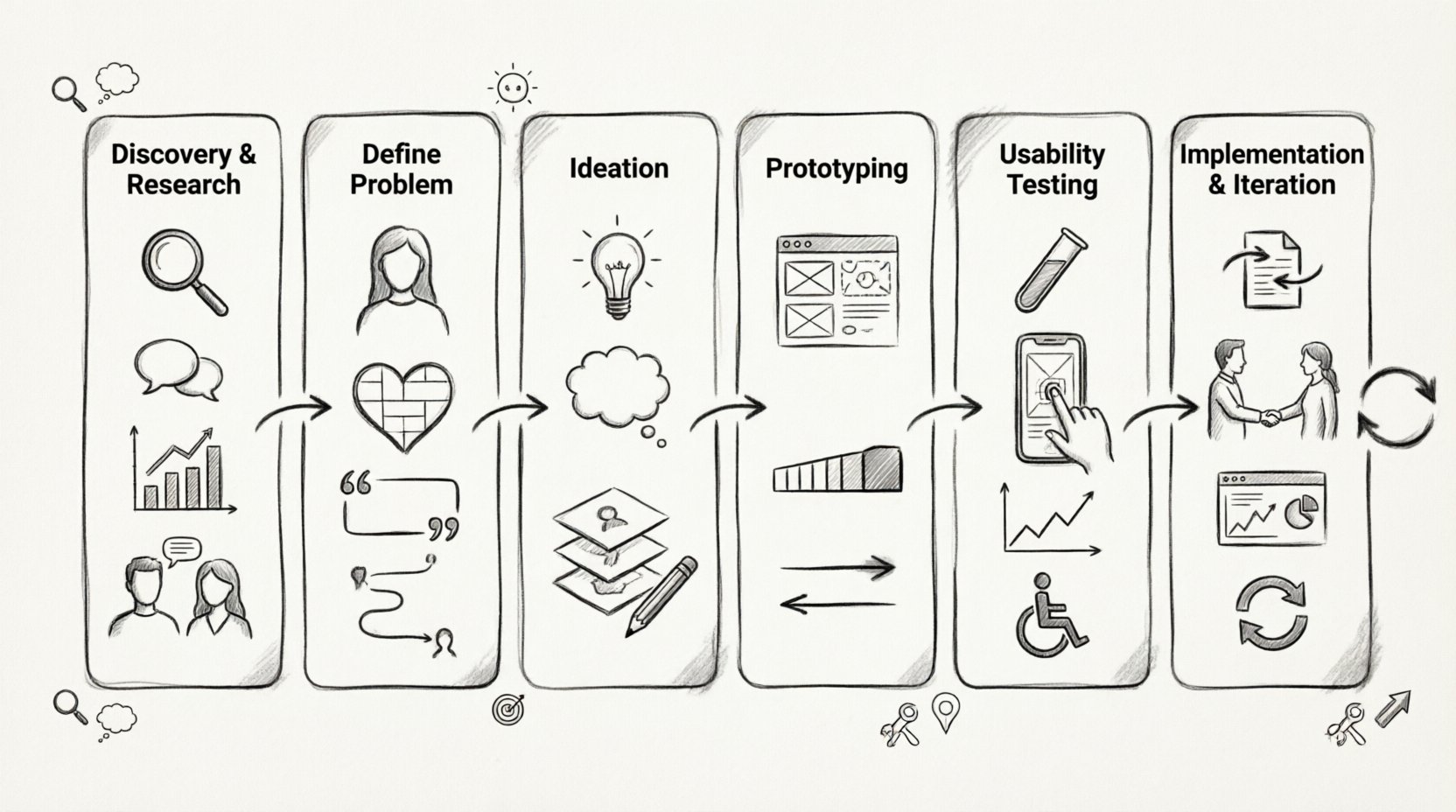
Entering the field of user experience design can feel overwhelming. With so many terms, methodologies, and expectations, it is easy to lose sight of the core mission. However, the workflow behind creating intuitive digital products remains consistent, regardless of the platform or industry. This guide breaks down the standard lifecycle of a design project, offering clarity for students and professionals looking to transition into this field. 🎓
User experience design is not just about making things look pretty. It is about solving problems for real people. It involves understanding human behavior, identifying barriers, and crafting solutions that make tasks easier, faster, and more satisfying. Whether you are building a mobile app, a website, or a complex dashboard, the steps below provide a framework for success. Let us walk through the journey together. 👇
🔍 Phase 1: Discovery and Research
The foundation of any successful design lies in understanding the problem before attempting to solve it. Skipping this step often leads to products that look good but fail to meet user needs. This phase is about gathering information to inform your decisions. 📊
1.1 Understanding the Context
Before diving into specific user data, you need to understand the business goals and technical constraints. Ask yourself:
- What is the primary business objective? 🎯
- Who are the stakeholders involved?
- What are the technical limitations?
- What is the timeline for delivery?
1.2 Qualitative Research Methods
Qualitative research helps you understand the “why” behind user actions. Common methods include:
- User Interviews: One-on-one conversations that dig deep into motivations and pain points. 🗣️
- Contextual Inquiry: Observing users in their natural environment while they perform tasks.
- Diary Studies: Users log their activities and thoughts over a set period.
1.3 Quantitative Research Methods
Quantitative research provides the “how much” or “how many.” It validates trends found in qualitative research. Common methods include:
- Surveys: Collecting data from a large group to identify patterns. 📝
- Analytics Review: Examining existing data to see how users interact with current products.
- Card Sorting: Understanding how users categorize information to inform navigation structures.
1.4 Competitive Analysis
Look at what others are doing in the market. Identify what works well and where competitors are failing. This helps you find opportunities to differentiate your solution. 🕵️♂️
| Research Type | Goal | Best Used When |
|---|---|---|
| Interviews | Understand motivations | Early discovery phase |
| Surveys | Validate trends | When you need statistical data |
| Competitor Analysis | Market positioning | Before defining features |
🎯 Phase 2: Define the Problem
Once you have collected data, it is time to synthesize it into actionable insights. This phase ensures everyone on the team agrees on what needs to be fixed. 🔨
2.1 User Personas
Personas are fictional characters created based on research data. They represent the different user types you might encounter. A persona includes:
- Demographics (age, location, job)
- Goals and motivations
- Pain points and frustrations
- Behavioral patterns
Referencing a persona during design keeps you focused on the actual user rather than your own assumptions. 🧑💻
2.2 Empathy Maps
An empathy map visualizes what a user says, thinks, does, and feels. It helps bridge the gap between data and emotional understanding. This is crucial for building compassion into the design.
2.3 Problem Statements
Define the core issue using a clear format. A common structure is:
“[User] needs to [need] because [insight].”
This keeps the scope narrow and focused. Avoid vague statements like “make the app better.” Be specific about what “better” means.
2.4 User Journey Maps
Map out the steps a user takes to achieve a goal. Identify touchpoints, emotions, and potential friction points along the way. This highlights where the process breaks down and where you can intervene. 🗺️
💡 Phase 3: Ideation and Concepting
Now that the problem is defined, it is time to generate solutions. This phase encourages creativity and divergent thinking. Do not judge ideas yet; quantity leads to quality. ✨
3.1 Brainstorming Techniques
Use structured methods to get ideas flowing:
- Brainwriting: Team members write down ideas silently before sharing.
- SCAMPER: A checklist to modify existing ideas (Substitute, Combine, Adapt, etc.).
- How Might We: Turn problem statements into opportunities for ideation.
3.2 Sketching and Storyboarding
Sketching is the fastest way to communicate ideas. It does not need to be artistic. The goal is to visualize flow and layout. Storyboarding places these sketches into a narrative context, showing how a user interacts with the product over time. 🎨
3.3 Information Architecture (IA)
Before designing screens, organize the content. Create a site map or app flow diagram. This defines the hierarchy of information and how users navigate between pages. A solid IA prevents users from getting lost. 🧭
🛠️ Phase 4: Prototyping
Prototyping turns ideas into tangible artifacts. It allows you to test interactions without writing code. Prototypes range from low fidelity to high fidelity. 📉
4.1 Low-Fidelity Prototypes
These are quick, rough representations. They might be paper sketches or basic digital wireframes. They focus on layout and structure rather than visual details. They are cheap to change and encourage rapid iteration. 🏗️
4.2 High-Fidelity Prototypes
These look and feel like the final product. They include colors, typography, and interactive elements. They are used for detailed usability testing and stakeholder presentations. 🖼️
4.3 Interaction Design
Define how elements respond to user input. What happens when a button is clicked? How does a menu slide in? Micro-interactions add polish and feedback, making the product feel responsive. 📱
| Prototype Fidelity | Visual Detail | Interaction Level | Use Case |
|---|---|---|---|
| Low-Fidelity | Minimal (boxes, lines) | None or basic clicks | Early concept validation |
| Mid-Fidelity | Some detail | Clickable flows | Team alignment |
| High-Fidelity | Pixel perfect | Complex animations | Final testing & handoff |
🧪 Phase 5: Usability Testing
Never assume your design works. You must test it with real users. This phase validates your assumptions and reveals hidden issues. 🔬
5.1 Planning the Test
Define clear objectives. What do you want to learn? Create a script for the moderator. Select participants who match your persona criteria. Ensure a mix of experience levels. 📅
5.2 Moderated vs. Unmoderated
- Moderated: A facilitator guides the user through tasks. Good for deep feedback and observing body language.
- Unmoderated: Users complete tasks on their own time. Good for gathering large amounts of data quickly.
5.3 Key Metrics
Track specific data points during testing:
- Success Rate: Did the user complete the task?
- Time on Task: How long did it take?
- Error Rate: How many mistakes were made?
- SUS Score: A standardized measure of perceived usability.
5.4 Accessibility Testing
Ensure your design is usable by everyone. Check for color contrast, keyboard navigation, and screen reader compatibility. Accessibility is not an afterthought; it is a requirement for ethical design. ♿
🚀 Phase 6: Implementation and Iteration
Once the design is validated, it moves to development. Your role does not end here. You must support the team to ensure the final product matches the vision. 🏗️
6.1 Design Handoff
Provide developers with detailed specifications. This includes asset exports, style guides, and interaction notes. Clear documentation reduces ambiguity and rework. 📄
6.2 Developer Collaboration
Stay involved during development. Answer questions, review builds, and check for visual consistency. This ensures the code reflects the design intent. 🤝
6.3 Post-Launch Analytics
After release, monitor performance. Are users completing tasks? Where are they dropping off? Use this data to inform the next cycle of improvements. The process is never truly linear; it is a loop. 🔄
6.4 Continuous Improvement
User needs change over time. Market conditions shift. Regular updates keep the product relevant. Plan for future releases based on feedback and new opportunities. 📈
🛡️ Soft Skills and Mindset
Technical skills are important, but soft skills determine long-term success in this field. You will collaborate with many different people, including engineers, product managers, and marketers.
7.1 Communication
You must explain your design decisions clearly. Be prepared to defend your choices with data from your research phase. Avoid jargon when speaking with non-designers. 🗣️
7.2 Empathy
Empathy is the core of UX. It applies not just to users, but to your colleagues. Understanding their constraints helps you build better workflows and stronger relationships. ❤️
7.3 Adaptability
Projects change. Requirements shift. Be flexible. The ability to pivot without losing momentum is a valuable trait. 🔄
📂 Building Your Portfolio
For students and career switchers, the portfolio is your most important asset. It proves you can do the work. Quality matters more than quantity.
8.1 Case Study Structure
Each project should tell a story. A strong case study includes:
- Problem Statement: What were you trying to solve?
- Process: Show your research, sketches, and iterations. 📝
- Outcome: What was the result? Did metrics improve?
- Reflection: What would you do differently next time?
8.2 Show Your Thinking
Do not just show final screens. Stakeholders want to see how you think. Include failed ideas and explain why you discarded them. This demonstrates critical thinking. 🧠
8.3 Curation
Select projects that showcase your range. If you are applying for mobile roles, include mobile work. If you are looking for B2B roles, show complex system designs. Tailor your portfolio to the job you want. 🎯
⚠️ Common Pitfalls to Avoid
Even experienced designers make mistakes. Being aware of common traps can save you time and frustration.
- Designing for Yourself: Your preferences are not the users’. Stick to the data. 🚫
- Skipping Research: Guessing leads to expensive errors later. Invest time early. ⏳
- Ignoring Accessibility: Excluding users limits your market and violates ethical standards. 🌍
- Over-Complicating: Simple is often better. Remove unnecessary elements. ✂️
- Focusing Only on Visuals: A beautiful interface that is hard to use is a failed product. 🎨
🌟 Final Thoughts on the Journey
The path to becoming a skilled UX designer is one of continuous learning. The tools change, but the principles of human-centered design remain constant. By following this end-to-end process, you build a reliable workflow that produces meaningful results.
Remember that every project is an opportunity to learn. Embrace the feedback, listen to the users, and stay curious. The industry values people who can solve real problems, not just create attractive visuals. Keep building, keep testing, and keep improving. 🏆
Your journey starts now. Take the first step, define your problem, and begin the process. The world needs better digital experiences, and you have the skills to create them. 🌐