Design without direction is guesswork. When teams build products based on assumptions, the result often misses the mark. User personas bridge the gap between raw data and human behavior, providing a concrete reference point for every design choice. However, many organizations treat them as decorative artifacts—static documents filed away after the first meeting. True value emerges when personas become active tools used to challenge assumptions and validate solutions.
This guide details the process of constructing effective user personas that drive real design outcomes. We will explore how to gather meaningful data, synthesize it into coherent narratives, and apply these insights throughout the development lifecycle.
Why Personas Often Fail 📉
Before building, it is necessary to understand why existing efforts fall short. Most failed personas suffer from three core issues:
- Lack of Data: They are created from focus groups or internal brainstorming rather than observed behavior.
- Static Nature: They are built once and never revisited, ignoring market shifts or user evolution.
- Decision Disconnect: Designers reference them for inspiration but ignore them when trade-offs must be made.
To avoid these pitfalls, a persona must be rooted in evidence. It should represent a segment of real users, not a composite of stereotypes. When a persona is accurate, it serves as a proxy for the user in the room during meetings.
The Foundation: Research and Data Gathering 🔍
A robust persona starts with rigorous research. You cannot fabricate needs; you must discover them. The quality of your design decisions is directly proportional to the depth of your research.
Qualitative vs. Quantitative Data
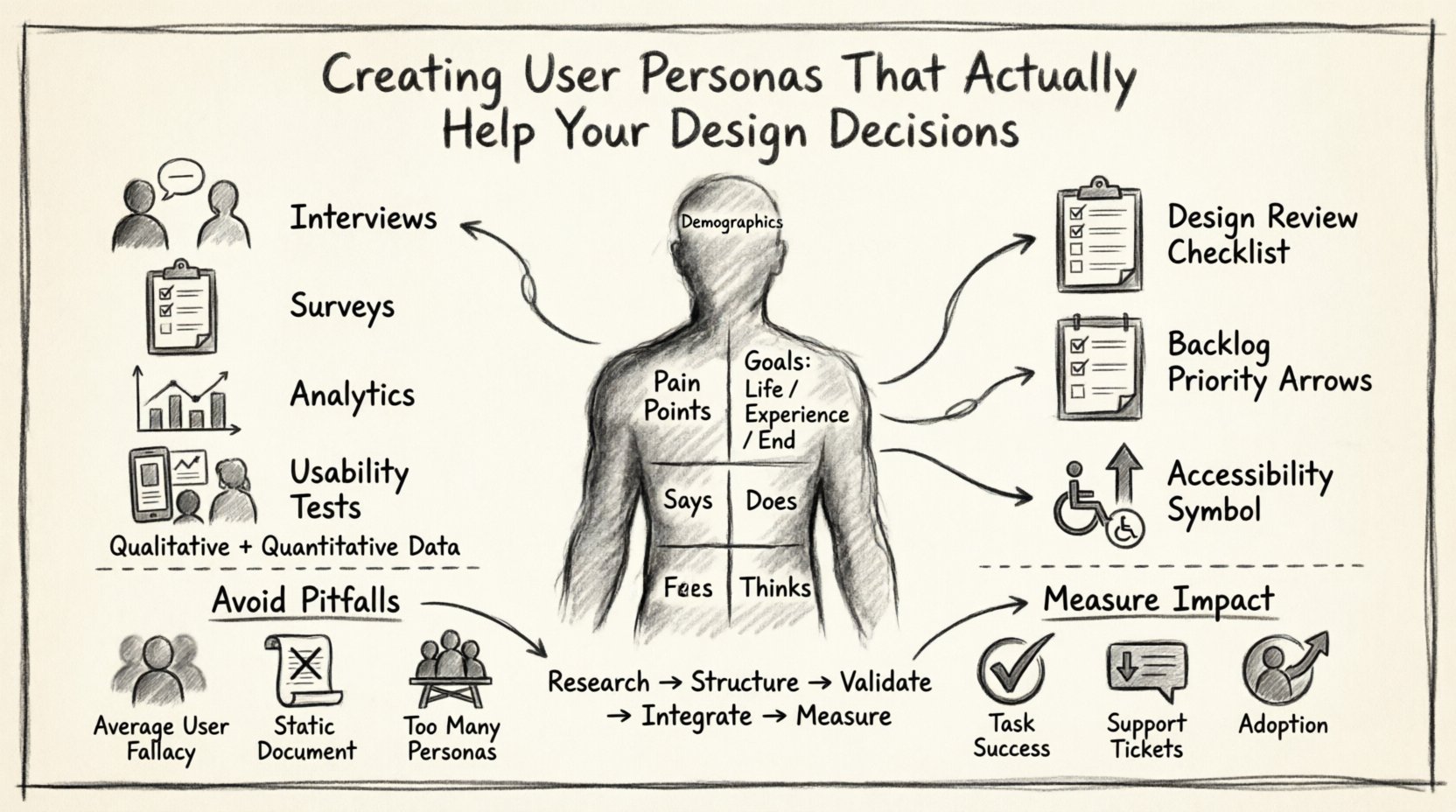
Effective personas require both types of data to function correctly. Quantitative data tells you what is happening, while qualitative data explains why.
- Quantitative: Surveys, analytics, usage logs. This helps identify patterns and segments.
- Qualitative: Interviews, contextual inquiries, usability testing. This reveals motivations and pain points.
Research Methods Overview
| Method | Best For | Key Output |
|---|---|---|
| One-on-One Interviews | Deep motivations, emotional drivers | Verbatim quotes, stories |
| Surveys | Demographics, broad trends | Statistical aggregates |
| Contextual Inquiry | Environmental factors, workflow | Observational notes |
| Usability Testing | Interaction friction, task success | Success rates, error logs |
When collecting this information, avoid leading questions. Instead of asking “Do you like feature X?”, ask “How did you solve this problem before?” This approach uncovers the actual behaviors rather than the desired ones.
Structuring the Persona 🏗️
A standard persona document should contain specific sections. These sections must work together to form a complete picture of the user.
1. Demographics and Background
This section establishes the basic context. It includes age, location, job title, and technical proficiency. While demographics alone do not drive design, they set boundaries.
- Age Range: Influences accessibility needs and interaction preferences.
- Tech Savviness: Determines the complexity of the interface required.
- Environment: Is the user on the go, in a noisy office, or at a quiet desk?
2. Psychographics and Goals
Goals are the most critical element. Without clear goals, a persona is just a profile. Goals fall into three categories:
- Life Goals: What does the user want to achieve in their life? (e.g., save time for family).
- Experience Goals: How do they want to feel while using the product? (e.g., confident, in control).
- End Goals: What specific tasks must they complete? (e.g., submit a tax return).
3. Pain Points and Frustrations
Design often exists to solve problems. Explicitly listing what annoys the user helps prioritize features that remove friction. Common frustrations include:
- Complex navigation structures.
- Lack of transparency in data usage.
- Slow load times.
- Inconsistent terminology across platforms.
The Empathy Map 🗺️
To deepen understanding, pair your persona with an Empathy Map. This visual tool breaks down user behavior into four quadrants: Says, Thinks, Does, and Feels.
| Says | Thinks |
|---|---|
| Verbal expressions from interviews. | Internal monologue, fears, doubts. |
| Does | Feels |
| Actions taken during tasks. | Emotional state, anxieties, hopes. |
This distinction is vital. A user might say “I need a report” but think “I need to prove I was working hard.” The design must address the underlying thought, not just the verbal request.
From Data to Narrative 📖
Once you have the data points, you must weave them into a narrative. A persona is a story, not a checklist. It should read like a biography that explains behavior.
Example Narrative Structure
- The Hook: Introduce the character in a specific scenario.
- The Conflict: Describe the problem they face.
- The Attempt: Show how they try to solve it currently.
- The Resolution: How the new product could help.
For instance, instead of stating “Sarah is 35,” write “Sarah spends 45 minutes every morning organizing her calendar, wishing there was a way to automate it.” This creates an immediate emotional connection for the design team.
Validating Your Personas ✅
Building a persona is not the end of the process; it is the beginning of validation. You must ensure the persona represents reality.
Checklist for Persona Accuracy
- Representative Sample: Does this reflect a significant portion of your user base?
- Stakeholder Review: Do sales and support teams recognize this user?
- Scenario Testing: If you apply this persona to a design mockup, does it feel right?
- Iterative Updates: Is there a mechanism to update the persona when new data arrives?
If stakeholders do not recognize the persona, your research may have missed key segments. If the design team cannot apply it, the persona lacks actionable insight.
Integrating Personas into Workflow ⚙️
Personas are useless if they sit on a shelf. They must be integrated into the daily workflow of the design and development teams.
1. Design Reviews
During critique sessions, ask: “Would Sarah find this helpful?” or “Does this solve Mark’s problem?” This shifts the conversation from subjective preference to user alignment.
2. Backlog Prioritization
When deciding which features to build next, refer to the persona goals. If a feature does not advance a primary persona’s goal, it may be lower priority. This prevents scope creep and feature bloat.
3. Accessibility Considerations
Personas often include accessibility requirements. If a persona uses a screen reader or has limited mobility, the design must accommodate these needs from the start, not as an afterthought.
Common Pitfalls to Avoid 🚫
Even with good intentions, teams make mistakes when creating personas. Awareness of these traps helps maintain quality.
The Average User Fallacy
Creating a persona that represents the “average” user is a mistake. Averages do not exist in human behavior. Users fall into distinct clusters with different needs. Designing for an average usually results in a product that satisfies no one.
Ignoring Edge Cases
Focusing only on the primary persona can lead to exclusion. While you should prioritize the main user, you must acknowledge secondary and tertiary personas. A power user might have different needs than a novice user.
Static Documents
User behavior changes. Markets shift. A persona created two years ago may no longer be valid. Establish a schedule to review and update persona data annually or after major product pivots.
Too Many Personas
Having five or six different personas confuses the team. Aim for three or four distinct archetypes. If you have too many, you risk diluting the focus and making it impossible to remember who you are designing for.
Measuring the Impact 📊
How do you know if your personas are working? You measure the alignment between design decisions and user outcomes.
- Task Success Rates: Do users complete tasks faster with the new design?
- Support Tickets: Are there fewer questions about features that should have been intuitive?
- Adoption Metrics: Are users actually using the features designed for them?
When these metrics improve, it indicates the personas are guiding the team toward the right solutions. If metrics stagnate, revisit the persona data to see if the underlying assumptions were correct.
Collaboration Across Teams 🤝
Personas are not just for designers. They serve as a common language for product managers, developers, and stakeholders.
For Product Managers
Personas help define the roadmap. They clarify which features deliver the most value to the most important users.
For Developers
Understanding the context of use helps developers choose the right technologies. For example, if a user accesses the app on low-bandwidth connections, the code must be optimized accordingly.
For Marketing
Marketing teams can use personas to craft messaging that resonates with the specific pain points and motivations identified during research.
Finalizing the Persona Document 📄
When compiling the final document, keep it concise. A 10-page document will not be read. A one-page summary with key details is sufficient for reference.
Essential Elements Checklist
| Element | Why It Matters |
|---|---|
| Photo | Humanizes the data instantly. |
| Name | Makes it easier to refer to the user in conversation. |
| Quote | Provides a voice to the data. |
| Goals | Defines the success criteria. |
| Pain Points | Highlights the problems to solve. |
Moving Forward with Intent 🚀
Creating user personas is an exercise in empathy. It requires stepping outside your own experience to understand the lives of others. When done correctly, it transforms the design process from guessing to knowing.
The goal is not to create a perfect document, but to create a living reference that informs better decisions. As your product evolves, so should your understanding of the people using it. Keep the research coming, keep the personas updated, and let the data guide your design.
Remember, the most successful products are built not for everyone, but for someone specific. By focusing on the needs of your defined personas, you ensure that every design choice adds value to the user experience.