Business Process Model and Notation (BPMN) is the standard for visualizing workflows. However, confusion often arises between the building blocks of these diagrams. Specifically, distinguishing between Tasks and Events is critical for accurate modeling. If you mix them up, the resulting process map may misrepresent reality. This guide breaks down the technical distinctions, practical applications, and the consequences of getting it wrong. We will explore shapes, semantics, and execution behavior.
🎯 Why the Distinction is Critical
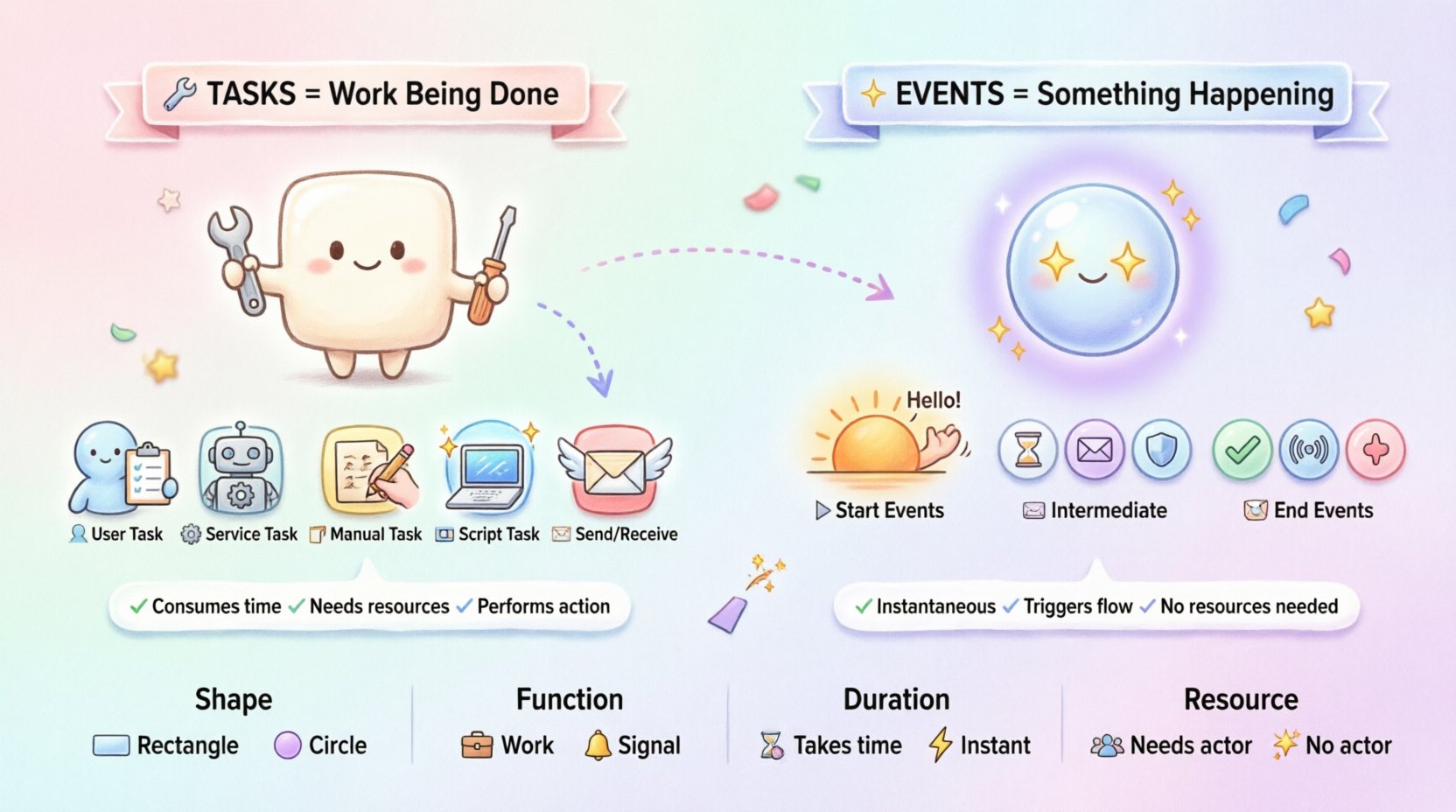
In BPMN, every symbol carries a specific meaning. The difference between a Task and an Event is not just visual; it is functional. A Task represents work being done. An Event represents something happening. This distinction dictates how process engines interpret the flow. It affects how time is tracked, how errors are handled, and how human resources are assigned.
- Tasks consume resources and take time to complete.
- Events trigger state changes or mark boundaries without consuming resources directly.
When modeling a process for automation, this distinction determines whether a system waits for input or performs an action. Getting this right ensures your KPIs are accurate. If you model a wait time as a Task, you might attribute processing time to the wrong actor. If you model an action as an Event, the engine might skip execution logic. Precision here leads to better operational insight.
🏗️ Deep Dive: BPMN Tasks
A Task is the most common activity in a process. It represents an atomic unit of work. In technical terms, a Task is an Activity that does not have sub-structure. It is a single step. The visual representation is a rounded rectangle. Let us look at the specific types of tasks and what they imply for the process.
1. User Tasks 👤
A User Task indicates that a human actor must perform the work. This is the bridge between system automation and human intervention. When a process reaches a User Task, the engine typically suspends execution and waits for the human to complete the action. The task remains in a pending state until the user clicks “Complete” or submits the form.
- Input: Data required to perform the work.
- Output: Result of the human action (e.g., approval, rejection, data entry).
- Duration: Variable. Depends entirely on human speed and availability.
2. Service Tasks ⚙️
A Service Task represents a system-to-system interaction. No human is involved. This is where the magic of automation happens. The process engine invokes an external service, such as an API call, a database write, or a web service. The engine waits for the service to respond before moving to the next step.
- Input: Structured data passed to the API.
- Output: The response payload from the external system.
- Duration: Determined by network latency and system performance.
3. Manual Tasks 📝
A Manual Task is similar to a User Task but implies the work happens outside the process system. The process engine does not track the completion. It assumes the work will be done eventually, but it does not send a notification or create a work item. It is used for legacy actions or offline procedures.
- Execution: No system trigger.
- Tracking: None. The engine moves to the next step immediately.
- Use Case: Filing a physical document or a verbal agreement.
4. Script Tasks 💻
When a Service Task is too generic, a Script Task allows for inline code execution. This is useful for data transformations or calculations that do not require an external service. The code runs within the engine itself.
- Logic: Custom logic written in a supported scripting language.
- Dependency: None. It runs locally within the process instance.
5. Send and Receive Tasks 📬
These tasks are specific to messaging. A Send Task transmits data to another system or process. A Receive Task waits for an incoming message. While they involve communication, they are still considered work being performed, not just a trigger state change.
- Send Task: The engine pushes data and moves on immediately.
- Receive Task: The engine pauses until a message arrives.
🎲 Deep Dive: BPMN Events
Events are circles. They mark the beginning, middle, or end of a process flow. Unlike Tasks, Events do not represent work. They represent the occurrence of something. They are the triggers that start processes or the signals that change the path of execution. Understanding the three categories of events is essential for control flow.
1. Start Events ▶️
A Start Event marks the point where a process begins. There is no incoming flow. The process instance is created when this event is triggered. You cannot have a Start Event in the middle of a process. It is always the first element.
- Timer Start Event: The process begins at a specific time or interval.
- Message Start Event: The process begins when a specific message is received.
- Signal Start Event: The process begins when a signal is broadcast globally.
2. Intermediate Events ⏸️
Intermediate Events occur between the Start and End of a process. They allow a process to wait for something or react to something happening mid-stream. They are drawn as a circle with a symbol inside (like a clock or an envelope).
- Timer Intermediate Event: The process pauses for a set duration. Useful for reminders or delays.
- Message Intermediate Event: The process waits for a specific message before continuing.
- Error Intermediate Event: The process catches an error that occurred in a previous task.
3. End Events ⏹️
An End Event marks the termination of a process. Once reached, the process instance is destroyed, and all data associated with it is archived or moved to history. There can be multiple End Events in one diagram, representing different outcomes (Success, Failure, Timeout).
- Message End Event: Sends a notification upon completion.
- Signal End Event: Triggers a signal for other processes to listen to.
- Error End Event: Marks a fatal error that stops the workflow.
📊 Comparison: Tasks vs. Events
To visualize the differences clearly, we can compare the two elements across several dimensions. This table highlights the structural and semantic gaps.
| Feature | Task | Event |
|---|---|---|
| Shape | Rounded Rectangle | Circle |
| Function | Performs work | Signals occurrence |
| Duration | Consumes time actively | Instantaneous (usually) |
| Engine Action | Executes logic or waits for input | Triggers or catches flow |
| Resource | Requires resource (Human or System) | Does not require resource |
| Position | Can be anywhere | Start (must be first), End (must be last), or Intermediate |
🤔 Why the Difference Matters for Business
It is easy to think of these as just drawing shapes. However, the business logic depends on the semantics. If you model a notification as a Task, the system might charge a processing fee. If you model a payment as an Event, the system might not verify the balance. Here is why precision is non-negotiable.
1. Accurate KPI Measurement 📈
Performance metrics rely on the model. If you want to measure how long a customer waits for approval, that is a Task. If you want to measure the time between submitting a form and receiving a response, that involves Events. Confusing the two skews your data. You might think a process is faster than it is because you counted a wait time as an Event (instant) rather than a Task (duration).
2. Automation Logic ⚡
Process engines execute code based on the type of element. A Service Task triggers a function. A Message Event waits for a callback. If you swap them, the code will not run, or the engine will hang. For example, a Service Task sends a request. A Message Event waits for a reply. If you use a Message Event where a Service Task is needed, the process will never send the data.
3. Exception Handling 🛡️
Events are often used to catch errors. An Error Intermediate Event can catch an exception thrown by a Task. If the Task is not properly defined, the Error Event cannot attach correctly. The distinction dictates the error boundary. A Task is where the error happens. An Event is where the error is caught.
4. Human Workflow Management 👥
Task lists are generated for User Tasks. The system knows a human needs to act. Intermediate Events do not generate work items. If you model a review step as an Intermediate Event, the human will never see a notification to do the work. They will be bypassed entirely. This leads to broken processes in reality.
🛠️ Common Modeling Mistakes
Even experienced modelers make errors. Recognizing these patterns helps you avoid them in your own work.
- Using Events for Actions: Do not use a circle to represent “Approve Order.” That is work. Use a User Task. An Event should only represent “Order Received.”
- Correction: Start Event = Order Received. Task = Approve Order.
- Confusing Timer Start and Intermediate: A Timer Start Event triggers a new process instance. A Timer Intermediate Event pauses an existing one. Do not start a new process just to wait.
- Ignoring Data Flow: Tasks often transform data. Events usually just pass it. If you need to calculate a value, use a Task (Script or Service). If you just need to pass the value along, use a Sequence Flow.
- Multiple Outgoing Flows: Tasks usually have one outgoing flow unless followed by a Gateway. Events have specific rules. An Intermediate Catch Event has one incoming and one outgoing. An Intermediate Throw Event has one incoming and one outgoing. Understanding the flow is key.
🔧 Advanced Scenarios: Interaction and Complexity
As processes grow, the interaction between Tasks and Events becomes more complex. Sub-processes introduce new layers. Let us look at how these elements behave in advanced contexts.
1. Event Sub-Processes
These are special blocks that contain an Event as the start. They run in parallel to the main process. They are typically used for Exception Handling. For example, if a Task fails, an Event Sub-Process catches the error. The main process continues, but the Sub-Process handles the recovery. This relies on the distinction: the Task failed, the Event caught it.
2. Parallel Gateways and Tasks
When using a Parallel Gateway, multiple Tasks may run simultaneously. Each Task is independent. If you replace one with an Event, the synchronization changes. The engine might wait for the Event to occur before proceeding, which alters the concurrency model. Ensure you understand if the parallelism is for work (Tasks) or for state (Events).
3. Data Persistence
Tasks often require writing data to a database before they complete. Events generally do not write data; they read it or signal it. If your process needs to store a log entry, use a Service Task. If you need to log the fact that the process started, use a Message End Event. The distinction impacts your database schema design.
📝 Best Practices for Modelers
To maintain clarity and accuracy, follow these guidelines when drawing your diagrams.
- Ask the “Who” Question: Who does the work? If a human or system performs an action, it is a Task. If something happens to the process, it is an Event.
- Example: “Send Email” is a Task. “Email Sent” is an Event.
- Keep It Atomic: Do not make a Task too complex. If it involves multiple steps, break it into a Sub-Process. This keeps the diagram readable.
- Label Clearly: Use clear labels. “Check Inventory” is better than “Action 1.” This helps stakeholders understand the Task type.
- Visual Consistency: Stick to the shapes. Rectangles for work. Circles for occurrences. Do not mix them to save space.
- Review with Developers: Developers need to know where the logic lives. Tasks map to code functions. Events map to triggers. Ensure they agree on the mapping.
🚀 Impact on Performance Monitoring
Finally, consider the monitoring aspect. When a process runs, you need to know where bottlenecks occur. Tasks are the primary source of bottlenecks because they take time. Events are instantaneous. If your process is slow, look at the Tasks. If your process is stuck waiting, look at the Intermediate Events. A Timer Intermediate Event waiting for 24 hours will show up as a long duration in the event log, but it is technically a wait state, not a work state. Distinguishing these helps you optimize resource allocation.
If you model a wait as a Task, you might hire more people to speed it up. If you model it as an Event, you might adjust the timer configuration. This decision impacts budget and efficiency. Therefore, the choice is not just technical; it is financial.
🔚 Final Considerations for Modelers
Mastering BPMN requires more than knowing the shapes. It requires understanding the lifecycle of a process instance. Tasks drive the work. Events drive the flow. Confusing them leads to broken automation, inaccurate reporting, and confused stakeholders. By adhering to the definitions outlined here, you ensure your diagrams are not just pretty pictures, but functional blueprints.
Take the time to verify every symbol. Ask if it represents work or a signal. Check the engine requirements. Validate the data flow. This diligence pays off in the reliability of your business processes. With the right foundation, your models will serve as a robust guide for digital transformation and operational excellence.
Remember, clarity is king. When in doubt, choose the symbol that best reflects the reality of the operation. A Task for work. An Event for occurrence. This simple rule keeps your models aligned with the business.