In the modern landscape of digital transformation, the gap between business requirements and technical implementation often creates friction. Business analysts define what needs to happen, while developers write the code to make it happen. This traditional handoff can lead to miscommunication, delays, and rigid systems that struggle to adapt. However, a standardized approach exists to bridge this divide. Business Process Model and Notation (BPMN) offers a visual language that allows complex workflows to be defined, analyzed, and executed without the need for traditional programming syntax.
This guide explores how BPMN enables process automation without writing code. By leveraging visual modeling, organizations can translate business logic directly into executable instructions. This approach reduces technical debt, accelerates deployment, and empowers non-technical stakeholders to participate in the automation lifecycle. We will examine the mechanics of model-driven execution, the specific BPMN elements that drive automation, and the strategic advantages of this methodology.
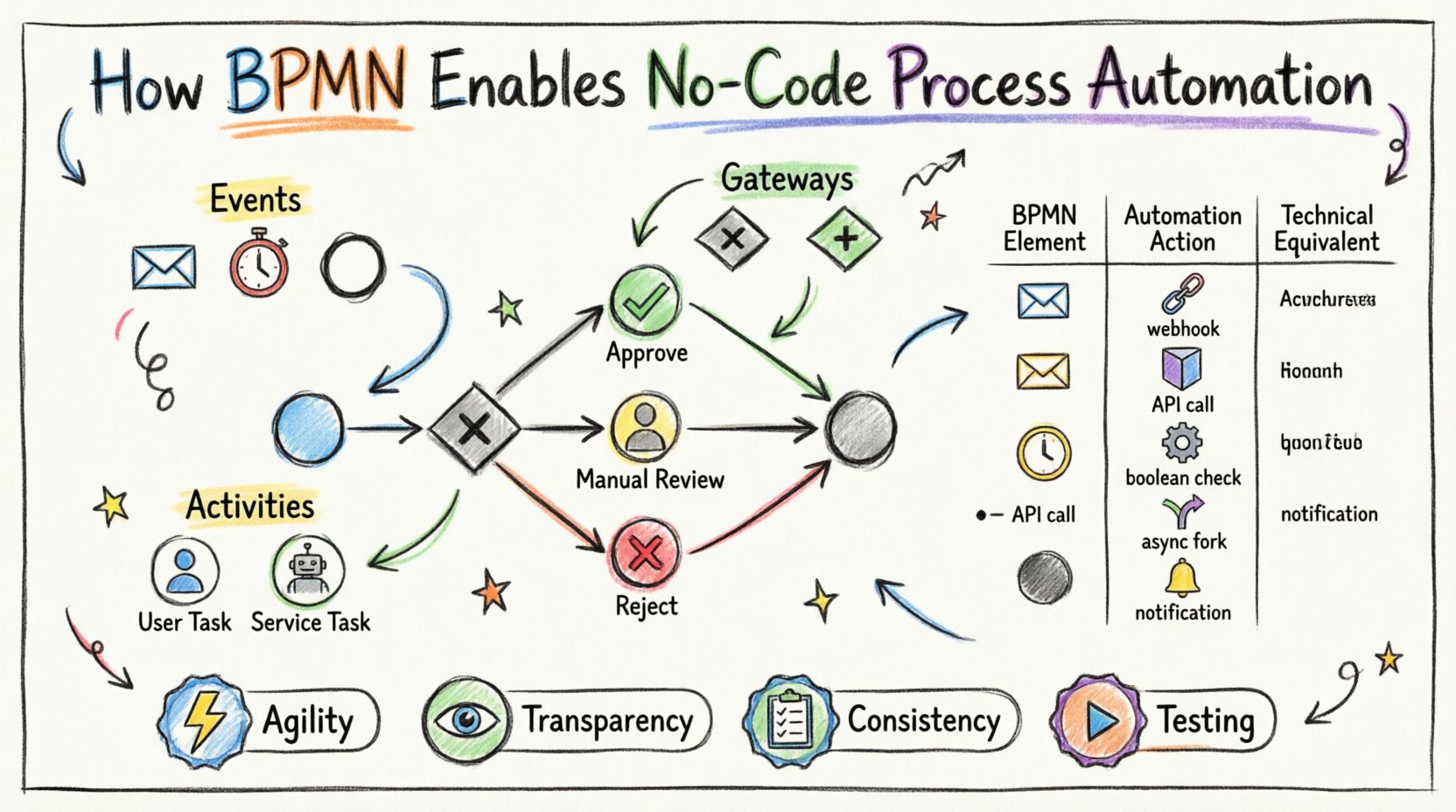
Understanding BPMN as a Specification Language 📋
BPMN is not merely a diagramming tool; it is a standardized notation designed to create business process models. The standard is maintained by the Object Management Group (OMG). Its primary purpose is to provide a common language that bridges the gap between the design phase and the execution phase.
When organizations adopt BPMN for automation, they are essentially adopting a specification language. Instead of writing Java, Python, or C# scripts to handle a business rule, the rule is captured in a visual element. The workflow engine interprets this model at runtime. This shift from imperative coding to declarative modeling changes the nature of software development.
Key characteristics of this approach include:
- Standardization: Because BPMN is an international standard, the notation is consistent across different platforms and vendors.
- Readability: The diagrams are designed to be understood by both business users and technical staff.
- Executability: BPMN 2.0 includes an XML exchange format that allows diagrams to be serialized into a format that engines can read and execute.
- Abstraction: The model abstracts away the underlying infrastructure, focusing on the flow of control and data.
This abstraction is the core enabler for no-code automation. When a process is modeled, the engine handles the threading, state management, and transaction logic. The modeler defines the path, and the engine handles the movement.
The Visual Syntax of Automation Logic 🧩
To understand how automation happens without code, one must understand the building blocks of BPMN. These elements represent the logical steps of a process. Unlike a flowchart, which describes what happened, a BPMN diagram describes what will happen.
1. Events: Triggers and Outcomes
Events are the starting and ending points of a process. They define the state changes that initiate or conclude automation.
- Start Events: These trigger the process. In an automation context, a start event often corresponds to an external signal, such as an email arrival, a database record creation, or a REST API call.
- Intermediate Events: These occur during the process. They might wait for a message from another system or a timer to expire. For example, waiting 3 days before sending a reminder email.
- End Events: These signify the successful completion or termination of the workflow. They often trigger notifications or update a status field in a database.
2. Activities: The Work
Activities represent the work being performed. In a code-free environment, these are mapped to predefined actions.
- User Tasks: These represent work that requires human intervention. The system pauses and waits for a user to log in and complete the action. This is common in approval workflows.
- Service Tasks: These represent automated actions performed by a system. No human is involved. Examples include sending an SMS, updating a CRM record, or calling an external API.
- Script Tasks: While this involves writing code, it is often limited to simple logic within the diagram. However, the focus here is on Service Tasks for true no-code environments.
3. Gateways: Decision Making
Logic without code relies heavily on gateways. These elements control the flow of the process based on conditions.
- Exclusive Gateway: This acts like an
if/elsestatement. Only one path is taken based on a data condition. For example, if the order total is over $1000, route to senior approval; otherwise, route to standard processing. - Parallel Gateway: This splits the process into multiple concurrent paths. All paths are executed simultaneously. This is useful for sending notifications to multiple departments at once.
- Inclusive Gateway: This allows multiple paths to be taken, depending on the data. Unlike the exclusive gateway, it is not mutually exclusive.
Mapping Elements to Execution Steps 🔄
The magic of BPMN automation lies in how the visual symbols map to backend actions. The workflow engine parses the BPMN XML file. It understands the semantics of the shapes. Below is a breakdown of how specific BPMN constructs translate into automated actions.
| BPMN Element | Visual Shape | Automation Action | Technical Equivalent |
|---|---|---|---|
| Start Event (Message) | Circle with envelope | Listen for incoming webhook | HTTP Listener / Endpoint |
| User Task | Rounded rectangle | Create work item in queue | Database Insert / Task Assignment |
| Service Task | Robot icon | Execute external function | API Call / Microservice Invocation |
| Exclusive Gateway | Diamond with X | Evaluate condition | Boolean Logic Check |
| Parallel Gateway | Diamond with + | Spawn concurrent threads | Async Task / Fork |
| End Event | Thick circle | Finalize transaction | Commit / Cleanup / Notification |
This mapping allows business analysts to design the process flow without knowing the specific API endpoints or database schemas. The engine handles the mapping configuration, often through a separate configuration layer, keeping the diagram clean.
Handling Decision Logic Without Conditionals ⚖️
One of the most significant hurdles in automation is handling complex decision logic. Traditionally, this requires nested conditional statements in code, which can become difficult to maintain. BPMN handles this visually through gateways and expressions.
When a process reaches an Exclusive Gateway, the engine evaluates an expression against the current process data. This data is stored in variables. If the expression returns true, the flow follows the outgoing sequence flow marked with the condition. If false, it follows the default path.
This approach offers several benefits:
- Visualization of Branching: You can see every possible outcome of a decision in a single diagram. In code, this logic might be scattered across multiple functions.
- Centralized Logic: The rules are defined in the process model. If a business rule changes, the diagram is updated, rather than hunting for the specific
ifstatement in a codebase. - Dynamic Evaluation: The conditions are evaluated at runtime. This means the decision can change based on real-time data inputs without redeploying the application.
For example, consider a loan application process. The logic might be:
- If Credit Score > 700 AND Income > 50,000, then Approve.
- If Credit Score > 600 AND Income > 50,000, then Manual Review.
- Otherwise, Reject.
In BPMN, these three paths are explicitly drawn out. The engine manages the state transitions. This makes the business rules transparent to auditors and stakeholders, who can verify the logic by looking at the diagram rather than reading source code.
Integrating External Systems via Service Tasks 🔌
Automation rarely happens in a vacuum. Processes often need to interact with other systems, such as CRM tools, ERP systems, or email servers. BPMN facilitates this through Service Tasks.
A Service Task is a generic container for any type of technical activity. In a no-code setup, this is typically configured through a connector or a pre-built adapter. The process model defines what needs to happen, and the engine configuration defines how it connects.
The mechanism generally works as follows:
- Variable Mapping: Data from the process is mapped to the input parameters of the service task.
- Invocation: The engine sends a request to the external system. This could be a REST call, a SOAP request, or a database query.
- Response Handling: The engine waits for the response. If the external system fails, the engine can trigger a compensation handler or an error event.
- Data Capture: The response data is stored in process variables, making it available for subsequent steps in the workflow.
This decoupling means the business process does not need to be rewritten when the external system changes. As long as the interface remains consistent, the BPMN model remains valid. This significantly reduces the maintenance burden associated with integrations.
Managing Human Interaction in Workflows 👥
Not all automation is fully automated. Many processes require human judgment. BPMN excels at managing these hybrid workflows where humans and systems collaborate.
User Tasks are the primary mechanism for this. When the engine encounters a User Task, it pauses the process execution and creates an entry in a worklist. This worklist is accessible to assigned users via a portal or task interface.
Key features of human-centric automation include:
- Assignment Rules: Tasks can be assigned based on roles, groups, or specific individuals. For example, all “Manager” roles can see the task.
- Delegation: If a user is unavailable, the task can be automatically reassigned to a backup role.
- Context Provision: The task interface can display relevant data from the process context, so the user has all the information needed to make a decision.
- Timeouts: If a task is not completed within a set time, the process can automatically escalate or move to a different path.
This ensures that human oversight is embedded into the automation flow where it is necessary, without breaking the digital thread. The process history remains intact, providing an audit trail of who did what and when.
Advantages of Model-Driven Execution 📈
Moving away from hard-coded workflows toward model-driven execution offers distinct strategic advantages. It shifts the focus from implementation to optimization.
- Agility: Processes can be modified rapidly. If a step needs to be added or removed, the diagram is updated and redeployed. This is much faster than compiling and testing a codebase.
- Transparency: The process is visible to everyone. There is no “black box” code that only a senior developer understands. This fosters trust and collaboration between IT and business units.
- Consistency: Standardized modeling ensures that processes across the organization follow similar patterns. This reduces errors and makes training easier.
- Testing: Processes can be simulated before they go live. Stakeholders can walk through the diagram to validate logic before any resources are consumed.
Data Flow and Variable Scoping 📦
Automation is not just about flow control; it is about data. A robust BPMN implementation manages data objects and variables throughout the lifecycle of the process.
Variables are used to store information passed between tasks. They can be scoped to the entire process or limited to a specific subprocess. This scoping prevents data conflicts and keeps the process clean.
When a Service Task completes, it can update these variables. When a User Task is completed, the user input is stored in variables. These variables can then be used in subsequent gateway conditions or passed to external systems. This creates a cohesive data environment where information flows naturally with the process.
Proper data modeling is essential. It ensures that the right information is available at the right time. Without this, automation becomes fragmented, requiring manual data entry at various stages, which defeats the purpose of efficiency.
Maintenance and Evolution of Processes 🛠️
One of the myths about automation is that once built, it is set in stone. In reality, business processes evolve. Regulations change, new products launch, and customer expectations shift. A BPMN-based approach supports this evolution.
Because the logic is visual, maintaining the process is often a collaborative effort. Business analysts can propose changes. Developers can validate technical feasibility. Once approved, the model is updated.
Versioning is another critical aspect. When a process changes, a new version is typically created. Old instances continue on the old version, while new instances start on the new version. This ensures that active operations are not disrupted by updates. This version control capability is native to many workflow engines and is integral to the BPMN standard.
Common Pitfalls to Avoid ⚠️
While BPMN simplifies automation, it is not a silver bullet. There are common mistakes that can hinder success.
- Over-Modeling: Trying to model every single edge case in the initial diagram can make it unreadable. Focus on the happy path first, then add error handling.
- Ignoring Exceptions: Automation fails. It is crucial to design Error Events and Compensation Handlers. What happens if the email server goes down? What if the API times out?
- Complexity Creep: As processes grow, diagrams can become spaghetti-like. Use sub-processes to modularize complex logic. Keep high-level diagrams clean.
- Hardcoding Logic: Avoid embedding complex logic directly into the gateway conditions if it becomes too verbose. Sometimes, a separate business rule engine is better for complex decision trees.
Optimizing the Automation Lifecycle 🎯
Implementing BPMN for automation is a journey. It requires a shift in mindset from coding to designing. Success depends on the alignment between the technical capabilities of the engine and the needs of the business.
Organizations should start with a pilot project. Choose a process that is repetitive, rule-based, and has clear inputs and outputs. This allows the team to learn the mechanics of the engine without risking critical operations. Once the foundation is laid, the approach can be scaled to more complex scenarios.
The goal is not just to automate tasks, but to improve the flow of value. By using BPMN, organizations create a living documentation of their operations. This documentation is executable, testable, and adaptable. It transforms process management from a static exercise into a dynamic capability.
As technology advances, the line between code and configuration continues to blur. BPMN sits firmly in the configuration space, offering a powerful way to build sophisticated automation without the overhead of traditional software development. By embracing this standard, teams can focus on solving business problems rather than wrestling with syntax.