In the landscape of Business Process Model and Notation (BPMN), the flow of execution is rarely a straight line. Real-world business operations involve choices, conditions, parallel activities, and waiting periods. To represent these complexities accurately, BPMN utilizes a specific set of symbols known as gateways. Understanding how these gateways function is critical for creating process models that are not only visually clear but logically sound. Without proper gateway usage, a process diagram becomes ambiguous, leading to execution errors or misinterpretation by stakeholders.
This guide provides a deep dive into the mechanics of BPMN gateways. We will explore how they control flow, the specific logic behind each type, and the best practices for modeling decisions. Whether you are designing a loan approval workflow or a manufacturing assembly line, the correct application of gateways ensures your process behaves as intended.
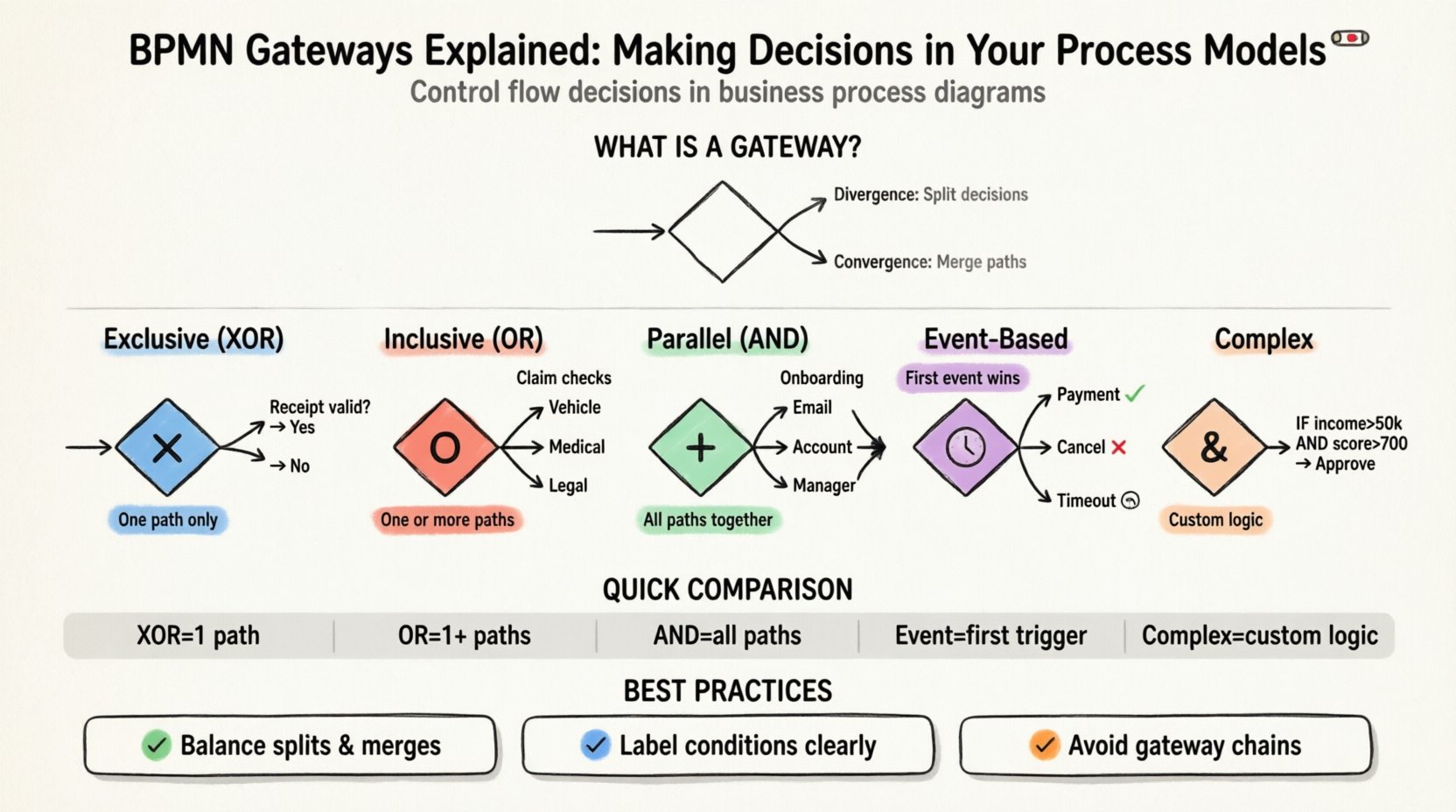
What Is a Gateway in BPMN? 🚦
A gateway serves as a control point within a process flow. It acts as a junction where the execution path can split, merge, or wait. In technical terms, gateways do not represent work or activity themselves; they represent the logic that determines which path the process takes next. They are the decision-makers in your diagram.
Gateways are categorized by their shape and the direction of the flow they manage. The primary distinction lies between divergence and convergence.
- Divergence: The process splits from one incoming path into multiple outgoing paths. This is where a decision is made.
- Convergence: Multiple incoming paths merge into a single outgoing path. This is where parallel activities are synchronized.
It is important to note that gateways are not tasks. They do not consume resources or take time to complete. They evaluate conditions instantaneously. If a gateway evaluates to false, the path does not execute. If it evaluates to true, the token moves forward.
The Five Main Gateway Types ⚙️
BPMN 2.0 defines several gateway shapes, each with distinct behavior. Confusing these types is the most common error in process modeling. Below is a detailed breakdown of each type.
1. Exclusive Gateway (XOR) 🔀
The Exclusive Gateway is the most common decision point. It represents a choice where only one outgoing path can be taken. The conditions on the outgoing sequence flows are mutually exclusive. If one condition is true, the others must be false.
Key Characteristics:
- Shape: Diamond with an “X” inside.
- Logic: If-Else logic. Only one branch executes.
- Default Flow: Can have a default sequence flow (dashed line) for when no other condition is met.
Example Scenario: A customer returns a product. The process asks: Is the receipt valid?
- If Yes ➡️ Process Refund.
- If No ➡️ Deny Request.
In this scenario, you cannot both process the refund and deny the request simultaneously. The Exclusive Gateway ensures the process follows exactly one route. When modeling with XOR, you must ensure all possible outcomes are covered. If a condition is missed, the process might hang or behave unpredictably.
2. Inclusive Gateway (OR) 🧩
The Inclusive Gateway allows for multiple paths to execute simultaneously, but it is not limited to just one. It represents an “Or” relationship where one, some, or all of the outgoing paths may be taken based on conditions.
Key Characteristics:
- Shape: Diamond with an “O” inside.
- Logic: Disjunctive logic. Multiple branches can activate.
- Convergence: Waits for all active incoming paths to complete before proceeding.
Example Scenario: An insurance claim is submitted. The system checks for different types of damage.
- Check for Vehicle Damage? ➡️ Yes ➡️ Notify Body Shop.
- Check for Medical Injury? ➡️ Yes ➡️ Notify Claims Adjuster.
- Check for Liability? ➡️ Yes ➡️ Notify Legal Team.
Here, a claim could involve vehicle damage and medical injury simultaneously. The Inclusive Gateway ensures that all applicable notifications are sent. Unlike the Exclusive Gateway, you do not need to create a default flow for every single combination of outcomes, but you must define the conditions clearly.
3. Parallel Gateway (AND) ⚡
The Parallel Gateway is used when you need to execute multiple activities at the same time. It does not evaluate conditions. Instead, it simply splits the flow into all outgoing paths and waits for all of them to finish.
Key Characteristics:
- Shape: Diamond with a plus sign (+) inside.
- Logic: All paths execute. No conditions evaluated.
- Synchronization: The merge point waits for all incoming tokens.
Example Scenario: A new employee is hired. The onboarding process requires sending welcome emails and setting up IT access.
- Send Welcome Email.
- Create System Account.
- Assign Manager.
These tasks do not depend on each other. They can happen in parallel. The Parallel Gateway splits the flow to start them all. At the end, a Parallel Gateway convergence point ensures that the process only moves to the next step once all three tasks are finished. This prevents the process from advancing before the setup is complete.
4. Event-Based Gateway 📅
Event-Based Gateways introduce a time or event dependency. They wait for one of several events to occur, and then the first event to happen determines the path taken. The other paths are discarded.
Key Characteristics:
- Shape: Diamond with a clock or circle inside.
- Logic: First event wins. Timer, Message, or Signal events.
- Timeout: Often used to implement deadlines.
Example Scenario: A customer orders a product. The system waits for payment confirmation.
- Event A: Payment Received (Success Path).
- Event B: Order Cancelled (Cancellation Path).
- Event C: Payment Timeout (Cancellation Path).
The gateway remains open, listening for events. As soon as one event triggers, the other paths are closed. This is distinct from Inclusive Gateways, which evaluate conditions immediately. Event-based gateways wait for external stimuli.
5. Complex Gateway 🧠
Complex Gateways are used when the decision logic cannot be expressed by a single condition. They allow for Boolean logic expressions involving multiple variables. This is often used when the flow depends on a combination of data states.
Key Characteristics:
- Shape: Diamond with an ampersand (&) inside.
- Logic: Custom Boolean expressions.
- Flexibility: Can handle complex data dependencies.
While powerful, Complex Gateways can make a process model difficult to read if overused. They should be reserved for situations where standard XOR or OR logic is insufficient.
Gateway Comparison Table 📊
To summarize the differences, refer to this table. It outlines the behavior of each gateway type regarding divergence and convergence.
| Gateway Type | Symbol | Condition Evaluation | Outgoing Paths | Convergence Logic |
|---|---|---|---|---|
| Exclusive (XOR) | X | Yes (Mutually Exclusive) | Exactly One | Wait for all incoming paths |
| Inclusive (OR) | O | Yes (Multiple Allowed) | One or More | Wait for all active incoming paths |
| Parallel (AND) | + | No (All Paths) | All Paths | Wait for all incoming paths |
| Event-Based | 🕒 | Event Trigger | First Event Wins | Wait for first event |
| Complex | & | Boolean Expression | Depends on Logic | Wait for all incoming paths |
Modeling Best Practices 📝
Using gateways correctly is one thing; using them effectively is another. Poorly structured gateways can lead to deadlocks or confusing diagrams. Follow these guidelines to maintain clarity.
1. Balance Your Gateways
A divergence gateway should generally have a corresponding convergence gateway. If you split a flow into three paths, you should merge them back together before continuing the main process. If you split but do not merge, the process structure becomes fragmented. This is known as a “flow imbalance.” While there are exceptions (such as when a process ends on a branch), maintaining balance improves readability.
- Split: 1 incoming ➡️ 3 outgoing.
- Join: 3 incoming ➡️ 1 outgoing.
2. Avoid Overlapping Gateways
Do not place two gateways immediately next to each other without an activity in between. For example, do not connect an Exclusive Gateway directly to another Exclusive Gateway. This creates a “gateway chain” that is hard to trace. Insert a task or a sub-process between them to clarify the transition.
3. Use Default Flows Carefully
Exclusive Gateways allow for a default sequence flow. This is useful when you want to cover a catch-all scenario. However, do not overuse this. If you have a default flow, ensure that the condition for the other paths is clearly defined. The default flow implies “If none of the above, then this.”
4. Naming Conventions
Label your gateways or the sequence flows connected to them. A gateway symbol alone does not explain the decision. The text on the outgoing flow should describe the condition.
- Bad: “Yes” / “No”
- Good: “Credit Score > 700” / “Credit Score <= 700”
Clear labels help stakeholders understand the decision logic without needing to visit the model documentation.
Common Pitfalls and Deadlocks ⚠️
Even experienced modelers make mistakes. Understanding common pitfalls helps you avoid them. Here are the most frequent issues regarding gateways.
1. Deadlocks
A deadlock occurs when a process waits for a condition that will never be met. This often happens with Parallel Gateways. If you split a flow into two paths, but one path ends without returning to the merge point, the convergence gateway will wait forever.
- Scenario: Split to Task A and Task B. Task B completes. Task A fails to complete and gets stuck.
- Result: The merge point waits for Task A, but it never arrives.
- Solution: Ensure every split path leads to the convergence point.
2. Missing Conditions
In Exclusive Gateways, if you have multiple outgoing paths, you must ensure all possible outcomes are covered. If a process reaches the gateway and none of the conditions are true, the token cannot move forward.
- Check: Do the conditions cover 100% of the data space?
- Check: Is there a default flow for unexpected data?
3. Event-Based vs. Parallel
Do not confuse Event-Based Gateways with Parallel Gateways. A Parallel Gateway splits and waits for tasks to finish. An Event-Based Gateway splits and waits for an event to occur. If you use a Parallel Gateway for a time-out scenario, the process will hang until the time is up, rather than reacting to the event.
Advanced Logic with Data Objects 📄
Gateways often rely on data objects to make decisions. In a real-world system, the process engine evaluates data variables. When modeling, you should indicate what data is being used.
Consider a loan approval process. The gateway decision depends on the applicant’s income and credit score.
- Data Source: Loan Application Object.
- Variable: credit_score.
- Condition: credit_score > 750.
While the diagram shows the condition, the underlying engine executes the logic. Ensure your data model supports the variables required by the gateways. If a gateway checks for a variable that does not exist in the process context, the execution will fail.
Testing and Validation 🔍
Once the model is built, validation is necessary. This involves simulating the process to see if the gateways behave as expected.
- Test Case 1: Run the process with data that triggers Path A. Verify Path B and C are not executed.
- Test Case 2: Run the process with data that triggers Path A and Path B. Verify both complete and merge correctly.
- Test Case 3: Run the process with data that triggers no paths. Verify the default flow or error handling activates.
Simulation tools allow you to step through the process. Watch the tokens move through the gateways. If a token gets stuck at a gateway, review the conditions. Are the data values correct? Is the syntax of the condition valid?
Summary of Flow Control 🔄
Mastering gateways is about understanding control flow. It is the difference between a static drawing and a dynamic blueprint. Each gateway type serves a specific purpose in managing the lifecycle of a process instance.
Recap of Usage:
- XOR: Use for simple choices (Yes/No, Option A/Option B).
- OR: Use for optional combinations (Notify Manager AND Notify Team).
- AND: Use for parallel work (Send Email AND Print Document).
- Event: Use for waiting on external triggers (Deadline or Message).
By applying these concepts rigorously, you create process models that are robust, maintainable, and easy to understand. The gateways are the logic engines of your diagrams. Treat them with the precision they require.
Extending Your Process Models 🚀
As you become comfortable with the basic types, you can explore more advanced patterns. Sub-processes can contain their own gateways. You can nest gateways within complex activities. However, keep the hierarchy manageable. Deep nesting of gateways makes the model hard to read.
Always prioritize clarity. If a gateway requires a paragraph of explanation to understand, consider simplifying the logic or splitting the process into separate diagrams. The goal is to communicate the process flow effectively to all stakeholders, from business analysts to developers.
Remember that BPMN is a standard. The symbols mean the same thing across different tools and organizations. By adhering to these standards, you ensure that your process models remain valid and interoperable. This consistency is vital for long-term process governance.
Continue to refine your modeling skills. Review existing models for gateway errors. Look for deadlocks, missing paths, and unclear conditions. Every model is an opportunity to improve. With practice, the decision points in your models will become second nature, allowing you to focus on the business value the process delivers.