In the modern landscape of software development and business operations, speed and clarity often seem to be at odds. Teams strive for rapid delivery using Agile methodologies, yet complex business processes demand rigorous documentation and visualization through Business Process Model and Notation (BPMN). This creates a perceived friction between the flexibility required for iteration and the structure needed for governance.
Integrating BPMN into Agile environments does not mean reverting to waterfall-style documentation. Instead, it involves adopting a strategic approach to process modeling that supports rather than hinders velocity. By treating process models as living artifacts, teams can maintain visibility into workflows without bogging down sprint cycles. This guide explores how to balance these methodologies effectively.
Understanding the Friction Between BPMN and Agile ⚖️
Traditionally, BPMN was designed for large-scale process analysis, often requiring extensive upfront modeling before execution began. Agile, conversely, prioritizes individuals and interactions over processes and tools. It favors working software over comprehensive documentation. When these two approaches meet, the risk of creating “analysis paralysis” is high.
- The Documentation Burden: Detailed BPMN diagrams can take hours to create. In a two-week sprint, this time is often seen as lost opportunity.
- The Change Reality: Agile projects evolve rapidly. A process model created at the start of a sprint may be obsolete by the end.
- The Communication Gap: Developers prefer code and logic flows. Business stakeholders prefer narrative and visual context. BPMN sits in the middle, bridging this gap if used correctly.
The goal is not to eliminate process modeling, but to make it lightweight and relevant. The focus shifts from creating perfect diagrams to creating useful ones that aid decision-making.
Core BPMN Elements for Agile Contexts 🧩
Before integrating modeling into Agile ceremonies, it is essential to understand which BPMN elements add value and which add noise. In a fast-paced environment, complexity must be minimized.
1. Events as Milestones 📅
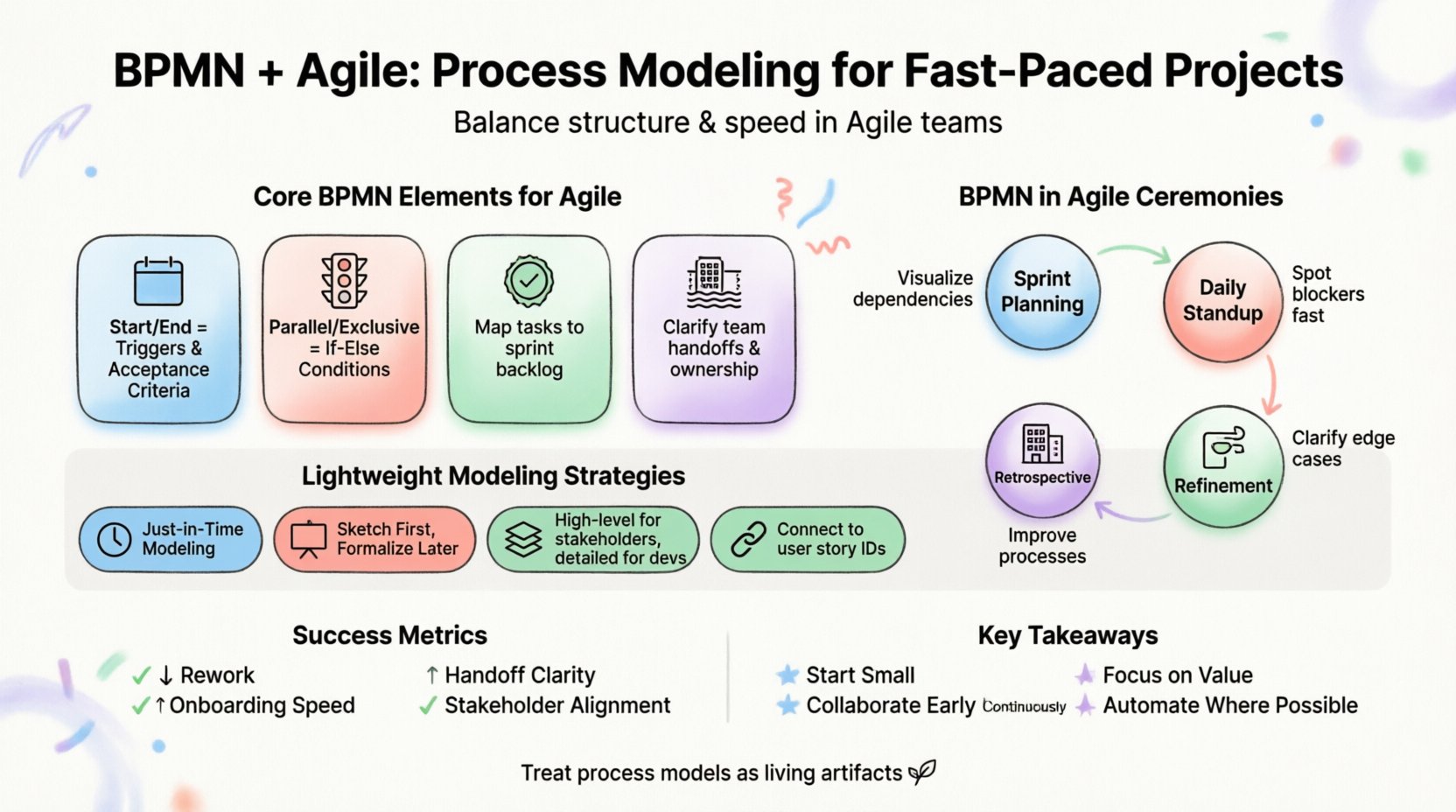
Start Events and End Events are critical for defining the scope of a user story. In Agile terms, a Start Event represents the trigger for a task (e.g., a customer submits a form). An End Event represents the acceptance criteria (e.g., the order is confirmed). Mapping these helps teams understand the boundaries of their work.
2. Gateways as Decision Logic 🚦
Gateways control the flow of the process. In Agile development, these correspond to conditional logic in code. A Parallel Gateway might represent parallel development tasks, while a Exclusive Gateway represents an if-else condition in the software. Visualizing these helps developers anticipate branching logic early.
3. Tasks as User Stories ✅
Standard Tasks in BPMN map directly to User Stories or Implementation Tasks. By keeping the task description concise and linking it to the specific sprint backlog, the model remains a reference point rather than a constraint.
4. Pools and Lanes for Roles 🏢
Swimlanes define who performs the action. In Agile, these can represent specific teams (e.g., Frontend, Backend, QA) or roles (e.g., Product Owner, Developer). This clarifies handoffs and reduces ambiguity about ownership.
Integrating BPMN into Agile Ceremonies 🗓️
To make BPMN useful, it must be present where decisions are made. Integrating modeling into standard Agile ceremonies ensures alignment without adding extra meetings.
| Agile Ceremony | Role of BPMN | Output |
|---|---|---|
| Sprint Planning | Visualizing the workflow of selected stories to identify dependencies. | Updated Process Diagram |
| Daily Standup | Quick reference for blockers in the process flow. | Verbal Updates on Flow Status |
| Refinement | Clarifying edge cases and decision points before coding begins. | Detailed Logic Flows |
| Retrospective | Identifying bottlenecks in the actual process vs. the intended process. | Process Improvement Actions |
This table highlights that BPMN is not a standalone activity. It is woven into the fabric of the development lifecycle.
Lightweight Modeling Strategies 📝
Creating high-fidelity diagrams for every sprint is unsustainable. Teams should adopt specific strategies to keep modeling efforts proportional to the value delivered.
- Just-in-Time Modeling: Only model the specific process flow that is currently being worked on. Do not model the entire enterprise process at once. Focus on the scope of the current release.
- Whiteboarding First: Use physical or digital whiteboards for initial brainstorming. Capture the logic quickly. Only formalize the diagram if it is stable enough to be committed to.
- Layered Abstraction: Create high-level maps for stakeholders and detailed flow diagrams for developers. Do not force a single diagram to satisfy all audiences.
- Link to Requirements: Connect BPMN elements directly to user story IDs in the project management tool. This creates traceability without duplicating text.
By adhering to these strategies, the team avoids the trap of maintaining a “perfect” diagram that no one reads. The diagram exists to serve the work, not to be the work.
Visualizing Workflows for DevOps 🔄
As projects move into production, the process model becomes a blueprint for automation and monitoring. In a DevOps environment, the process definition should ideally align with the deployment pipeline.
Continuous Integration and Process Monitoring
When a process is automated, the BPMN model serves as the source of truth for the workflow engine. If the process changes, the model must update. This ensures that the code matches the business intent.
- Traceability: Every step in the automated workflow can be traced back to a specific task in the BPMN model.
- Monitoring: Alerts can be configured based on BPMN elements. For example, if a specific task takes longer than expected, a warning is triggered.
- Optimization: Process mining tools can compare the actual execution logs against the original BPMN model to find deviations.
Handling Exceptions
Agile development often overlooks exception handling until it is too late. BPMN excels at visualizing what happens when things go wrong. Using Error Events or Compensation activities in the model helps teams design robust systems that handle failures gracefully.
Maintaining Models as Living Artifacts 🌱
One of the biggest risks in BPMN is creating a document that becomes outdated immediately after creation. In Agile, a static document is a liability. The model must evolve alongside the software.
Version Control for Diagrams
Just as code is version controlled, process models should be stored in the same repository. This allows teams to see the history of process changes. It prevents “shadow processes” where the documentation differs from reality.
Assigning Ownership
Every process model needs an owner. In Agile teams, this is often the Product Owner or a dedicated Business Analyst. They are responsible for ensuring the diagram reflects the current state of the product. If a feature is deprecated, the diagram is updated.
Automated Synchronization
Where possible, use tools that generate diagrams from code or configuration files. This reduces manual updates. If the code changes, the diagram updates automatically. This is the ideal state for maintaining accuracy in fast-paced environments.
Common Pitfalls to Avoid ⚠️
Even with the best intentions, teams can fall into traps that undermine the value of BPMN in Agile. Being aware of these common mistakes helps maintain efficiency.
- Over-Engineering: Using complex BPMN 2.0 constructs for simple flows. Keep it simple. A standard flow is better than a complex, precise one that no one understands.
- Isolation: Creating diagrams in a silo without developer input. The model must be reviewed by the people who will implement the logic.
- False Precision: Trying to model every single edge case at the start. Agile embraces change. Model the happy path first, then add exceptions as they arise.
- Lack of Context: Providing a diagram without explaining the business value. The diagram should answer “Why are we doing this?” not just “How does it work?”.
The Role of the Business Analyst in Agile 🤝
The Business Analyst (BA) plays a pivotal role in bridging the gap between business needs and technical execution. In an Agile environment with BPMN, the BA acts as a translator.
- Facilitator: They lead workshops to map out processes collaboratively.
- Prototyper: They create quick visual prototypes to validate ideas before development starts.
- Guardian: They ensure the process model remains accurate as the product evolves.
This role shifts from “documenting everything” to “facilitating understanding.” The BA ensures that the visual representation of the process is accurate enough to prevent rework, but flexible enough to accommodate feedback.
Measuring Success in Process Modeling 📊
How do you know if BPMN is helping your Agile team? Look for specific indicators of improvement rather than vanity metrics like “number of diagrams created.”
- Reduced Rework: Are developers asking fewer questions about logic during implementation?
- Faster Onboarding: Does new team members understand the workflow faster?
- Clearer Handoffs: Are there fewer errors when moving work between teams (e.g., Dev to QA)?
- Stakeholder Alignment: Do business stakeholders agree that the system matches their expectations?
These metrics focus on the outcome of the modeling effort, ensuring that the activity adds tangible value to the project.
Conclusion on Process Integration 🏁
Successfully combining BPMN with Agile requires a shift in mindset. It is not about forcing a rigid structure onto a flexible team, but about providing the right level of visibility to enable better decisions. By keeping models lightweight, integrating them into ceremonies, and treating them as living documents, teams can harness the power of process modeling without sacrificing the speed that Agile demands.
The future of process management lies in this hybrid approach. It allows organizations to remain compliant and efficient while staying responsive to market changes. When the process model serves the team rather than the other way around, it becomes a powerful asset in the pursuit of excellence.
Key Takeaways for Implementation 🎯
- Start Small: Model only what is necessary for the current sprint.
- Collaborate: Involve developers and testers in the modeling process.
- Update Continuously: Treat the diagram as code that needs maintenance.
- Focus on Value: Ensure every diagram element serves a purpose in communication or execution.
- Automate Where Possible: Reduce manual effort by linking models to code and tools.
By following these principles, teams can create a sustainable environment where process modeling enhances agility rather than hindering it. The result is a more transparent, efficient, and predictable delivery process.