Database schemas act as the foundational contract between application logic and data storage. When a team works on a complex system, the Entity-Relationship Diagram (ERD) becomes the shared source of truth. However, design changes often lead to conflicts, broken migrations, and deployment delays. Properly managing these diagrams ensures that the database architecture remains consistent, documented, and synchronized with the codebase.
Collaboration on ER diagrams requires more than just a shared drawing file. It demands a structured workflow that accommodates multiple contributors while maintaining data integrity. This guide explores the essential strategies for version controlling and collaborating on ER diagrams without relying on specific proprietary tools. By adopting these methods, teams can reduce friction, prevent data loss, and maintain a clear history of architectural decisions.
🔍 Why Version Control Matters for Database Design
Many organizations treat database schemas as static artifacts that are only touched during major deployments. This approach creates a significant risk. When multiple developers modify the diagram simultaneously, changes can overwrite each other. Without a history of changes, it becomes difficult to trace why a specific column was added or why a relationship was removed.
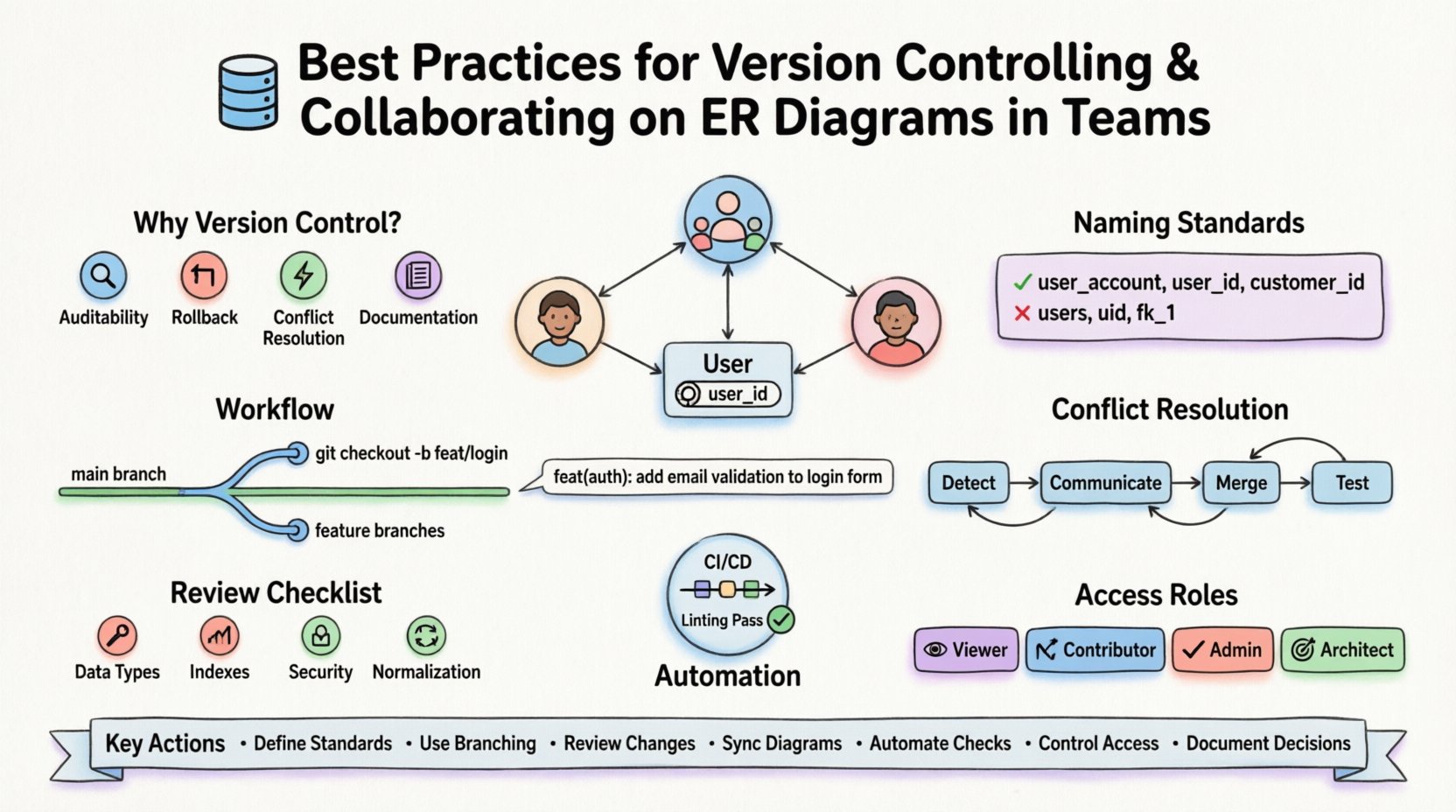
- Auditability: Every change to the schema is recorded with a timestamp and author.
- Rollback Capability: If a new design causes errors, the team can revert to a stable state quickly.
- Conflict Resolution: Systems can detect when two people attempt to modify the same entity.
- Documentation: The history of the diagram serves as documentation for the evolution of the data model.
Ignoring version control in the design phase often leads to the “schema drift” problem, where the diagram no longer matches the actual database. This discrepancy confuses new team members and introduces bugs into the application.
📝 Establishing a Standardized Naming Convention
Before implementing a version control system, the team must agree on a naming standard. Inconsistent naming makes it nearly impossible to track changes automatically or manually. A clear convention reduces cognitive load when reviewing diagrams and ensures that the diagram remains readable over time.
Entity and Table Names
Entities should be named using a singular, descriptive noun. This avoids ambiguity regarding what the table represents.
- Preferred:
user_account,order_item,product_catalog - Avoid:
users,orders_items,prod_cat
Use underscores to separate words. This improves readability, especially in systems that enforce lowercase restrictions.
Attribute and Column Names
Attributes should follow the same casing as the entity. Prefixing foreign keys with the related entity name clarifies the relationship.
- Preferred:
user_id,product_name,created_at - Avoid:
uid,pn,date_created
Relationship Naming
Foreign keys should explicitly state the direction of the relationship. This helps in understanding the cardinality and ownership of the data.
- Preferred:
customer_idin theorderstable - Avoid:
cust_ref,fk_1
🌿 Structuring the Version Control Workflow
Implementing a workflow similar to code version control ensures that diagram changes are isolated before they are merged into the main design. This prevents the “main” branch from containing incomplete or broken models.
Branching Strategies
Use feature branches for specific changes. This keeps the diagram stable while work is in progress.
- Main Branch: Represents the approved, production-ready schema.
- Feature Branch: Dedicated to a specific module or change set (e.g.,
feature/payment-gateway). - Hotfix Branch: Used for critical corrections that bypass standard review.
Commit Messages
Commit messages act as the changelog. They must be descriptive and actionable.
- Bad:
update schema - Good:
add shipping_address column to orders table - Good:
refactor user_role to support multiple roles per user
Include references to task IDs or ticket numbers. This links the diagram change directly to the business requirement.
⚔️ Managing Concurrent Edits and Merge Conflicts
When two team members edit the same entity, conflicts are inevitable. Handling these conflicts requires a predefined protocol to ensure that data is not lost or corrupted during the merge process.
Conflict Detection
The system should alert users when overlapping changes are detected. Look for warnings when:
- Both users modify the same column.
- Both users change the data type of a shared field.
- Both users add a foreign key relationship to the same table.
Resolution Strategies
When a conflict arises, follow these steps to resolve it:
- Communication: Contact the other contributor immediately to discuss the intent of the change.
- Manual Merge: If the system allows, combine the attributes into a single entity definition.
- Conflict Resolution Branch: Create a temporary branch to test the merged schema before applying it.
- Locking: For critical entities, use file locking mechanisms to prevent simultaneous edits.
Example Conflict Scenario
Imagine Developer A adds a phone_number column to the users table. Developer B simultaneously adds a mobile_number column to the same table.
- Identify that both changes target the same table.
- Review the requirements. Do we need two columns, or is
phone_numberthe intended name? - Standardize the naming convention.
- Apply the change to the main branch with a detailed commit message.
👀 The Role of Code Reviews in Diagram Design
Just as code requires review, schema diagrams do as well. A peer review ensures that the design aligns with best practices, security standards, and performance requirements before it is merged.
Review Checklist
Reviewers should check the following items:
- Data Types: Are the chosen types appropriate for the expected data volume?
- Indexes: Are columns used for searching properly indexed?
- Constraints: Are foreign keys and unique constraints defined correctly?
- Security: Are sensitive fields marked for encryption or access control?
- Normalization: Is the design free from unnecessary redundancy?
Review Process
Establish a formal pull request or merge request process for diagram changes.
- Request at least one approval from a senior architect or lead.
- Require the reviewer to validate the diagram against the migration scripts.
- Ensure that the diagram matches the codebase structure.
🔄 Integrating Diagrams with Database Migrations
The diagram should be the source of truth, but the migration scripts are the execution mechanism. Keeping these two in sync is critical. Discrepancies between the visual model and the applied code cause deployment failures.
Migration Scripts
Every change in the diagram should result in a corresponding migration file. These files should be versioned alongside the diagram.
- Sequential Numbering: Use timestamps or sequential IDs for migration files.
- Idempotency: Ensure scripts can be run multiple times without error.
- Documentation: Include comments in the script explaining the rationale for the change.
Diagram Synchronization
After a migration is applied, the diagram must be updated immediately. Do not leave the diagram outdated for weeks.
- Update the diagram as part of the merge request process.
- Use tools that can reverse-engineer the database to update the diagram automatically.
- Verify that the diagram reflects the current state of the production database.
⚙️ Automation and Validation Strategies
Manual checks are prone to human error. Automating validation ensures that the diagram adheres to standards without requiring constant manual intervention.
Linting Schemas
Implement automated checks that run against the diagram files. These checks can catch common mistakes.
- Missing Primary Keys: Flag any entity without a defined key.
- Invalid Data Types: Check for types not supported by the target database engine.
- Naming Violations: Enforce the agreed-upon naming conventions.
CI/CD Integration
Integrate diagram validation into the continuous integration pipeline. If the diagram fails validation, the build should fail.
- Run validation scripts on every push to the repository.
- Block deployments if the diagram does not match the migration scripts.
- Generate reports on schema health for the team.
🔐 Access Control and Permissions
Not every team member should have the ability to change the core schema. Restricting access prevents accidental modifications to critical entities.
Role-Based Access Control
Define clear roles for who can edit, view, or approve changes.
| Role | Permissions | Responsibility |
|---|---|---|
| Viewer | Read-only access to diagrams | Understand the architecture |
| Contributor | Can create branches and edit diagrams | Implement specific features |
| Admin | Can merge changes and manage permissions | Ensure schema integrity |
| Architect | Can approve merges and enforce standards | Final sign-off on changes |
Protection Rules
Protect the main branch from direct pushes. All changes must go through a merge request.
- Require status checks to pass before merging.
- Require a minimum number of approvals.
- Lock critical tables to prevent accidental deletion.
💬 Communication Channels and Documentation
Version control is technical; collaboration is human. Clear communication ensures that everyone understands the context behind the changes.
Documentation Standards
Every diagram should include a readme file or embedded notes that explain the design decisions.
- Entity Purpose: Why does this table exist?
- Data Sources: Where does the data come from?
- Future Plans: Are there planned changes to this entity?
Team Updates
Keep the team informed about major schema changes.
- Announce breaking changes in team meetings.
- Update the project wiki with schema evolution logs.
- Notify API consumers if data structures change.
🚫 Common Pitfalls to Avoid
Even with a solid plan, teams can fall into traps that compromise the schema integrity. Avoid these common mistakes to maintain a healthy workflow.
| Pitfall | Impact | Mitigation |
|---|---|---|
| Outdated Diagrams | Confusion and errors during onboarding | Update diagram with every migration |
| Hardcoded Values | Inflexible application logic | Use configuration tables for constants |
| Ignoring Performance | Slow queries and high latency | Review indexing strategy regularly |
| Lack of Backup | Data loss in case of failure | Automated backups and version history |
| Direct Production Edits | Untracked changes and downtime | Enforce migration workflow only |
🛠️ Summary of Key Actions
To ensure successful collaboration and version control for ER diagrams, teams should focus on the following core actions:
- Define Standards: Agree on naming conventions and data types before starting work.
- Use Branching: Isolate changes in feature branches to prevent conflicts.
- Review Changes: Require peer review for all schema modifications.
- Sync Diagrams: Keep the visual model in sync with the actual database state.
- Automate Checks: Implement linting and validation to catch errors early.
- Control Access: Restrict write permissions to trusted contributors.
- Document Decisions: Record the reasoning behind architectural choices.
By treating the ER diagram as code, teams can leverage the same robust version control mechanisms used for application logic. This approach reduces risk, improves transparency, and allows the database architecture to evolve alongside the application without disruption. The goal is not just to store data, but to manage the design of the system that handles it.
Implementing these practices takes time and discipline, but the payoff is a stable, scalable, and well-documented data infrastructure. Teams that prioritize schema governance will find fewer deployment issues and a smoother development cycle overall.
Related posts:
 Comprehensive Walkthrough: Designing Scalable ER Diagrams for High-Traffic Backend Systems
 Q&A: Solving Top 15 Confusions About Relationships, Keys, and Cardinality in ER Diagrams
 ER Diagrams vs. Data Flow Diagrams: Knowing When Each Serves Your Backend Needs
 Deep Dive into ER Diagrams: Mapping Real-World Business Rules to Technical Schemas