In agile environments, the distinction between a user story and a technical task often blurs. Teams frequently find themselves populating backlogs with items that look like stories but function as tasks. This confusion creates friction during refinement, distorts velocity metrics, and obscures the true value delivered to the end user. Understanding the nuance between these two formats is essential for maintaining a clear roadmap and ensuring that development effort aligns with business goals.
When a technical requirement is written as a user story, the focus shifts from value to completion. This shift can lead to a backlog filled with technical debt that feels urgent but offers no direct user benefit. It is crucial to recognize when an item is a piece of infrastructure work versus a feature that solves a user problem. This guide explores the differences, the risks of mixing them, and the strategies to keep your backlog clean and value-driven.
🧐 Defining the Core Concepts
Before diving into the pitfalls, we must establish clear definitions. In agile methodologies, clarity is the foundation of efficiency.
📖 What is a User Story?
A user story is a description of a feature told from the perspective of the person who desires the new capability. It typically follows a standard format:
- As a [type of user],
- I want [some goal],
- So that [some benefit].
This structure forces the team to think about who is using the system and why they need it. The primary purpose is to facilitate a conversation about value, not to dictate implementation details. A well-written story is small enough to be completed within a single sprint and provides enough information to determine when it is done.
🛠️ What is a Technical Task?
A technical task is an item of work required to build, maintain, or improve the system. These tasks are often invisible to the end user. Examples include database migrations, refactoring code, updating dependencies, or setting up a new server environment. While critical for the health of the product, these items do not directly satisfy a user need in the same way a feature does.
Technical tasks are best managed as sub-tasks under a story or as separate infrastructure items in a dedicated backlog. They should not be prioritized against user features using the same value metrics unless the technical debt poses an immediate risk to delivery.
⚠️ Why the Confusion Happens
Teams often conflate stories and tasks for several reasons. Identifying these root causes is the first step toward correction.
- Developer-Centric Thinking: Developers naturally think in terms of implementation steps. When asked to write a story, they may write the solution instead of the requirement.
- Pressure to Show Progress: Stakeholders often want to see a list of items to track. Technical tasks are easier to estimate and complete quickly, making them attractive for filling velocity charts.
- Lack of Product Ownership: If the product owner is not deeply involved in refinement, the team may assume the technical details are sufficient to describe the work.
- Legacy Habits: Teams transitioning from waterfall or task-tracking systems often carry over the habit of listing every technical step as a separate ticket.
📉 The Impact on Value Delivery
When technical tasks are disguised as user stories, the entire product strategy suffers. The backlog becomes a list of things to do rather than a list of value to deliver.
🎯 Obscured Prioritization
Prioritization relies on comparing value. If a story about “updating the search index” is in the same queue as “allow users to filter search results,” the team loses the ability to measure value accurately. The search index update is a prerequisite, but it is not the value itself. The value is the ability to filter. Mixing them makes it difficult to say no to technical work when user value is more urgent.
📏 Distorted Estimation
Estimating user stories is often done in story points or ideal days based on complexity and uncertainty. Technical tasks are often estimated in hours. When both are mixed, velocity calculations become unreliable. A sprint might appear to have high completion because many small technical tasks were finished, even if no user-facing value was delivered.
🧪 Testing and Quality Assurance
Testing strategies differ between stories and tasks. User stories require acceptance criteria that can be verified by a tester or a user. Technical tasks often require code review or infrastructure checks. When a technical task is written as a story, the acceptance criteria may focus on implementation details (e.g., “Database migrated to version 5”) rather than user outcomes (e.g., “System performance improves by 20%”). This leads to testing that validates the process rather than the outcome.
🔍 Distinguishing Between Stories and Tasks
How do you know if an item is a story or a task? The following table outlines the key differences.
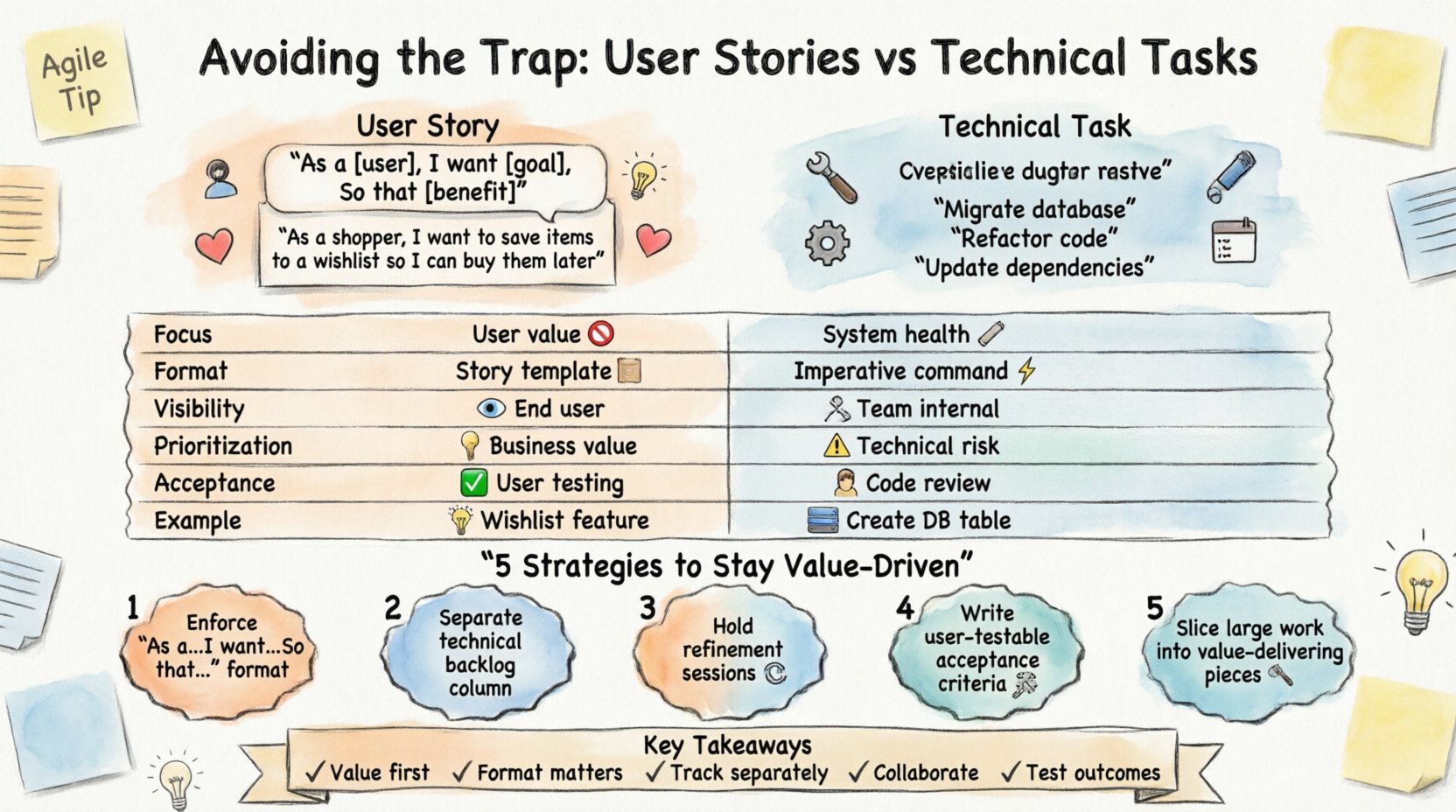
| Feature | User Story | Technical Task |
|---|---|---|
| Focus | User value and experience | System health and implementation |
| Format | As a… I want… So that… | Imperative statement (e.g., “Implement API”) |
| Visibility | Visible to the end user | Internal to the development team |
| Prioritization | Based on business value | Based on technical necessity or risk |
| Acceptance | User acceptance criteria | Code review or technical validation |
| Example | “As a shopper, I want to save items to a wishlist so I can buy them later.” | “Create a database table for wishlist items.” |
Using this framework helps teams categorize items correctly during backlog refinement.
🛠️ Strategies to Prevent the Trap
Prevention is better than cure. Implementing specific practices can help maintain the integrity of your backlog.
1️⃣ Enforce the User Story Format
Require that all items in the primary backlog follow the standard “As a… I want… So that…” structure. If an item cannot be written this way, it is likely a task. This simple rule forces the team to identify the user and the benefit before discussing the solution.
2️⃣ Separate Technical Backlogs
Consider maintaining a separate section or column for technical debt and infrastructure work. This keeps the main backlog focused on features. Technical work can be tracked alongside features but should be clearly labeled as infrastructure. This ensures stakeholders understand that this work does not directly generate user revenue or satisfaction.
3️⃣ Refinement Sessions
Hold regular refinement meetings where the team reviews items for quality. During these sessions, ask: “Who is this for?” and “What value does this provide?” If the answer is vague or technical, move the item to a task list or split it into a story and a supporting task.
4️⃣ Invest in Acceptance Criteria
Strong acceptance criteria force clarity. A user story should have criteria that a tester can execute without asking the developer. If the criteria require checking a log file or running a specific command, it is a task. If the criteria can be verified by interacting with the UI, it is a story.
5️⃣ Split Large Items
Sometimes a piece of work is too large to be a single story. In these cases, break it down. Ensure at least one slice delivers value. For example, if building a new payment system, do not write one story for “Build Payment System.” Instead, write “Allow users to pay with Credit Card” and “Allow users to pay with PayPal.” The underlying infrastructure becomes a task supporting these stories.
🧩 The Role of Technical Debt
Technical debt is real and must be addressed. However, it should not be hidden inside user stories. When technical debt is written as a story, it implies the debt is a feature. This is misleading.
- Reframing Debt: Instead of “Fix Login Bug,” write “Improve Login Reliability.” Focus on the outcome of the fix, not the fix itself.
- Allocating Capacity: Reserve a percentage of each sprint for technical work. This ensures debt is addressed without disrupting the flow of value delivery.
- Risk-Based Prioritization: Prioritize technical tasks based on risk. If a component is unstable, it affects all future stories. This justifies its priority, but it remains a task, not a story.
🤝 Collaboration Between Roles
The distinction between stories and tasks requires collaboration. It is not the sole responsibility of the product owner or the developers.
👤 Product Owners
Product owners must champion the value perspective. They should challenge requests that focus too heavily on implementation. If a developer suggests a story about refactoring code, the product owner should ask, “Does this help the user right now?” If the answer is no, it is a task.
👨💻 Developers
Developers should advocate for clear requirements. They should not accept vague stories that hide technical complexity. When a story is too technical, developers should work with the product owner to rephrase it into a value statement. This ensures the team understands the goal, not just the method.
👩💼 QA and Testers
Testers play a key role in validation. They can identify when acceptance criteria are technical. If a test case requires checking a database schema, it is a task. If it requires checking a user action, it is a story. Testers should flag items that do not align with user scenarios.
🔄 Handling Legacy Systems
Working with legacy systems often requires heavy technical work. This can make it tempting to write technical tasks as stories to justify the time. Resist this urge.
- Be Honest: Acknowledge that some work is maintenance. It is valid to have maintenance work, but label it correctly.
- Bundle Value: Whenever possible, tie technical work to a user feature. For example, “Refactor Search Module” is a task. “Improve Search Speed by 50%” is a story that includes the refactor as part of the solution.
- Transparent Reporting: Report technical work separately in velocity metrics. This prevents the team from feeling pressured to deliver “fake” value to meet targets.
📝 The Definition of Done
The Definition of Done (DoD) applies to both stories and tasks, but the criteria differ. A user story is done when it is usable by the customer. A task is done when the code is integrated and tested.
- Story DoD: Code merged, tests passed, documentation updated, deployed to staging, and accepted by the product owner.
- Task DoD: Code merged, unit tests passed, documentation updated, and verified by a senior developer.
Keeping these definitions separate ensures that a sprint is not marked complete simply because the technical infrastructure is ready, but the user interface is not.
🎓 Training and Culture
Changing habits requires training. Teams that struggle with this issue often need a refresher on agile principles. Workshops can help clarify the difference between value and effort.
- Workshops: Conduct sessions where teams practice rewriting technical tasks into user stories.
- Coaching: Bring in an external coach to observe refinement sessions and provide feedback on backlog quality.
- Review Metrics: Look at the ratio of story points to technical hours. A high ratio of technical work might indicate a need for better prioritization.
🛑 Common Pitfalls to Avoid
Even with good intentions, teams can slip back into old habits. Watch out for these common errors.
- “As a System” Stories: Avoid writing stories like “As a system, I want to process data.” The system is not the user. The user is the person using the system.
- Implementation Details: Do not include “using React” or “using SQL” in the story. These are implementation choices, not user requirements.
- Hidden Dependencies: Do not hide dependencies as separate stories. If Feature A depends on Feature B, Feature B should be a story if it has value. If it has no value, it is a task.
- Over-Splitting: Do not split a story into too many tiny pieces just to fill a sprint. Value should be the driver, not the count of tickets.
🚀 Moving Forward
Maintaining a clean backlog is an ongoing process. It requires vigilance and a shared commitment to value. When technical tasks are written as user stories, the team risks losing sight of the product vision. By distinguishing between the two, teams can prioritize work that matters, estimate more accurately, and deliver results that users actually care about.
The goal is not to eliminate technical work, but to frame it correctly. Technical work supports the stories; it is not the story itself. By adhering to these guidelines, teams can build products that are robust, maintainable, and aligned with user needs.
📌 Key Takeaways
- 📖 Value First: Always start with the user value, not the technical solution.
- 🛠️ Format Matters: Use the “As a… I want… So that…” format for stories.
- 📊 Track Separately: Keep technical tasks distinct from user stories in your tracking tools.
- 🤝 Collaborate: Product owners and developers must agree on the definition of value.
- 🧪 Test Outcomes: Acceptance criteria should verify user outcomes, not code changes.
By staying alert to the trap of writing technical tasks as user stories, you ensure that your agile practice remains true to its purpose: delivering value efficiently and effectively.