Imagine describing your system’s data flow in plain English and instantly seeing a polished, standards-compliant Data Flow Diagram appear on your screen. That’s the power of Visual Paradigm’s AI-powered DFD generator tool. Whether you’re a business analyst mapping customer journeys, a developer documenting system architecture, or a student learning data modeling, this online AI diagram maker transforms complex analysis into an intuitive, visual experience. No more blank canvas anxiety. No more hours spent manually arranging shapes. Just describe, generate, and refine.
What Is an AI-Powered DFD Generator Tool?
An AI data flow diagram generator is a smart visual modeling tool that converts natural language descriptions into structured, editable DFDs. Instead of dragging and dropping symbols manually, you simply type what your system does—like “Show how customer orders flow through an e-commerce platform”—and the AI identifies key components: external entities, processes, data stores, and data flows. It then assembles them into a logically organized diagram using your preferred notation style. This online DFD maker isn’t just a time-saver; it’s a thinking partner that helps you clarify system boundaries and data relationships from the very first draft.
Why Visual Paradigm Is the Leading AI Visual Modeling Tool
While many platforms offer basic diagramming, Visual Paradigm stands out as a professional AI-powered visual modeling tool trusted by enterprises, educators, and developers worldwide. Here’s why it’s the go-to choice for instant DFD creation:
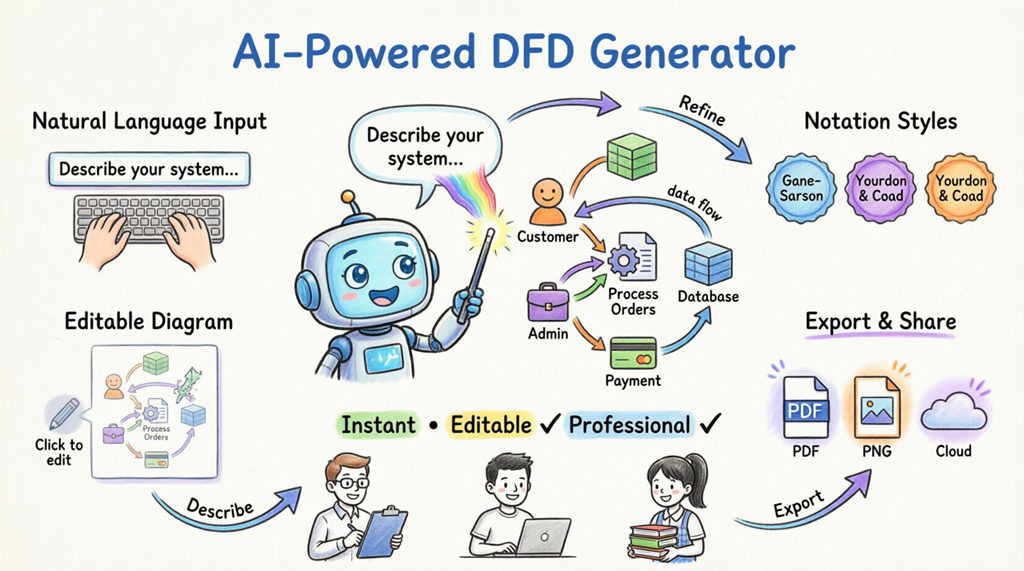
- Instant DFD Creation from Text: Describe your system in everyday language, and the AI diagram generator produces a complete, structured Data Flow Diagram in seconds.
- Multiple Notation Styles Supported: Choose from standard, Gane-Sarson, Yourdon & Coad, or Yourdon DeMarco styles—the AI adapts symbols while preserving logical accuracy.
- Fully Editable Native Diagrams: Every AI-generated DFD opens as a native Visual Paradigm file. Refine processes, decompose levels, add annotations, or connect to other models—all within the same visual modeling platform.
- Seamless Integration & Export: Generated diagrams open directly in the editor, ready for documentation, collaboration, or export to PDF, PNG, or Word. Perfect for stakeholder presentations or technical specs.
- Enterprise-Grade Reliability: Built on decades of modeling expertise, Visual Paradigm ensures your AI-generated diagrams follow industry standards and best practices.
How the Online AI DFD Maker Works: Step by Step
Getting professional results with Visual Paradigm’s AI DFD creator is refreshingly simple. Here’s the workflow:
- Launch & Select: Open Visual Paradigm, create a new project, then navigate to Tools > AI Diagram Generation.
- Choose Diagram Type & Style: Select “Data Flow Diagram” and pick your preferred notation style.
- Describe Your System: Type a clear, concise description. Example: “Generate a Data Flow Diagram to visualize how data moves through an online shopping system.”
- Generate & Review: Click OK. The AI diagram generator analyzes your text, identifies entities and flows, and builds the diagram.
- Refine & Extend: The diagram opens in the editor. Add details, decompose processes into lower-level DFDs, or link to UML, SysML, or C4 models.
See it in action: a user enters a natural language prompt into the AI interface.

After processing, the AI delivers a clean, professional Level-1 DFD for an online shopping system—complete with customers, admin, payment processes, databases, and clearly routed data flows.

Who Benefits from This AI-Powered DFD Tool?
This online AI visual modeling tool serves diverse professionals:
- Business Analysts: Quickly map as-is and to-be processes during requirements gathering. Share clear visuals with non-technical stakeholders.
- Software Developers: Document data architecture before coding. Use AI-generated DFDs as living documentation that evolves with your system.
- System Architects: Validate data boundaries and integration points early. Connect DFDs to broader architecture frameworks like C4 or ArchiMate.
- Students & Educators: Learn DFD fundamentals faster. Generate examples for assignments or lectures, then modify them to explore “what-if” scenarios.
- Consultants: Accelerate client deliverables. Produce polished diagrams in minutes instead of hours, focusing energy on insights, not layout.
Beyond DFDs: The Complete AI Visual Modeling Ecosystem
Visual Paradigm isn’t just an AI DFD generator—it’s a comprehensive AI-powered visual modeling platform. The same intuitive prompt-to-diagram workflow works for:
- UML diagrams (Use Case, Class, Sequence, and more)
- SysML for systems engineering
- C4 models for software architecture
- ERD, BPMN, Mind Maps, and enterprise architecture frameworks
Describe a library management system, and the AI can generate a Use Case Diagram. Describe a payment gateway, and it builds a Class Diagram with attributes and relationships. This versatility makes Visual Paradigm a future-proof investment for teams managing complex, multi-diagram projects.
Pro Tips for Getting the Best Results from Your AI DFD Maker
Maximize the value of Visual Paradigm’s AI diagram generator with these practical tips:
- Be Specific but Concise: Instead of “Show an e-commerce system,” try “Show how customer orders, payments, and inventory data flow between web app, payment gateway, and warehouse database.”
- Use Clear Entity Names: Name external actors (Customer, Admin), processes (Validate Payment, Update Inventory), and data stores (Order DB, Product Catalog) explicitly.
- Iterate in Layers: Start with a high-level Context Diagram, then use AI to generate Level-1 DFDs for complex processes. Decompose further as needed.
- Leverage Templates: Combine AI generation with pre-built DFD templates for common scenarios like login flows or order processing.
- Validate Logic Post-Generation: AI handles layout and structure brilliantly, but always review data flows for completeness and accuracy before finalizing.
Start Creating Professional DFDs in Minutes
The future of visual modeling is here—and it’s powered by AI. With Visual Paradigm’s online AI DFD generator tool, you can turn ideas into actionable diagrams faster than ever. Spend less time drawing and more time analyzing, designing, and communicating.
Ready to transform your workflow? Download Visual Paradigm today and generate your first AI-powered Data Flow Diagram in minutes.
Related Resources
Data flow diagrams (DFD) graphically represent the movement of data within a system, illustrating key processes, data stores, and external entities to simplify the understanding of information transfers.
- Interactive Online DFD Maker Tool: User-friendly interface for creating professional data flow diagrams without installation.
- Free Online DFD Drawing Solution: Web-based tool for designing and sharing DFDs instantly.
- Pre-built DFD Templates for Quick Design: Library of ready-to-use templates to accelerate system modeling.
- Step-by-Step DFD Tutorial Guide: Beginner-friendly resource for creating effective data flow models.
- What is Data Flow Diagram? – Visual Paradigm Guide: In-depth overview of DFDs in business information systems.
- How to Create Data Flow Diagram (DFD)? – Tutorial: Practical guide to using symbols and notation for mapping data movement.
- Mastering Data Flow Diagrams with Visual Paradigm: Advanced tutorial for building complex, precise data flow structures.
- Demystifying Information Flow with DFDs: Guide to modeling information movement across system components.
- AI-Powered Instant Creation of DFDs, ERDs & More: Article exploring AI diagram generator capabilities for editable models from natural language.
- Advanced Data Flow Diagram Tool Features: Overview of professional functionalities for creating, editing, and sharing precise DFDs.